• Skip to primary navigation
  • Skip to main content
  • Skip to primary sidebar

Yellow Bricks

by Duncan Epping

  • Home
  • Unexplored Territory Podcast
  • HA Deepdive
  • ESXTOP
  • Stickers/Shirts
  • Privacy Policy
  • About
  • Show Search
Hide Search

VMware

Where’s my vSAN Data Protection screen in 8.0 U3?

Duncan Epping · Jun 28, 2024 ·

The first time I deployed vSphere/vSAN 8.0 U3 I immediately looked for the vSAN Data Protection UI. I always get excited about new features, and simply want to test it. I mean who doesn’t like scalable snapshots and a great way of managing snapshot schedules? Finally available within the vSphere Client! Of course, I could not find it, but I figured that was because I was on some weird alpha build of the product. Now that the product has shipped, it must be there out of the box, right?

No it isn’t. You will need to deploy an appliance in order for this functionality to appear in the UI. The appliance can be found under “Drivers and Tools” under the vSphere Hypervisor download (Which is under VMware vSphere), it is called “VMware vSAN Snapshot Service Appliance”. The current version is named “snapservice_appliance-8.0.3.0-24057802_OVF10.ova”. You need to deploy this OVA, and I would highly recommend to request a DNS name for it and have it properly registered. I fiddled around with the hosts file on VCSA and forgot to add the name to my local host file on my laptop, and had some weird issues as a result, which I am trying to reproduce at the moment, I will report back if/when I can.

The other thing to point out is the following, the documentation tells you to download the certs and copy the text for the Appliance, it isn’t something most of us do daily either, you can simply open a web browser and use the following url “https://<name of your vCenter server>/certs/download.zip” to download the certs and then unzip the downloaded file. (More details to be found here.) It will contain the certs, and if you open the cert with a proper text editor you can copy/paste that into the deployment screen for the OVA. (Yes, I know there are other ways as well, but I found this one to be the easiest.)

Now, when you deployed the OVA, and when everything is configured correctly, you should see a successful task, or actually two: download plugin, deploy plug, as shown in the next screenshot.

If you do get the “error downloading plug-in” error message, it likely is one of two things:

  1. DNS / Hosts files are not correctly configured, resulting in the URL not being reachable. Make sure you can resolve the URL!
  2. Cert thumbprint was incorrectly copied/pasted. Use this document to fix the issue.

Okay, now that I got the appliance up and running, I will probably do a follow-up post on what you can do with it 🙂

vSAN Stretched: Why is the witness not part of the cluster when the link between a data site and the witness fails?

Duncan Epping · Jun 25, 2024 ·

Last week I received a question about vSAN Stretched which had me wondering for a while what on earth was going on. The person who asked this question was running through several failure scenarios, some of which I have also documented in the past here. The question I got is what is supposed to happen when I have the following scenario as shown in the diagram and the link between the preferred site (Site A) and the witness fails:

The answer, at least that is what I thought, was simple: All VMs will remain running, or said differently, there’s no impact on vSAN. While doing the test, indeed the outcome I documented, which is also documented in the Stretched Clustering Guide and the PoC Guide was indeed the same, the VMs remain running. However, one of the things that was noticed is that when this situation occurs, and indeed the connection between Site A and the Witness is lost, the witness is somehow no longer part of the cluster, which is not what I would expect. The reason I would not expect this to happen is because if a second failure would occur, and for instance the ISL between Site A and Site B goes down, it would direclty impact all VMs. At least, that is what I assumed.

However, when I triggered that second failure and I disconnected the ISL between Site A and Site B, I saw the witness re-appearing again immidiately, I saw the witness objects going from “absent” to “active”, and more importantly, all VMs remained running. The reason this happens is fairly straight forward, when running a configuration like this vSAN has a “leader” and a “backup”, and they each run in a seperate fault domain. Both the leader and the backup need to be able to communicate with the Witness for it to be able to function correctly. If the connection between Site A and the Witness is gone, then either the leader or the backup can no longer communicate with the Witness and the Witness is taken out of the cluster.

So why does the Witness return for duty when the second failure is triggered? Well, when the second failure is triggered the leader is restarted in Site B (as Site A is deemed lost), and the backup is already running in Site B. As both the leader and the backup can communicate again with the witness, the witness returns for duty and so will all of the components automatically and instantly. Which means that even though the ISL has failed between Site A and B after the witness was taken out of the cluster, all VMs remain accessible as the witness is reintroduced instantly to ensure availability of the workload. Pretty cool!  (Thanks to vSAN engineering for providing these insights on why this happens!)

Memory Tiering… Say what?!

Duncan Epping · Jun 14, 2024 ·

Recently I presented a keynote at the Belgium VMUG, the topic was Innovation at VMware by Broadcom, but I guess I should say Innovation at Broadcom to be more accurate. During the keynote I briefly went over the process and the various types of innovation and what this can lead to. During the session, I discussed three projects, namely vSAN ESA, the Distributed Services Engine, and something which is being worked on called: Memory Tiering.

Memory Tiering is a very interesting concept that was first publicly discussed at Explore (or VMworld I guess it was still. called) a few years ago as a potential future feature. You may ask yourself why anyone would want to tier memory, as the impact from a performance stance can be significant. There are various reasons to do so, one of them being the cost of memory. Another problem the industry is facing is the fact that memory capacity (and performance) has not grown at the same rate as CPU capacity, which has resulted in many environments being memory-bound, differently said the imbalance between CPU and memory has increased substantially. That’s why VMware started Project Capitola.

When Project Capitola was discussed most of the focus was on Intel Optane, and most of us know what happened to that. I guess some assumed that that would also result in Project Capitola, or memory tiering and memory pooling technology, being scrapped. This is most definitely not the case, VMware has gone full steam ahead and has been discussing the progress in public, although you need to know where to look. If you listen to that session it is clear that there are various efforts, that would allow customers to tier memory in various ways, one of them being of course the various CXL based solutions that are coming to market now/soon.

One of which is memory tiering via a CXL accelerator card, basically an FPGA that has the sole purpose of increasing memory capacity, offload memory tiering and accelerating certain functionality where memory is crucial like for instance vMotion. As mentioned in the SNIA session, using an accelerator card can lead to a 30% reduction in migration times. An accelerator card like this will also open up other opportunities, like pooling memory for instance, which is something customers have been asking for since we created the concept of a cluster. Being able to share compute resources across hosts. Just imagine, your VM can use memory capacity available on another host without having to move the VM. Yes, before anyone comments on this, I do realize that this will have a significant performance impact potentially.

That is of course where the VMware logic comes into play. At VMworld in 2021 when Project Capitola was presented, the team also shared the performance results of recent tests, and it showed that the performance degradation was around 10% when 50% of DRAM was used and 50% of Optane memory. I was watching the SNIA session, and this demo shows the true power of VMware vSphere, memory tiering, and acceleration (Project Peaberry as it is called). On average the performance degradation was around 10%, yet roughly 40% of virtual memory was accessed via the Peaberry accelerator. Do note that the tiering is completely transparent to the application, this works for all different types of workloads out there. The crucial part here to understand is that because the hypervisor is already responsible for memory management, it knows which pages are hot and which pages are cold, that also means it can determine which pages it can move to a different tier while maintaining performance.

Anyway, I cannot reveal too much about what may, or may not, be coming in the future. What I can promise though is that I will make sure to write a blog as soon as I am allowed to talk about more details publicly, and I will probably also record a podcast with the product manager(s) when the time is there, so stay tuned!

Doing network/ISL maintenance in a vSAN stretched cluster configuration!

Duncan Epping · Nov 21, 2023 ·

I got a question earlier about the maintenance of an ISL in a vSAN Stretched Cluster configuration which had me thinking for a while. The question was what would you do with your workload during maintenance. I guess the easiest of course is to power off all VMs and simply shutdown the cluster, for which vSAN has a UI option, and there’s a KB you can follow. Now, of course, there could also be a situation where the VMs need to remain running. But how does this work when you end up losing the connection between all three locations? Normally this would lead to a situation where all VMs will become “inaccessible” as you will end up losing quorum.

As said, this had me thinking, you could take advantage of the “vSAN Witness Resiliency” mechanism which was introduced in vSAN 7.0 U3. How would this work?

Well, it is actually pretty straight forward, if all hosts of 1 site are in maintenance mode, failed, or powered off, the votes of the witness object for each VM/Object will be recalculated within 3 minutes. When this recalculation has completed the witness can go down without having any impact on the VM. We introduced this capability to increase resiliency in a double-failure scenario, but we can (ab)use this functionality also during maintenance. Of course I had to test this, so the first step I took was placing all hosts in 1 location into maintenance mode (no data evac). This resulted in all my VMs being vMotioned to the other site.

Now next I checked with RVC if my votes were recalculated or not. As stated, depending on the number of VMs this can take around 3 minutes in total, but usually will probably be quicker. After the recalculation had been completed I powered off the Witness, and this was the result as shown below, all VMs were still running.

Of course, I had to double check on the commandline using RVC (you can use the command “vsan.vm_object_info” to check a particular object for instance) to ensure that indeed the components of those VMs were still “ACTIVE” instead of “ABSENT”, and there you go!

Now when maintenance has been completed, you simply do the reverse, you power on the witness, and then you power on the hosts in the other location. After the “resync” has been completed the VMs will be rebalanced again by DRS. Note, DRS rebalancing (or should rules being applied) will only happen when the resync of the VM has been completed.

What does Datastore Sharing/HCI Mesh/vSAN Max support when stretched?

Duncan Epping · Oct 31, 2023 ·

This question has come up a few times now, what does Datastore Sharing/HCI Mesh/vSAN Max support when stretched? It is a question which keeps coming up somehow, and I personally had some challenges to find the statements in our documentation as well. I just found the statement and I wanted to first of all point people to it, and then also clarify it so there is no question. If I am using Datastore Sharing / HCI Mesh, or will be using vSAN Max, and my vSAN Datastore is stretched, what does VMware (or does not) support?

We have multiple potential combinations, let me list them and add whether it is supported or not, not that this is at the time of writing with the current available version (vSAN 8.0 U2).

  • vSAN Stretched Cluster datastore shared with vSAN Stretched Cluster –> Supported
  • vSAN Stretched Cluster datastore shared with vSAN Cluster (not stretched) –> Supported
  • vSAN Stretched Cluster datastore shared with Compute Only Cluster (not stretched) –> Supported
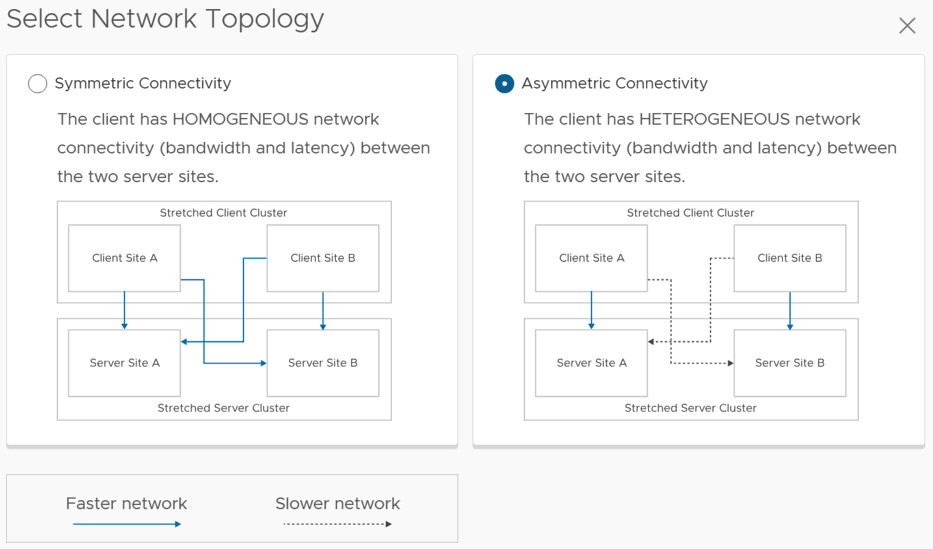
  • vSAN Stretched Cluster datastore shared with Compute Only Cluster (stretched, symmetric) –> Supported
  • vSAN Stretched Cluster datastore shared with Compute Only Cluster (stretched, asymmetric) –> Not Supported

So what is the difference between symmetric and asymmetric? The below image, which comes from the vSAN Stretched Configuration, explains it best. I think Asymmetric in this case is most likely, so if you are running Stretched vSAN and a Stretched Compute Only, it most likely is not supported.

This also applies to vSAN Max by the way. I hope that helps. Oh and before anyone asks, if the “server side” is not stretched it can be connected to a stretched environment and is supported.


  • « Go to Previous Page
  • Page 1
  • Interim pages omitted …
  • Page 3
  • Page 4
  • Page 5
  • Page 6
  • Page 7
  • Interim pages omitted …
  • Page 124
  • Go to Next Page »

Primary Sidebar

About the Author

Duncan Epping is a Chief Technologist and Distinguished Engineering Architect at Broadcom. Besides writing on Yellow-Bricks, Duncan is the co-author of the vSAN Deep Dive and the vSphere Clustering Deep Dive book series. Duncan is also the host of the Unexplored Territory Podcast.

Follow Us

  • X
  • Spotify
  • RSS Feed
  • LinkedIn

Recommended Book(s)

Also visit!

For the Dutch-speaking audience, make sure to visit RunNerd.nl to follow my running adventure, read shoe/gear/race reviews, and more!

Do you like Hardcore-Punk music? Follow my Spotify Playlist!

Do you like 80s music? I got you covered!

Copyright Yellow-Bricks.com © 2026 · Log in