• Skip to primary navigation
  • Skip to main content
  • Skip to primary sidebar

Yellow Bricks

by Duncan Epping

  • Home
  • Unexplored Territory Podcast
  • HA Deepdive
  • ESXTOP
  • Stickers/Shirts
  • Privacy Policy
  • About
  • Show Search
Hide Search

networking

VLAN ID 4095

Duncan Epping · Jun 10, 2010 ·

One of my colleagues today asked me if it was possible to use VLAN ID 4095 for the “management” network of ESXi. This VLAN ID is however reserved for a very specific purpose.

This particular VLAN ID is only to be used for “Virtual Guest Tagging” (VGT). It basically means that the VLAN ID is stripped off at the Guest OS layer and not at the portgroup layer. In other words the VLAN trunk(multiple VLANs on a single wire) is extended to the virtual machine and the virtual machine will need to deal with it.

When will you use this? To be honest there aren’t many use cases any more. In the past it was used to increase the number of VLANs for a VM. The limit of 4 NICs for VI3 meant a maximum of 4 portgroups / VLANs per VM. However with vSphere the maximum amount of NICs went up to 10 and as such the amount of VLANs for a single VM also went up to 10.

Before people start to get excited about Virtual Guest Tagging, I personally prefer to stay away it. It heavily complicates the configuration of the VM and the vSwitch/dvSwitch and adds additional unneeded “stress” on your VMs vCPU.
Network loss after HA initiated failover

Duncan Epping · Mar 25, 2010 ·

I had a discussion with one of my readers last week and just read this post on the VMTN community which triggered this article.

When you create a highly available environment take into account that you will need to have enough vSwitch ports available when a failover needs to occur. By default a vSwitch will be created with 56 ports and in general this is sufficient for most environments. However when two of your hosts fail in a 10 host cluster you might end up with 60 or more VMs running on a single host. If this would happen several VMs would not have a vSwitch port assigned.

The most commonly used command when creating an automated build procedure probably is:

esxcfg-vswitch -a vSwitch1

This would result in a vSwitch named “vSwitch1” with the default amount of 56 ports. Now it is just as easy to set it up with 128 ports for instance:

esxcfg-vswitch -a vSwitch1:128

Always design for a worst case scenario. Also be aware of the overhead, some ports are reserved for internal usage. You might want to factor in some additional ports for this reason as for instance in the example above you will have 120 ports available for your VMs and not the 128 you specified.

E1000 and dropped rx packets

Duncan Epping · Feb 2, 2010 ·

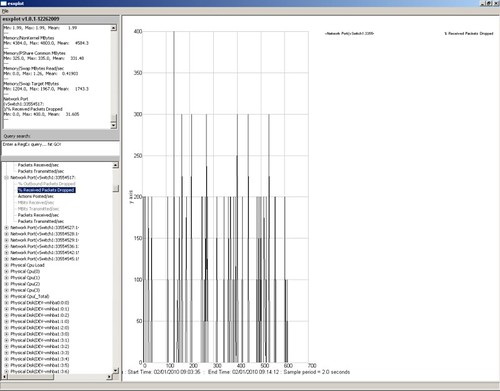
At a customer site we received several notifications of performance issues with a VMware VI3 environment. After having checked the configuration of the VMs and the Hosts we decided to dive into esxtop. At first sight we did not see any abnormalities. Low %RDY, which is usually the first thing I check, some swapping but not enough to cause any major delays. The weird thing about this one is that it seemed that only when IP was sent/received the VM felt sluggish. As we could not reproduce the issue we decided to start esxtop in batchmode and use esxplot and perfmon to get to the bottom of it. Soon we found what the issue was, receive packets were being dropped at the vSwitch level.

The following screenshot depicts the symptoms.

In other words, at times an enormous amount of received packets were dropped. After some research I found an article which actually describes this behavior. (http://kb.vmware.com/kb/1010071) We tried increasing the buffer size for the E1000 virtual network adapter this VM was configured with but it did not resolve the issue. As there were other drivers mentioned in the post we decided to “upgrade” the NIC to a “vmxnet” NIC and this actually resolved the issue. Although performance is not where we expected it would be yet we are not seeing any dropped packets anymore and can focus on the next possible cause.

getvSwitchMacTable.pl

Duncan Epping · Dec 4, 2009 ·

I’ve been following William Lam‘s VMTN account in my RSS reader for a while as William regularly releases useful scripts. Lately he has been pumping iron and releasing new scripts or new versions of scripts on an almost daily basis. One of the most useful scripts that William released lately is “getvSwitchMacTable.pl”. Make sure to add William to you RSS reader or just follow him on twitter.

Source

This script allows you to dump information about your vSwitche(s) pertaining to the VM(s) that are attached, the portgroups in which the VM(s) are attached to and the corresponding MAC Address that maps to the portgroup/vswitch

You can specify a specific Cluster, Datacenter or if execute against vCenter without options, it will extract ALL VMs or you execute against an individual ESX(i).

Active / Standby etherchannels?

Duncan Epping · Oct 12, 2009 ·

I’ve seen this a couple of times already and just had a very long phone call with a customer who created the following set up:

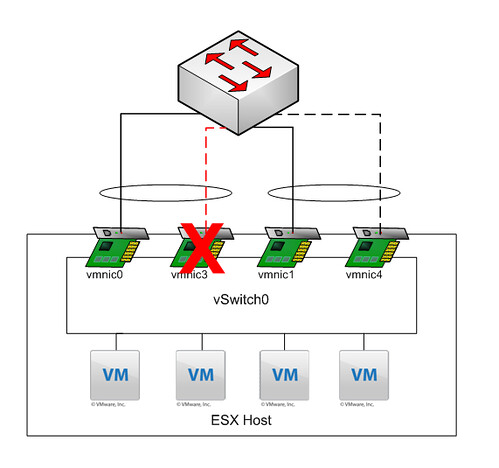
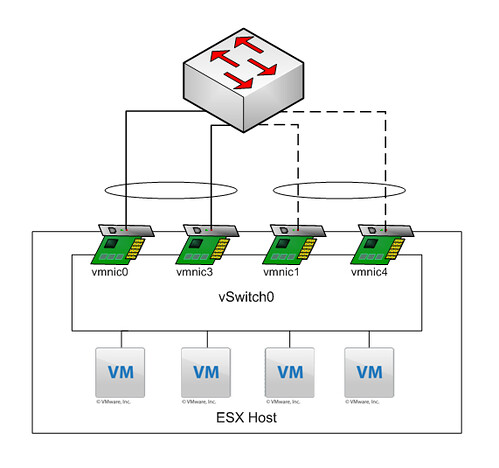
So basically the first two nics are active with load balancing set to IP-Hash and configured as an Etherchannel on the stacked Cisco 3750’s. The second pair are “standby”. Also with load balancing set to IP-Hash and configured as a second Etherchannel on the stacked Cisco 3750’s. A diagram probably makes more sense:

Explanation: All NICs belong to the same vSwitch. Etherchannel 01 consist of “vmnic0” and “vmnic3” and both are active. Etherchannel 02 consists of “vmnic1” and “vmnic4” and both are standby.

My customer created this to ensure a 2Gb link is always available. In other words if “vmnic3” fails “vmnic1” and “vmnic4” should take over as they are a “pair”. But is this really what happens when “vmnic3” fails?

As you can clearly see, what they expected to happen did not happen. When “vmnic3” failed VMware ESX “promoted” the first standby NIC to active, which in this case belongs to a different Etherchannel. What happened next was not a pretty sight, mac-address table went completely nuts with “MACFLAPS” all over the place. I’m not a networking guy but I can tell you this introducing a loop when you configured portfast is not a smart idea. DON’T DO THIS AT HOME KIDS!

  • « Go to Previous Page
  • Page 1
  • Interim pages omitted …
  • Page 4
  • Page 5
  • Page 6
  • Page 7
  • Page 8
  • Page 9
  • Go to Next Page »

Primary Sidebar

About the Author

Duncan Epping is a Chief Technologist and Distinguished Engineering Architect at Broadcom. Besides writing on Yellow-Bricks, Duncan is the co-author of the vSAN Deep Dive and the vSphere Clustering Deep Dive book series. Duncan is also the host of the Unexplored Territory Podcast.

Follow Us

  • X
  • Spotify
  • RSS Feed
  • LinkedIn

Recommended Book(s)

Also visit!

For the Dutch-speaking audience, make sure to visit RunNerd.nl to follow my running adventure, read shoe/gear/race reviews, and more!

Do you like Hardcore-Punk music? Follow my Spotify Playlist!

Do you like 80s music? I got you covered!

Copyright Yellow-Bricks.com © 2026 ยท Log in