• Skip to primary navigation
  • Skip to main content
  • Skip to primary sidebar

Yellow Bricks

by Duncan Epping

  • Home
  • Unexplored Territory Podcast
  • HA Deepdive
  • ESXTOP
  • Stickers/Shirts
  • Privacy Policy
  • About
  • Show Search
Hide Search

networking

dvSwitch?

Duncan Epping · Sep 24, 2009 ·

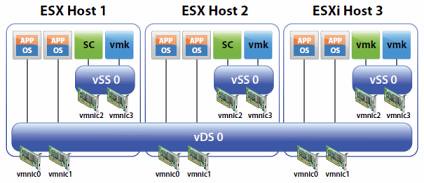
I receive the same question around dvSwitches almost every week; should I only use dvSwitches or go for a hybrid model? The whitepaper that has been released a couple of months ago clearly states that a hybrid model is a supported configuration but would I recommend it? Or would a pure vDS model make more senses?

Let me first start with the most obvious answer: it depends. Let’s break it down and create two categories:

  1. Hosts with two NIC ports
  2. Hosts with more than two NIC ports

Now most of you would probably say who the hell would only have two NIC ports? Think 10Gbe in blade environments for instance. With only two physical NIC ports available you would not have many options. You would have exactly two options(if not using Flex-10 of course):

  1. Pure vDS
  2. Pure vSwitch

Indeed, no hybrid option as you would still want to have full redundancy which means you will need at least 2 physical ports for any virtual switch. Now what would I recommend when there are only two physical NIC ports available; I guess it depends on the customer. There are multiple pros and cons for both models but I will pick the most obvious and relevant two for now:

  1. PRO vDS: Operational benefits. Updating port groups, consistency and increased flexibility with vDS.
  2. CON vDS: If vCenter fails there’s no way to manage your vDS

There it is; probably the most important argument on why or why not to run your Service Console on a vDS. If vCenter fails there’s no way to manage your vDS. For me personally this is the main reason why I would most like not recommend running your Service Console/VMkernel portgroups on a dvSwitch. In other words: Hybrid is the way to go…

<update 21-April-2011>
I guess it all comes down to what you are comfortable with and a proper operational procedure! But why? Why not just stick to Hybrid? I guess you could, but than again why not benefit from what dvSwitches have to offer? Especially in a converged network environment being able to use dvSwitches will make your life a bit easier from an operational perspective. On top of that you will have that great dvSwitch only Load Based Teaming to your disposal, load balancing without the need to resort to IP-Hash. I guess my conclusion is: Go Distributed… There is no need to be afraid if you understand the impact and risks and mitigate these with solid operational procedures.
</update 21-April-2011>
 

Whitepaper: VMware vNetwork Distributed Switch

Duncan Epping · Jul 22, 2009 ·

I just noticed this great whitepaper on the Distributed Switch(vDS) and thought it might also be useful for you guys:

http://vmware.com/files/pdf/vsphere-vnetwork-ds-migration-configuration-wp.pdf

This guide is intended to help users understand the various scenarios and considerations for migration to the vNetwork Distributed Switch (vDS). It also includes a step-by-step guide on migration from a Standard Switch environment to a vDS environment.

How to show load balancing policy in the COS?

Duncan Epping · Jun 5, 2009 ·

Kelly Olivier had a good question on the VMTN Communities. How can I check from the Service Console which network load balancing I’m using? Of course his first bet was “vmware-vim-vmd” but unfortunately there doesn’t seem to be an option to show which load balancing policy is being used.

As far as I know there’s another way to show this:

cat /etc/vmware/esx.conf | grep "teamPolicy\/team"

This would return the following:

/net/vswitch/child0001/teamPolicy/team = "lb_srcid"

Possible load balancing policies:
lb_srcid = Virtual port id
lb_ip = IP Hash
lb_srcmac = MAC Address

If anyone knows of any other methods of showing this info let me know and/or contribute to the topic on VMTN.

Update:

@lamw just posted that it is possible to get this info from vmware-vim-cmd:

vmware-vim-cmd hostsvc/net/vswitch_info | grep -E '(policy|name)'
      name = "vSwitch0",
         policy = (vim.host.NetworkPolicy) {
               policy = "loadbalance_ip",
      name = "vSwitch1",
         policy = (vim.host.NetworkPolicy) {
               policy = "loadbalance_srcid",
      name = "vSwitch5",
         policy = (vim.host.NetworkPolicy) {
               policy = "loadbalance_srcid",

Ken’s view on Service Console redundancy and my take…

Duncan Epping · Apr 9, 2009 ·

I’ve read Ken’s article on Service Console redundancy a couple of times, When is it OK to default on your VI? As I also wrote on the VMTN Blog I really love Ken’s posts so far. They are in depth and Ken knows what he is talking about. His argument, keep it simple, make sense.

Basically, what we’ve done is to let everything default. All the adapters are active, the load balancing method is virtual switch port based and nothing is overridden by the port groups.

But I actually don’t agree with Ken on this one. I never use “virtual port id” load balancing for the Service Console and VMkernel, especially not if I combine these two port groups on one vSwitch.

Call me a control freak if you like, but I want to know which port group is using which vmnic. I always use an Active/Standby scenario for the vSwitch that holds the Service Console and VMkernel. Let me steal Ken’s excellent diagram to give you an idea what I’m talking about:

If anything goes wrong there’s full redundancy, which is a must have. The setup can be scripted in a couple of lines and if you need to troubleshoot you know exactly which physical NIC is being used for what purpose. The Service Console and the VMkernel/VMotion are just too important to be guessing where they are running in my opinion, especially in large environments. I want every server to be exactly the same, I don’t want to have the Service Console running on vmnic0 on the first server and on vmnic2 on the next. Like I said… I like to be in control, full control.

For those who want to set this up via a scripted install:

/usr/bin/vimsh -n -e “hostsvc/net/portgroup_set
–nicorderpolicy-active=vmnic0 –nicorderpolicy-standby=vmnic2 vSwitch0
‘Service Console’”
/usr/bin/vimsh -n -e “hostsvc/net/portgroup_set
–nicorderpolicy-active=vmnic2 –nicorderpolicy-standby=vmnico vSwitch0 VMkernel”

HP’s Flex-10 and VMware ESX(i) support

Duncan Epping · Jan 28, 2009 ·

Recently a customer asked me if HP Flex-10 was fully supported for ESX(i) or not. For those that don’t know what Flex-10 is:

HP’s new Virtual Connect Flex-10 Ethernet module is the industry’s first interconnect that flexibly allocates the bandwidth of a 10 Gb Ethernet network port across four NIC connections. This eliminates the need for additional costly NICs, switches and cables while concurrently increasing bandwidth flexibility.

After checking the compatibility guide the answer was “Yes”. So what’s the point of mentioning it here? Well, although it was fully supported there is a mention in the KB about possible problems with HA and VMotion:

  • VI Client does not show NIC connnection is down when the uplink to external switch is down
  • VMware HA is not supported with ESXi 3.5 Update 3 (embedded and installable) hosts with uplinks connected to Flex-10 NICs.
  • VMotion migration of virtual machine May time out with the default migration timeout value of 20
  • ESX Server May fail to respond under the following configuration

I guess the tip of today: Always check the compatibility guide, but also check the KB cause problems like this might influence your implementation time, plan and even your design!

  • « Go to Previous Page
  • Page 1
  • Interim pages omitted …
  • Page 5
  • Page 6
  • Page 7
  • Page 8
  • Page 9
  • Go to Next Page »

Primary Sidebar

About the Author

Duncan Epping is a Chief Technologist and Distinguished Engineering Architect at Broadcom. Besides writing on Yellow-Bricks, Duncan is the co-author of the vSAN Deep Dive and the vSphere Clustering Deep Dive book series. Duncan is also the host of the Unexplored Territory Podcast.

Follow Us

  • X
  • Spotify
  • RSS Feed
  • LinkedIn

Recommended Book(s)

Also visit!

For the Dutch-speaking audience, make sure to visit RunNerd.nl to follow my running adventure, read shoe/gear/race reviews, and more!

Do you like Hardcore-Punk music? Follow my Spotify Playlist!

Do you like 80s music? I got you covered!

Copyright Yellow-Bricks.com © 2026 · Log in