• Skip to primary navigation
  • Skip to main content
  • Skip to primary sidebar

Yellow Bricks

by Duncan Epping

  • Home
  • Unexplored Territory Podcast
  • HA Deepdive
  • ESXTOP
  • Stickers/Shirts
  • Privacy Policy
  • About
  • Show Search
Hide Search

HCI2476BU – Tech Preview RDMA and next-gen storage tech for vSAN

Duncan Epping · Sep 5, 2018 ·

This session I had high on my list to go and watch live. Unfortunately, I was double booked during the show, hence I had to watch “HCI2476BU – Tech Preview RDMA and next-gen storage tech for vSAN” online as well. This session was by my colleagues Biswa and Srinath (PM/Engineering) and discusses how we can potentially use RDMA and next-gen storage technology for vSAN.
I am not going to cover the intro, as all readers by now are well aware of what vSAN is and does. What I think was interesting was the quick overview of the different types of ready nodes we have available. Recently included is the Cisco E-Series which is intended for Edge Computing scenarios. Another interesting comment was around some of the trends in the market around CPU, it seems that “beefy” single-socket servers are gaining traction. Not entirely surprising considering it lowers the licensing considerably and you can go up to 64 cores per CPU with AMD EPYC. Next up is the storage aspect of things, what can we expect in the upcoming years?

Biswa mentions that there’s a clear move towards the adoption of NVMe, moving away from SAS/SATA. It is expected that the NVMe devices will be able to deliver 500k+ of IOPS in the next 2 years. Just think about that. 500k IOPS from a single device. Biswa also briefly touched on DDR4 based Persistent Memory, where we can expect million(s) of IOPS with nanoseconds of latency. Next various types of devices are discussed and the performance and endurance capabilities. Even if you consider what is available today, it is a huge contrast compared to 1-2 years ago. Of course, all of this will come at a cost. From a networking perspective 10G/25G/40G is mainstream now or becoming, and RDM enabled (RoCE) NIC is becoming standardized as well. 100G will become the new standard, but this will take 3-5 years at a minimum.

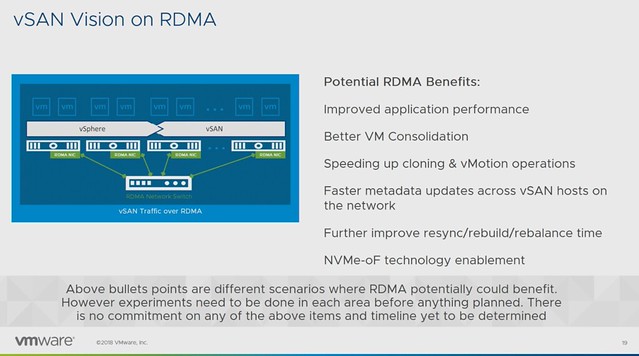
Before the RDMA section started a quick intro to RDMA was provided: “Remote direct memory access from one computer into that of another without involving either one’s operating system allows for high throughput and low latency, which is especially useful in massive parallel computer clusters”. The expected potential / benefits for vSAN is:

  • Improved application performance
  • Better VM Consolidation
  • Speeds up cloning & vMotion
  • Faster metadata updates
  • Faster resync/rebuild times
  • NVMe-oF technology enablement

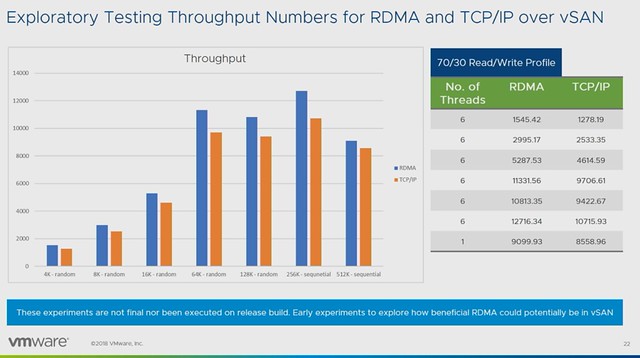
Early performance tests show a clear performance benefit for using RDMA. Throughput and IOPS are clearly higher, while latency is consistency lower when comparing RDMA to TCP/IP. Note that vSAN has not been optimized in these particular cases yet and this is just one example of a particular workload on a very specific configuration. (Tests were conducted with Mellanox.)
But what about that “next-gen storage”? How can we use this to increase IOPS/throughput while lowering not only latency but also HCI “overhead” like CPU and Memory consumption? Also, what does it mean for the vSAN architecture, what do we need to do to enable this? Faster networks, faster devices may mean that changes are required to various modules/processes. (Like DOM, LSOM, CLOM etc.)

Persistent Memory is definitly one of those next-gen storage devices which will require us to rethink the architecture. Simply because of the ultra low latency, the lower the latency the higher the overhead of the storage stack appears to be. Especially when we are reaching access times which are close to memory speeds. Can we use these devices in an “adaptive tiering” architecture where we use PMEM, NVMe and SSDs? Where for instance PMEM is used for metadata, or even metadata and capacity for hot blocks?
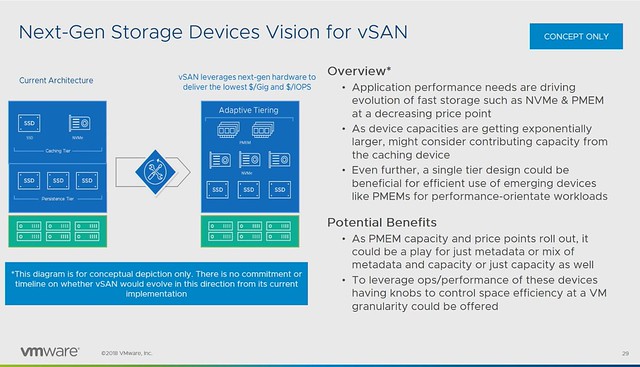
Last but not least a concept demo was shown around NVMe-oF for vSAN. Meaning that NVMe over Fabric allows you to present (additional) capacity to ESXi/vSAN hosts. These devices would be “JBOF”, aka “just a bunch of flash” connected over RDMA / NVMe-oF. In other words, these hosts had no direct locally attached storage, but instead these NVMe devices are presented as “local devices” across the fabric. Which, potentially, allows you to present a lot of storage to hosts which have no local storage capabilities even(Blades anyone?). Also, I wonder if this would allow us in the future to have similar benefits of fabric connected devices as for instance VMware Cloud on AWS has. Meaning that devices can be connected to other hosts after a failure, so that a resync/rebuild can be avoided? Food for thought definitely.

Make sure to watch “HCI2476BU – Tech Preview RDMA and next-gen storage tech for vSAN” online if you want to know more, as it doesn’t appear to be scheduled for VMworld Europe!
HCI2164BU – HCI Management, current and futures

Duncan Epping · Sep 5, 2018 ·

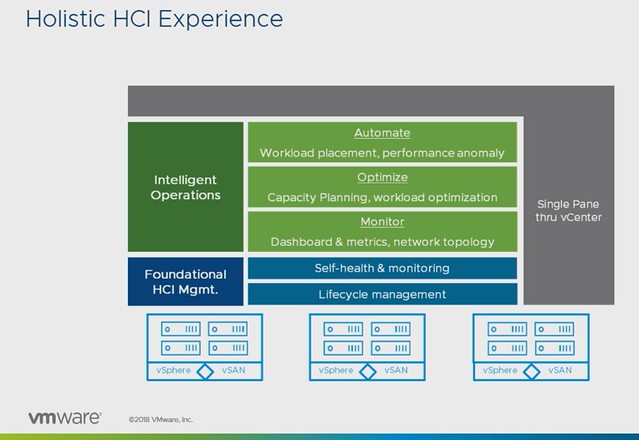
This session by Christian Dickmann and Junchi Zhang is usually one of my favorites in the HCI track, mainly because they show a lot of demos and in many cases show you what ends up being part of the product in 6-12 months. The session revolved all around management, or as they called it in the session “providing a holistic HCI experience”.

After a short intro Christian showed a demo around what we currently have around the installation of the vCenter Server Appliance and how we can deploy that to a vSAN Datastore, followed by the Quickstart functionality. I posted a demo of Quickstart earlier this week, let me post it here as well so you have an idea of what it is/does.

In the next demo, Christian showed how you can upgrade the firmware of a disk controller using Update Manager. Pretty cool, but afaik still limited to a single disk controller, hopefully, more will follow soon. But more importantly, after that demo ended he started talking about “Guided SDDC Update & Patching”, and this is where it got extremely interesting. We all know that it isn’t easy to upgrade a full stack, and what Christian was describing would be doing exactly that. Do you have Horizon? Sure, we will upgrade that as well when we do vCenter / ESXi / vSAN etc. Do you have NSX as part of your infra? Sure, that is also something we will take into account and upgrade it when required. This would also include firmware upgrades for NICs, disk controllers etc.

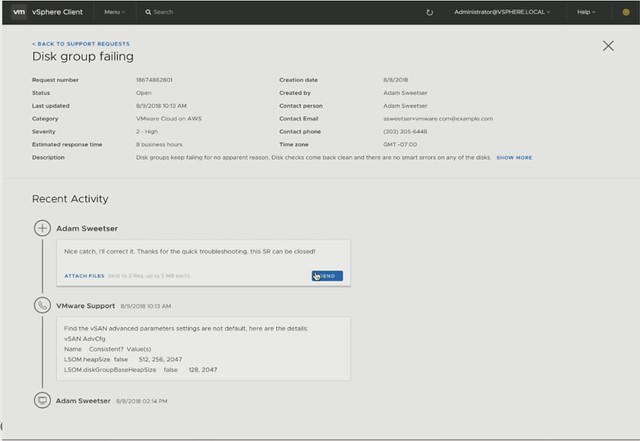
Next Christian showed the Support Insight feature, which is enabled through the Customer Experience Improvement Program. His demo then showed how to create a support request right from the H5 Client. The process shows that the solution understands the situation and files the ticket. Then it shows what the support team sees. It allows the support team to quickly analyze the environment, and more importantly inform the customer about the solution. No need to upload log bundles or anything like that, that all happens automatically. That’s not where it stop, you will be informed in the H5 client about the solution as well. Cool right?

Next Junchi was up and he discussed Capacity Management first. As he mentioned it appears to be difficult for people to understand the capacity graphs provided by vSAN. Junchi proposes a new model where it is clear instantly what the usable space is and by what current capacity is being consumed. Not just on a cluster level, but also at a VM level. This should also include what-if scenarios for usage projection. Junchi then quickly demoed the tools available that help with sizing and scaling.

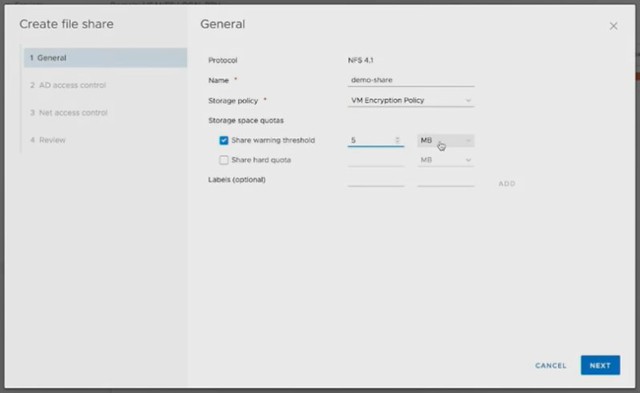
Next Native File Services was briefly discussed, Data Protection and Cloud Native Storage. What does the management of these services look like? The file services demo that Junchi showed was really slick. Fill out IP details and Domain details and have File Services running in a minute or two natively on vSAN. Only thing you would need to do is create file shares and give folks access to the file shares. Also, monitoring will go through the familiar screens like the health check etc.

Last but not least Junchi discusses the integration with vRealize Automation on-premises and SaaS-based, a very cool demo showing how Cloud Assembly (but also vRA) will be able to leverage storage policies and new applications are provided using blueprints which have these policies associated with them.

That was it, if you like to know more, watch the session online, or attend it in EMEA!

HCI1603BU – Tech Preview of Native vSAN Data Protection

Duncan Epping · Sep 4, 2018 ·

The second session I watched was HCI1603BU Tech Preview of Native vSAN Data Protection by Michael Ng. I already discussed vSAN Data Protection last year, but considering the vSAN Beta is coming up soon that includes this functionality I felt it was worth covering again. Note that the beta will be a private beta, so if you are interested please sign up, you may be one of the customers getting selected for the beta.

Michael started out with an explanation about what an SSDC brings to customers, and how a digital foundation is crucial for any organization that wants to be competitive in the market. vSAN, of course, is a big part of the digital foundation, and for almost every customer data protection and data recovery is crucial. Michael went over the various vSAN use cases and also the availability and recoverability mechanisms before introducing Native vSAN Data Protection.
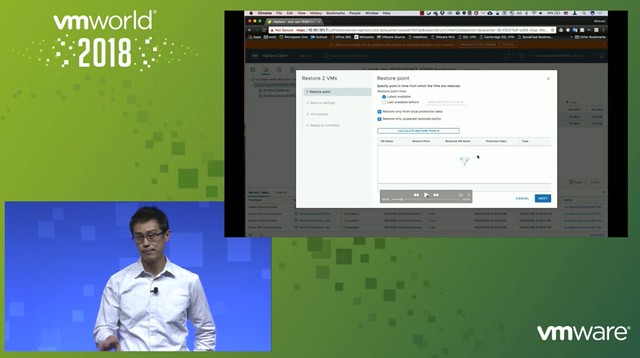
Now it is time for the vSAN Native Data Protection introduction. Michael first explains that we will potentially have a solution in the future where we can simply create snapshots locally through specifying the number of local snapshots you want in policy. On top of that, in the future, we will potentially provide the option to specify the snapshots (plus a full copy) will need to be offloaded to secondary storage. Secondary storage could be NFS, S3 Object Storage (both on-premises and in the cloud). Also, it should be possible to replicate VMs and snapshots to a DR location through policies.

What I think is very compelling is the fact that the native protection comes as part of vSAN/vSphere, there’s no need to install an appliance or additional software. vSAN Data Protection will be baked into the platform. Easy to enable and easy to consume through policy. The first focus is vSAN Local Data Protection.

vSAN Local Data Protection will provide Crash and Application-consistent snapshots at an RPO of 5 minutes and with a low RTO. On top of that, it will be possible to instant clone the snapshot. Meaning that you can restore the snapshot as an “instant clone”, this could be interesting when you want to test a certain patch or upgrade for instance. You can even specify during the recovery that the NIC doesn’t need to be connected. Application consistency is achieved by leveraging VSS providers on Windows and on Linux the VMware Tools pre- and post-scripts are being used.

What enables vSAN Data Protection is a new snapshotting technology. This new technology provides a lot better performance than traditional vSphere (or vSAN) snapshots. It also provides for better scale, meaning that you can go way above the 32 limit we currently have.

Next Michael demoed vSAN Data Protection, which is something I have done on various occasions if you are interested in what it looks like just watch the session. If I have time I may record a demo myself just so it is easier to share with you.

What I personally hadn’t seen yet were the additional performance views added. Very useful as it allows you to quickly check what the impact is of snapshots on general performance. Is there an impact? Do I need to change my policy?

Last but not least various questions were asked, most interesting parts was the following:

  • “file level restore” is on the roadmap but the first feature they will tackle is offloading to secondary storage.
  • “consistency groups” is something that is being planned for, especially useful when you have applications or services spanning VMs.
  • Integration with vRealize Automation, some of it is planned for the first release, everything is SPBM based which already have APIs. Being planned for is “self-service restore”
  • 100 snapshots per VM is tested for the first release

Good session, worth watching!

HCI1998BU – Enable High-Capacity Workloads with Elastic vSAN on VMware Cloud

Duncan Epping · Sep 4, 2018 ·

I just watched the session by Rakesh and Peng on Elastic vSAN, also known as “EBS Backed vSAN”. This session was high on my list to watch live at VMworld, but unfortunately, I couldn’t attend it due to various other obligations. If you are interested in the full session, make sure to watch it here, it is free. If you want to read a short summary then have a look below.

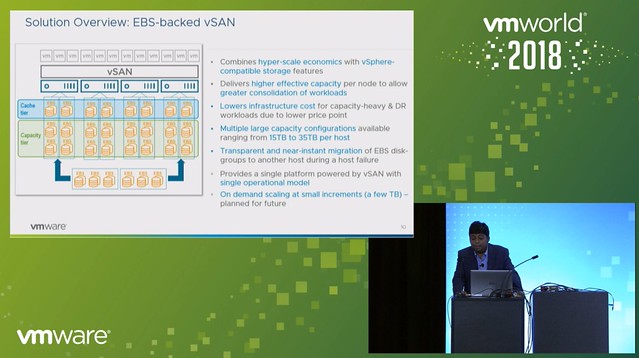
EBS backed vSAN is exactly what you expect it to be, having said that I do want to point out that EBS backed vSAN is supported for vSAN in VMware Cloud on AWS only. On top of that, it is recommended to run workloads on it which require high capacity. You could, for instance, consider leveraging EBS backed vSAN as a high capacity target for DR as a Service. But of course this could also be used in cases where there is sufficient CPU/Memory capacity available, but only storage needs to scale in VMware Cloud on AWS. 10TB is the capacity limit per host in VMC today, EBS backed vSAN removes this limit. With EBS backed vSAN you can increase the host per 15, 20, 25, 30 or 35TB per host. Which means you can deliver up to 140TB of capacity in a single 4 node cluster, for 16 nodes that is 560TB!

What is great about this solution is that it also solves another problem. Everyone knows that a host failure results in resyncing data. And depending on how much capacity the host was delivering this could take a long time. With EBS backed vSAN this problem does not exist any longer. When a host fails the EBS volumes simply will be mounted to another host, or a new host when this is introduced. This is a huge benefit if you ask me, even when there’s a high change rate as this happens within seconds.

One thing to point out as a constraint though is that today in VMC you can’t run the management workloads on EBS backed vSAN just yet. Rakesh did mention that this is being tested.

Next, the architecture was discussed, this is where Peng took over. He mentioned that the IOPS limit is set to 10K (regardless of the size) and the throughput is limited at 160MBps. All of this delivered typically with sub-millisecond latency, which is very impressive. Also, Peng mentioned that EBS backed vSAN provided very consistent and predictable performance in all tests. On top of that, EBS backed vSAN is also very reliable and highly available, even when compared to flash devices.

What I found interesting is the architecture, vSAN gets presented a SCSI device, however EBS is network attached and an EBS protocol client was implemented and then presented as an NVMe target through the PCI-e interface. The PCI-e interface allows for multi-volume, hot-add and hot-remove. This is what allows the EBS devices to be removed from a host which has failed (or has a failure) and then added to a healthy host.

When EBS backed vSAN is enabled each host will have 3 disk groups, and each disk group will have 3-7 capacity disks. Note that it is recommended to use RAID-5 for space efficiency and “Compression only mode” is enabled on these disk groups. Considering the target workloads, and the architecture (and EBS performance constraints) it didn’t make sense to use deduplication, hence the vSAN team implemented a solution where it is possible to have only compression enabled. Some I/O amplification is not an issue when you run all-flash and have hundreds of thousands of IOPS per device, but as stated EBS is limited to 10k IOPS per device, which means you need to be smart about how you use those resources.

During the Q&A one thing that was mentioned, which I found interesting, is that although today EBS backed vSAN needs to be introduced in certain increments across the whole cluster, that will not be the case in the future. In the future, according to Peng, it should be possible to add EBS volumes to disk groups on particular hosts even, allowing for full and optimal flexibility,

And for those who didn’t know, the VMworld Hands-On Labs was running on top of EBS backed vSAN and performance above expectations!

VMworld Video: vSphere 6.7 Clustering Deep Dive

Duncan Epping · Sep 3, 2018 ·

As all videos are posted for VMworld (and nicely listed by William), I figured I would share the session Frank Denneman and I presented. It ended up in the Top 10 Sessions on Monday, which is always a great honor. We had a lot of positive feedback and comments, thanks for that! Most importantly, it was a lot of fun again to be up on stage at VMworld talking about this content after 6 years of absence or so. For those who missed it, watch it here:

https://s3-us-west-1.amazonaws.com/vmworld-usa-2018/VIN1249BU.mp4

Also very much enjoyed the book signing session at the Rubrik booth with Niels and Frank. I believe Rubrik gave away around 1000 copies of the book. Hoping we can repeat this huge success in EMEA. But more on that later. If you haven’t picked up the book yet and won’t be at VMworld Europe, consider picking it up through Amazon, e-book is 14.95 USD only.


  • « Go to Previous Page
  • Page 1
  • Interim pages omitted …
  • Page 71
  • Page 72
  • Page 73
  • Page 74
  • Page 75
  • Interim pages omitted …
  • Page 497
  • Go to Next Page »

Primary Sidebar

About the Author

Duncan Epping is a Chief Technologist and Distinguished Engineering Architect at Broadcom. Besides writing on Yellow-Bricks, Duncan is the co-author of the vSAN Deep Dive and the vSphere Clustering Deep Dive book series. Duncan is also the host of the Unexplored Territory Podcast.

Follow Us

  • X
  • Spotify
  • RSS Feed
  • LinkedIn

Recommended Book(s)

Also visit!

For the Dutch-speaking audience, make sure to visit RunNerd.nl to follow my running adventure, read shoe/gear/race reviews, and more!

Do you like Hardcore-Punk music? Follow my Spotify Playlist!

Do you like 80s music? I got you covered!

Copyright Yellow-Bricks.com © 2026 · Log in