• Skip to primary navigation
  • Skip to main content
  • Skip to primary sidebar

Yellow Bricks

by Duncan Epping

  • Home
  • Unexplored Territory Podcast
  • HA Deepdive
  • ESXTOP
  • Stickers/Shirts
  • Privacy Policy
  • About
  • Show Search
Hide Search

UI Confusion: VM Dependency Restart Condition Timeout

Duncan Epping · Sep 3, 2018 ·

Various people have asked me, and I wrote about this before in several articles but as part of a longer article which makes it difficult to find. When specifying the restart priority or restart dependency you can specify when the next batch of VMs should be powered on. Is that when the VMs are powered on when they are scheduled for being powered on, when VMware Tools reports them as running or when the application heartbeat reports itself?

In most cases, customers appear to go for either “powered on” or “VMware Tools” heartbeat. But what happens when one of the VMs in the batch is not successfully restarted? Well HA waits… For how long? Well that depends:
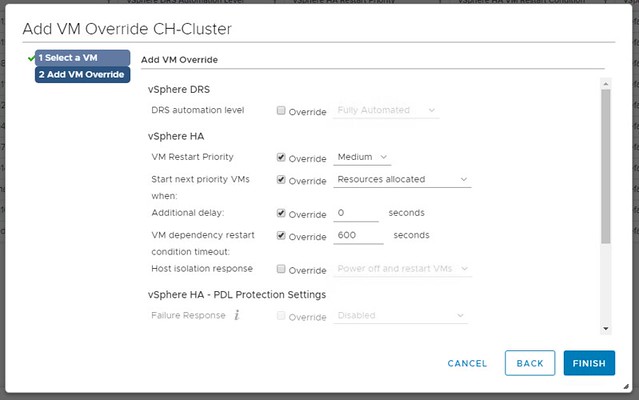
In the UI you can specify how long HA needs to wait by using the option called “VM Dependency Restart Condition Timeout”. This is the time-out in seconds used when one (or multiple VMs) can’t be restarted. So we initiate the restart of the group, and we will start the next batch when the first is successfully restart or when the time-out has been exceeded. By default, the time-out is 600 seconds, and you can override this in the UI.

What is confusing about this setting is the name, it states “VM Dependency Restart Condition Timeout”. So does this time-out apply to “Restarts Priority” or does it apply to “Restart Dependency” or maybe both? The answer is simple, this only applies to “Restart Priority”. Restart Dependency is a rule, a hard rule, a must rule, which means there’s no time-out. We wait until all VMs are restarted when you use restart dependency. Yes, the UI is confusing as the option mentions “dependency” where it should really talk about “priority”. I have reported this to engineering and PM, and hopefully it will be fixed in one of the upcoming releases.
VMworld – VMware vSAN Announcements: vSAN 6.7 U1 and beta announced!

Duncan Epping · Aug 27, 2018 ·

VMworld is the time for announcements, and of course for vSAN that is no different. This year we have 3 major announcements and they are the following:

  • VMware vSAN 6.7 U1
  • VMware vSAN Beta
  • VMware Cloud on AWS new features

So let’s look at each of these, first of all, VMware vSAN 6.7 U1. We are adding a bunch of new features, which I am sure you will appreciate. The first one is various VUM Updates, of which I feel the inclusion of Firmware Updates through VUM is the most significant one. For now, this is for the Dell HBA330 only, but soon other controllers will follow. On top of that there now also is support for custom ISO’s. VUM will recognize the vendor type and validate compliance and update accordingly when/if needed.

The other big thing we are adding os the “Cluster Quickstart wizard“. I have shown this at various sessions already, so some of you may be familiar with it. It basically is a single wizard that allows you to select the required services, add the hosts and configure the cluster. This includes the configuration of HA, DRS, vSAN and the network components needed to leverage these services. I recorded a quick demo that actually shows you what this looks like

One of the major features in my opinion that is introduced is UNMAP. Yes, unmap for vSAN. So as of 6.7 U1 we are now capable of unmapping blocks when the Guest OS sends an unmap/trim command. This is great as it will greatly enhance/improve space efficiency. Especially in environments where for instance large files or many files are deleted. You need to enable it, for now, through “rvc”. And you can do this as follows:

/localhost/VSAN-DC/computers/6.7 u1> vsan.unmap_support -e .

When you run the above command you should see the below response.

Unmap support is already disabled
6.7 u1: success
VMs need to be power cycled to apply the unmap setting
/localhost/VSAN-DC/computers/6.7 u1>

Pretty simple right? Does it really require the VM to be power cycled? Yes, it does, as during the power-on the Guest OS actually queries for the unmap capability, there’s no way for VMware to force that query without power cycling the VM unfortunately. So power it off, and power it on if you want to take advantage of unmap immediately.

There are a couple smaller enhancements that I wanted to sum up for those who have been waiting for it:

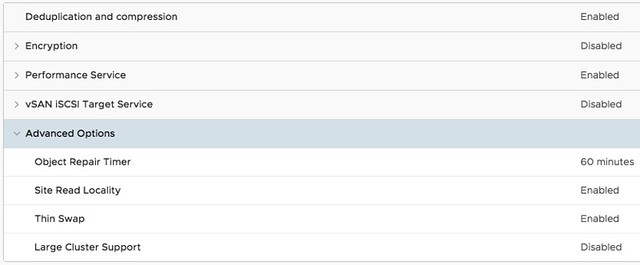
  • UI Option to change the “Object Repair Timer” value cluster-wide. This is the option which determines when vSAN starts repairing an object which has an absent component.
  • Mixed MTU support for vSAN Stretched Clusters (different MTU for Witness traffic then vSAN traffic)
  • Historical capacity reporting
  • VROps dashboards with vSAN stretched cluster awareness
  • Additional PowerCLI cmdlets
  • Enhanced support experience (Network diagnostic mode, specialized dashboards), you can find the below graphs under Monitor/vSAN/Support
  • Additional health checks (storage controllers firmware, unicast network performance test etc)

And last but not least, with vSAN Stretched we have the capability to protect data within a site. As of vSAN 6.7 U1 we also now have the ability to protect data within racks, it is however only available through an RPQ request. So if you need protection within a rack, contact GSS and file an RPQ.

Another announcement was around a vSAN Beta which is coming up. This vSAN Beta will have some great features, three though have been revealed:

  • Data Protection (Snapshot based)
  • File Services
  • Persistent Storage for Containers

I am not going to reveal anything about this, simply to avoid violating the NDA around this. Sign up for the Beta so you can find out more.

And then the last set of announcements was around functionality introduced for vSAN in VMware Cloud on AWS. Here there were two major announcements if you ask me. The first one is the ability to use Elastic Block Storage (EBS volumes) for vSAN. Meaning that in VMware Cloud on AWS you are no longer limited to the storage capacity physically available in the server, no you can now extend your cluster with capacity delivered through EBS. The second one is the availability of vSAN Encryption in VMware Cloud on AWS. This, from a security perspective, will be welcomed by many customers.

That was it, well… almost. This whole week many sessions will reveal various new potential features and futures. I aim to report on those when sitting in on those presentations, or potentially after VMworld.


SRM support for VVols coming!

Duncan Epping · Aug 24, 2018 ·

VMworld is coming up, which means that is “announcements season”. First announcement that I can share with you is the fact that VVols support for SRM is now officially on the roadmap. This is something Cormac and I have pushed hard for the past couple of years, and it is great to see this is finally being planned! A post about this was just published on the VMware Virtual Blocks blog and I think the following piece says it all. Read the blog for more info.

Some of our storage partners such as HP Enterprise 3PAR, HP Enterprise Nimble, and Pure Storage have developed and certified to the lastest VVol 2.0 VASA providers specification. VVol 2.0 is part of the vSphere 6.5 release and supports array-based replication with VVol.  To support VVol replication operations on these storage arrays, VMware also developed a set of PowerCLI cmdlets so common BC/DR operations such as failover, test failover, and recovery workflows can be scripted as needed. The use of PowerCLI works well for many VVol customers, but we believe many more customers will be able to take advantage of SRM orchestrated BC/DR workflows with VVol.

I can’t wait for this to be made available, and I am sure many VVol customers (and potential customers) will agree with me that this is a highly anticipated feature!

Startup update: Runecast 2.0

Duncan Epping · Aug 21, 2018 ·

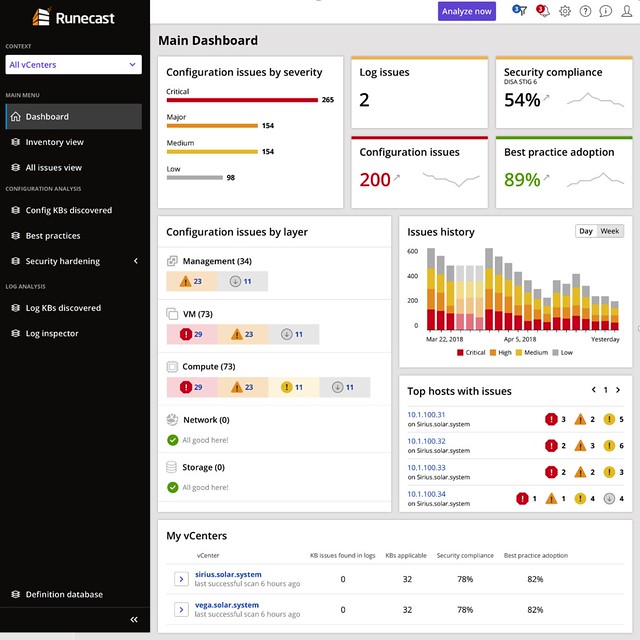
Last week I was briefed by Runecast (together with Cormac) on the new version, Runecast 2.0, which was released/announced today. I always enjoy talking to Stan as every time we talk they have something new which surprises me, or he tells me about something cool on the roadmap. For those who did not read my previous articles, Runecast is a company which focusses on analyzing VMware environments and assess the environment on potential issues. These issues could be anything ranging from configuration issues, driver/firmware issue, to security issues. It reminds me very much of what we have with vSAN which is the health check. The big difference though is that this solution includes many more checks and doesn’t just focus on vSAN but on many different parts of the stack. Just to give you an idea, today Runecast can analyze your vSphere environment up to vSphere 6.7 and can also analyze vSAN and NSX-V. The cool thing is that it also does this “offline”, they have an appliance and regular updates (rules and features) and this means that even in a dark site this would work.

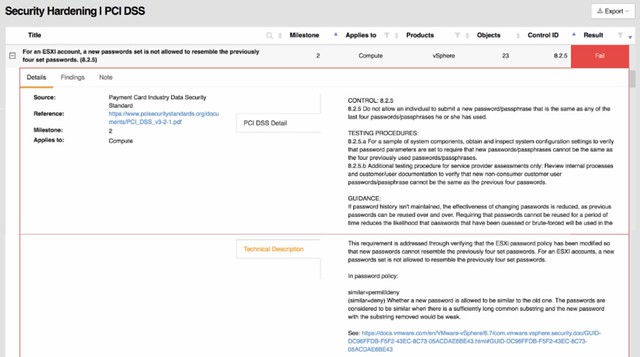
A lot of Runecast’s customers are either in the financial space or government space. I guess this is also why their focus for the 2.0 version was primarily on PCI-DSS. With over 200 technical checks, which map against PCI-DSS requirements, they (as Runecast told me) have by far the largest collection of requirements in an automated analyzer (for VMware) in the industry. Definitely, a smart enhancement, if you are not interested in PCI-DSS, you can simply disable the whole check and it will never show up in your interface. You can also, if only a limited number of clusters should be validated, filter out certain results.

The 20 version of Runecast also comes with a lot of updates around the appliance, now I consider these “internals” as for most customers it is not relevant in terms of the value it offers, but it is important to know from a security perspective I guess.

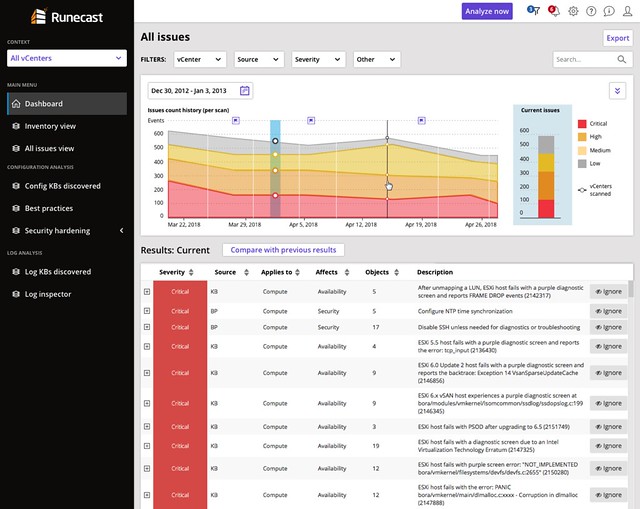
This version also introduces a historical perspective. Meaning that starting with Runecast 2.0 the historical information of checks is stored. This will allow you to see some form of trending when it comes to the different checks/validations. You could for instance now track if you do updates and maintenance if the number of potential issues is going down. You could also task someone with validating the reported issues and fixing those when or where possible. This should over time improve the availability, reliability, and security of your environment.

Last but not least the UI has been fully overhauled. They redesigned it just to make it easier to read and understand. Also, a couple of dashboards were added, which makes sense… a new release means new dashboards!

If you happen to go to VMworld, make sure to stop by their booth and have a look, I think you will find it interesting. Or simply read the Runecast blog, and download the appliance and try it out.

All-Flash Stretched vSAN Cluster and VM/Host Rules

Duncan Epping · Aug 20, 2018 ·

I had a question last week about the need for DRS Rules or also known as VM/Host Rules in an All-Flash Stretched vSAN Infrastructure. In a vSAN Stretched Cluster, there is read locality implemented. The read locality functionality, in this case, ensures that: reads will always come from the local fault domain.

This means that in the case of a stretched environment, the reads will not have to traverse the network. As the maximum latency is 5ms, this avoids a potential performance hit of 5ms for reads. The additional benefit is also that in a hybrid configuration we avoid needing to re-warm the cache. For the (read) cache re-warming issue we recommend our customers to implement VM/Host Rules. These rules ensure that VMs always run on the same set of hosts, in a normal healthy situation. (This is explained on storagehub here.)

What about an All-Flash cluster, do you still need to implement these rules? The answer to that is: it depends. You don’t need to implement it for “read cache” issues, as in an all-flash cluster there is no read cache. Could you run without those rules? Yes, you can, but if you have DRS enabled this also means that DRS freely moves VMs around, potentially every 5 minutes. This also means that you will have vMotion traffic consuming the inter-site links, and considering how resource hungry vMotion can be, you need to ask yourself if cross-site load balancing adds anything, what the risk is, what the reward is? Personally, I would prefer to load balance within a site, and only go across the link when doing site maintenance, but you may have a different view or set of requirements. If so, then it is good to know that vSAN and vSphere support this.

  • « Go to Previous Page
  • Page 1
  • Interim pages omitted …
  • Page 72
  • Page 73
  • Page 74
  • Page 75
  • Page 76
  • Interim pages omitted …
  • Page 497
  • Go to Next Page »

Primary Sidebar

About the Author

Duncan Epping is a Chief Technologist and Distinguished Engineering Architect at Broadcom. Besides writing on Yellow-Bricks, Duncan is the co-author of the vSAN Deep Dive and the vSphere Clustering Deep Dive book series. Duncan is also the host of the Unexplored Territory Podcast.

Follow Us

  • X
  • Spotify
  • RSS Feed
  • LinkedIn

Recommended Book(s)

Also visit!

For the Dutch-speaking audience, make sure to visit RunNerd.nl to follow my running adventure, read shoe/gear/race reviews, and more!

Do you like Hardcore-Punk music? Follow my Spotify Playlist!

Do you like 80s music? I got you covered!

Copyright Yellow-Bricks.com © 2026 · Log in