• Skip to primary navigation
  • Skip to main content
  • Skip to primary sidebar

Yellow Bricks

by Duncan Epping

  • Home
  • Unexplored Territory Podcast
  • HA Deepdive
  • ESXTOP
  • Stickers/Shirts
  • Privacy Policy
  • About
  • Show Search
Hide Search

Server

#VMworld #STO1794BU – Evolution of vSAN

Duncan Epping · Aug 30, 2017 ·

First session of the day at 08:30: “The Evolution of vSAN”. Vijay Ramachandran and Christos Karamanolis will be talking where vSAN came from and where it will be going towards in the upcoming years. Vijay started out laying the foundation, talking about what HCI is, what the benefits are and where it fits in.

I think Vijay was spot on, HCI simplifies operating storage / infrastructure as the various layers have converged and the single management pane simplifies your life. Especially when using an appliance model. I liked how Vijay explained the difference between vSAN and competitive solutions. The big difference is the fact that for competitors the storage piece is a separate entity(virtual appliance), with vSAN your storage stack comes as part of vSphere.

Next Vijay discussed all the different use cases and customer types. He showed some new survey data, and it showed that 65% of our customers use vSAN for business critical apps (Oracle, SQL, Exchange, SAP etc). With the two other big use cases being Horizon View/Citrix Xen Desktop but also for Management Clusters and DMZ. Some of the newer use cases we are starting to see are NoSQL solutions.
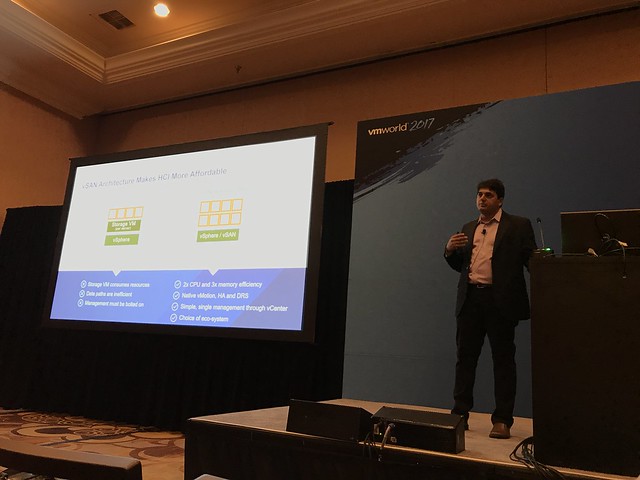
Next Performance was discussed, shocking how vSAN 6.6 bumped performance with 60% even when all data services are enabled. 60% is a lot higher than I expected, especially as this wasn’t just an increase in IOPS but 6.6 also brought a decrease in latency! Before Vijay handed it over, he mentioned the latest vSAN Customer Count: 10k!

Up now Christos, this will be the forward looking part of the session. Christos kicks off talking about three key tends. First, the new storage devices out in the market: NVMe and NVDIMM. These faster devices in most cases will require a re-architecture or at a minimum think about how you leverage these devices. NVMe devices are becoming more affordable and provide extremely low latency and high IOPS, and non-volatile memory even tops that. How will this change the architecture for vSAN? Secondly, the growth of public cloud, is there a way HCI can leverage that? And thirdly, cloud native apps. How do these new application architectures and delivery methods change the storage requirements?

Christos briefly discussed a potential future change for vSAN which is the convergence of the caching tier and the capacity tier… Providing essentially a single tier of storage devices in your vSAN environment, where vSAN will automatically tier data between devices. You could imagine meta-data residing on NVDIMM or NVMe while “cold data” resides on the “lower tiers”. No longer should it be needed to define a caching layer and a capacity layer. Which should result in better performance and better capacity utilization.

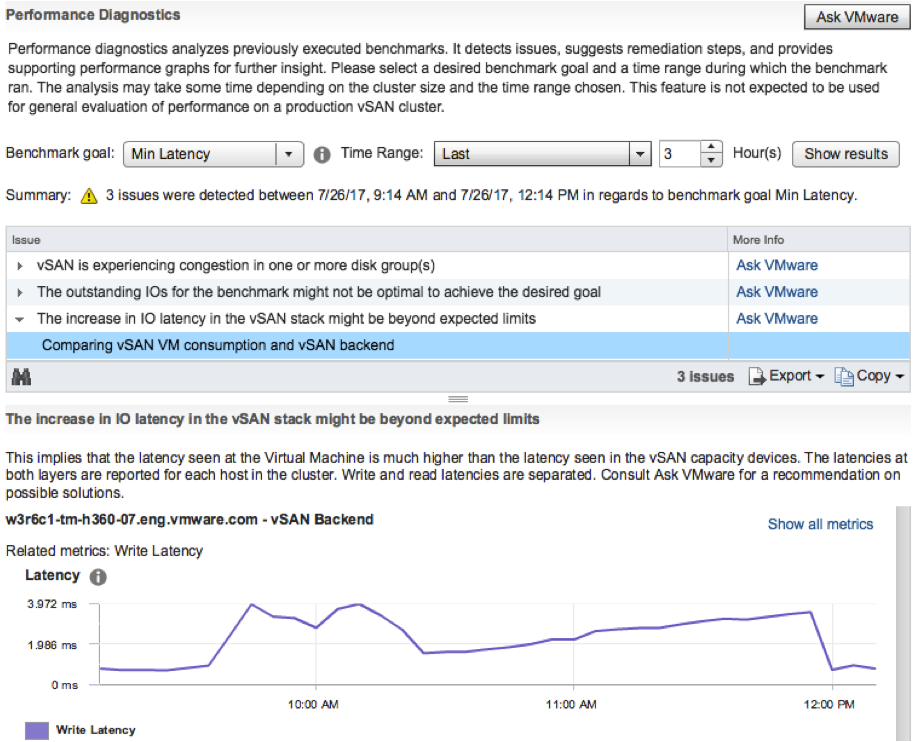
Next point being discussed is the operational aspect. Functionality introduced recently have made the life of customers easier, things like vSAN and VUM, S.M.A.R.T support, PowerCLI cmlets, vRA / VROps and LogInsight advanced support and integration. Next Christos demoed one of the latest addition, the Performance Diagnostic feature that is part of vSAN 6.6.1. If you haven’t seen it yet, watch my demo on youtube.
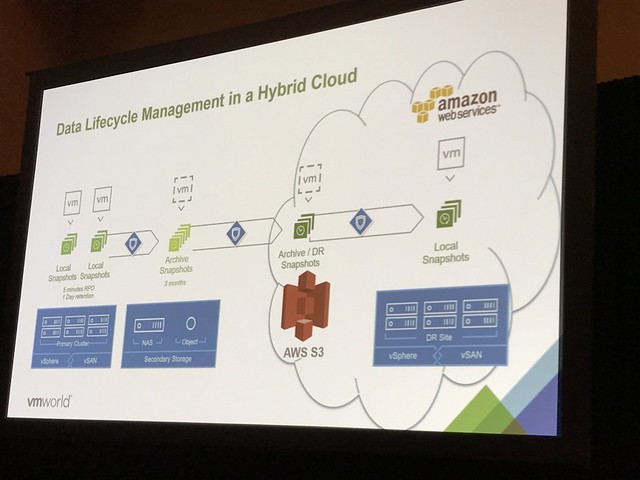
Next Christos discusses how vSAN is used in AWS and how hybridity is achieved leveraging Hyper-Converged architectures. Enterprise grade storage is needed in AWS to provide the ability to use DRS, HA and other essential vSphere functionality. This is where vSAN came in to play. This provides you a very similar experience in the cloud as on-premises. But of course there’s a big benefit of leveraging VMware Cloud on AWS. In the future you can expect an extremely easy scalable storage stack. Compute already scales in a simple manner, but what if you do not need extra compute and just want to add storage, this will be possible soon. Not only will you be able to add storage, but you will also be able to connect to all native AWS Services. You can imagine that a great use case would be “Disaster Recover”. What you can expect from VMware in the near future is a DR as a Service solution, allowing you to failover from your local datacenter in to VMware Cloud on AWS. This offering would be leveraging SRM and vSphere Replication. But on top of that a new snapshotting mechanism is developed, which will allow even for a more flexible architecture. Not just the ability to replicate to vSAN, NFS or something like data domain. But also store your data in S3 in AWS, and when a recovery needs to occur, without having an environment pre-provisioned in VMware Cloud on AWS, trigger a fail-over when it needs to occur and have a VMware Cloud on AWS infrastructure being spun out and your VMs being recovered from S3 in to that environment.
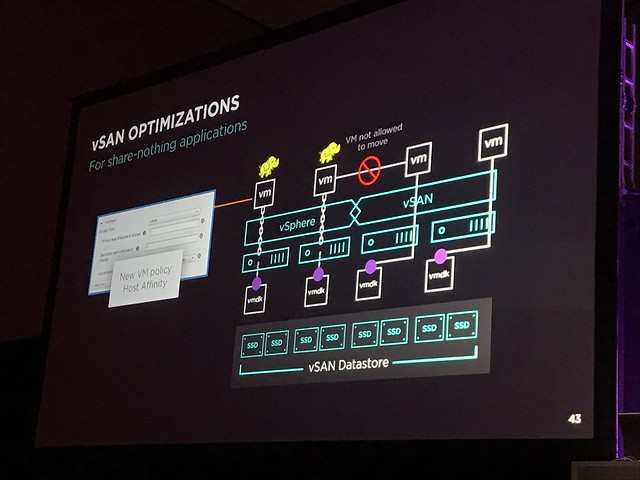
Last topic of the session was Cloud Native Apps. Christos discussed Project Hatchway. Project Hatchway provides the Docker Volume Service and the vSphere Cloud Provider for Kubernetes. On top of that vSAN will be optimized for “share-nothing” applications. As mentioned in my summary of STO1490, these enhancements will allow you to co-locate data and compute when you have “FTT=0” configured even. Also, sequential I/O will be improved in future releases, as in many cases these share-nothing applications are highly sequential workloads.

Great session, not sure it was recorded, but if it was… watch it online when it is released!
#STO1490BU : vSAN Vision – The Future of HCI

Duncan Epping · Aug 28, 2017 ·

I am not able to attend many sessions, but wanted to add this one to my schedule. This session was hosted by Lee Caswell (VP Products Storage and Availability VMware), Christos Karamanolis (CTO Storage and Availability VMware) and the VP for Technical Solutions for Fox Dean Perrine.

Lee Caswell kicked off talking about the customer adoption and spoke about some of the fundaments of hyper-convergence and storage management. I think the numbers speak for itself that Lee spoke about, an expected marked size of 10.7 billion USD f for HCI in 2021, growing 3x faster than traditional storage systems. Key reason for it being: simplification of ops/architecture. And that is the reason we just hit 10k customers.

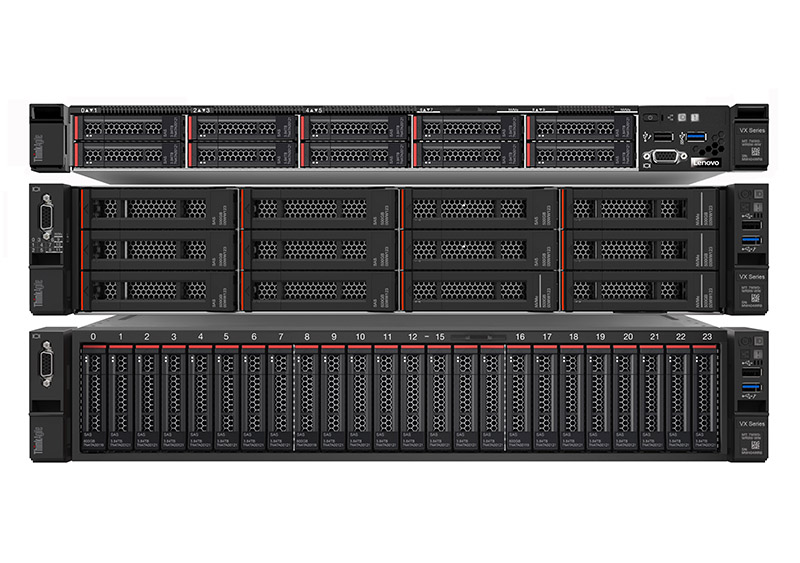
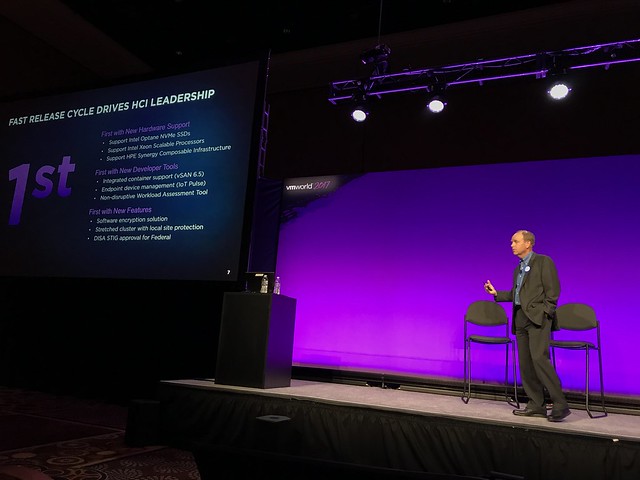
vSAN had 2 major releases in the past year, with some “firsts” during the past 12 months. Like first in HCI to support Intel Optane NVMe SSDs and HPE Synergy support etc. Today Lenovo released a new integrated HCI system called ThinkAgile VX. ServeTheHome has a great article on it, make sure to read it. What is the benefit over a ReadyNode? Well for instance that all support is coming from Lenovo, it is “appliance style”.
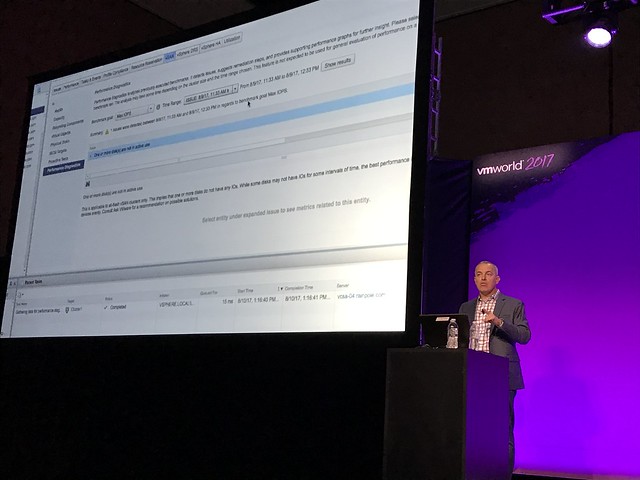
Jeff Hunter was pulled up to on stage to demo vSAN and the power of vSAN in terms of performance and ease of use. Jeff moved a VM from NFS to vSAN and shows what the performance increase was. More importantly in my opinion was how easy it was to move the VM by leveraging Policy Based Management. (Change policy and the correct datastore is presented, vSAN in this case.)

Next is announcement around “licensing”, single socket solution, 3 servers including all licenses for less than 25k. Great price point of which hopefully many SMBs and Enterprises which need a ROBO/Edge solution can benefit from.

Dean Perrine is up next and is discussing what Fox is using vSAN for and why. They replaced their NetApp FlexPod environment with Cisco UCS C220 with vSAN. Main reason for replace the FlexPod was the need to reduce complexity, lower power consumption while increasing performance. Fox had problems around Database performance, and it was critical to support this. The environment is used to run Mission-critical video applications like their broadcasting system and channels like Fox Sport etc. In other words, events like the Superbowl are hosted on vSAN as an infrastructure. Currently running across multiple sites leveraging vSAN, NSX and SRM to provide resiliency and flexibility need to run important workloads like this in a highly resilient fashion.

Up next Christos Karamanolis, so it is going to get technical. First up discussing performance, most critical for enterprise customer is predictable performance. Christos shows a benchmark that the vSAN team ran, which was a Stock Brokerage (TPC-E like) workload. What is shown is consistent latency below a millisecond across tests and database sizes. As Christos emphasizes, very important for customers like Fox, as large latency spikes could easily disrupt broadcasting large events.

Christos next demoes the Performance Diagnostic feature that is part of vSAN 6.6.1. If you haven’t seen it yet, watch my demo on youtube. The feature in short analyses benchmarks and provides you tips and hints around how to improve your benchmark or your vSAN configuration from a policy, software or hardware point of view.

Next Christos discusses vSAN usage for VMware Cloud on AWS. What was interesting here, is what Christos mentioned around scaling: independently scale vSAN / Storage from Compute. He didn’t add much detail, so I cannot share much more than this, so I will leave it up to your imagination.

Storage for Cloud Native Apps is up last. What if you have Kubernetes or are using Docker? Can you leverage vSAN or something else? Meet Project Hatchway. Which is a combination of a Docker Volume Service and the vSphere Cloud Provider for Kubernetes. Drivers for storage, natively integrated for instance with Kubo. Leveraging Policy Based Management control/manage/monitor your persistent storage for you containarized workloads. There’s a ton of detail to be found on StorageHub here. Something else that will be introduced to optimize vSAN for workloads like Cassandra / MongoDB etc is the ability to have “storage affinity” for your workloads. In other words, data is co-located with the VM and we will not move the VM around is locality is key for these workloads. You can also imagine these workloads to be deployed with a low “failures to tolerate” level as availability is provided by the app.

And that was it. Great session, thanks for that. Looking forward to sitting in on some of the other “vision/futures” vSAN related sessions.

Don’t know why DRS is not balancing your cluster? DRS Dump Insight!

Duncan Epping · Aug 27, 2017 ·

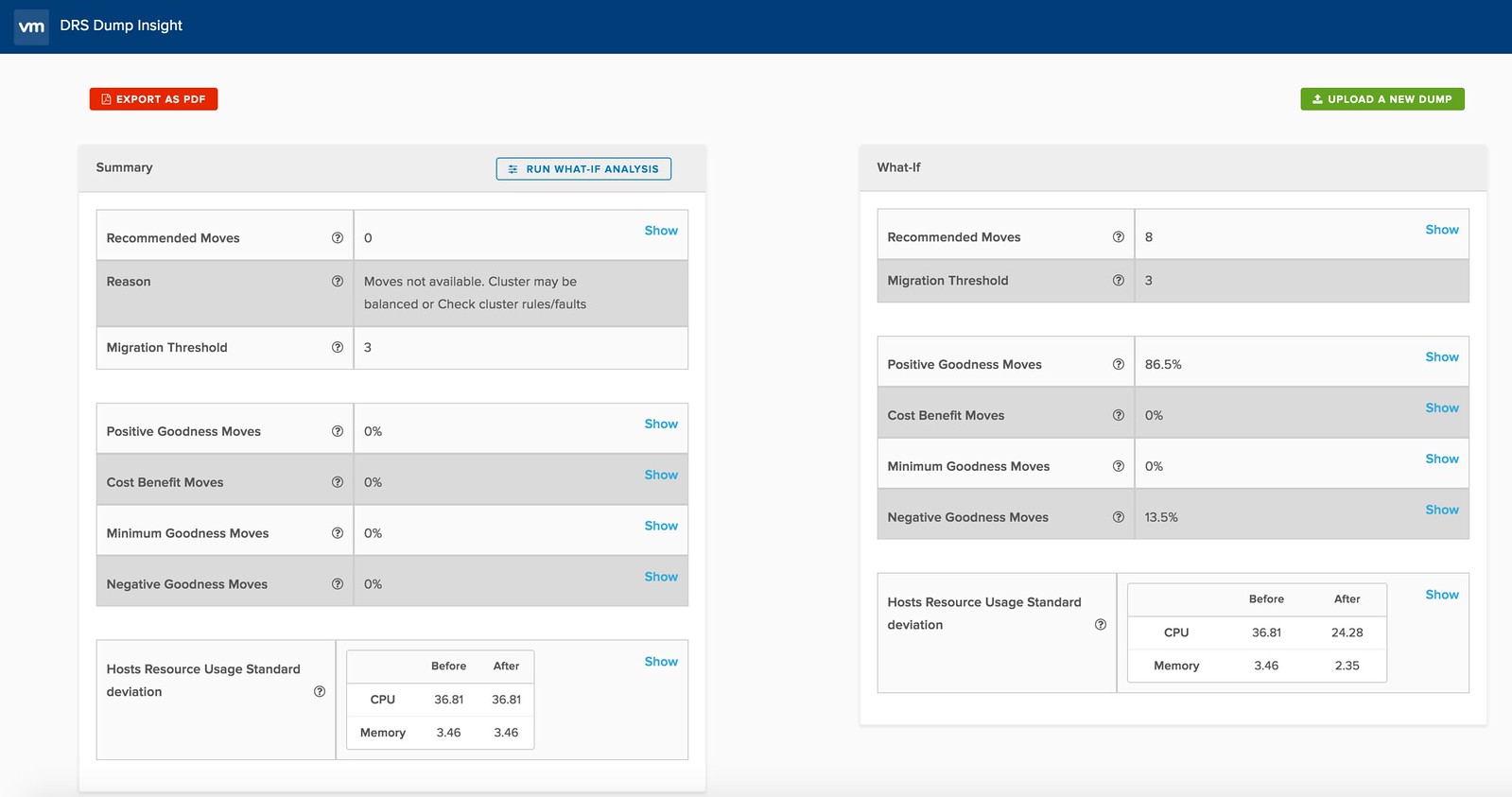
I was just reading up and noticed the DRS Dump Insight solution. It is a SaaS based DRS Dump Analyzer which gives you details around why your cluster is not balanced, or why certain recommendations are not made. Especially the “what if” scenarios are cool if you ask me. You can take a dump and then using the whatif feature check out what would happen to your cluster if for instance all affinity rules were dropped. Or what would happen if the DRS migration threshold is changed, or some advanced settings are used.

You can find some more info about it here, and the SaaS tool here. I hope this will make it in to the product soon in the form of a “health check”… Very useful and insightful! Oh, if you can’t access the website, try it in “Incognito Mode”. Seems there are some issues with the certificate.

vSAN 6.6.1 Performance Diagnostics Demo

Duncan Epping · Aug 14, 2017 ·

I was playing in my lab this morning and figured I would record a demo of a new feature which is part of vSAN 6.6.1. The Performance Diagnostics feature is aimed to help those running benchmarks to optimize their benchmarks, or optimize their vSAN configuration to reach their expected goals. Note that it is a “cloud connected” feature, and in order to use this you need to participate in the Customer Experience Improvement Program. This however is enabled by default in the latest releases of vSphere. This means that data is send up to the VMware cloud, anonymous, then analyzed and the results are send back to the Web Client. Anyway, enough said, just watch the demo.

vSphere 6.5 U1 is out… and it comes with vSAN 6.6.1

Duncan Epping · Jul 28, 2017 ·

vSphere 6.5 U1 was released last night. It has some cool new functionality in there as part of vSAN 6.6.1 (I can’t wait for vSAN 6.6.6 to ship ;-)). There are a lot of fixes of course in 6.6.1 and U1, but as stated, there’s also new functionality:

  • VMware vSphere Update Manager (VUM) integration
  • Storage Device Serviceability enhancement
  • Performance Diagnostics in vSAN

So those using vSAN 6.2 who upgraded to vSphere 6.0 U3, here’s your chance to upgrade to get all vSAN 6.5 functionality, and more!

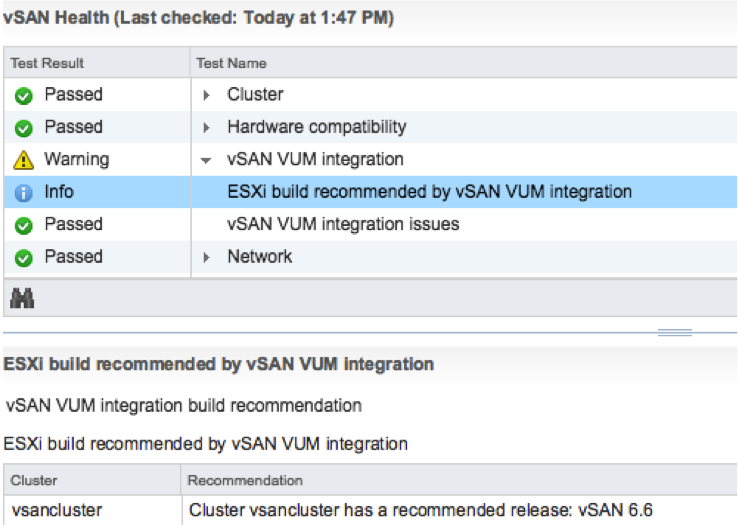
The VUM integration is pretty cool if you ask me. First of all, when there’s a new release the Health Check will call it out from now on. And on top of that, when you go to VUM then also things like async drivers will be taken in to consideration. Where you would normally have to slipstream drivers in to the image and make that image available through VUM, we now ensure that the image used is vSAN Ready! In other words, as of vSphere 6.5 U1 Update Manager is fully aware of vSAN and integrated as well. We are working hard to bring all vSAN Ready Node vendors on-board. (With Dell, Supermicro, Fujitsu and Lenovo leading the pack.)

Then there’s this feature called “Storage Device Serviceability enhancement”. Well this is the ability to blink the LEDs on specific devices. As far as I know, in this release we added support for HP Gen 9 controllers.

And last but not least: Performance Diagnostics in vSAN. I really like this feature. Note that this is all about analyzing benchmarks. It is not (yet?) about analyzing steady state. So in this case you run your benchmark, preferably using HCIBench, and then analyze it by selecting a specific goal. Performance will be analyzed using “cloud analytics”, and at the end you will get various recommendations and/or explanations for the results you’ve witnessed. These will point back to KBs, which in certain cases will give you hints how to solve your (if there is) bottleneck.

Note that in order to use this functionality you need to join CEIP (Customer Experience Improvement Program), which means that you will upload info in to VMware. But this by itself is very valuable as it allows our developers to solve bugs / user experience issues and getting a better understanding of how you use vSAN. I spoke with Christian Dickmann on this topic yesterday as he tweeted the below, and he was really excited, he said he had various fixes going in the next vSAN release based on the current data set. So join the program!

A huge THANK YOU to anyone participating in Customer Experience Improvement Program (CEIP)! Eye-opening data that we are acting on.

— Christian Dickmann (@cdickmann) July 27, 2017

For those how can’t wait, here’s the release notes and downloads links:

  • vCenter Server 6.5 u1 release notes: https://docs.vmware.com/en/VMware-vSphere/6.5/rn/vsphere-vcenter-server-651-release-notes.html
  • vCenter Server 6.5 u1 downloads: https://my.vmware.com/web/vmware/details?downloadGroup=VC65U1&productId=614&rPId=17343
  • ESXi 6.5 release notes: https://docs.vmware.com/en/VMware-vSphere/6.5/rn/vsphere-esxi-651-release-notes.html
  • ESXi 6.5 download: https://my.vmware.com/web/vmware/details?downloadGroup=ESXI65U1&productId=614&rPId=17342
  • vSAN 6.6.1 release notes: https://docs.vmware.com/en/VMware-vSphere/6.5/rn/vmware-vsan-661-release-notes.html

Oh and before I forget, there’s new functionality in the H5 Client for vCenter in 6.5 U1. As mentioned on this vSphere blog: “Virtual Distributed Switch (VDS) management, datastore management, and host configuration are areas that have seen a big increase in functionality”. And then some of the “max config” items had a big jump. 50k powered on VMs for instance is huge:

  • Maximum vCenter Servers per vSphere Domain: 15 (increased from 10)
  • Maximum ESXi Hosts per vSphere Domain: 5000 (increased from 4000)
  • Maximum Powered On VMs per vSphere Domain: 50,000 (increased from 30,000)
  • Maximum Registered VMs per vSphere Domain: 70,000 (increased from 50,000)

That was it for now!

  • « Go to Previous Page
  • Page 1
  • Interim pages omitted …
  • Page 52
  • Page 53
  • Page 54
  • Page 55
  • Page 56
  • Interim pages omitted …
  • Page 336
  • Go to Next Page »

Primary Sidebar

About the Author

Duncan Epping is a Chief Technologist and Distinguished Engineering Architect at Broadcom. Besides writing on Yellow-Bricks, Duncan is the co-author of the vSAN Deep Dive and the vSphere Clustering Deep Dive book series. Duncan is also the host of the Unexplored Territory Podcast.

Follow Us

  • X
  • Spotify
  • RSS Feed
  • LinkedIn

Recommended Book(s)

Also visit!

For the Dutch-speaking audience, make sure to visit RunNerd.nl to follow my running adventure, read shoe/gear/race reviews, and more!

Do you like Hardcore-Punk music? Follow my Spotify Playlist!

Do you like 80s music? I got you covered!

Copyright Yellow-Bricks.com © 2026 · Log in