• Skip to primary navigation
  • Skip to main content
  • Skip to primary sidebar

Yellow Bricks

by Duncan Epping

  • Home
  • Unexplored Territory Podcast
  • HA Deepdive
  • ESXTOP
  • Stickers/Shirts
  • Privacy Policy
  • About
  • Show Search
Hide Search

Server

New white paper available: vSphere APIs for I/O Filtering (VAIO)

Duncan Epping · Oct 13, 2017 ·

Over the past couple of weeks Cormac Hogan and I have been updating various Core Storage white papers which had not been touched in a while for different reasons. We were starting to see more and more requests come in for update content and as both of used to be responsible for this at some point in the past we figured we would update the papers and then hand them over to technical marketing for “maintenance” updates in the future.

You can expect a whole series of papers in the upcoming weeks on storagehub.vmware.com and the first one was just published. It is on the topic of the vSphere APIs for I/O Filtering and provides an overview of what it is, where it sits in the I/O path and how you can benefit from it. I would suggest downloading the paper, or reading it online on storagehub:
  • vSphere APIs for I/O Filtering White Paper online
  • vSphere APIs for I/O Filtering White Paper download

What is the overhead for Swap in a stretched cluster?

Duncan Epping · Oct 10, 2017 ·

Last week internally we had a debate about the overhead of a swap file in a stretched cluster. With the ability to have a double protection (across site and within a site) the question was what the overhead for a swap file would be. You can imagine that for a stretched cluster you set your VMs to have RAID-1 across site and RAID-1 within or RAID-5 within the site. (Depending on whether you have all-flash or not.) So the question is, how many copies of the swap file would you end up with?

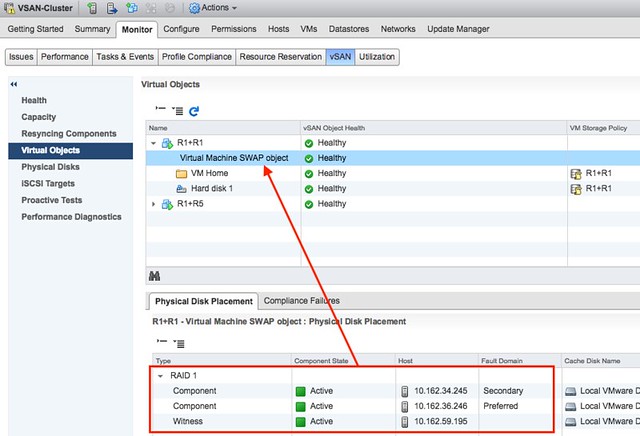
The swap file with vSAN is a special object. Regardless of how the policy you associate with the VM, it is always created as a RAID-1 object. This goes for a normal cluster as well as a stretched cluster. That means that the Swap object will always consist of 3 components. Two of those are data components and one of them is a witness.

In the first screenshot you see a VM which is called R1+R1. This VM has Primary Failures To Tolerate (PFTT) set to 1 and Secondary Failures To Tolerate (SFTT) set to 1. The swap however, as it is a special object, is created with PFTT=1 and SFTT=0 as the screenshot shows. It has 1 data component in each site, and a witness in the witness site.

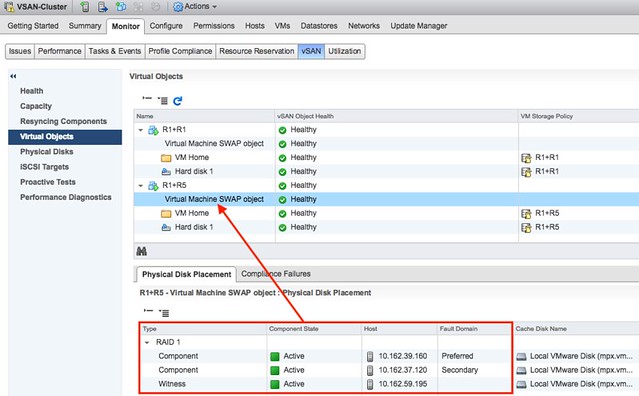
Same applies for the situation when PFTT=1 and SFTT=1 but the failure tolerance method selected is RAID-5. In that case the swap file is also PFTT=1 and SFTT=0 as shown in the screenshot below.

And of course I also double checked through RVC:

vsan.object_info . bf7fdc59-dd62-2983-ee34-02002304a139

DOM Object: bf7fdc59-dd62-2983-ee34-02002304a139 
(v5, owner: 10.162.39.160, proxy owner: None, policy: hostFailuresToTolerate = 1, 
forceProvisioning = 1, proportionalCapacity = 100, CSN = 2)
  RAID_1
    Component: bf7fdc59-86bc-4884-d236-02002304a139 
      (state: ACTIVE (5), host: 10.162.39.160, md: mpx.vmhba1:C0:T1:L0, ssd: mpx.vmhba1:C0:T4:L0,
      votes: 1, usage: 4.1 GB, proxy component: false)
    Component: bf7fdc59-1830-4b84-5138-02002304a139 
      (state: ACTIVE (5), host: 10.162.37.120, md: mpx.vmhba1:C0:T2:L0, ssd: mpx.vmhba1:C0:T4:L0,
      votes: 1, usage: 4.1 GB, proxy component: false)
    Witness: bf7fdc59-6f4a-4d84-725b-02002304a139 
      (state: ACTIVE (5), host: 10.162.59.195, md: mpx.vmhba1:C0:T1:L0, ssd: mpx.vmhba1:C0:T4:L0,
      votes: 1, usage: 0.0 GB, proxy component: false)

So this means the overhead of swap is always “only” 100%. However, you can of course create “thin swapfiles” when you are not over-provisioning on memory and avoid that cost completely!

The difference between an isolation and a partition with vSphere

Duncan Epping · Oct 10, 2017 ·

I have a lot of discussions with customers on the topic of stretched clusters, but also regular vSphere clusters. Something that often comes up is the discussion around what happens in an isolation or partition scenario. Fairly often customers (but also VMware employees) use those words interchangeably. However, a partition is not the same as an isolation. They are 2 different scenarios, and also as a result they have a different type of response associated with it. Before I explain the difference in the two responses to a situation like this, what is a partition and what is an isolation?

  • An isolation event is a situation where a single host cannot communicate with the rest of the cluster. Note: single host!
  • A partition is a situation where two (or more) hosts can communicate with each other, but no longer can communicate with the remaining two (or more) hosts in the cluster. Note: two or more!

Why is that such a big deal? Well the response in the case of these two scenarios are different. And the response/result is also determined by what types of configuration you have. Lets break down the scenarios one by one, including the type of infrastructure used (when it is relevant).

Isolation Event

When a host is isolated it will:

  • start an election process
    • declare itself primary
  • ping the isolation address
  • declare itself isolated
  • power off / shut down VMs (when this is configured)
  • communicate through the connected datastores that it is isolated
  • the VMs will be restarted on the remaining hosts in the cluster

And then of course vSphere HA will be able to restart the VMs. Note that in the case of vSAN, it isn’t possible to write to the datastore when a host is isolated, so it won’t do that. Yet the workloads will still have been powered off / shutdown so it is safe for vSphere HA to restart them

Partition (traditional storage)

When two or more hosts are partitioned (they can communicate with each other) and the vSphere HA primary is not part of the partition it will:

  • start an election process
  • declare a primary in the partition
  • figure out what has happened to the hosts and VMs in the other partition
    • restart any VMs that somehow were impacted, or appeared now to be powered off while the last known state was powered on
  • if all VMs are running, vSphere HA won’t try to restart any, this is the expected result!

Partition (vSAN stretched)

When the partition scenario happens in a stretched vSAN environment there’s an extra (potential) step. Along the way, vSAN will identify all VMs which have no accessible components and kill those VMs so they can be restarted in the partition which has quorum. In this scenario, you have 3 locations, two for data and 1 for the witness. If a data site loses access to the other locations then the data site is partitioned (the hosts can still communicate with each other within the site), as such the isolation response is not triggered. However, vSAN will still kill these VMs as they are rendered useless (lost access to disk).

I know it is just semantics, but nevertheless, I do feel it is important to understand the difference between an isolation and a partition, especially as the response (and who responds) is different in these situations. Hope it helps,

Which disk controller to use for vSAN

Duncan Epping · Sep 28, 2017 ·

I have many customers going through the plan and design phase for implementing a vSAN based infrastructure. Many of them have conversations with OEMs and this typically results in a set of recommendations in terms of which hardware to purchase. One thing that seems to be a recurring theme is the question which disk controller a customer should buy. The typical recommendation seems to be the most beefy disk controller on the list. I wrote about this a while ago as well, and want to re-emphasize my thinking. Before I do, I understand why these recommendations are being made. Traditionally with local storage devices selecting the high-end disk controller made sense. It provided a lot of options you needed to have a decent performance and also availability of your data. With vSAN however this is not needed, this is all provided by our software layer.

When it comes to disk controllers my recommendation is simple: go for the simplest device on the list that has a good queue depth. Just to give an example, the Dell H730 disk controller is often recommended, but if you look at the vSAN Compatibility Guide then you will also see the HBA330. The big difference between these two is the RAID functionality offered on the H730 and the cache on the controller. Again, this functionality is not needed for vSAN, by going for the HBA330 you will save money. (For HP I would recommend the H240 disk controller.)

Having said that, I would at the same time recommend customers to consider NVMe for the caching tier instead of SAS or SATA connected flash. Why, well for the caching layer it makes sense to avoid the disk controller. Place the flash as close to the CPU as you can get for low latency high throughput. In other words, invest the money you are saving on the more expensive disk controller in NVMe connected flash for the caching layer.

VMworld vSAN Sessions Playlist

Duncan Epping · Sep 27, 2017 ·

I just created a simple playlist up on youtube which has most (if not all) vSAN sessions on there. If you are interested in vSAN simply have a look at the playlist and pick what you want to watch.

  • « Go to Previous Page
  • Page 1
  • Interim pages omitted …
  • Page 50
  • Page 51
  • Page 52
  • Page 53
  • Page 54
  • Interim pages omitted …
  • Page 336
  • Go to Next Page »

Primary Sidebar

About the Author

Duncan Epping is a Chief Technologist and Distinguished Engineering Architect at Broadcom. Besides writing on Yellow-Bricks, Duncan is the co-author of the vSAN Deep Dive and the vSphere Clustering Deep Dive book series. Duncan is also the host of the Unexplored Territory Podcast.

Follow Us

  • X
  • Spotify
  • RSS Feed
  • LinkedIn

Recommended Book(s)

Also visit!

For the Dutch-speaking audience, make sure to visit RunNerd.nl to follow my running adventure, read shoe/gear/race reviews, and more!

Do you like Hardcore-Punk music? Follow my Spotify Playlist!

Do you like 80s music? I got you covered!

Copyright Yellow-Bricks.com © 2026 · Log in