• Skip to primary navigation
  • Skip to main content
  • Skip to primary sidebar

Yellow Bricks

by Duncan Epping

  • Home
  • Unexplored Territory Podcast
  • HA Deepdive
  • ESXTOP
  • Stickers/Shirts
  • Privacy Policy
  • About
  • Show Search
Hide Search

Server

How many pages can be shared if Large Pages are broken up?

Duncan Epping · Nov 7, 2010 ·

I have written multiple articles(1, 2, 3, 4) on this topic so hopefully by now everyone knows that Large Pages are not shared by TPS. However when there is contention the large pages will be broken up in small pages and those will be shared based on the outcome of the TPS algorythm. Something I have always wondered and discussed with the developers a while back is if it would be possible to have an indication of how many pages can possibly be shared when Large Pages would be broken down. (Please note that we are talking about Small Pages backed by Large Pages here.) Unfortunately there was no option to reveal this back then.

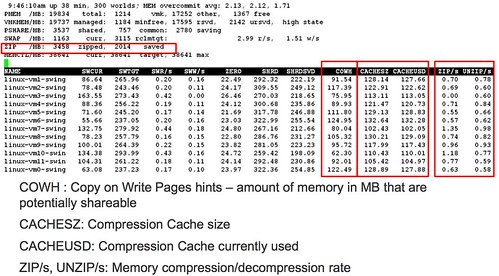
While watching the VMworld esxtop session “Troubleshooting using ESXTOP for Advanced Users, TA6720” I noticed something really cool. Which is shown in the quote and the screenshot below which is taken from the session. Other new metrics that were revealed in this session and shown in this screenshot are around Memory Compression. I guess the screenshot speaks for itself.

  • COWH : Copy on Write Pages hints – amount of memory in MB that are potentially shareable,
  • Potentially shareable which are not shared. for instance when large pages are used, this is a good hint!!
There was more cool stuff in this session that I will be posting about this week, or at least adding to my esxtop page for completeness.
The Dutch VMUG Event, 10th of December 2010!

Duncan Epping · Nov 5, 2010 ·

The Dutch VMUG event has always been infamous for the massive amount of attendees and the excellent agenda. Of course the 2010 edition will be no different. The VMUG Team secured a great selection of speakers, and with roughly 700 attendees I guess you could say that it is a mini-VMworld.

Just for those wondering who will be speaking and what the topics are I made a short summary which is listed below. For the Dutch speaking you can find it as well on the VMUG website.

  • VMware Keynote by Richard Garsthagen
  • VMware vCloud Director by Willem van Engeland (VMware, Specialist SE Cloud) and Duncan Epping
  • vSphere 4 Backup by Doug Hazelman (VEEAM)
  • vSphere Disaster Recovery by Gabrie van Zanten (Openline / Gabesvirtualworld.com)
  • vSphere Introduction by Viktor van den Berg (XTG / VMUG Leader)
  • Advanced Troubleshooting by Eric Sloof (NTPro.nl)
  • HA & DRS Q&A by Frank Denneman (VMware) and Duncan Epping
  • Project VRC Phase III by Ruben Spruijt (PQR) and Jeroen v.d. Kamp (Login)
  • PowerCLI is for Administrators by Alan Renouf (EMC) / Luc Dekens
  • VDI & Storage = Deep Impact by Herco van Brug
  • Workshop: Customizing vEcoshell for your Environment by Scott Herrold (Quest)

These are not all sessions, but these are the ones I personally wanted to highlight. Just look at those names…. it won’t get any better than that. If you don’t want to miss out on these sessions make sure you sign up now because I bet it will be sold out quickly.

By the way, as Frank and I will be doing a Q&A session on HA & DRS I will be publishing a blog post soon to start gathering questions… So if there is anything regarding HA or DRS you always wanted to have explained let us know. This is your chance.

How does Symantec ApplicationHA integrate/work with VMware HA?

Duncan Epping · Nov 3, 2010 ·

I briefly touched on this topic already, but I guess on Yellow-Bricks the primary focus should be technical. I downloaded Symantec’s Application HA and decided to give it a spin, I already started documenting the installation of the ApplicationHA Console and the Guest Component but Mr Sloof beat me to it and documented his finding in the following two articles.

  • ApplicationHA – Install and Configure
  • The ApplicationHA Configuration Wizard – Monitoring SQL Server 2008

No need to repeat it in my opinion as Eric did an excellent job. I do want to point two things out and they are around the requirements/constraints of the product:

  • Symantec ApplicationHA Console requires Windows Server 2008 or Windows Server 2008 R2.
    • The Console provides the integration between vCenter and ApplicationHA from a UI perspective. An ApplicationHA tab will be added to the vSphere Client which can be used to configure and control ApplicationHA.
  • A 64Bit Guest OS is required for the ApplicationHA Windows Guest Component.
    • This is the actually component that enables application level protection.

This basically means that if you are primarily using 32Bit OS’s, like I for instance do in my homelab, it won’t work as the installer literally throws an error that the VM doesn’t meet the requirements. That is for now, as I bet that when demand grows Symantec will add support for 32Bit OSs.

So what is this ApplicationHA product?

Symantec ApplicationHA is an extension of VM / Application Monitoring. Symantec simplified Veritas Cluster Server (VCS) to enable application availability monitoring including of course responding to issues. Just to be absolutely clear, the foundation still is VCS based the unnecessary bits and pieces were taken out. Note that it is not a multi-node clustering solution like VCS itself but a single node solution.

The question remains how does it integrate with vCenter and more specifically with HA?

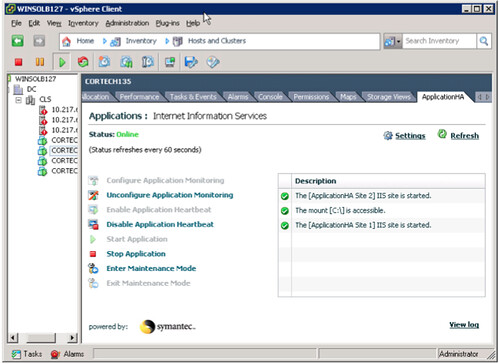
Lets start with the integration with vCenter. This is where the “ApplicationHA Console” comes into play. It basically adds a tab on a VM level that gives you the details of this VM in terms of ApplicationHA of course depending on the fact if you installed the Guest Component or not the Tab will display different info. Ultimately it should look as follows:

Now this example shows IIS being monitoring, but not only IIS also a disk mount. By the way, besides having a standard agent for IIS; ApplicationHA also includes an agent for MS SQL and MS Exchange. My primary focus for this article is Windows by of course Symantec also offers agents for Linux which includes Oracle, SAP and Weblogic. Just because your application is not included today it doesn’t mean you are out of luck. Symantec regularly updates the ApplicationHA Agent pack. However there is also a standard Guest Component which enables you to monitor standard services, mountpoints, processes and is what Symantec calls an Infrastructure Agent.

That brings me to the next point. From a GUI perspective it seems like there is a single component  that monitors the state of your application. That is not the case, as stated above it can monitor the availability of services, process and much more. As stated this is what Symantec calls the Infrastructure Agent and yes it has multiple components. I have listed the most crucial agents below with a short description:

  • Heartbeat Agent – The Heartbeat agent monitors the configured application service group.
  • MountMonitor Agent – The MountMonitor agent monitors the mount path of the configured storage. It is independent of how the underlying storage is managed (whether SFW disk groups or LDM disks or any other storage management software). The mount path can be a drive letter or a folder mount.
  • GenericService Agent – The GenericService agent brings services online, takes them offline, and monitors their status. A service is an application type that is supported by Windows, and conforms to the interface rules of the Service Control Manager (SCM).
  • Process Agent – The Process agent brings processes online, takes them offline, and monitors their status. You can specify different executables for each process routine.

Each of these agents has very specific configuration attributes. An example for instance would be the “DelayBeforeAppFault” for the Heartbeat Agent. This specifies the number of seconds the agent must wait in case of an error before communicating application fault to VMware HA. I guess I just hit the nail on the head. The Heartbeat Agent is the agent that is responsible for communication with VMware HA. Basically it provides a means to trigger VMware HA to kick in when Symantec can not handle the issue with a restart of the service.

So what happens if an Application that has been configured for protection fails?

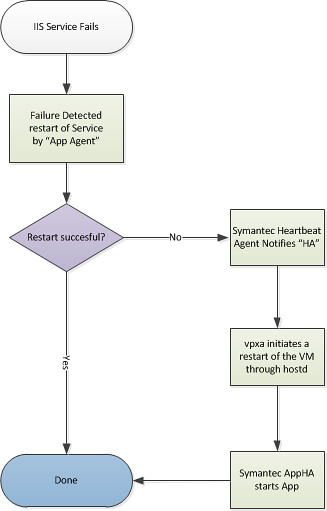
First Symantec ApplicationHA is triggered to try to get the Application up and running after the failure occurred by restarting the application. It should be noted that Symantec’s ApplicationHA is aware of dependencies and knows in which order services should be started or stopped. If however for whatever reason this fails for an “X” amount of times VMware HA will be asked to take action. (X is configurable by changing the config attribute “AppRestartAttempts”.) The action that HA takes will be a restart of the virtual machine.

But wait is it really VMware HA? With that meaning is it the good old “AAM” agent who is responsible for this action? No it isn’t. In this case both “vpxa” and “hostd” are responsible for the action taken. I guess visualizing the process will make it a bit easier to digest:

I hope this makes it a bit more clear on how the product works and how it integrates with VMware HA itself.

ESXi disk size requirement?

Duncan Epping · Oct 27, 2010 ·

I’ve seen this question passing by a couple of times now and I found myself going through the document to dig up the reference. I thought it would come in handy to document it:

Q) What is the disk size requirements for ESXi installable?
A) The minimal required disk size is 5GB (Page 24, ESXi Installable and vCenter Server Setup Guide), recommend is 6GB (KB: http://kb.vmware.com/kb/1026500)

A price winners view on VMworld…. (by Jason C)

Duncan Epping · Oct 27, 2010 ·

When I entered the competition on yellow-bricks, I showed a list of the sessions and labs I would like to do as my reason for going. I think it is only fair to show what I actually did whilst I was there. I was able to do the majority of the breakout sessions I wanted to and all the labs I hoped to complete. You do need to remain flexible on the breakout sessions some clash with each other and others fill up quick so you may not get a seat thankfully all the breakouts are recorded so can be viewed later.

ESXi / Performance / Troubleshooting and storage
SS8222 Transitioning to ESXi, Architecture for Next-Generation vSphere
TA6720 Troubleshooting using ESXTOP for Advanced Users
TA7171 Performance Best Practices for vSphere
TA8129 A Beginner’s Guide to Performance Troubleshooting with vSphere
TA8133 Best Practices to Increase Availability and Throughput for VMware
LAB23 VMware ESXi Remote Management Utilities
LAB24 VMware vSphere™ Performance & Tuning
LAB25 VMware vSphere™ Troubleshooting*
TA7805 Tech Preview: Storage DRS
Group Discussion Storage with Chad Sakac
Group Discussion Storage Performance with Scott Drummonds

SRM
LAB11 VMware vCenter™ Site Recovery Manager—Basic Install & Config
LAB12 VMware vCenter™ Site Recovery Manager— Extended Config & Troubleshooting
BC6703 How To Be Successful with SRM Implementations
BC7773 VMware Site Recovery Manager: Misconceptions and Misconfigurations

Just for fun:
LAB13 VMware vCloud Director—Install & Config (Had to see what it was all about)
LAB17 VMware vCenter™ Orchestrator (Hidden Gem)
LAB20 VMware vCenter™ vShield
LAB26 VMware vSphere™ PowerCLI (Yes still trying to get the hang of it Alan)

I enjoyed the group discussions they came as a bit of a surprise as I did not see them on the schedule originally. Groups of 20-30 people led by industry leaders answering a selection of multiple choice questions in a specific area with an open discussion about the answers. Unfortunately not all these were taped which I think is a shame as I am sure many would find them useful.

When I met Duncan he said try to focus on one thing to write about from a technical view if you can. Slight problem I found at least one thing in each breakout session , lab or discussions that I have written down to take away. Not sure where to begin I was hoping to review the recordings to check what might be most useful. In a way I’d like to talk about it all but that could take more than one article. Talking of the breakout session I found every single one informative and well presented.

Most of you have already read other articles on the labs and I guess there is not much more for me to add. I never had to queue though I did tend to get there first thing. They were well organised and generally easy to follow with plenty of time. Two screen set up one for working on and one for following the instructions. Like others I thought it would be nice to have access to them outside the event, not sure how they would have worked though on my laptop in practice.

One of the things that I wanted to call out which is not on the agenda is having the ability to chat with your peers, listen to other people’s thoughts. Have the ability to talk through your thoughts and ideas, see if they make sense and receive constructive feedback. This on its own is priceless.

The solutions exchange is an experience by itself and as it was my first time a pleasant one at that. Though when the same company scanned me every day I was starting to wonder what the heck is going on. It is in the solutions exchange where I think I found my one thing , I had a chance to play with the EMC hands on labs just the Unisphere bit and VAAI. Very impressed with Unisphere can’t wait to upgrade the EMC Clariion planned for after New Year going to make my job so much easier. Talking about VAAI, wow what a difference a clone of a 20GB VM was 5 times quicker using VAAI, I was impressed!

So what’s that one topic Duncan told me to pick…. drum roll please…. STORAGE ….. It seems to be a recurring theme one way or the other in every session. Started to think about the most difficult thing for me to manage and measure performance of and it is again storage.

Quote from one of the sessions:

most performance issues related to storage

Another quote which interested me was the following:

What does the amateur do find the VMFS volume with the most space and put the new VM on that storage.

Guilty as charged. I am that amateur, but than again in my defense if the people developing these apps or services could give me any indication of the IO and its profile I would eat my hat.

But wait there is a savior on the horizon did you see ” TA7805 Tech Preview: Storage DRS”? I have searched for people talking about this after VMworld but have not found much. For me hands down the most important thing discussed at VMworld. If I could have one wish for the next version on vSphere this would be it, ideally on the Enterprise sku at the very highest that would be great. The presentation was given by the same engineer who talked about SIOC last year so I have high hopes for it being included in the next version.

It does what it says on the tin, DRS for storage.

  1. Helps with virtual disk placement
  2. Load balances IO
  3. Takes care of Out of space issues.
  4. Monitors over time so if VM’s get hotter they can be moved
  5. Data store maintenance auto move VM’s to maintain balance.
  6. Add data stores move VM’s

One caveat I foresee, I hope they speak to the SRM team as I know SRM is not to happy when you go around moving the data store a VM is stored on.

In conclusion would I go again? Absolutely! I may have to pay for it myself but I reckon I can do it all for less than the cost of a 3 day training course and it is a worthwhile investment, both for myself and for the council. I have already started to apply some of the knowledge gained from the sessions I went to back at work. It is a gift that keeps on giving as I now have access to 170 hours worth of VMworld 2010 sessions to look at over the coming year.

Last thing I promise. Did you know you can now get access to all the sessions from 2009 for free? Me neither but you can and some of them are pretty much the same as this years from what I have seen especially the esxtop and performance. I think there is something in there for everyone. You do have to register but let me say again they are free so go Enjoy…

http://www.vmworld.com/community/sessions/

To Duncan, VMware, the Bella Centre and the wonderful City of Copenhagen.

Until next time, Tak for alt.

Jason C

  • « Go to Previous Page
  • Page 1
  • Interim pages omitted …
  • Page 200
  • Page 201
  • Page 202
  • Page 203
  • Page 204
  • Interim pages omitted …
  • Page 336
  • Go to Next Page »

Primary Sidebar

About the Author

Duncan Epping is a Chief Technologist and Distinguished Engineering Architect at Broadcom. Besides writing on Yellow-Bricks, Duncan is the co-author of the vSAN Deep Dive and the vSphere Clustering Deep Dive book series. Duncan is also the host of the Unexplored Territory Podcast.

Follow Us

  • X
  • Spotify
  • RSS Feed
  • LinkedIn

Recommended Book(s)

Also visit!

For the Dutch-speaking audience, make sure to visit RunNerd.nl to follow my running adventure, read shoe/gear/race reviews, and more!

Do you like Hardcore-Punk music? Follow my Spotify Playlist!

Do you like 80s music? I got you covered!

Copyright Yellow-Bricks.com © 2026 · Log in