• Skip to primary navigation
  • Skip to main content
  • Skip to primary sidebar

Yellow Bricks

by Duncan Epping

  • Home
  • Unexplored Territory Podcast
  • HA Deepdive
  • ESXTOP
  • Stickers/Shirts
  • Privacy Policy
  • About
  • Show Search
Hide Search

Server

Command-line upgrade of vCenter fails with Test transaction failed to update packages error

Duncan Epping · Aug 27, 2021 ·

I have various test environments, and one of my environments I was testing the command-line upgrade of vCenter Server. Now, most of my environments we tend to use for destructive testing and strange update/upgrade scenarios, so we hit some strange issues every now and then. While I was doing the command-line based upgrade of vCenter Server (see this post for how to do that), I hit an error. The error was the following:

Test transaction failed to update packages

I looked at the log called “/var/log/vmware/applmgmt/software-packages.log”, and I noticed the following entry:

eventlog is obsoleted by (installed) syslog-ng-3.17.2-1.ph3.x86_64

I removed the package manually as follows:

rpm -e syslog-ng-3.17.2-1.ph3.x86_64

I then retried the update and it worked, as shown in the screenshot below!

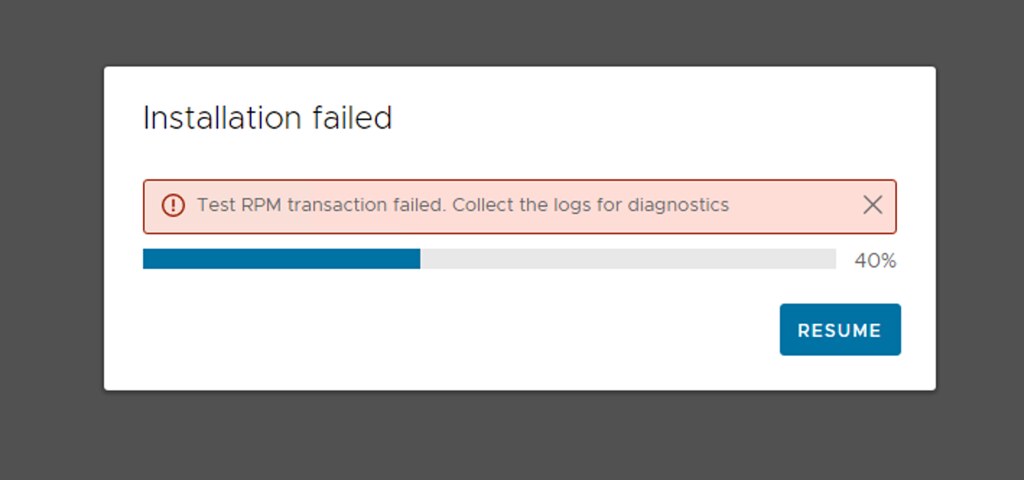
Updating VCSA and hitting the error Test RPM transaction failed

Duncan Epping · Aug 26, 2021 ·

I was updating my environment to vCenter Server 7.0 U2c, while going through the process I got this error that says “Test RPM transaction failed”. Below is the screenshot of the error. if you click “resume” you then, unfortunately, get stuck in an infinite loop. The only way to get out of the loop is by removing a file via SSH on vCSA called “/etc/applmgmt/appliance/software_update_state.conf”.

So now what if you want to update? We resolved it as follows, and let me include the deletion of the state file as well:

rm /etc/applmgmt/appliance/software_update_state.conf

Then we rebooted the VCSA:

reboot

Then we went into the appliance shell via SSH and ran the installer from the appliance:

appliancesh
software-packages install --url --acceptEulas

After which the installation was completed correctly.

vSAN Storage Rules policy capability allows to set dedupe per VM?

Duncan Epping · Aug 24, 2021 ·

There was a question posted on the VMware Community Forums, and as this is something I have been asked regularly, I figured I would do a quick blog post about it. Although I have covered this before, it doesn’t hurt to repeat, as it appears to be somewhat confusing for people. When you create a VM Storage Policy, starting with vSAN 7.0 U2 you have the ability to specify if a VM needs to be Encrypted, have Dedupe and Compression enabled, have Compression-Only enabled, and/or needs to be stored on all-flash vSAN or Hybrid. Never noticed it? Look at the screenshot below.

In the screenshot, you see that you have the ability to specify which data service needs to be enabled. I guess this is where the confusion comes into play, as this functionality is not about enabling the data service for the VM to which you assign the policy. This is about which data service needs to be enabled on the datastore to which the VM can be provisioned. Huh, what? Okay, let’s explain.

If you are using vSAN as your storage platform, and you are sharing vSAN Datastores between clusters leveraging the HCI Mesh feature, then you could find yourself in a situation where some clusters are hybrid and some are all-flash. Some may have data services enabled like Encryption or Deduplication, some may not. In that scenario you want to be able to specify which features need to be enabled for the datastore the VM is provisioned to. So what this “storage rules” feature does is that it ensure that the datastore which is shown as “compatible” actually has the specified capabilities enabled! In other words, if you tick “data-at-rest encryption” in a policy and assign the policy to a VM, then only the datastores which have “data-at-rest encryption” enabled will be shown as compatible with your VM!

So again, “storage rules” apply to the data services that should be enabled on the vSAN Datastore, and do not enable data services on a per VM/VMDK basis.

<Update for vSAN 8.0 ESA>

With vSAN 8.0 ESA the above has changed. With vSAN 8.0 ESA you can set compression per VM, and you actually do that using the policy storage rules. I discussed this in this blog post.

There’s a new podcast in town, but it is in Dutch!

Duncan Epping · Aug 3, 2021 ·

I wanted to inform the Yellow-Bricks readers that I started a podcast recently with Frank Denneman and Johan van Amersfoort. The name of the podcast is “In de aap gelogeerd” and that may already reveal that it is not in English, but it is in Dutch. Some may wonder why, well I guess that is easy to explain, all three of us are Dutch. Yes, we know, the podcast would have a bigger reach in English, and we may consider starting an additional podcast over time in English, but for now… just in Dutch. (For now… we are considering a podcast in English as well, but more on that later!)
For those who are Dutch-speaking, we will have a guest every episode starting with the second episode and we will publish a ~ 45-minute episode once every two weeks on Tuesday. The first episode, which just launched, is an introduction to the podcast. The second episode will feature Pim van de Vis (VMware), the third will feature Luc Dekens (retired IT professional), and the fourth will feature Bouke Groenescheij (independent contractor). With each of them, we will be discussing different topics. Of course we have much more planned, but we are not going to reveal that just yet!

If you are interested, you can find the links to find the podcast on any podcast app here, or simply search for “in de aap gelogeerd” in your podcast app of choice! You can also subscribe on youtube here, or follow our podcast account on twitter for the latest news.

Please subscribe, give it a try, and if you have any feedback or like to hear from a particular guest, drop us a note on twitter!

My recommended sessions for VMworld 2021!

Duncan Epping · Jul 21, 2021 ·

It is that time of the year again, the VMworld content catalog has been posted online! Like every year I am going to provide a list of sessions that I highly recommend watching. There are many great sessions, and I can’t list them all, so I am going to limit it to 15 sessions again. If you feel there’s a great session missing, feel free to leave a comment of course! Oh and before I forget, I suspect that at the first day of the event multiple sessions will be added (new products/features/versions etc), so keep checking the content catalog during the event as well!

I have a session with Cormac titled: “VMware vSAN – Dynamic Volumes for Traditional and Modern Applications [MCL1084]”. We will be discussing how to use vSAN for VMs and Containers. Find it here.

In no particular order:

  • Project Monterey: Present, Future and Beyond [MCL1401] by Sudhanshu Jain and Simer Singh
    SmartNICs and DPUs have been talked about a lot at last years VMworld, and slowly we are starting to see more and more uptake of it amongst customers. If you are interested in what these accelerators can do for you today and tomorrow, make sure to check this session!
  • VMware’s Vision for Storage and Data in a Multi-Cloud World [MCL2505] by Marc Fleischmann and Vijay Ramachandran
    This has traditionally always been one of my favorite sessions about the future of Storage and Data. Why? Well, in this session Marc and Vijay will give insights into what you can expect from VMware in the near (and long term) future. Who doesn’t enjoy a roadmap!
  • Make Sustainable Choices for Product Innovation, Operations: What Can I Do? [IC2794] by Joe Baguley and Adrian Cockcroft
    Two powerhouses have teamed up, Adrian Cockcroft and Joe Baguley. Not just for this session, but they have another session around sustainability (IC2792). Not only an intriguing subject, but also something which is on top of many C-level execs today.
  • Core Storage Best Practices Deep Dive [MCL2071] by Jason Massae and Cody Hosterman
    This is a VMworld top 10 session literally every year for a reason. It has great content, it is deep technical, and it is delivered by great speakers. Must see!
  • Security Deep Dive and Emerging Capabilities in VMware Cloud on AWS [SEC1362] by Ron Fuller
    I haven’t seen any sessions by Ron just yet, but the title and the description just interest me. I think that security is still overlooked, and I think that for everyone it would be useful to learn about how security offerings are implemented in public cloud environments!
  • VEBA Revolutions – Unleashing the Power of Event-Driven Automation [CODE2773] by Michael Gasch and William Lam
    It took me a while to see where VEBA would be useful, but after it clicked I have recommended various folks to check out this event-driven way of automation to solve certain problems they were experiencing. Plus, Michael Gasch and William Lam means it will be deep and excellent!
  • VDI Nerdfest 2021: Demos That Make Admins Drool [EUS1289] by Johan van Amersfoort and Jon Towles
    This session last year was packed with great demos, this alone for me is a reason to watch it again this year. I always appreciate a great demo, something that has you thinking “how did they do that?”…
  • Extreme Performance Series: Performance best practices [MCL1635] by Mark A and Valentin Bondzio
    This one comes as both a session as well as a boot camp (MCL2033). This session will provide you the tools you need to do performance troubleshooting, or simply will provide you with a better understanding of all the different parts of the stack and where potential choking points could be.
  • 60 Minutes of Non-Uniform Memory Access (NUMA) 3rd Edition [MCL1853] by Frank Denneman
    Never attended this session and you call yourself a geek? SHAME!
  • Best Practices for Running AI Workloads in VMs on VMware vSphere [VI1459] by Justin Murray and Andrew Liu
    Justin delivered one of the best sessions in 2020 if you ask me, also on the topic of AI and GPUs, and I expect a lot of this joint session with NVIDIA’s Andrew Liu.
  • The Future of VM Provisioning – Enabling VM Lifecycle Through Kubernetes [APP1564] by Myles Gray and Nikitha Suryadevara
    Kubernetes is all about containerized apps! Could it be used for provisioning VMs? Myles and Nikitha will tell you all about it in this session. Interesting concept!
  • The Evolution of Intelligent Edge and Electrical Grid Modernization [VI1455] by Daniel Beveridge, Alan Renouf, and Prithpal Khajuria
    Daniel and Alan are part of the Office of CTO, and more specifically the innovation labs. That is why this session stood out. Combine it with the buzzwords “intelligent edge” and a co-speaker from Intel (Prithpal), and I am sure this session will spark conversations!
  • Upskill Your Workforce with Augmented and Virtual Reality and VMware [VI1596] by Alan Renouf and Matt Coppinger
    I worked on a project at the start of 2020 with Alan and Matt around virtualizing VR and AR workloads, very interesting stuff. Also interesting to hear about these different AR and VR use cases that enterprises have these days. Reminds me, I still need to pick up an Oculus Quest 2.
  • Automating Ransomware Remediation with the VMware Carbon Black Cloud SDK [CODE2782] by Alex van Brunt and Emanuela Mitreva
    Open up any website that discusses IT and you will most likely see one or two articles on the topic of ransomware. There’s a long list of sessions discussing what Carbon Black is at VMworld, but this one stood out to me as it discussed automating the remediation, which should be a crucial part of your plan to defend against attacks!
  • Migration in Action with Google Cloud VMware Engine [MCL1764] by Emad Younis and Simon Long
    Emad has a few sessions on the topic of multi-cloud workload migration and management, I had to pick one, so I picked this one where the migration to Google Cloud is discussed. Sounds like an interesting session, and both Emad and Simon are great presenters, so it should be good!
  • That was it for now, if more sessions are added to the catalog I may just do an update, probably after VMworld after I watched some of them. Anyway, now it is time to sign up for VMworld 2021! Let’s hope we can all attend “in-person” again next year.
  • « Go to Previous Page
  • Page 1
  • Interim pages omitted …
  • Page 15
  • Page 16
  • Page 17
  • Page 18
  • Page 19
  • Interim pages omitted …
  • Page 336
  • Go to Next Page »

Primary Sidebar

About the Author

Duncan Epping is a Chief Technologist and Distinguished Engineering Architect at Broadcom. Besides writing on Yellow-Bricks, Duncan is the co-author of the vSAN Deep Dive and the vSphere Clustering Deep Dive book series. Duncan is also the host of the Unexplored Territory Podcast.

Follow Us

  • X
  • Spotify
  • RSS Feed
  • LinkedIn

Recommended Book(s)

Also visit!

For the Dutch-speaking audience, make sure to visit RunNerd.nl to follow my running adventure, read shoe/gear/race reviews, and more!

Do you like Hardcore-Punk music? Follow my Spotify Playlist!

Do you like 80s music? I got you covered!

Copyright Yellow-Bricks.com © 2026 · Log in