Last week I was invited to the vSpeaking Podcast. The podcast discussed the Top 10 Admin Tools for VMware customers. It is a great list if you ask me, hear all about through your favorite podcast app, or just click play below!
Server
Installed wordpress plugin CloudFlare and not receiving emails any more?
I had this situation where emails were not received anymore after I installed the CloudFlare plugin for WordPress. I installed CloudFlare so that the content of my blog would be cached “locally” for most visitors, as my blog is hosted in The Netherlands. After installing CloudFlare I started having issues with receiving emails. It took me a few days before I realized I had issues, as I barely check my Yellow-Bricks.com email account. After some troubleshooting I noticed it was only incoming emails that did no longer work. I checked the cloudflare settings, and I had already disable the proxying of the “mail” and “webmail” records, but still it didn’t work. Then I noticed an MX record entry that pointed to “mx20.spamshield.eu”.

I removed “mx20.spamshield.eu” and replaced it with the address of my mail server… And also removed the second entry for the MX record. After doing that emails started coming in again.
Very large sps-runtime.log.stderr log file
On VMTN someone hit a situation where the sps-runtime.log.stderr log file grew extremely large on their vCenter Server Appliance (7.0 in this case). I have seen this before, and sizes over 10GB are not uncommon. The sps-runtime.log.stderr file belongs to the service that provides the Policy-Based Storage capabilities. You can of course stop the service and then delete the files, and restart the service again. However, you could also empty the file by simply doing the following on the command-line:
cat /dev/null > /storage/log/vmware/vmware-sps/sps-runtime.log.stderr
This results in a 0kb file immediately.
iSCSI IQN may have changed after upgrade to 7.0 U2
Last week I noticed some folks reporting that they had an issue with upgrades to 7.0 U2 from 7.0 U1. The issue they experienced was not being able to access their iSCSI Datastores any longer. I did some digging internally and found out there was a change in how we store the iSCSI IQN when the IQN is randomly created. Now note, this problem only exists for randomly created IQNs, so if you have a custom-named iSCSI IQN then you can stop reading here. If you have a random IQN and also have access control defined for your initiators, then you will want to read this if you are planning on upgrading.
Basically what happens if you upgrade from 7.0 U1 to 7.0U2 and you use a randomly generated IQN is that we regenerate the IQN after a reboot. What does that look like, well on VMTN user Nebb2k8 posted this:
7U1d = iqn.1998-01.com.vmware:labesx06-4ff17c83
7U2a = iqn.1998-01.com.vmware:labesx07:38717532:64
As you can see, the format also changed.
So if you lose (or lost) access after the upgrade, you simply copy the newly generated IQN and add it to the access control list of your storage system for the LUNs it applies to. Make sure to remove the old IQNs. Another option of course is to configure the randomly generated IQN as a custom IQN, this is pretty straightforward as shown below for “vmhba67”. You could create new IQNs, or you could re-use the randomly generated old IQNs if you want to keep them the same.
$ esxcli iscsi adapter get -A vmhba67

 vmhba67
   Name: iqn.1998-01.com.vmware:w1-hs3-n2503.eng.vmware.com:452738760:67

$ esxcli iscsi adapter set -A vmhba67 -n iqn.1998-01.com.vmware:w1-hs3-n2503.eng.vmware.com:452738760:67
If you would like to know more about this issue, make sure to read this KB article, or read this article by Jason Massae which also provides some PowerCLI code to get/set the IQN.
How do I change the name of a vSwitch with vSphere 7.0 U2 and higher?
Some of you may have noticed it already, and some may not, but a lot of the configuration details that were traditionally stored in “esx.conf” have now moved elsewhere. The question is where did it go? Well it went into “configstore” and with “configstore” now also comes a commandline interface called “configstorecli”. I briefly mentioned this in a previous post a few weeks ago. Today I noticed a question on VMTN around renaming a vswitch on a host and how you can do this now that the vswitch details have disappeared from esx.conf.
I figured I should be able to test this in my lab and write a short howto. So here we go.
You can look at the current network configuration for your vSwitch using the following command:
configstorecli config current get -c esx -g network_vss -k switches
Then what you can do is dump the info in a json file, which you will then be able to edit:
configstorecli config current get -c esx -g network_vss -k switches > vswitch.json
The file will look something like this:
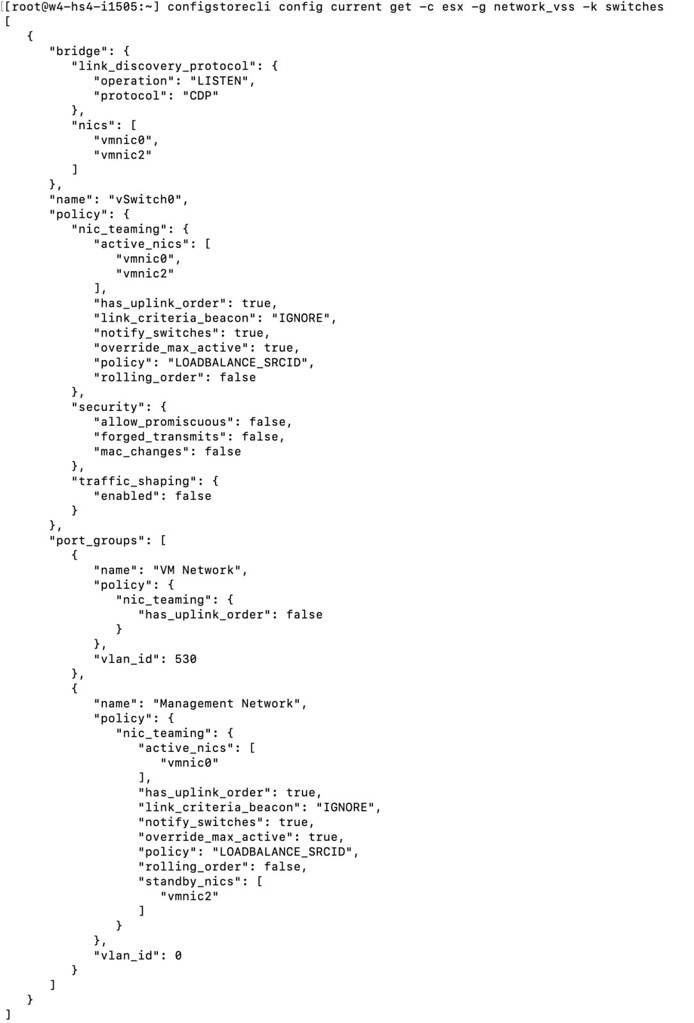
After you made the required changes, you then load the configuration using the json file:
configstorecli config current set -c esx -g network_vss -k switches -i vswitch.json --overwrite
I changed the name of my vSwitch0 to “vSwitchDuncan” and as you can see below, the change worked! Although do note, you will need to reboot the host before you see the change!

For those who prefer video content, I also created a quick demo which shows the above process: