• Skip to primary navigation
  • Skip to main content
  • Skip to primary sidebar

Yellow Bricks

by Duncan Epping

  • Home
  • Unexplored Territory Podcast
  • HA Deepdive
  • ESXTOP
  • Stickers/Shirts
  • Privacy Policy
  • About
  • Show Search
Hide Search

Server

Which vSAN Maintenance Mode option was used on a host?

Duncan Epping · Jun 7, 2021 ·

Last week there was a question on VMTN around maintenance mode, this customer wanted to find out which vSAN Maintenance Mode option was used while the host was placed in maintenance mode. The person who placed the host into maintenance wasn’t around, and I guess the customer wanted to know if data was moved from the host or not. They looked at the events and tasks, but unfortunately it wasn’t obvious from that vCenter section, next up were the logs. I also looked at the logs, and you would expect this info to be stored in hostd.log, but it wasn’t, so where is it? Well it actually is a configuration item, and you can dig it up here:

Pre ESXi 7.0 the info is stored in the “esx.conf” file, just grep for “hostDecommission”. Let me show you:

$ grep "/vsan/hostDecommission" /etc/vmware/esx.conf
/vsan/hostDecommissionVersion = "10"
/vsan/hostDecommissionState = "decom-state-decommissioned"
/vsan/hostDecommissionMode = "decom-mode-ensure-object-accessibility"

If the ESX is at 7.0 or later, just run the below config store command:

$ configstorecli config current get -c vsan -g system -k host_state
{
   "decom_mode": "ENSUREOBJECT_ACCESSIBILITY",
   "decom_state": "DECOMMISSIONED",
   "decom_version": 0
}

I hope that helps others who have a similar question!
Issue adding tags to the vCLS VMs with vCenter Server 7.0 U2b

Duncan Epping · Jun 1, 2021 ·

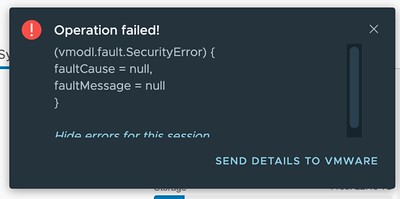
Today I was talking to one of our field folks and he asked if there was an issue with Tags in combination with vCLS VMs in 7.0 U2b specifically. I had tested assigning tags to vCLS VMs before, and it worked just fine. With 7.0 U2b unfortunately this has stopped working. The error you will see displayed in the vSphere Client is the following:

(vmodl.fault.SecurityError) {
faultCause = null,
faultMessage = null
}

Or as it shows in the UI:

So what can you do about it? Well, unfortunately not much right now, I filed a bug and uploaded the logs, engineers are looking at it as we speak, and hopefully, I will have an answer for those who need to use tags soon.

UPDATE: Engineering has found a workaround, customers who can’t wait for the fix can contact GSS to get the workaround implemented!

Can I make a host in a cluster the vSphere HA primary / master host?

Duncan Epping · May 21, 2021 ·

There was an interesting question on the VMware VMTN Community this week, although I wrote about this in 2016 I figured I would do a short write-up again as the procedure changed since 7.0u1. The question was if it was possible to make a particular host in a cluster the vSphere HA primary (or master as it was called previously) host. The use case was pretty straightforward, in this case, the customer had a stretched cluster configuration with vSAN, they wanted to make sure that the vSphere HA primary host was located in the “preferred” site, as this could potentially speed up the restart of VMs. Now, mind you, that when I say “speed up” we are talking about 2-3 seconds difference at most, but for some folks, this may be crucial. I personally would not recommend making configuration changes, but if you do want to do this, vSphere does have the option to do so.

When it comes to vSphere HA, there’s no UI option or anything like that to assign the “primary/master” host role. However, there’s the option to specify an advanced setting on a host level to indicate that a certain host needs to be favored during the primary/master election. Again, this is not very common for customers to configure, but if you desire to do so, it is possible. The advanced setting is called “fdm.nodeGoodness” and depending on which version you use, you will need to configure it either via the fdm.cfg file, or via the configstorecli. You can read about this process in-depth here.

Of course, I did try if this worked in my lab, here’s what I did, I first list the current configured advanced options using configstorecli for vSphere HA:

configstorecli config current get -g cluster -c ha -k fdm
{
   "mem_reservation_MB": 200,
   "memory_checker_time_in_secs": 0
}

Next, I will set the “node_goodness” for my host, when setting this it will need to be a positive value, in my case I am setting it to 10000000. I first dumped the current config in a json file:

configstorecli config current get -g cluster -c ha -k fdm > test.json

Next, I edited the file and added the setting “node_goodness” with a value of 10000000, so that is looks as follows:

{ 
    "mem_reservation_MB": 200, 
    "memory_checker_time_in_secs": 0,
    "node_goodness": 10000000
} 

I then imported the file:

configstorecli config current set -g cluster -c ha -k fdm -infile test.json

After importing the file and reconfiguring for HA on one of my hosts, you can see in the screenshots below that the master role moved from 1507 to 1505.


I also created a quick demo, for those who prefer video content:

VMUG Advantage Homelab Group Buy Discount offer!

Duncan Epping · Apr 28, 2021 ·

Some of you may have seen the blog that William Lam posted last year titled the “VMUG Advantage Homelab Group Buy Discount”. Some of you may have not seen this. Basically, William worked with the VMUG on a discount for the VMUG Advantage Program. Why am I posting this? Well, I am pleased to announce that I have teamed up with William Lam and the VMUG to bring the VMUG Advantage Group Buy to the VMware Community. The great thing about this group buy is that the higher the number of people signing up, the higher the discount will be! But why should you sign up?

I get questions about career development a lot. How do I become an expert in vSAN or NSX for instance? How do I get to the next level? Well, there’s no shortcut, unfortunately. You have got to put in the work! What better way than building a lab, testing and playing with the products, taking training courses etc? That is where VMUG Advantage comes into play as it can provide access to all of those things, and/or at least lower the cost for these things. What is included?

  • 365-day Evaluation Licenses
    • Including vSphere, vCloud Foundation, vSAN, NSX, vRealize, Workstation, Horizon, and more!
  • VMworld Discounts
  • 20-35% discount on training
  • Access to “test drive“

The VMUG Advantage Program comes at a cost of 200 USD. Last year the discount was 15%, which means the price ended up being 170 USD for a full year. If you have just one training course planned per year, the VMUG Advantage Program will have already paid for itself (20% discount on a 3000+ USD training course). Yes, I have been talking about USD so far, but of course, this offer is available to all our community members globally (Europe, APJ, Africa, Middle East, etc). Now, again, the discount percentage you get, will depend on the number of people signing up for this years promotion. The ranges look as follows:

Quantity Discount Cost
1-199 12% $176
200-299 14% $172
300+ 15% $170

If more than 1000 people sign up, VMUG HQ will also do a raffle and give away some cool VMUG Advantage “swag”.Can’t wait? Sign up for the discount code here, join the program!

Now before I forget, personally I think that the VMUG Advantage Program is a great program, and I feel that it is a great investment in your career. However, I also do realize that not everyone may be in a position where they can afford to invest 170-176 USD. I would highly encourage people to have a conversation with their employer, in many cases, employers are happy for employees to join these programs, if only because it allows them to benefit from the discounts on training courses, exams, and of course VMworld. Sign up for the discount code here, join the program!

<UPDATE: We have reached 250, so right now we are at 15% discount!>

HCI Mesh error: Failed to run the remote datastore mount pre-checks

Duncan Epping · Apr 21, 2021 ·

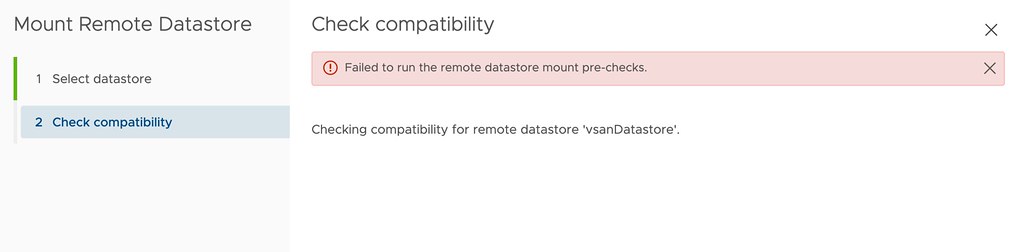
I had two comments on my HCI Mesh compute only blogpost where both were reporting the same error when trying to mount a remote datastore. The error that popped up was the following:

Failed to run the remote datastore mount pre-checks.

I tried to reproduce it in my lab, as both had upgraded from 7.0 to U2 I did the same, that didn’t result in the same error though. The error doesn’t provide any details around why the pre-check fails, as shown below in the screenshot. After some digging I found out that the solution is simple though, you need to make sure IPv6 is enabled on your hosts. Yes, even when you are not using IPv6, it still needs to be enabled to pass the pre-checks. Thanks, Jiří and Reza for raising the issue!

HCI Mesh error: Failed to run the remote datastore mount pre-checks

  • « Go to Previous Page
  • Page 1
  • Interim pages omitted …
  • Page 17
  • Page 18
  • Page 19
  • Page 20
  • Page 21
  • Interim pages omitted …
  • Page 336
  • Go to Next Page »

Primary Sidebar

About the Author

Duncan Epping is a Chief Technologist and Distinguished Engineering Architect at Broadcom. Besides writing on Yellow-Bricks, Duncan is the co-author of the vSAN Deep Dive and the vSphere Clustering Deep Dive book series. Duncan is also the host of the Unexplored Territory Podcast.

Follow Us

  • X
  • Spotify
  • RSS Feed
  • LinkedIn

Recommended Book(s)

Also visit!

For the Dutch-speaking audience, make sure to visit RunNerd.nl to follow my running adventure, read shoe/gear/race reviews, and more!

Do you like Hardcore-Punk music? Follow my Spotify Playlist!

Do you like 80s music? I got you covered!

Copyright Yellow-Bricks.com © 2026 · Log in