• Skip to primary navigation
  • Skip to main content
  • Skip to primary sidebar

Yellow Bricks

by Duncan Epping

  • Home
  • Unexplored Territory Podcast
  • HA Deepdive
  • ESXTOP
  • Stickers/Shirts
  • Privacy Policy
  • About
  • Show Search
Hide Search

Server

Back to Basics: Using the vSphere 5.1 Web Client to configure iSCSI

Duncan Epping · Sep 14, 2012 ·

In this article I will take you through the steps required to setup iSCSI using the vSphere 5.1 Web Client. In most iSCSI environment the VMware software iSCSI adapter is used, so that is what I will use. I had already setup a storage VMkernel NIC in one of my previous post, read that if you haven’t yet. Adding a software adapter can be done in a couple of simple steps:

  • On the “Manage” section of your host click on “Storage”
  • Click the green “plus” and select “Software iSCSI adapter”
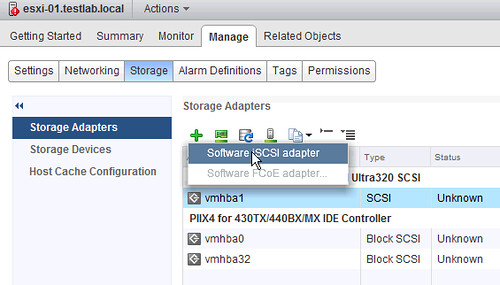
  • Click “OK”
  • Now a new adapter will be added to the “Storage Adapters” list

[Read more…] about Back to Basics: Using the vSphere 5.1 Web Client to configure iSCSI
Back to Basics: Using the vSphere 5.1 Web Client to configure a vSwitch

Duncan Epping · Sep 13, 2012 ·

In the previous articles we created a Datacenter, a cluster and added hosts to it. Now that we have done that we can start finalizing the configuration. This is just one example out of the many ways to configure networking for an ESXi host, and I kept it really really simple. This is not following any best practices, I just wanted to show some of the steps. In this scenario I have 4 network cards per host and I have VLANs for each network segment. Separating traffic through the use of VLAN is highly recommended and is a best practice.

Lets configure the virtual switch first. I will use a “standard vSwitch” for now. In this case we will set all vmnics to active on the vSwitch and control NIC usage on a portgroup level. [Read more…] about Back to Basics: Using the vSphere 5.1 Web Client to configure a vSwitch

Back to Basics: Using the vSphere 5.1 Web Client to create a Cluster object

Duncan Epping · Sep 12, 2012 ·

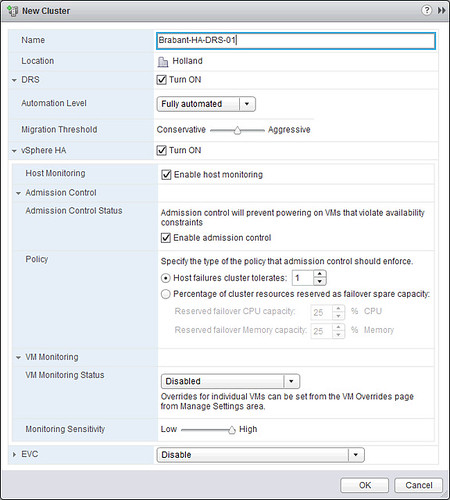
We’ve shown you how to create a vSphere Datacenter object, next we are going to create a cluster object. Again, this is fairly straight forward:

  • Click on “Create a Cluster” in your “Getting Started” tab.
  • Provide a name for your cluster and tick “Turn On” for both “DRS” and “vSphere HA”.
  • Click “OK”.

We will not tweak any settings around HA and DRS, the defaults should work for most, although I would prefer to use the “Percentage Based” admission control policy. For more details I would like to recommend reading the vSphere 5.1 Clustering Deepdive. [Read more…] about Back to Basics: Using the vSphere 5.1 Web Client to create a Cluster object

Get your Kindle copy of the vSphere 4.1 HA/DRS Deepdive for free

Duncan Epping · Sep 11, 2012 ·

I just sent out this tweet. Last time we did this promo many people said they somehow missed it and asked if we could do it again. We started the promo this morning, make sure to download it now as it will not be free (yes that is $ 0,-!) for long. Promo ends Thursday.

Special offer, the vSphere 4.1 HA/DRS Deepdive Kindle edition for FREE! vmwa.re/free41

Enjoy,

Back to Basics: Using the vSphere 5.1 Web Client to create a Datacenter object

Duncan Epping · Sep 11, 2012 ·

I am going to assume you already have vCenter 5.1 up and running, if you don’t read this article. Once again, this is a “Back to Basics” series, so don’t expect deepdive info here.

First point your browser to the vSphere Web Client. The vSphere Web Client can be found at: https://<IP address or DNS name of your vCenter instance>:9443/vsphere-client/. Now you will see is a question if it is okay to install the “VMware Remote Console Plugin” as shown in the following screenshot.

[Read more…] about Back to Basics: Using the vSphere 5.1 Web Client to create a Datacenter object

  • « Go to Previous Page
  • Page 1
  • Interim pages omitted …
  • Page 140
  • Page 141
  • Page 142
  • Page 143
  • Page 144
  • Interim pages omitted …
  • Page 336
  • Go to Next Page »

Primary Sidebar

About the Author

Duncan Epping is a Chief Technologist and Distinguished Engineering Architect at Broadcom. Besides writing on Yellow-Bricks, Duncan is the co-author of the vSAN Deep Dive and the vSphere Clustering Deep Dive book series. Duncan is also the host of the Unexplored Territory Podcast.

Follow Us

  • X
  • Spotify
  • RSS Feed
  • LinkedIn

Recommended Book(s)

Also visit!

For the Dutch-speaking audience, make sure to visit RunNerd.nl to follow my running adventure, read shoe/gear/race reviews, and more!

Do you like Hardcore-Punk music? Follow my Spotify Playlist!

Do you like 80s music? I got you covered!

Copyright Yellow-Bricks.com © 2026 · Log in