• Skip to primary navigation
  • Skip to main content
  • Skip to primary sidebar

Yellow Bricks

by Duncan Epping

  • Home
  • Unexplored Territory Podcast
  • HA Deepdive
  • ESXTOP
  • Stickers/Shirts
  • Privacy Policy
  • About
  • Show Search
Hide Search

Server

Nice advanced ESXTOP tip from #VMworld session INF-VSP1423

Duncan Epping · Sep 24, 2012 ·

I was watching INF-VSP1423 – esxtop for Advanced Users today by Krishna Raj Raja. This is a VMworld 2012 San Francisco session, if you attended SF but did not attend this session look it up and watch it… If you are going to VMworld Barcelona, schedule it. It is an excellent session, deep technical with some great insights presented by a very smart VMware engineer. There was a tip in there which I found very useful.

Krishna showed an example where he noticed a lot of I/O being generated on a particular LUN. How do you figure out who / what is causing this? Well it is not as difficult as you think it would be…

  • Open up esxtop (more details on my esxtop page)
  • Go to the “Device” view (U)
  • Find the device which is causing a lot of I/O
  • Press “e” and enter the “Device ID” in my case that is an NAA identifier so “copy+paste” is easiest here
  • Now look up the World ID under the “path/world/partition” column
  • Go back to CPU and sort on %USED (press “U”)
  • Expand (press “e”) the world that is consuming a lot of CPU, as CPU is needed to drive I/O

This should enable you to figure out which world is driving the high amount of I/Os. Now you can kill it, contact the user / admin causing it… nice right.

There are some more nuggets in this session around PSTATE (power state), co-sharing, Host Caching (llswp) and much more… I am not going to reveal those as you should be attending this session or at a minimum watch it online.
Can I protect my vCenter Server with vSphere Replication?

Duncan Epping · Sep 21, 2012 ·

Someone asked this question last week when I posted my “back to basics” vSphere Replication blog. I guess protecting vCenter Server isn’t too difficult but how about recovering it after a failure?

Those who have used vSphere Replication know that you need vCenter Server to click “Recover”. In a dual vCenter Server configuration that is not a problem. But what if you just want to protect your vCenter Server virtual machine and replicate it to a second piece of storage. I tested this and then “killed” my vCenter Server. How do I get my vCenter Server up and running again from this replica?

Let me start by saying that this is unsupported as far as I know. So lets start by checking the folder in which the replica of the vCenter Server resides:

  8.5K Sep 21 09:46 hbrcfg.GID-d69c6cad-42a5-474a-86c4-c3158d1a3b42.6.nvram.18
  3.4K Sep 21 09:46 hbrcfg.GID-d69c6cad-42a5-474a-86c4-c3158d1a3b42.6.vmx.16
   267 Sep 21 09:46 hbrcfg.GID-d69c6cad-42a5-474a-86c4-c3158d1a3b42.6.vmxf.17
124.0K Sep 21 09:46 hbrdisk.RDID-9786ae39-cd3a-4773-be63-cd1bc3641d59.14.175750085646519-delta.vmdk
   379 Sep 21 09:46 hbrdisk.RDID-9786ae39-cd3a-4773-be63-cd1bc3641d59.14.175750085646519.vmdk
 52.0K Sep 21 09:46 hbrdisk.RDID-ae17cfad-c8d8-460c-99a1-8f26ff1133b9.13.43820857661344-delta.vmdk
   375 Sep 21 09:46 hbrdisk.RDID-ae17cfad-c8d8-460c-99a1-8f26ff1133b9.13.43820857661344.vmdk
  4.1K Sep 21 09:46 hbrgrp.GID-d69c6cad-42a5-474a-86c4-c3158d1a3b42.txt
 25.0G Sep 21 09:46 vcenter-tm01-flat.vmdk
   473 Sep 21 09:46 vcenter-tm01.vmdk
 60.0G Sep 21 09:46 vcenter-tm01_1-flat.vmdk
   476 Sep 21 09:46 vcenter-tm01_1.vmdk

As you can see the folder contains a lot of files we are familiar with… Especially the vmdk files and the vmx files is something we can work with. So how would we get this vcenter up and running. Lets look at the vmxf file first as that will reveal the original name of the vmx file:

<vmxPathName type="string">vcenter-tm01.vmx</vmxPathName></VM></Foundry>

Next I am going to copy the “.nvram”, “.vmx” and “.vmxf” file and give them the name “vcenter-tm01.nvram” etc.

cp hbrcfg.GID-d69c6cad-42a5-474a-86c4-c3158d1a3b42.6.vmxf.17 vcenter-t 
vcenter-tmp.vmxf

So now I have all the files I need with the right name… Next I will first “unregister” the original vCenter Server virtual machine… just to avoid any weird issues. I list all the virtual machines registered against this host first:

vim-cmd /vmsvc/getallvms

Now that I have the “vmid” I can unregister the original virtual machine:

vim-cmd /vmsvc/unregister <vmid>

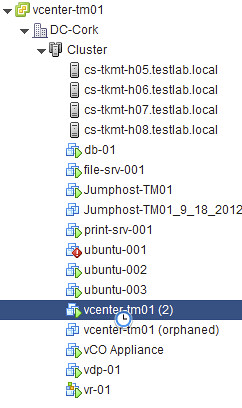
Now that the original virtual machine is removed unregistered from the host, I should be able to register the “new” vCenter Server virtual machine… aka the replica.

vim-cmd /solo/register /vmfs/volumes/4f228789-84f6b84c-e17e-984be1047b16/vcenter-tm01/vcenter-tm01.vmx

Lets break that one down just to be clear:

vim-cmd /solo/register /path/to/vmxfile/filename.vmx

This command will return the “vmid” of the virtual machine we just registered. Now we can power it on…

vim-cmd /vmsvc/power.on

Now it sits there for a while, and when I log in with the vSphere Client and check the host it is running on I see this message that says “the virtual machine might have been moved or copied…”, I answer it by saying that is was copied and now the vCenter virtual machine boots up and I can login again. Yes there is an orphaned vCenter Server instance there, and you will need to clean that up… also there might be some obsolete files in the folder of this replica, and you might want to clean those up as well. Anyway, the vCenter Server virtual machine is up and running again, and that was the goal of this exercise right 🙂

Say goodbye to the “Transfer LUN” aka “Swing LUN” aka “Stepping Stone”

Duncan Epping · Sep 21, 2012 ·

Every once in a while I go through some articles and see if they need to be revised or not. As there are over 1400 articles on yellow-bricks.com that is not an easy task, I can tell you that. Today I stumbled on this article I wrote early 2010. This article discussed the use of a “swing lun” to limit the amount of LUNs masked to a single host. Let me copy/paste the part that I want to revise:

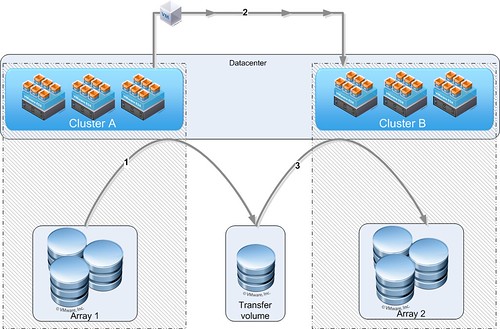
In my design I usually propose a so called “Transfer Volume”. This Volume(NFS or VMFS) can be used to transfer VMs to a different cluster. Yes there’s a slight operational overhead here, but is also reduces overhead in terms of traffic to a LUN and decreases the chance of scsi reservation conflicts etc.

Here’s the process:

  1. Storage VMotion the VM from LUN on Array 1 to Transfer LUN
  2. VMotion VM from Cluster A to Cluster B
  3. Storage VMotion the VM from Transfer LUN to LUN on Array 2

Of course these don’t necessarily need to be two separate arrays, it could just as easily be a single array with a group of LUNs masked to a particular cluster. For the people who have a hard time visualizing it:

I guess this is a great example of why you need to revise your design with every release… This used to be a valid workaround to limit the amount of LUNs attached to a Cluster while maintaining the flexibility to move between clusters using Storage vMotion and vMotion. With vSphere 5.1 that is no longer needed now that we have enhanced functionality for vMotion. (Frank has an awesome vMotion deepdive… read it) Make sure to update your design and make the needed changes to your infrastructure if and when required…

A host has failed, which VMs were impacted and restarted by HA?

Duncan Epping · Sep 20, 2012 ·

Someone asked me a question a while back and I figured it was time to write it down… Or in this case to record a video. The vSphere Web Client is a powerful tool when it comes to finding events and problems. This video shows how you can use the vSphere Web Client to figure out which virtual machines were impacted by a host failure and restarted by HA. On top of that I also show you how you can use PowerCLI to list all virtual machines that were restarted recently by HA. No I didn’t write that PowerCLI blurb myself, I elegantly stole it from the infamous PowerCLI guru Jonathan Medd. So if you need the blurb, hit his article and check the “update 2” section as it contains the code for vSphere 5.0 and up. (I tested it on 5.1 and it works as you can see in the video.)

Enabling PDL enhancements in a non-stretched environment?

Duncan Epping · Sep 20, 2012 ·

I received two questions on the same topic last week. The question was around using the PDL enhancements in a non-stretched environment… does it make sense? The question was linked to a scenario where for instance a storage admin makes a mistake and removes access for a specific host to a LUN. For those who don’t know what a PDL is read this article, but in short it is a SCSI sense code issued by an array when it believes storage will be permanently unavailable.

First of all, the vSphere HA advanced option “das.maskCleanShutdownEnabled” is enabled by default as of vSphere 5.1. In other words, HA is going to assume a virtual machine needs to be restarted when it is powered and isn’t able to update the config files. (Config files contain the details about the shutdown state normally, was it an admin initiated shutdown?)

Now, one thing to note is that “disk.terminateVMOnPDLDefault” is not on by default. If this setting is not explicitly enabled then the virtual machine will not be killed and HA won’t be able to take action. In other words, if your storage admin changes the presentation of your LUNs and removes a host accidentally the virtual machine will just sit there without access to disk. The OS might fail at some point, your application will definitely not be happy, but this is it.

To answer the question, yes even in a non-stretched environment it makes sense to enable both disk.terminateVMOnPDLDefault and das.maskCleanShutdownEnabled. Virtual machines will be automatically restarted by HA if they are killed by the VMkernel when a PDL has been detected.

  • « Go to Previous Page
  • Page 1
  • Interim pages omitted …
  • Page 138
  • Page 139
  • Page 140
  • Page 141
  • Page 142
  • Interim pages omitted …
  • Page 336
  • Go to Next Page »

Primary Sidebar

About the Author

Duncan Epping is a Chief Technologist and Distinguished Engineering Architect at Broadcom. Besides writing on Yellow-Bricks, Duncan is the co-author of the vSAN Deep Dive and the vSphere Clustering Deep Dive book series. Duncan is also the host of the Unexplored Territory Podcast.

Follow Us

  • X
  • Spotify
  • RSS Feed
  • LinkedIn

Recommended Book(s)

Also visit!

For the Dutch-speaking audience, make sure to visit RunNerd.nl to follow my running adventure, read shoe/gear/race reviews, and more!

Do you like Hardcore-Punk music? Follow my Spotify Playlist!

Do you like 80s music? I got you covered!

Copyright Yellow-Bricks.com © 2026 · Log in