One of our product managers asked me if I could share this survey with the world. The topic is vCenter Federation and APIs. It literally takes a couple of minutes to fill out. Your help / input is greatly appreciated, so please if you have those two minutes to spare at the end of the day, then take the time:
Server
New Beta Program option: VMware Hosted Beta
Many of you probably have participated in one of the many beta programs VMware has offered in the last couple of years. I personally have participated in various beta programs when I was a customer / partner and I always loved going through the various exercises. The challenging part for me always was finding the time to setup the environment.
Recently VMware started offering a new way to participate in the evaluation and feedback of VMware’s developing products. The VMware Beta Program is now offering a Hosted Beta; providing registered users access to pre-build online Lab environments with guided workflows to get a closer look at the latest and greatest VMware technologies without the need to build-out infrastructure onsite.
This hosted technology is based on the same technologies used for the Hands-On Labs (HOL) at VMworld, providing a fully built environment to explore intricate product features while requiring nothing more than an HTML5 compliant browser and the latest View Client.
In my opinion this is a great opportunity to test-drive products and provide VMware with your feedback on the features still under development. On top of that this will allow you to spend 1-2 hour blocks to get acquainted with new technology, without the need to be on-site. You can do this at the office, or at home with just a connection to the internet.
If you are interested and want to learn more about the VMware Beta Program you can go here: http://communities.vmware.com/community/vmtn/beta
If you are interested in joining the VMware Beta Program you can either work with your VMware account team or submit a participation request form found here: http://communities.vmware.com/community/beta/betainterest
Awesome Fling: vCenter 5.1 Pre-Install Check
One of the things that many people have asked me is how they could check if their environment was meeting the requirements for an upgrade to 5.1. Until today I never really had a good answer for it but fortunately that has changed. Alan Renouf has spent countless of hours developing a script that validated your environment and assesses if it is ready for an upgrade to vSphere 5.1.
This is a PowerShell script written to help customers validate their environment and assess if it is ready for a 5.1.x upgrade. The script checks against known misconfiguration and issues raised with VMware Support. This script checks the Windows Server and Active Directory configuration and provides an on screen report of known issues or configuration issues, the script also provides a text report which can help with further trouble shooting.
Is that helpful or what? Instead of going through the motion your just run this pre-flight script and it will tell you if you are good to go or not, or if changes are required. If you are planning an upgrade or are about to upgrade make sure to run this script.
Awesome job Alan, lets keep these coming!
What is: Current Memory Failover Capacity?
I have had this question many times by now, what is “Current Memory Failover Capacity” that is shown in the cluster summary when you have selected the “Percentage Based Admission Control Policy”? What is that percentage? 99% of what? And will it go down to 0%? Or will it go down to the percentage that you reserved? Well I figured it was time to put things to the test and no longer be guessing.

As shown in the screenshot above, I have selected 33% of memory to be reserved and currently have 99% of memory failover capacity. Lets power-on a bunch of virtual machines and see what happens. Below is the result shown in a screenshot, “current memory failover capacity” went down from 99% to 94%.
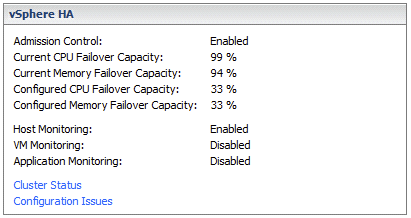
Also when I increase the reservation in a virtual machine I can see “Current Memory Failover Capacity” drop down even further. So it is not about “used” but about “unreserved / reserved” memory resources (including memory overhead), let that be absolutely clear! When will vCenter Server shout “Insufficient resources to satisfy configured failover level for vSphere HA”?
It shouldn’t be too difficult to figure that one out, just power-on new VMs until it says “stop it”. As you can see in the screenshot below. This happens when you reach the percentage you specified to reserve as “memory failover capacity”. In other words in my case I reserved 33%, when “Current Memory Failover Capacity” reaches 33% it doesn’t allow the VM to be powered on as this would violate the selected admission control policy.

I agree, this is kind of confusing… But I guess when you run out of resources it will become pretty clear very quickly 😉
Using das.vmmemoryminmb with Percentage Based admission control
I had question today about using the advanced settings to set a minimal amount of resources that HA would use to do the admission control math with. Many of us have used these advanced settings das.vmMemoryMinMB and das.vmCpuMinMHz to dictate the slot size when no reservations were set in an environment where the “host failures” admission control policy was used. However what many don’t appear to realize is that this will also work for the Percentage Based admission control policy.
If you want to avoid extreme overcommitment and want to specify a minimal amount of resources that HA should use to do the math with then even with the Percentage Based admission control policy you can use these settings. In the case where your VM reservation does not exceed the value specified, the value is used to do the math with. In other words if you set “das.vmMemoryMinMB” to 2048, it will use 2048 to do the math with unless the reservation set on the VM is higher.
I did a quick experiment in my test lab which I had just rebuilt. Without das.vmMemoryMinMB and two VMs running (with no reservation) I had 99% Mem Failover Capacity as shown in the screenshot below:
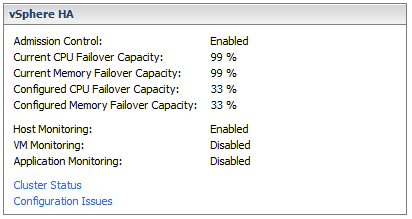
With das.vmMemoryMinMB set to 20480, and two VMs running, I had 78% Mem Failover Capacity as shown in the screenshot below:
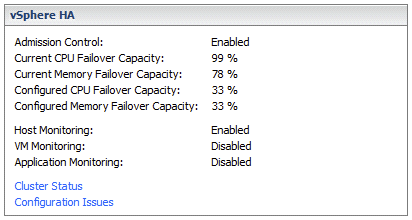
I guess that proves that you can use das.vmMemoryMinMB and das.vmCpuMinMHz to influence Percentage Based admission control.