• Skip to primary navigation
  • Skip to main content
  • Skip to primary sidebar

Yellow Bricks

by Duncan Epping

  • Home
  • Unexplored Territory Podcast
  • HA Deepdive
  • ESXTOP
  • Stickers/Shirts
  • Privacy Policy
  • About
  • Show Search
Hide Search

Server

vCenter Heartbeat installation and validation

Duncan Epping · Feb 5, 2013 ·

Today the vCenter Heartbeat team shared a video with me that they created. This video shows the vCenter Heartbeat installation and how to validate the installation itself. The KB Video team blogged about it also today, and you can find there article here which was the foundation for this article.

This video is a first installment of a series answering the most common questions asked by the VMware user community when deploying vCenter Server Heartbeat. Whether deploying in High Availability or Disaster Recovery deployment modes, this video will offer key points, tips and considerations for a successful deployment.

For more detailed information you can find the links to the relevant documentation sites.
To familiarize yourself with the Heartbeat installation requirements, see the Heartbeat documentation page here.

For vSphere 5.1 documentation, see the vSphere 5.1 documentation page here.
vSphere Metro Storage Cluster storage latency requirements

Duncan Epping · Feb 5, 2013 ·

I received some questions today around the storage latency requirements for vSphere Metro Storage Cluster (vMSC) solutions. In the past the support limits were strict:

  • 5ms RTT for vMotion for Enterprise license and lower, 10ms RTT for vMotion for Enterprise plus
  • 5ms RTT for storage replication

RTT stands for Round Trip Time by the way. Recently, and today I noticed I never blogged about this, the support limits have changed. For instance EMC VPLEX supports up to 10MS RTT for vMotion (not fully tested for stretched cluster / vSphere HA). Which indeed makes a lot of sense to have it aligned with the vMotion limits as more than likely the same connection between sites is used for both storage replication and vMotion traffic.

So I would recommend anyone who is considering implementing a vMSC environment (or architecting one) to contact your storage vendor about their support limits when it comes to storage latency.

Do I still need to set “HaltingIdleMsecPenalty” with vSphere 5.x?

Duncan Epping · Feb 4, 2013 ·

I received a question last week from a customer. They have a fairly big VDI environment and are researching the migration to vSphere 5.1. One of the changes they made in the 4.1 time frame was the advanced setting “HaltingIdleMsecPenalty” in order to optimize hyper threading fairness for their specific desktop environment. I knew that this was no longer needed but didn’t have an official reference for them (There is a blog post by Tech Marketing performance guru Mark A. that mentions it though). Today I noticed it was mentioned in a whitepaper which was recently released titled “The CPU Scheduler in VMware vSphere 5.1“. I recommend everyone to read this whitepaper as it gives you a better understanding of how the scheduler works and how it has been improved over time.

The following section is an outtake from that white paper.

Improvement in Hyper-Threading Utilization

In vSphere 4.1, a strict fairness enforcement policy on HT systems might not allow achieving full utilization of all logical processors in a situation described in KB article 1020233 [5]. This KB also provides a work-around based on an advanced ESX host attribute, “HaltingIdleMsecPenalty”. While such a situation should be rare, a recent change in the HT fairness policy described in “Policy on Hyper-Threading,” obviates the need for the work-around. Figure 8 illustrates the effectiveness of the new HT fairness policy for VDI workloads. In the experiments, the number of VDI users without violating the quality of service (QoS) requirement is measured on vSphere 4.1, vSphere 4.1 with “HaltingIdleMsecPenalty” tuning applied, and vSphere 5.1. Without the tuning, vSphere 4.1 supports 10% fewer users. On vSphere 5.1 with the default setting, it slightly exceeds the tuned performance of vSphere 4.1.

vCloud Suite Poster

Duncan Epping · Jan 31, 2013 ·

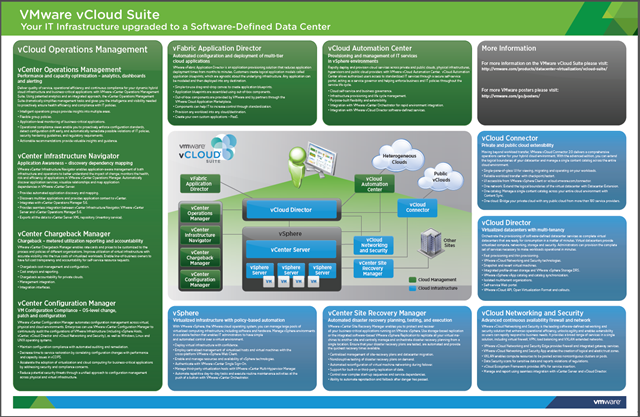
One of the last things I worked on while I was part of Technical Marketing was a poster and a white paper. The paper is still being processed but the poster has been released this week. Many thanks to Alan Renouf who did a lot of work on this one.

Now that it is done it looks so incredibly simple. I can tell you though that it took quite a lot of iterations before we got to this diagram and I am very happy about the result. Once again, thanks to everyone who helped to get this one out of the door…

vCloud Suite Poster

If you are at Partner Exchange 2013 (PEX) make sure you pick up a poster to take back to your office, if you are not at PEX then please click here to get the PDF version.

Also, don’t forget to visit http://vmware.com/go/Posters for more fantastic VMware posters available to download.

Converged compute and storage solutions

Duncan Epping · Jan 28, 2013 ·

Lately I have been looking more and more in to converged compute and storage solutions, or “datacenter in a box” solutions as some like to call them. I am a big believer of this concept as some of you may have noticed. Those who have never heard of these solutions, an example of this would be Nutanix or Simplivity. I have written about both Nutanix and Simplivity in the past, and for a quick primer on those respective solutions I suggest to read those articles. In short, these solutions run a hypervisor with a software based storage solution that creates a shared storage platform from local disks. In others, no SAN/NAS required, or as stated… a full datacenter experience in just a couple of U’s.

One thing that stood out to me though in the last 6 months is that for instance Nutanix is often tied to VDI/View solutions, in a way I can understand why as it has been part of their core message / go-to-market strategy for a long time. In my opinion though there is no limit to where these solutions can grow and go. Managing storage, or better said your full virtualization infrastructure, should be as simple as creating or editing a virtual machine. One of the core principles mentioned during the vCloud Distributed Storage talk at VMworld, by the way vCloud Distributed Storage is a VMware software defined storage initiative.

Hopefully people are starting to realize that these so-called Software Defined Storage solutions will fit in most, if not all, scenarios out there today. I’ve been having several discussions with people about these solutions and wanted to give some examples of how it could fit in to your strategy.

Just a week ago I was having a discussion with a customer around disaster recovery. They wanted to add a secondary site and replicate their virtual machines to that site. The cost associated with a second storage array was holding them back. After an introduction to converged storage and compute solutions they realized they could step in to the world of disaster recovery slowly. They realized that these solutions allowed them to protect their Tier-1 applications and expand their DR protected estate when required. By using a converged storage and compute solutions they can avoid the high upfront cost and it allows them to scale out when needed (or when they are ready).

One of the service providers I talk to on a regular basis is planning on creating a new cloud service. Their current environment is reaching its limits and predicting how this new environment will grow in the upcoming 12 months is difficult due to the agile and dynamic nature of this service they are developing. The great thing though about a converged storage and compute solution is that they can scale out whenever needed, without a lot of hassle. Typically the only requirement is the availability of 10Gbps ports in your network. For the provider though the biggest benefit is probably that services are defined by software. They can up-level or expand their offerings when they please or when there is a demand.

These are just two simple examples of how a converged infrastructure solution could fit in to your software defined datacenter strategy. The mentioned vendors Nutanix and Simplivity are also just two examples out of various companies offering these. I know of multiple start-ups who are working on a similar products and of course there are the likes of Pivot3 who already offer turnkey converged solutions. As stated earlier, personally I am a big believer in these architectures and if you are looking to renew your datacenter or at the verge of a green-field deployment… I highly recommend researching these solutions.

Go Software Defined – Go Converged!

  • « Go to Previous Page
  • Page 1
  • Interim pages omitted …
  • Page 129
  • Page 130
  • Page 131
  • Page 132
  • Page 133
  • Interim pages omitted …
  • Page 336
  • Go to Next Page »

Primary Sidebar

About the Author

Duncan Epping is a Chief Technologist and Distinguished Engineering Architect at Broadcom. Besides writing on Yellow-Bricks, Duncan is the co-author of the vSAN Deep Dive and the vSphere Clustering Deep Dive book series. Duncan is also the host of the Unexplored Territory Podcast.

Follow Us

  • X
  • Spotify
  • RSS Feed
  • LinkedIn

Recommended Book(s)

Also visit!

For the Dutch-speaking audience, make sure to visit RunNerd.nl to follow my running adventure, read shoe/gear/race reviews, and more!

Do you like Hardcore-Punk music? Follow my Spotify Playlist!

Do you like 80s music? I got you covered!

Copyright Yellow-Bricks.com © 2026 · Log in