• Skip to primary navigation
  • Skip to main content
  • Skip to primary sidebar

Yellow Bricks

by Duncan Epping

  • Home
  • Unexplored Territory Podcast
  • HA Deepdive
  • ESXTOP
  • Stickers/Shirts
  • Privacy Policy
  • About
  • Show Search
Hide Search

Server

Free Kindle copy of vSphere 5.0 Clustering Deepdive?

Duncan Epping · May 28, 2013 ·

Do you want a free Kindle copy of the vSphere 5.0 Clustering Deepdive or the vSphere 4.1 HA and DRS Deepdive? Well make sure to check Amazon next week! I just put both of the books up for a promotional offer… For 48 hours, Wednesday June the 5th and Thursday June the 6th, you can download the Kindle (US Kindle Store) copy of both these books for free, yes that is correct ZERO dollars.
So make sure you pick it up either Wednesday June the 5th or Thursday June the 6th, it might be the only time this year it is on promo.
Pinging from different VMkernel NICs using esxcli?

Duncan Epping · May 27, 2013 ·

Today I had a network issue in my lab, I still don’t have a clue what the issue was but I did discover something useful. I had 3 different VMkernel’s setup and I wanted to make sure each of the three had network connection to a specific destination address. After going through the esxcli command I bumped in to the following command which I found very helpful:

esxcli network diag ping -I vmk0 -H 10.27.51.132

In this case I use VMkernel Interface “vmk0” to ping to the address “10.27.51.132”. If I want to use a different VMkernel Interface I just specify it, so swap “vmk0” with “vmk1” for instance. Useful right?!

How to change the IP Address of ESXi through the commandline

Duncan Epping · May 27, 2013 ·

I was building out my virtualized lab and instead of re-installing ESXi over and over again I figured I would just quickly clone them. Now of course this leads to a “minor” problem as the virtualized ESXi hosts will all boot with the same IP-Address. As I don’t have DHCP to my disposal I needed to change them manually, so how do you change the IP address of ESXi through the commandline?

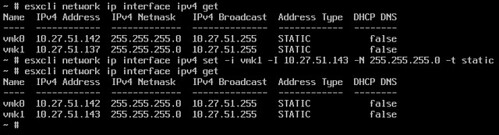
It is actually pretty straight forward with esxcli these days. First thing I did was listing all VMkernel NICs:

esxcli network ip interface ipv4 get

This will give you the list of all VMkernel interfaces with their details (See screenshot below). Changing the IP address is just a matter of adding some parameters:

esxcli network ip interface ipv4 set -i vmk1 -I 10.27.51.143 -N 255.255.255.0 -t static

In your situation you will need to replace “vmk1” with the appropriate VMkernel NIC of course and change the IP details.

change ip address of esxi

Number of vSphere HA heartbeat datastores less than 2 error, while having more?

Duncan Epping · May 23, 2013 ·

Last week on twitter someone mentioned he received the error that he had less than two vSphere HA heartbeat datastores configured. I wrote an article about this error a while back so I asked him if he had two or more. This was the case, so next thing to do was to “reconfigure for HA” to clear the message hopefully.

The number of vSphere HA heartbeat datastores for this host is 1 which is less than required 2

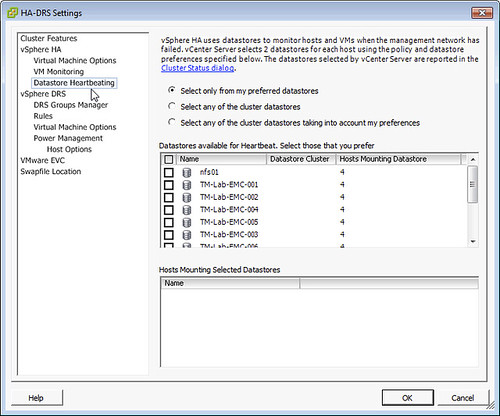
Unfortunately after reconfiguring for HA the error was still there, next suggestion was looking at the “heartbeat datastore” section in HA. For whatever reason HA was configured to “Select only from my preferred datastores” and no datastores were selected just like in the screenshot below. HA does not override this so when configured like this NO heartbeat datastores are used, resulting in this error within vCenter. Luckily the fix is easy, just set it to “Select any of the cluster datastores”.

the number of heartbeat datastores for host is 1

Is flash the saviour of Software Defined Storage?

Duncan Epping · May 22, 2013 ·

I have this search column open on twitter with the term “software defined storage”. One thing that kept popping up in the last couple of days was a tweet from various IBM people around how SDS will change flash. Or let me quote the tweet:

“What does software-defined storage mean for the future of #flash?”

It is part of a twitter chat scheduled for today, initiated by IBM. It might be just me misreading the tweets or the IBM folks look at SDS and flash in a completely different way than I do. Yes SDS is a nice buzzword these days. I guess with the billion dollar investment in flash IBM has announced they are going all-in with regards to marketing. If you ask me they should have flipped it and the tweet should have stated: “What does flash mean for the future of Software Defined Storage?” Or to make it even sound more marketing is flash the saviour of Software Defined Storage?

Flash is a disruptive technology, and changing the way we architect our datacenters. Not only did it already allow many storage vendors to introduce additional tiers of storage it also allowed them to add an additional layer of caching in their storage devices. Some vendors even created all flash based storage systems offering thousands of IOps (some will claim millions), performance issues are a thing of the past with those devices. On top of that host local flash is the enabler of scale-out virtual storage appliances. Without flash those type of solutions would not be possible, well at least not with a decent performance.

Since a couple of years host side flash is also becoming more common. Especially since several companies jumped in to the huge gap there was and started offering caching solutions for virtualized infrastructures. These solutions allow companies who cannot move to hybrid or all-flash solutions to increase the performance of their virtual infrastructure without changing their storage platform. Basically what these solutions do is make a distinction between “data at rest” and “data in motion”. Data in motion should reside in cache, if configured properly, and data in rest should reside on your array. These solutions once again will change the way we architect our datacenters. They provide a significant performance increase removing many of the performance constraints linked to traditional storage systems; your storage system can once again focus on what it is good at… storing data / capacity / resiliency.

I think I have answered the questions, but for those who have difficulties reading between the lines, how does flash change the future of software defined storage? Flash is the enabler of many new storage devices and solutions. Be it a virtual storage appliance in a converged stack, an all-flash array, or host-side IO accelerators. Through flash new opportunities arise, new options for virtualizing existing (I/O intensive) workloads. With it many new storage solutions were developed from the ground up. Storage solutions that run on standard x86 hardware, storage solutions with tight integration with the various platforms, solutions which offer things like end-to-end QoS capabilities and a multitude of data services. These solutions can change your datacenter strategy; be a part of your software defined storage strategy to take that next step forward in optimizing your operational efficiency.

Although flash is not a must for a software defined storage strategy, I would say that it is here to stay and that it is a driving force behind many software defined storage solutions!

  • « Go to Previous Page
  • Page 1
  • Interim pages omitted …
  • Page 125
  • Page 126
  • Page 127
  • Page 128
  • Page 129
  • Interim pages omitted …
  • Page 336
  • Go to Next Page »

Primary Sidebar

About the Author

Duncan Epping is a Chief Technologist and Distinguished Engineering Architect at Broadcom. Besides writing on Yellow-Bricks, Duncan is the co-author of the vSAN Deep Dive and the vSphere Clustering Deep Dive book series. Duncan is also the host of the Unexplored Territory Podcast.

Follow Us

  • X
  • Spotify
  • RSS Feed
  • LinkedIn

Recommended Book(s)

Also visit!

For the Dutch-speaking audience, make sure to visit RunNerd.nl to follow my running adventure, read shoe/gear/race reviews, and more!

Do you like Hardcore-Punk music? Follow my Spotify Playlist!

Do you like 80s music? I got you covered!

Copyright Yellow-Bricks.com © 2026 · Log in