• Skip to primary navigation
  • Skip to main content
  • Skip to primary sidebar

Yellow Bricks

by Duncan Epping

  • Home
  • Unexplored Territory Podcast
  • HA Deepdive
  • ESXTOP
  • Stickers/Shirts
  • Privacy Policy
  • About
  • Show Search
Hide Search

Server

vCloud ecosystem announcements at VMware Partner Exchange

Duncan Epping · Feb 27, 2013 ·

It is has been a while since I wrote anything about vCloud Director itself… Primarily because I have been focused on other things within the vCloud Suite the last couple of months. This week various partners of VMware announced new products at VMware Partner Exchange 2013 (By the way, 2014 is scheduled to be held at the Moscone Center in San Francisco). I wanted to take a couple of minutes to provide a quick overview of what was announced. Personally I think it is great that we are starting to see more and more partners developing products and solutions to enhance the vCloud Director experience, especially in the Backup/Restore space this was more than welcome. So what was announced this week so far, in no particular order:

  • Zerto announced Virtual Replication 3.0
    In a blog article they explain what is new and improved in version 3.0. What I personally think is exciting is the fact that they support vCloud Director 5.1 and provide support and integration with vCloud Automation Center. On top of that the 3.0 product offers a self-service portal, I bet this is what a lot of the service providers were waiting for. It will make creating DR as a Service solution offering a lot simpler. There is a lot more added, so for all the details make sure you hit the links above.
  • Veeam announced version 7 of Veeam Backup and Replication with vCloud Director integration
    I guess the title says it all. With version 7 Veeam will support vCloud Director environment. Veeam will not only allow you to back up the VMs in a vCloud Director vApp but it will also allow you to back all vApp metadata and attributes. Of course restore functionality of vApps and VMs directly in to vCloud Director is included. Definitely something I know a lot people were waiting for.
  • Commvault announced Simpana version 10 with vCloud Director integration
    I have always been impressed with Commvault’s backup solution. It is simple and robust. So you can imagine I was happy when I found out they were working on integration Simpana with vCloud Director. I can’t find too much details about the level of integration to be honest, but there is a long list of new features in version 10 to be found here. Hopefully we will find out more soon. For more details it probably easier to read Viktor’s post then it is to read the Commvault website.
  • EMC announced VMAX Cloud Edition
    Not so much specifically targeted at vCloud users, but more at Service Providers who are looking to build a large fully self-service cloud environment. VMAX Cloud Edition is not a bigger or more scalable version of VMAX, no it is a fully self-service, multi-tiered and multi-tenancy capable VMAX. No point in me diving too deep, as Chad wrote an excellent article about VMAX Cloud Edition, make sure to read it.

If I find other announcements I will add them to this article throughout the week of VMware Partner Exchange

How to disable Datastore Heartbeating

Duncan Epping · Feb 25, 2013 ·

I have had this question multiple times now, how do I disable datastore heartbeating? Personally, I don’t know why you would ever want to do this… but as multiple people have asked I figured I would write it down. There is no “disable” button unfortunately, but there is a work-around. Below are the steps you need to take to disable datastore heartbeating.

vSphere Client:

  • Right Cluster object
  • Click “Edit Settings”
  • Click “Datastore Heartbeating”
  • Click “Select only from my preferred datastores”
  • Do not select any datastores

Web Client:

  • Click “Cluster object”
  • Click “Manage” tab
  • Click “vSphere HA”
  • Click “Edit button” on the right side
  • Click “Datastore Heartbeating”
  • Click “Select only from my preferred datastores”
  • Do not select any datastores

It is as simple as that… However, let me stress that this is not something that I would recommend doing. Only when you are troubleshooting and need it disabled for whatever reason, please make sure to enable it when you are done.

Introducing startup PernixData – Out of stealth!

Duncan Epping · Feb 20, 2013 ·

There are many startups out there that do something with storage these days. To be honest, many of them do the same thing and at times I wonder why on earth everyone focuses on the same segment and tries to attack it with the same product / feature set. One of the golden rules for any startup should be that you have a unique solution that will sell itself. Yes I realize that it is difficult, but if you want to succeed you will need to stand out.

About a year ago Satyam Vaghani (former VMware principal engineer who was responsible for VMFS, VAAI, VVOLs etc.) and Poojan Kumar (former VMware Data products lead and ex-Oracle Exadata founder) decided to start a company – PernixData. PernixData was conceptualized based on their experiences working on the intersection of virtualization, flash based storage and data. Today PernixData is revealed to the world. For those who don’t know, Pernix means “agile”. But what is PernixData about?

How many of you haven’t experienced storage performance problems? It probably is, in fact, the number one bottleneck in most virtualized environments. Convincing your manager (director / VP) that you need a new ultra-fast (and expensive) storage device is not easy; far from it. On top of that, data will always hit the network first before being acknowledged and every read will go over your storage network. How cool would it be if there was a seamless software solution that solves all your storage performance problems without you requiring to rip and replace your existing storage assets?

Server-side flash overcomes problems associated with network based storage and server-side caching solutions provide some respite. Yet, server-side caching solutions usually neither satisfy enterprise class requirements for availability nor transparently support clustered hypervisor features such as VMware vMotion. In addition, while they accelerate reads they fail to do much for writes. Customers are then stuck between either overhauling their entire storage infrastructure or going with caching solutions that work for limited use cases. PernixData is about to release a cool new product – a flash virtualization platform – that bridges this gap. By picking up where hypervisors left off, PernixData is planning to become the VMware of server flash and is aiming to do to server flash what VMware did to CPU and memory. So, what is this flash virtualization platform and why would you need it?

PernixData’s flash virtualization platform virtualizes all flash resources across all server nodes in a vCenter Server cluster into a single high-performance, enterprise class data tier. The great thing is that this happens in a transparent way. PernixData sits completely within the hypervisor and in the data-path of your virtual machine. Note that there are no requirements to install anything in the guest (virtual machine). PernixData is not a virtual appliance because virtual appliances introduce performance overhead and would need to be managed with all costs and complexity associated.

PernixData is also flash technology agnostic. It can leverage SSD or PCIe flash (or both) within the platform. The nice thing is that PernixData uses a scale-out architecture. As you add hosts with flash they can be dynamically added to the platform. On top of that, PernixData does both read and write acceleration while providing full data protection and is fully compatible with VM mobility solutions like vMotion, Storage vMotion, HA, DRS and Storage DRS.

Even more exciting PernixData will support both Write-through and Write-back modes. The cool part is that PernixData also ensures IO is replicated for high availability purposes. You don’t want to run your VM in Write-back mode when you cannot guaranteed data is highly available right?! I guess that is one of the unique selling points of the solution. A distributed, scale out, flash virtualization platform which is not only flash agnostic but also non-disruptive for your virtual workloads.

I would imagine this is many times cheaper than buying a new storage array. Even without knowing what the cost of PernixData will be, or which flash device (PCIe or SSD) you would decide to use… I bet when it comes to overall costs of the solution (product + implementation costs) it will be many many times cheaper.

As I started off with, the golden rule for any startup should be that they have a unique solution that sells itself. I am confident that PernixData FVP has just that by being a disruptive technology that solves a big problem in virtualized environments  in a scale-out and transparent manner while leveraging your existing storage investments.

If you want to be kept up to date, make sure to follow Satyam, Poojan , Charlie and PernixData on twitter. If you are interested in joining the PernixData FVP Beta, make sure to sign up!

Make sure to also read Frank’s article on PernixData.

<update>

I recommend watching the Storage Field Day videos for more details from Satyam Vaghani himself, note the playlist this is 4 videos!

</update>

vSphere HA 5.x restart attempt timing

Duncan Epping · Feb 18, 2013 ·

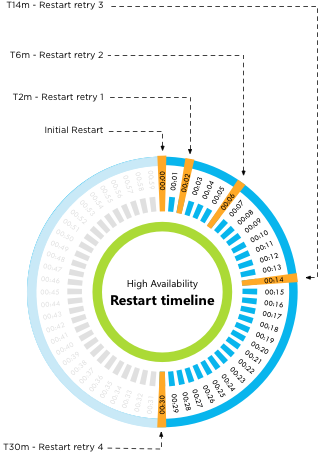
I wrote about how vSphere HA 5.x restart attempt timing works a long time ago but there appears still to be some confusion about this. I figured I would clarify this a bit more, I don’t think I can make it more simple than this:

  • Initial restart attempt
  • If the initial attempt failed, a restart will be retried after 2 minutes of the previous attempt
  • If the previous attempt failed, a restart will be retried after 4 minutes of the previous attempt
  • If the previous attempt failed, a restart will be retried after 8 minutes of the previous attempt
  • If the previous attempt failed, a restart will be retried after 16 minutes of the previous attempt

After the fifth failed attempt the cycle ends. Well that is, unless a new master host is selected (for whatever reason) between the first and the fifth attempt. In that case, we start counting again. Meaning that if a new master is selected after attempt 3, the new master will start with the “initial restart attempt.

Or as Frank Denneman would say:

vSphere HA 5.x restart attempt timing


** Disclaimer: This article contains references to the words master and/or slave. I recognize these as exclusionary words. The words are used in this article for consistency because it’s currently the words that appear in the software, in the UI, and in the log files. When the software is updated to remove the words, this article will be updated to be in alignment. **

Software Defined Datacenter Roadshow – Benelux – Free Event!

Duncan Epping · Feb 6, 2013 ·

Would like to hear more about Software Defined Datacenters from experts like Frank Denneman, Mike Laverick, Cormac Hogan, Kamau Wanguhu and many others? VMware and IBM are organizing an awesome event in the Benelux. Yes this is a full day event, and it is free for everyone, if you just want to sign up… go here. If you need to be convinced keep reading as there are some awesome sessions scheduled.

Agenda
09.00 - 09.30 Registration
09.30 - 09.45 Welcome
09.45 - 10.30 Keynote VMware: Software-Defined Data Center
10.30 - 11.15 Keynote IBM: Converged Systems: beyond NextGen DC’s
11.15 - 11.30 Break and split into parallel sessions
11.30 - 12.15 Parallel track 1 or meet the expert
12.15 - 13.00 Lunch
13.00 - 13.45 Parallel track 2 or meet the expert
14.00 - 14.45 Parallel track 3 or meet the expert
15.00 - 15.45 Parallel track 4 or meet the expert
16.00 - 16.45 Parallel track 5 or meet the expert
16.45 - 17.30 Networking drink

The awesome part is that at this event you will also have the ability to sit down with one of the experts for a 1:1 discussion and get your questions answered. Below is the list of people you can sit down with, make sure to register for that!

VMware
Frank Denneman – Resource Management Expert
Cormac Hogan – Storage Expert
Kamau Wanguhu – Software Defined Networking Expert
Mike Laverick – Cloud Infrastructure Expert
Ton Hermes – End User Computing Expert

IBM
Tikiri Wanduragala – IBM PureSystems Expert
Dennis Lauwers – Converged Systems Expert
Geordy Korte – Software Defined Networking Expert
Andreas Groth – End User Computing Expert

So if you live in The Netherlands, Belgium or Luxemburg… make sure to sign up. As mentioned, it is a free event. And with people like Cormac Hogan, Frank Denneman, Mike Laverick and Kamau Wanguhu you know it is going to get deep technical.

  • 5th March – Amsterdam
  • 7th March – Brussels
  • 8th March – Luxemburg

–> Sign up now <–

  • « Go to Previous Page
  • Page 1
  • Interim pages omitted …
  • Page 128
  • Page 129
  • Page 130
  • Page 131
  • Page 132
  • Interim pages omitted …
  • Page 336
  • Go to Next Page »

Primary Sidebar

About the Author

Duncan Epping is a Chief Technologist and Distinguished Engineering Architect at Broadcom. Besides writing on Yellow-Bricks, Duncan is the co-author of the vSAN Deep Dive and the vSphere Clustering Deep Dive book series. Duncan is also the host of the Unexplored Territory Podcast.

Follow Us

  • X
  • Spotify
  • RSS Feed
  • LinkedIn

Recommended Book(s)

Also visit!

For the Dutch-speaking audience, make sure to visit RunNerd.nl to follow my running adventure, read shoe/gear/race reviews, and more!

Do you like Hardcore-Punk music? Follow my Spotify Playlist!

Do you like 80s music? I got you covered!

Copyright Yellow-Bricks.com © 2026 · Log in