• Skip to primary navigation
  • Skip to main content
  • Skip to primary sidebar

Yellow Bricks

by Duncan Epping

  • Home
  • Unexplored Territory Podcast
  • HA Deepdive
  • ESXTOP
  • Stickers/Shirts
  • Privacy Policy
  • About
  • Show Search
Hide Search

Server

vCenter Single Sign On aka SSO, what do I recommend?

Duncan Epping · Jun 26, 2013 ·

I have had various people asking me over the last 9 months what I would recommend when it comes to SSO. Would I use a multi-site configuration, maybe even an HA configuration or would I go for the Basic configuration? What about when I have multiple vCenter Server instances, would I share the SSO instance between these or deploy multiple SSO instances? All very valid questions I would say. I have kept my head low intentionally the last year to be honest, but after reading this excellent blog post by Josh Odgers where he posted an awesome  architectural decision flow chart I figured it was time voice my opinion. Just look at this impression of the flow chart (for full resolution visit Josh’s website):
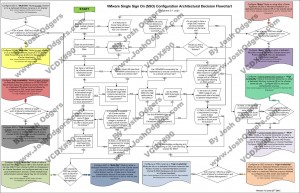
Complex? Yes I agree, probably too complex for most people. Difficult to digest, and that is not due to Josh’s diagramming skills. SSO has various deployment models (multi site, HA, basic), and then there is the option to deploy it centralized or localized as well. On top of that there is also the option to protect it using Heartbeat. Now you can probably understand why the flow diagram ended up looking complex. Many different options but what makes sense?

Justin King already mentioned this in his blog series on SSO (part 1, 2, 3, 4) as a suggestion, but lets drive it home! Although it might seem like it defeats the purpose I would recommend the following in almost every single scenario one can imagine: Basic SSO deployment, local to vCenter Server instance. Really, the KISS principle applies here. (Keep It Simple SSO!) Why do I recommend this? Well for the following simple reasons:

  • SSO in HA mode does not make sense as clustering the SSO database is not supported, so although you just deployed an HA solution you still end up with a single point of failure!
  • You could separate SSO from vCenter, but why would you create a dependency on network connection between the vCenter instance and the SSO instance? It is asking for trouble.
  • A centralized SSO instance sounds like it make sense, but the problem here is that it requires all connecting vCenter instances to be on the same version. Yes indeed, this complicates your operational model. So go localized for now.

So is there a valid reason to deviate from this? Yes there is and it is called Linked Mode. Linked Mode “requires” SSO to be deployed in a “multi-site” configuration, this is probably one of the few reasons I would not follow the KISS principle when there is a requirement for linked-mode… personally I never use Linked Mode though, I find it confusing.

So there you have it, KISS!
How does Mem.MinFreePct work with vSphere 5.0 and up?

Duncan Epping · Jun 14, 2013 ·

With vSphere 5.0 VMware changed the way Mem.MinFreePct worked. I had briefly explained Mem.MinFreePct in a blog post a long time ago. Basically Mem.MinFreePct, pre vSphere 5.0, was the percentage of memory set aside by the VMkernel to ensure there are always sufficient system resources available. I received a question on twitter yesterday based on the explanation in the vSphere 5.1 Clustering Deepdive and after exchanging > 10 tweets I figured it made sense to just write an article.

https://twitter.com/vmcutlip/status/345289952684290048

Mem.MinFreePct used to be 6% with vSphere 4.1 and lower. Now you can imagine that when you had a host with 10GB you wouldn’t worry about 600MB being kept free, but that is slightly different for a host with 100GB as it would result in 6GB being kept free but still not an extreme amount right. What would happen when you have a host with 512GB of memory… Yes, that would result in 30GB of memory being kept free. I am guessing you can see the point now. So what changed with vSphere 5.0?

In vSphere 5.0 a “sliding scale” principle was introduced instead of Mem.MinFreePct. Let me call it “Mem.MinFree”, as I wouldn’t view this as a percentage but rather do the math and view it as a number instead. Lets borrow Frank’s table for this sliding scale concept:

Percentage kept free of –>
Memory Range
6% 0-4GB
4% 4-12GB
2% 12-28GB
1% Remaining memory

What does this mean if you have 100GB of memory in your host? It means that from the first 4GB of memory we will set aside 6% which equates to ~ 245MB. For the next 8GB (4-12GB range) we set aside another 4% which equates to ~327MB. For the next 16GB (12-28GB range) we set aside 2% which equates to ~ 327MB. Now from the remaining 72GB (100GB host – 28GB) we set aside 1% which equates to ~ 720MB. In total the value of Mem.MinFree is ~ 1619MB. This number, 1619MB, is being kept free for the system.

Now, what happens when the host has less than 1619MB of free memory? That is when the various memory reclamation techniques come in to play. We all know the famous “high, soft, hard, and low” memory states, these used to be explained as: 6% (High), 4% (Soft), 2% (Hard), 1% (Low). FORGET THAT! Yes, I mean that… forget these as that is what we used in the “old world” (pre 5.0). With vSphere 5.0 and up these water marks should be viewed as a Percentage of Mem.MinFree. I used the example from above to clarify it a bit what it results in.

Free memory state Threshold in Percentage
Threshold in MB
High water mark Higher than or equal to Mem.MinFree 1619MB
Soft water mark 64% of Mem.MinFree 1036MB
Hard water mark 32% of Mem.MinFree 518MB
Low water mark 16% of Mem.MinFree 259MB

I hope this clarifies a bit how vSphere 5.0 (and up) ensures there is sufficient memory available for the VMkernel to handle system tasks…

Thanks for making the book promotion a huge success!

Duncan Epping · Jun 11, 2013 ·

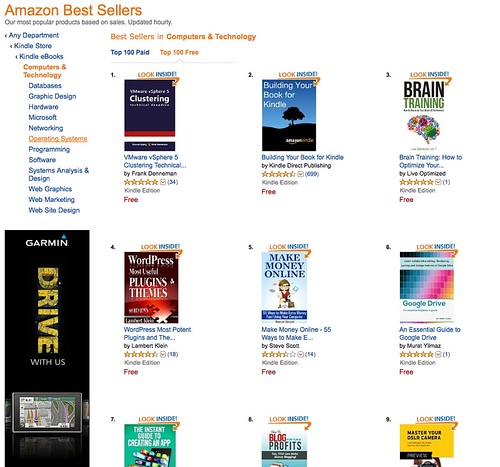
I just want to thank everyone for making the vSphere 4.1 and vSphere 5.0 Clustering Deepdive book promotion a huge success. Thanks for sharing the news with your colleagues / friends / readers! Frank and I never expected that so many would be downloaded… As I said on facebook:

  • vSphere 4.1 HA/DRS Deepdive on Amazon –> $ 0,-
  • vSphere 5.0 Clustering Deepdive ebook on Amazon –> $ 0,-
  • Revenue for the authors –> $ 0,-
  • 7000+ downloads of the books, and the number 1 spot on Amazon again –> PRICELESS!

Reminder: Free Kindle copy of vSphere 5 and 4.1 Clustering Deepdive

Duncan Epping · Jun 5, 2013 ·

Just a reminder, if you want your free Kindle copy of the vSphere 5.0 Clustering Deepdive or the vSphere 4.1 HA and DRS Deepdive, make sure to check Amazon (US Kindle Store) today and tomorrow (Wednesday June the 5th and Thursday June the 6th)! You can download the Kindle copy of both these books for free, yes that is correct ZERO dollars.

So make sure you pick it up either before the promo expires…

** Note I have linked the US Kindle stores, it is also available for free in local Kindle stores, just do search! **


Manual vMotion and using DRS to select a host results in no migration?

Duncan Epping · May 30, 2013 ·

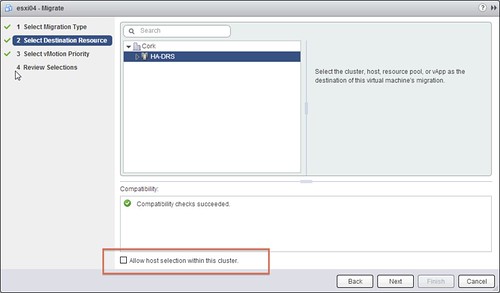
I had a question from a customer last week. He was doing a manual migration on a cluster which had DRS enabled. He was using the vSphere Web Client and was wondering if he should tick the “Allow host selection within this cluster” tickbox or not, as shown in the screen shot below. The customer decided not to tick the “host selection” tickbox and decided that DRS would pick the right destination for the virtual machine. After he clicked “Finish” he noticed that the “relocation” literally finished in seconds and he wondered if anything happened at all… When he looked at the virtual machine he noticed it was still located on the same host, how can that be?

Well the answer is fairly straight forward, in this case the DRS cluster was balanced and that is the typical situation for most clusters out there I would say. When initiating the vMotion workflow the Cluster was selected as a destination so DRS had to figure out what the best destination would be. Considering the cluster was in balance, there would be absolutely no point in moving this virtual machine so what did DRS decide? Indeed, destination = source.

If you are going through this workflow using the Web Client, make sure to tick “Allow host selection within this cluster” and select a destination other than your source… otherwise the effort was pointless.

Manual vMotion

  • « Go to Previous Page
  • Page 1
  • Interim pages omitted …
  • Page 124
  • Page 125
  • Page 126
  • Page 127
  • Page 128
  • Interim pages omitted …
  • Page 336
  • Go to Next Page »

Primary Sidebar

About the Author

Duncan Epping is a Chief Technologist and Distinguished Engineering Architect at Broadcom. Besides writing on Yellow-Bricks, Duncan is the co-author of the vSAN Deep Dive and the vSphere Clustering Deep Dive book series. Duncan is also the host of the Unexplored Territory Podcast.

Follow Us

  • X
  • Spotify
  • RSS Feed
  • LinkedIn

Recommended Book(s)

Also visit!

For the Dutch-speaking audience, make sure to visit RunNerd.nl to follow my running adventure, read shoe/gear/race reviews, and more!

Do you like Hardcore-Punk music? Follow my Spotify Playlist!

Do you like 80s music? I got you covered!

Copyright Yellow-Bricks.com © 2026 · Log in