• Skip to primary navigation
  • Skip to main content
  • Skip to primary sidebar

Yellow Bricks

by Duncan Epping

  • Home
  • Unexplored Territory Podcast
  • HA Deepdive
  • ESXTOP
  • Stickers/Shirts
  • Privacy Policy
  • About
  • Show Search
Hide Search

Software Defined

Something to know about vSphere Flash Read Cache

Duncan Epping · Sep 24, 2013 ·

When I was looking in to vSphere Flash Read Cache (part of vSphere 5.5) there was one thing that had my interest, how does it interact with vSphere HA and DRS and more specifically, are there any caveats? It all started with the question what are the requirements for a virtual machine to be successfully restarted by vSphere HA?

The answer was simple, when you define a vSphere Flash Read Cache size for a virtual disk on a virtual machine, that amount of cache capacity defined for that virtual disk needs to be available on a local flash resource in order for the VM to be restarted / powered-on. So what does this mean? Well it means that when you set a flash read cache for a given virtual disk to 4GB, that 4GB needs to be available on your local host where the VM will be powered on. But what in the case of an HA initiated restart? Will HA ignore this requirement during restarts or will it try to guarantee the same performance? [Read more…] about Something to know about vSphere Flash Read Cache
The Compatibility Guides are now updated with VSAN and vFlash info!

Duncan Epping · Sep 23, 2013 ·

For those wanting to play with Virtual SAN (VSAN) and vSphere Flash Read Cache (vFRC / vFlash), the compatibility guides are being updated at the moment. Hit the following URL to find out what is currently supported and what not:

  • vmware.com/resources/compatibility/
  • For vSphere Flash Read Cache:
    • Select “VMware Flash Read Cache” from the drop down list titled “What are you looking for”.
    • Hit “update and view results”
  • For Virtual SAN:
    • Select “Virtual SAN (beta)” from the drop down list titled “What are you looking for”
    • Select “ESXi 5.5” and click “Next”
    • Select a category (server, i/o controller, hdd, ssd), at the time of writing only server was available
    • Select the type of Server and click next
    • Now a list is presented of supported servers

I know both lists are short today, this is an on-going efforts and I know many vendors are now wrapping up and submitting their test reports, more to be added over the course of the next couple of weeks so keep on coming back to the compatibility guide.

Be careful when defining a VM storage policy for VSAN

Duncan Epping · Sep 19, 2013 ·

I was defining a VM storage policy for VSAN and it resulted in something unexpected. You might have read that when no policy is defined within vCenter that VSAN defaults to the following for availability reasons:

  • Failures to tolerate = 1

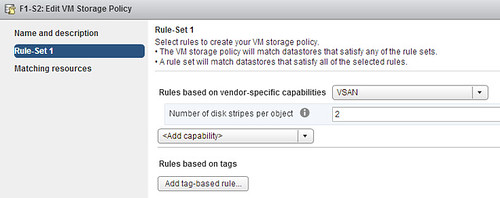
So I figured I would define a new policy and include “stripe width” in this policy. I wanted to have a stripe width of 2 and “failures to tolerate” set to the default of 1. I figured as “failures to tolerate” is set to 1 anyway by default I would specify it, but would just specify stripe width. Why add rules which already have the correct value right?

VM storage policy for VSAN

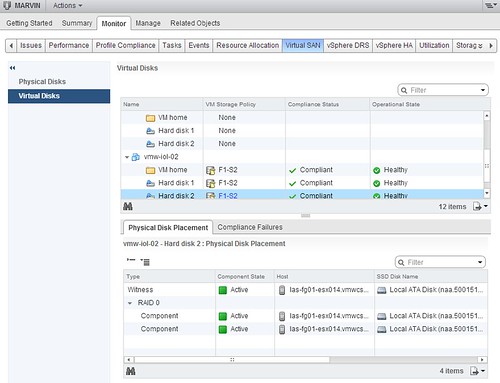
Well that is what I figured, no point in adding it… and this was the result:

Do you notice something in the above screenshot? I do… I see no “RAID 1” mentioned and all components reside on the same host, esx014, in this case. So what does that mean? It means that when you create a profile and do not specify “failures to tolerate” that is default to 0 and no mirror copies are created. This is not the situation you want to find yourself in! So when you define stripe width, make sure you also define “failures to tolerate”. Even better, when you create a VM Storage Policy always include “failures to tolerate. Below is an example of what my policy should have looked like.

VM storage policy for VSAN

So remember this: When defining a new VSAN VM Storage Policy always include “Number of failures to tolerate”! If you did forget to specify it, the nice thing here is that you can change VM Storage Policies on the fly and apply them directly to your VMs. Cormac has a nice article on this subject!

Isolation / Partition scenario with VSAN cluster, how is this handled?

Duncan Epping · Sep 19, 2013 ·

After explaining how a disk or host failure worked in a VSAN cluster, it only made sense to take the next step… How are Isolations or Partitions in a Virtual SAN cluster handled? I guess lets start with the beginning, and I am going to try to keep it simple, first a recap of what we learned in the disk/host failures article.

Virtual SAN (VSAN) has the ability to create mirrors of objects. This ability is defined within a policy (VM Storage Policy aka Storage Policy Based Management). You can define option called “failures to tolerate” anywhere between 0 and 3 at the moment. By default this option is set to 1. This means you will have two copies of your data. On top of that VSAN will need a witness / quorum to help figuring out who takes ownership in the case of an event. So what does this look like? Note that in the below diagram I used the term “vmdk” and “witness” to simplify things, in reality this could be any type of component of a VM.

So what did we learn from this (hopefully) simple diagram?

  • A VM does not necessarily have to run on the same host as where its storage objects are sitting
  • The witness lives on a different host than the components it is associated with in order to create an odd number of hosts involved for tiebreaking under a network partition
  • The VSAN network is used for communication, IO and HA

Lets recap some of the HA changes first for a VSAN cluster before we dive in to the details:

  • When HA is turned on in the cluster, FDM agent (HA) traffic uses the VSAN network and not the Management Network. However, when a potential isolation is detected HA will ping the default gateway (or specified isolation address) using the Management Network.
  • When enabling VSAN ensure vSphere HA is disabled. You cannot enable VSAN when HA is already configured. Either configure VSAN during the creation of the cluster or disable vSphere HA temporarily when configuring VSAN.
  • When there are only VSAN datastores available within a cluster then Datastore Heartbeating is disabled. HA will never use a VSAN datastore for heartbeating as the VSAN network is already used for network heartbeating using the Datastore for heartbeating would not add anything,
  • When changes are made to the VSAN network it is required to re-configure vSphere HA!

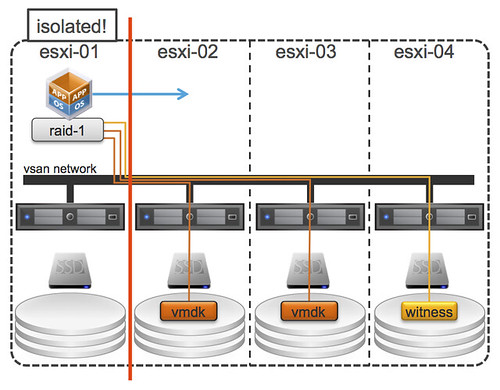
As you can see the VSAN network plays a big roll here, and even bigger then you might realize as it is also used by HA for network heartbeating. So what if the host on which the VM is running gets isolated from the rest of the network? The following would happen:

  • HA will detect there are no network heartbeats received from “esxi-01”
  • HA master will try to ping the slave “esxi-01”
  • HA will declare the slave “esxi-01” is unavailable
  • VM will be restarted on one of the other hosts… “esxi-02” in this case, but that could be any, depicted in the diagram below

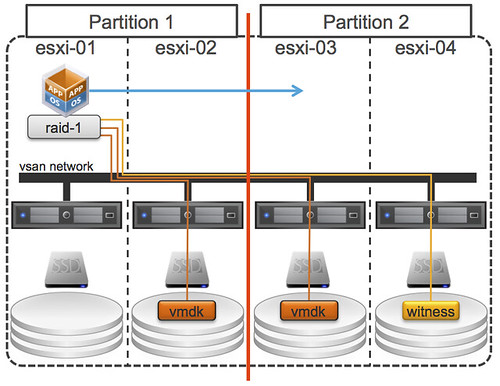
Simple right? Before I forget, for these scenarios it is important to ensure that your isolation response is set to power-off. But I guess the question now arises… what if “esxi-01” and “esxi-02” would be part of the same partition? What happens then? Well that is where the witness comes in to play. Let show the diagram first, as that will make it a bit easier to understand!

Now this scenario is slightly more complex. There are two partitions, one of the partition is running the VM with its VMDK and the other partition has a VMDK and a witness. Guess what happens? Right, VSAN uses the witness to see which partition has quorum and based on that fact one of the two will win. In this case Partition-2 has more than 50% of the components of this object and as such is the winner. This means that the VM will be restarted on either “esxi-03” or “esxi-04” by HA. Note that the VM in Partition-1 will not be powered off, even if you have configured the isolation response to do so, as this partition would re-elect a master and would be able to see each other!

But what if “esxi-01” and “esxi-04” were isolated, what would happen then? This is what it would look like:

Remember that rule which I slipped in to the previous paragraph? The winner is declared based on the % of components available within that partition. If the partition has access to more than 50% it has won. Meaning that when “esxi-01” and “esxi-04” are isolated, either “esxi-02” or “esxi-03” can restart the VM because 66% of the components reside within this part of the cluster. Nice right?!

I hope this makes isolations / partitions a bit clearer, I realize though concepts will be tough for the first weeks/months… I will try to explore some more (complex) scenarios in the near future.

How VSAN handles a disk or host failure

Duncan Epping · Sep 18, 2013 ·

I have had this question multiple times by now, I wanted to answer it in the Virtual SAN FAQ but I figured I would need some diagrams and probably more than 2 or 3 sentences to explain this. How are host or disk failures in a Virtual SAN cluster handled? I guess lets start with the beginning, and I am going to try to keep it simple.

I explained some of the basics in my VSAN intro post a couple of weeks back, but it never hurts to repeat this. I think it is good to explain the IO path first before talking about the failures. Lets look at a 4 host cluster with a single VM deployed. This VM is deployed with the default policy, meaning “stripe width” of 1 and “failures to tolerate” to 1 as well. When deployed in this fashion the following is the result:

In this case you can see: 2 mirrors of the VMDKs and a witness. These VMDKs by the way are the same, they are an exact copy. What else did we learn from this (hopefully) simple diagram?

  • A VM does not necessarily have to run on the same host as where its storage objects are sitting
  • The witness lives on a different host than the components it is associated with in order to create an odd number of hosts involved for tiebreaking under a network partition
  • The VSAN network is used for communication / IO etc

Okay, so now that we know these facts it is also worth knowing that VSAN will never place the mirror on the same host for availability reasons. When a VM writes the IO is mirrored by VSAN and will not be acknowledged back to the VM until all have completed. Meaning that in the example above both the acknowledgement from “esxi-02” and “esxi-03” will need to have been received before the write is acknowledge to the VM. The great thing here is though that all writes will go to flash/ssd, this is where the write-buffer comes in to play. At some point in time VSAN will then destage the data to your magnetic disks, but this will happen without the guest VM knowing about it… [Read more…] about How VSAN handles a disk or host failure

  • « Go to Previous Page
  • Page 1
  • Interim pages omitted …
  • Page 62
  • Page 63
  • Page 64
  • Page 65
  • Page 66
  • Interim pages omitted …
  • Page 71
  • Go to Next Page »

Primary Sidebar

About the Author

Duncan Epping is a Chief Technologist and Distinguished Engineering Architect at Broadcom. Besides writing on Yellow-Bricks, Duncan is the co-author of the vSAN Deep Dive and the vSphere Clustering Deep Dive book series. Duncan is also the host of the Unexplored Territory Podcast.

Follow Us

  • X
  • Spotify
  • RSS Feed
  • LinkedIn

Recommended Book(s)

Also visit!

For the Dutch-speaking audience, make sure to visit RunNerd.nl to follow my running adventure, read shoe/gear/race reviews, and more!

Do you like Hardcore-Punk music? Follow my Spotify Playlist!

Do you like 80s music? I got you covered!

Copyright Yellow-Bricks.com © 2026 ยท Log in