I was playing in my lab this morning and figured I would record a demo of a new feature which is part of vSAN 6.6.1. The Performance Diagnostics feature is aimed to help those running benchmarks to optimize their benchmarks, or optimize their vSAN configuration to reach their expected goals. Note that it is a “cloud connected” feature, and in order to use this you need to participate in the Customer Experience Improvement Program. This however is enabled by default in the latest releases of vSphere. This means that data is send up to the VMware cloud, anonymous, then analyzed and the results are send back to the Web Client. Anyway, enough said, just watch the demo.
Software Defined
Unbalanced Stretched vSAN Cluster
I had this question a couple of times the past month so I figured I would write a quick post. The question that was asked is: Can I have an unbalanced stretched cluster? In other words: Can I have 6 hosts in Site A and 4 hosts in site B when using vSAN Stretched Cluster functionality? Some may refer to this as asymmetric or uneven. Either way, the number of hosts in the two locations differ.
Is this supported? In short: Yes.
The longer answer: Yes you can do this, this is fully supported but you will need to keep your selected PFTT (Primary Failures To Tolerate), SFTT (Secondary Failures To Tolerate) and FTM (Failure Tolerance Method) in to account. If PFTT=1 and SFTT=2 and FTM=Erasure Coding (RAID5/6) then the minimum number of hosts per site is 6. You could however have 10 hosts in Site A while having 6 hosts in Site B.
Some may wonder why anyone would want this, well you can imagine you are running workloads which do not need to be recovered in the case of a full site failure. If that is the case you could stick these to 1 site. (You can set PFTT=0 and SFTT=1, which would result in this scenario for that particular VM.)
That is the power of Policy Based Management and vSAN, extremely flexibility and on a per VM/VMDK basis!
vSphere 6.5 U1 is out… and it comes with vSAN 6.6.1
vSphere 6.5 U1 was released last night. It has some cool new functionality in there as part of vSAN 6.6.1 (I can’t wait for vSAN 6.6.6 to ship ;-)). There are a lot of fixes of course in 6.6.1 and U1, but as stated, there’s also new functionality:
- VMware vSphere Update Manager (VUM) integration
- Storage Device Serviceability enhancement
- Performance Diagnostics in vSAN
So those using vSAN 6.2 who upgraded to vSphere 6.0 U3, here’s your chance to upgrade to get all vSAN 6.5 functionality, and more!
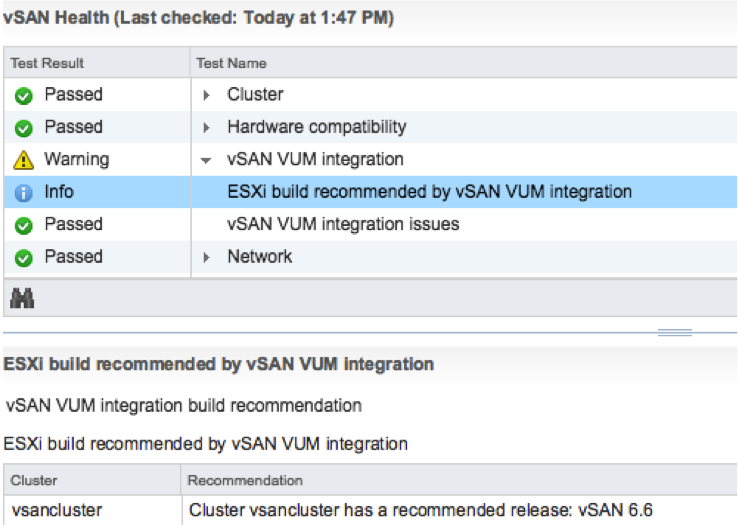
The VUM integration is pretty cool if you ask me. First of all, when there’s a new release the Health Check will call it out from now on. And on top of that, when you go to VUM then also things like async drivers will be taken in to consideration. Where you would normally have to slipstream drivers in to the image and make that image available through VUM, we now ensure that the image used is vSAN Ready! In other words, as of vSphere 6.5 U1 Update Manager is fully aware of vSAN and integrated as well. We are working hard to bring all vSAN Ready Node vendors on-board. (With Dell, Supermicro, Fujitsu and Lenovo leading the pack.)
Then there’s this feature called “Storage Device Serviceability enhancement”. Well this is the ability to blink the LEDs on specific devices. As far as I know, in this release we added support for HP Gen 9 controllers.
And last but not least: Performance Diagnostics in vSAN. I really like this feature. Note that this is all about analyzing benchmarks. It is not (yet?) about analyzing steady state. So in this case you run your benchmark, preferably using HCIBench, and then analyze it by selecting a specific goal. Performance will be analyzed using “cloud analytics”, and at the end you will get various recommendations and/or explanations for the results you’ve witnessed. These will point back to KBs, which in certain cases will give you hints how to solve your (if there is) bottleneck.
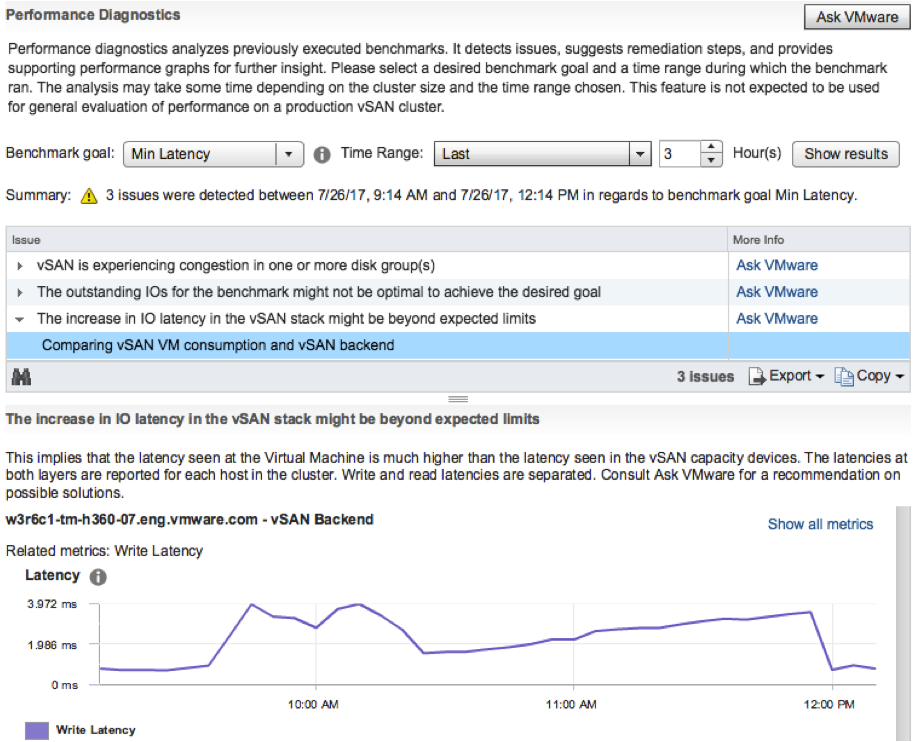
Note that in order to use this functionality you need to join CEIP (Customer Experience Improvement Program), which means that you will upload info in to VMware. But this by itself is very valuable as it allows our developers to solve bugs / user experience issues and getting a better understanding of how you use vSAN. I spoke with Christian Dickmann on this topic yesterday as he tweeted the below, and he was really excited, he said he had various fixes going in the next vSAN release based on the current data set. So join the program!
A huge THANK YOU to anyone participating in Customer Experience Improvement Program (CEIP)! Eye-opening data that we are acting on.
— Christian Dickmann (@cdickmann) July 27, 2017
For those how can’t wait, here’s the release notes and downloads links:
- vCenter Server 6.5 u1 release notes: https://docs.vmware.com/en/VMware-vSphere/6.5/rn/vsphere-vcenter-server-651-release-notes.html
- vCenter Server 6.5 u1 downloads: https://my.vmware.com/web/vmware/details?downloadGroup=VC65U1&productId=614&rPId=17343
- ESXi 6.5 release notes: https://docs.vmware.com/en/VMware-vSphere/6.5/rn/vsphere-esxi-651-release-notes.html
- ESXi 6.5 download: https://my.vmware.com/web/vmware/details?downloadGroup=ESXI65U1&productId=614&rPId=17342
- vSAN 6.6.1 release notes: https://docs.vmware.com/en/VMware-vSphere/6.5/rn/vmware-vsan-661-release-notes.html
Oh and before I forget, there’s new functionality in the H5 Client for vCenter in 6.5 U1. As mentioned on this vSphere blog: “Virtual Distributed Switch (VDS) management, datastore management, and host configuration are areas that have seen a big increase in functionality”. And then some of the “max config” items had a big jump. 50k powered on VMs for instance is huge:
- Maximum vCenter Servers per vSphere Domain: 15 (increased from 10)
- Maximum ESXi Hosts per vSphere Domain: 5000 (increased from 4000)
- Maximum Powered On VMs per vSphere Domain: 50,000 (increased from 30,000)
- Maximum Registered VMs per vSphere Domain: 70,000 (increased from 50,000)
That was it for now!
VMkernel Observations (VOBs)
I never really looked at VOBs but as this came up last week during a customer meeting I decided to look in to it a bit. I hadn’t realized there was such a large number of them in the first place. My conversation was in the context of vSAN, but there are many different VOBs. For those who don’t know VOBs are system events. These events are logged and you can create different alarms for when they are being logged.
You can check the full list of VOBs on ESXi, SSH in to it and then look at this file:
- /usr/lib/vmware/hostd/extensions/hostdiag/locale/en/event.vmsg
When they are triggered you will see them here:
- /var/log/vobd.log
And as stated when you want to do something with them you can create a customer alarm. Select “specific event occuring on this object” and click next:
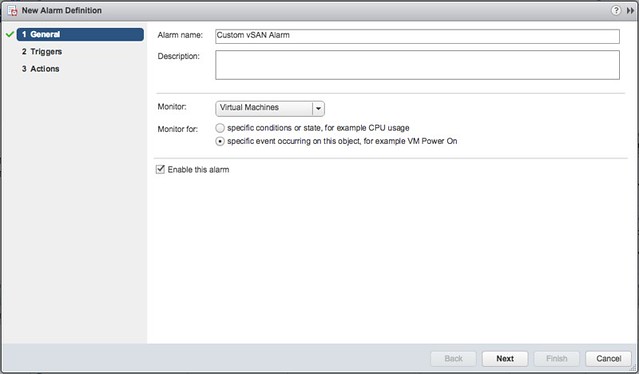
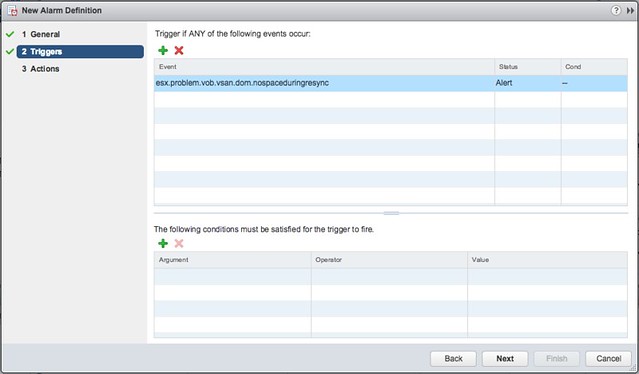
Now you add an event, simply click the “+” and remove the current value and simply copy/paste the VOB string in, the string will look something like this: “esx.problem.vob.vsan.pdl.offline”. Hit enter when you added it and then click “Next” and “Finish”.
I find the following useful myself:
- esx.problem.vsan.net.redundancy.reduced
- esx.problem.vob.vsan.lsom.componentthreshold
- esx.problem.vob.vsan.lsom.diskerror
- esx.problem.vob.vsan.pdl.offline
- esx.problem.vsan.lsom.congestionthreshold
- esx.problem.vob.vsan.dom.nospaceduringresync
There are many more, and I just listed those I found useful for vSAN, for more detail check the following links:
- https://docs.vmware.com/en/VMware-vSphere/6.0/com.vmware.vsphere.virtualsan.doc/GUID-FB21AEB8-204D-4B40-B154-42F58D332966.html
- http://www.virtuallyghetto.com/2015/03/new-vobs-for-creating-vcenter-server-alarms-in-vsphere-6-0.html
- http://www.virtuallyghetto.com/2014/04/handy-vsan-vobs-for-creating-vcenter-alarms.html
- http://www.virtuallyghetto.com/2014/04/other-handy-vsphere-vobs-for-creating-vcenter-alarms.html
Sizing a vSAN Stretched Cluster
I have had this question a couple of times already, how many hosts do I need per site when the Primary FTT is set to 1 and the Secondary FTT is set to 1 and RAID-5 is used as the Failure Tolerance Method? The answer is straight forward, you have a local RAID-5 set locally in each site. RAID-5 is a 3+1 configuration, meaning 3 data blocks and 1 parity block. As such each site will need 4 hosts at a minimum. So if the requirement is PFTT=1 and SFTT=1 with the Failure Tolerance Method (FTM) set to RAID-5 then the vSAN Stretched Clustering configuration will be: 4+4+1. Note, that also when you use RAID-1 you will need at minimum 3 hosts per site. This because locally you will have 2 “data” components and 1 witness component.
From a capacity stance, if you have a 100GB VM and do PFTT=1, SFTT=1 and FTM set to RAID-1 then you have a local RAID-1 set in each site. Which means 100GB requires 200GB in each location. So 200% required local capacity, 400% for the total cluster. Using the below table you can easily see the overhead. Note that RAID-5 and RAID-6 are only available when using all-flash.
I created a quick table to help those going through this exercise. I did not include “FTT=3” as this in practice is not used too often in stretched configurations.
| Description | PFTT | SFTT | FTM | Hosts per site | Stretched Config | Single site capacity | Total cluster capacity |
|---|---|---|---|---|---|---|---|
| Standard Stretched across locations with local protection | 1 | 1 | RAID-1 | 3 | 3+3+1 | 200% of VM | 400% of VM |
| Standard Stretched across locations with local RAID-5 | 1 | 1 | RAID-5 | 4 | 4+4+1 | 133% of VM | 266% of VM |
| Standard Stretched across locations with local RAID-6 | 1 | 2 | RAID-6 | 6 | 6+6+1 | 150% of VM | 300% of VM |
| Standard Stretched across locations no local protection | 1 | 0 | RAID-1 | 1 | 1+1+1 | 100% of VM | 200% of VM |
| Not stretched, only local RAID-1 | 0 | 1 | RAID-1 | 3 | n/a | 200% of VM | n/a |
| Not stretched, only local RAID-5 | 0 | 1 | RAID-5 | 4 | n/a | 133% of VM | n/a |
| Not stretched, only local RAID-6 | 0 | 2 | RAID-6 | 6 | n/a | 150% of VM | n/a |
Hope this helps!