• Skip to primary navigation
  • Skip to main content
  • Skip to primary sidebar

Yellow Bricks

by Duncan Epping

  • Home
  • Unexplored Territory Podcast
  • HA Deepdive
  • ESXTOP
  • Stickers/Shirts
  • Privacy Policy
  • About
  • Show Search
Hide Search

Software Defined

vSAN Stretched Cluster: PFTT and SFTT what happens when a full site fails and multiple hosts fail?

Duncan Epping · Mar 19, 2018 ·

This question was asked on the VMTN community forum and it is a very valid question. Our documentation explains this scenario, but only to a certain level and it seems to be causing some confusion as we speak. To be honest, it is fairly complex to understand. Internally we had a discussion with engineering about it and it took us a while to grasp it. As the documentation explains, the failure scenarios are all about maintaining quorum. If quorum is lost, the data will become inaccessible. This makes perfect sense, as vSAN will always aim to protect the consistency and reliability of data first.

So how does this work, well when creating a policy for a stretched cluster you specify Primary Failures To Tolerate (PFTT) and Secondary Failures To Tolerate (SFTT). PFTT can be seen as “site failures”, and you can always only tolerate 1 at most. SFTT can be seen as host failures, and you can define this between 0 and 3. Where we by far see FTT=1 (RAID-1 or RAID-5) and FTT=2 (RAID-6) the most. Now, if you have 1 full site failure, then on top of that you can tolerate SFTT host failures. So if you have SFTT=1 then this means that 2 host failures in the site that survived would result in data becoming inaccessible.

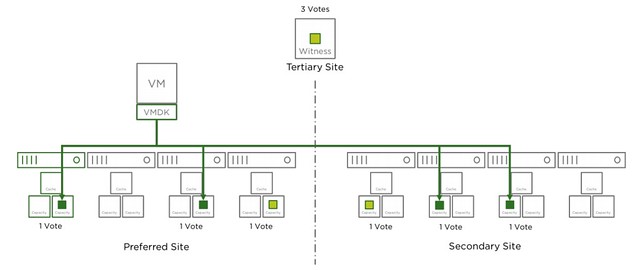
Where this gets tricky is when the Witness fails, why? Well because the witness is seen as a site failure. This means that if you have lets say 2 hosts failing in Data Site A and 1 host failing in Data Site B, while you had SFTT=2 assigned to your components, that your objects that are impacted will become inaccessible. Simply because you exceeded PFTT and SFTT. I hope that makes sense? Lets show that in a diagram (borrowed it from our documentation) for different failures, I suggest you do a “vote count” so that it is obvious why this happens. The total vote count is 9. Which means that the object will be accessible as long as the remaining vote count is 5 or higher.
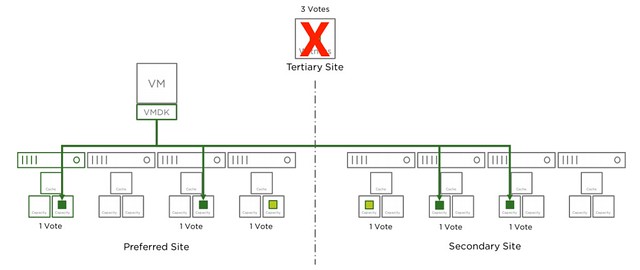
Now that the witness has failed, as shown in the next diagram, we lose 3 votes of the total 9 votes, no problem as we need 5 to remain access to the data.
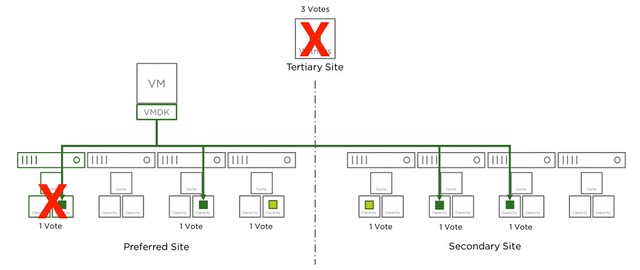
In the next diagram another host has failed in the environment, we now lost 4 votes out of the 9. Which means we still have 5 out of 9 and as such remain access.
And there we go, in the next diagram we just lost another one host, in this case it is the same location as the first host, but this could also be a host in the secondary site. Either way, this means we only have 4 votes left out of the 9. We needed 5 at a minimum, which means we now lose access to the data for those objects impacted. As stated earlier, vSAN does this to avoid any type of corruption/conflicts.
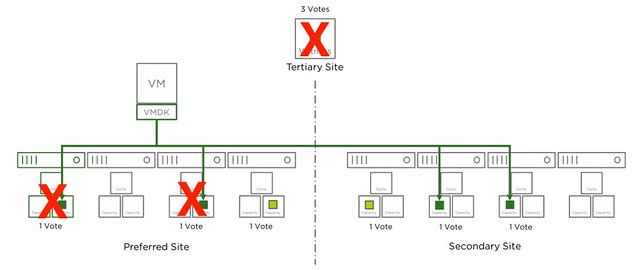
The same applies to RAID-6 of course. With RAID-6 as stated you can tolerate 1 full site failure and 2 host failures on top of that, but if the witness fails this means you can only lose 1 host in each of the sites before data may become inaccessible. I hope this helps those people running through failure scenarios.
Doing maintenance on a Two-Node (Direct Connect) vSAN configuration

Duncan Epping · Mar 13, 2018 ·

I was talking to a partner and customer last week at a VMUG. They were running a two node (direct connect) vSAN configuration and had some issues during maintenance which were, to them, not easy to explain. What they did is they placed the host which was in the “preferred fault domain” in to maintenance mode. After they placed that host in to maintenance mode the link between the two hosts for whatever reason failed. After they rebooted the host in the preferred host it connected back to the witness but at this point in time the connection between the hosts had not returned yet. This confused vSAN and that resulted in the scenario where the VMs in the secondary fault domain were powered off. As you can imagine an undesired effect.

This issue is solved in the near future in a new version of vSAN, but for those who need to do maintenance on a two-node (direct connect) configuration (or a full site maintenance in a stretched environment) I would highly recommend the following simple procedure. This will need to be done when doing maintenance on the host which is in the “preferred fault domain”:

  • Change the preferred fault domain
    • Under vSAN, click Fault Domains and Stretched Cluster.
    • Select the secondary fault domain and click the Mark Fault Domain as preferred for Stretched Cluster icon
  • Place the host in to maintenance mode
  • Do your maintenance

Fairly straight forward, but important to remember…

vSAN Adaptive Resync, what does it do?

Duncan Epping · Jan 18, 2018 ·

I am starting to get some more questions about vSAN Adaptive Resync lately. This was introduced a while back, but is also available in the latest versions of vSAN through vSphere 6.5 Patch 02. As a result various folks have started to look at it and are starting to wonder what it is. Hopefully by now everyone understands what resync traffic is and when you see resync traffic. The easiest example of course is a host failure. If a host has failed and there’s sufficient disk space and there’s additional hosts available to make the impacted VMs compliant with their policy again then vSAN will resync the data.

Resync aims to finish the creation of these new components asap, simple reason for this is availability. The longer the resync takes, the longer you are at risk. I think that makes sense right? In some cases however it may occur that when VMs are very busy and resync is happening that VM observed latency goes through the roof. We already had a manual throttling mechanism for when this situation occurs, but of course preferably vSAN should throttle resync traffic properly for you. This is what vSAN Adaptive Resync does.

So how does that work? Well, when the high watermark is reached for VM latency then vSAN will cut the bandwidth of resync in half. Next vSAN will check if the VM latency is below the low watermark, if not then it will cut resync traffic in half again. It does this until the latency is below the low watermark. When the latency is below the low watermark then vSAN will increase the bandwidth of resync traffic granularly until the low watermark is reached and stay at that level. (Some official info can be found in this kb, and this virtual blocks blog.)

Hope that helps,

Where is the vSAN storage performance proactive test in vSphere 6.5 U1 patch 02?

Duncan Epping · Jan 16, 2018 ·

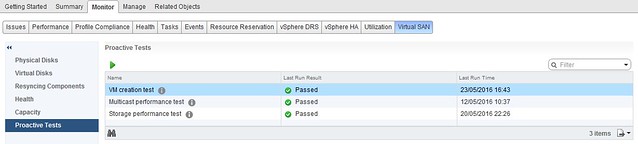
I had some customers asking where the storage performance proactive test and the multicast proactive test was in the latest release of vSAN. In the past this is what the UI looked like when they would go to the Proactive Test section:

proactive test disappeared

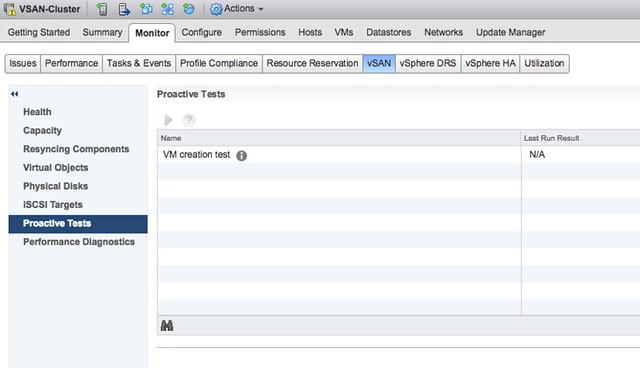
But now it looks like this:

proactive test disappeared

What happened? Well, two tests have been removed. I guess most people will understand why the Multicast test has been removed, with the disappearance of Multicast in vSAN the test was not needed any longer. To be clear, if you are running vSAN in unicast mode the test will not show, if you are running in multicast mode however then of course the test will still be shown. But what about the Storage Performance Test?

We have noticed that most customers were using HCI Bench when doing benchmarks or using their own tooling (please don’t use legacy tools). Those who were using the proactive test often drew incorrect conclusions as it does not provide the flexibility a solution like HCI Bench offers. VMware felt that HCI Bench was a more suitable solution for doing benchmarks and this is definitely VMware’s recommended solution, as such the decision was made to focus on HCI Bench from a development perspective and deprecate the perf benchmark feature in the Proactive Tests section.

Holiday gift: vSAN Essentials book available for free

Duncan Epping · Dec 19, 2017 ·

Christmas is coming so Cormac and I figured we would do something special for everyone, after a long debate we decided to make the vSAN Essentials book available for free. Note that this is the “Essential Virtual SAN” book which was published by VMware Press / Pearson and is based on the 6.2 version of vSAN. The book however is still very relevant today, and of course we are considering doing an update of the content to either the latest release, or maybe even to an upcoming release. You can read the book online (which is what we recommend), but you can also download it as PDF, EPUB or MOBI format. Basically you can read it anywhere, anytime and using any device. Nice right!?!

We used the Gitbook platform to publish the book and decided to leverage the beta version of gitbook as it looks very clean and makes the content easy to read online. Also, I have used the gitbook platform in the past for the HA Deepdive, and I wanted to give back by beta testing their platform. Ah well, instead of rambling on, here’s the book:

vsan-essentials.com

If you find anything unusual, please leave a comment here. Hope you will enjoy it, and appreciates us (the authors) giving back to the community. If you do then I hope you will consider donating to charity, the amount doesn’t matter, all help is welcome! I personally support Hardcore Help Foundation, and I hope you will considering doing the same! A donation of 10€ will provide clean, safe water to a family for two years. They need your help to reach out to more families in need.

  • « Go to Previous Page
  • Page 1
  • Interim pages omitted …
  • Page 15
  • Page 16
  • Page 17
  • Page 18
  • Page 19
  • Interim pages omitted …
  • Page 71
  • Go to Next Page »

Primary Sidebar

About the Author

Duncan Epping is a Chief Technologist and Distinguished Engineering Architect at Broadcom. Besides writing on Yellow-Bricks, Duncan is the co-author of the vSAN Deep Dive and the vSphere Clustering Deep Dive book series. Duncan is also the host of the Unexplored Territory Podcast.

Follow Us

  • X
  • Spotify
  • RSS Feed
  • LinkedIn

Recommended Book(s)

Also visit!

For the Dutch-speaking audience, make sure to visit RunNerd.nl to follow my running adventure, read shoe/gear/race reviews, and more!

Do you like Hardcore-Punk music? Follow my Spotify Playlist!

Do you like 80s music? I got you covered!

Copyright Yellow-Bricks.com © 2026 · Log in