• Skip to primary navigation
  • Skip to main content
  • Skip to primary sidebar

Yellow Bricks

by Duncan Epping

  • Home
  • Unexplored Territory Podcast
  • HA Deepdive
  • ESXTOP
  • Stickers/Shirts
  • Privacy Policy
  • About
  • Show Search
Hide Search

BC-DR

Stretched Clusters: Disable failover of specific VMs during full site failure

Duncan Epping · Oct 21, 2015 ·

Last week at VMworld when presenting on Virtual SAN Stretched Clusters someone asked me if it was possible to “disable the fail-over of VMs during a full site failure while allowing a restart during a host failure”. I thought about it and said “no, that is not possible today”. Yes you can “disable HA restarts” on a per VM basis, but you can’t do that for a particular type of failure.

The last statement is correct, HA does not allow you to disable restarts for a site failure. You can fully disable HA for a particular VM though. But when back at my hotel I started thinking about this question and realized that there is a work around to achieve this. I didn’t note down the name of the customer who asked the question, so hopefully you will read this.

When it comes to a stretched cluster configuration typically you will use VM/Host rules. These rules will “dictate” where VMs will run, and typically you use the “should” rule as you want to make sure VMs can run anywhere when there is a failure. However, you can also create “must” rules, and yes this means that the rules will not be violated and that those VMs can only run within that site. If a host fails within a site then the impacted VMs will be restarted within the site. If the site fails then the “must rule” will prevent the VMs from being restarted on the hosts in the other location. The must rules are pushed down to the “compatibility list” that HA maintains, which will never be violated by HA.
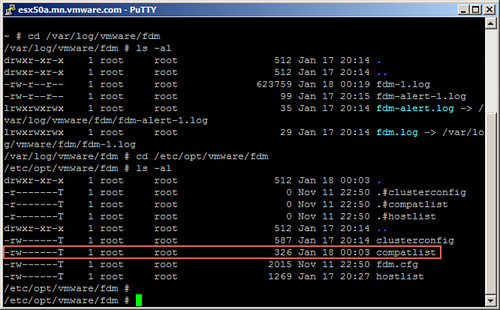
Simple work-around to prevent VMs from being restarted in another site.
SMP-FT support for Virtual SAN ROBO configurations

Duncan Epping · Oct 12, 2015 ·

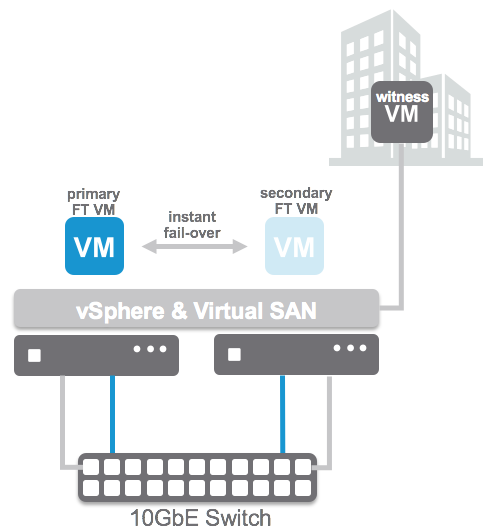
When we announced Virtual SAN 2-node ROBO configurations at VMworld we received a lot of great feedback and responses. A lot of people asked if SMP-FT was supported in that configuration. Apparently many of the customers using ROBO still have legacy applications which can use some form of extra protection against a host failure etc. The Virtual SAN team had not anticipated this and had not tested this explicit scenario unfortunately so our response had to be: not supported today.

We took the feedback to the engineering and QA team and these guys managed to do full end-to-end tests for SMP-FT on 2-node Virtual SAN ROBO configurations. Proud to announce that as of today this is now fully supported with Virtual SAN 6.1! I want to point out that still all SMP-FT requirements do apply, which means 10GbE for SMPT-FT! Nevertheless, if you have the need to provide that extra level of availability for certain workloads, now you can!

HA/DRS configuration with Virtual SAN Stretched Cluster environment

Duncan Epping · Sep 9, 2015 ·

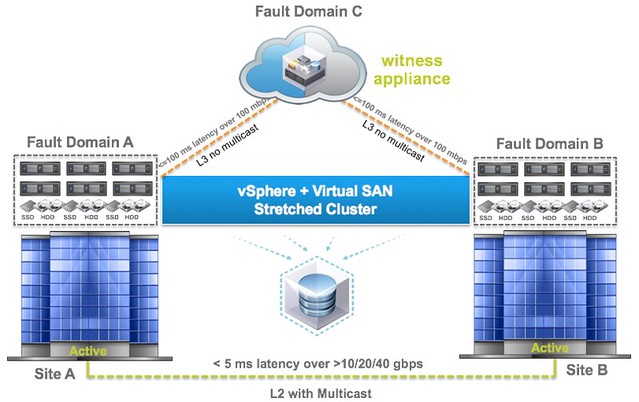
This question is going to come sooner or later, how do I configure HA/DRS when I am running a Virtual SAN Stretched cluster configuration. I described some of the basics of Virtual SAN stretched clustering in a what’s new for 6.1 post already, if you haven’t read it then I urge you to do so first. There are a couple of key things to know, first of all the latency between data sites that can be tolerated is 5ms and to the witness location ~100ms.

If you look at the picture you below you can imagine that when a VM sits in Fault Domain A and is reading from Fault Domain B that it could incur a latency of 5ms for each read IO. From a performance perspective we would like to avoid this 5ms latency, so for stretched clusters we introduce the concept of read locality. We don’t have this in a non-stretched environment, as there the latency is microseconds and not miliseconds. Now this “read locality” is something we need to take in to consideration when we configure HA and DRS.

[Read more…] about HA/DRS configuration with Virtual SAN Stretched Cluster environment

VMworld 2015: Site Recovery Manager 6.1 announced

Duncan Epping · Sep 1, 2015 ·

This week Site Recovery Manager 6.1 was announced. There are many enhancements in SRM 6.1 like the integration with NSX for instance and policy driven protection, but personally I feel that support for stretched storage is huge. When I say stretched storage I am referring to solutions like EMC VPLEX, Hitachi Virtual Storage Platform and IBM San Volume Controller(etc). In the past, and you can still today, when you had these solutions deployed you would have a single vCenter Server with a single cluster and moved VMs around manually when needed, or let HA take care of restarts in failure scenarios.

As of SRM 6.1 running these types of stretched configurations is now also supported. So how does that work, what does it allow you to do, and what does it look like? Well in contrary to a vSphere Metro Storage Cluster solution with SRM 6.1 you will be using two vCenter Server instances. These two vCenter Server instances will have an SRM server attached to it which will use a storage replication adaptor to communicate to the array.

But why would you want this? Why not just stretch the compute cluster also? Many have deployed these stretched configurations for disaster avoidance purposes. The problem is however that there is no form of orchestration whatsoever. This means that all workloads will come up typically in a random fashion. In some cases the application knows how to recover from situations like that, in most cases it does not… Leaving you with a lot of work, as after a failure you will now need to restart services, or VMs, in the right order. This is where SRM comes in, this is the strength of SRM, orchestration.

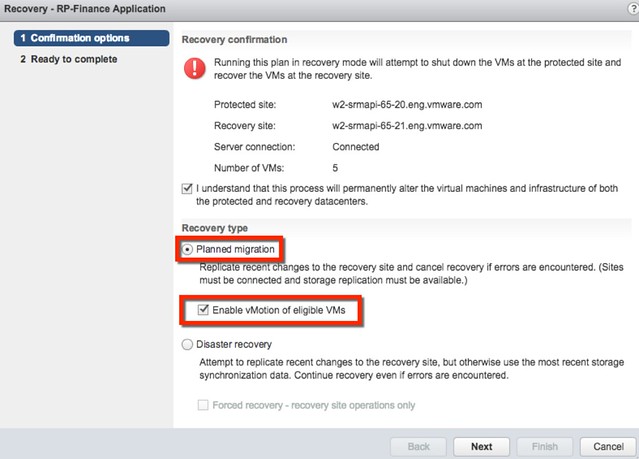
Besides doing orchestration of a full failover, what SRM can also do in the 6.1 release is evacuate a datacenter using vMotion in an orchestrated / automated way. If there is a disaster about to happen, you can now use the SRM interface to move virtual machines from one datacenter to another, with just a couple of clicks, planned migration is what it is called as can be seen in the screenshot above.

Personally I think this is a great step forward for stretched storage and SRM, very excited about this release!

Rubrik 2.0 release announced today

Duncan Epping · Aug 19, 2015 ·

Today the Rubrik 2.0 release was announced. I’ve written about who they are and what they do twice now so I am not going to repeat that. If you haven’t read those articles please read those first. (Article 1 and article 2) Chris Wahl took the time to brief me and the first thing that stood out to me was the new term that was coined namely: Converged Data Management. Considering what Rubrik does and has planned for the future I think that term is spot on.

When it comes to 2.0 there are a bunch of features that are introduced, I will list them out and then discuss some of them in a bit more detail:

  • New Rubrik appliance model r348
    • Same 2U/4Node platform, but leveraging 8TB disks instead of 4TB disks
  • Replication
  • Auto Protect
  • WAN Efficient (global deduplication)
  • AD Authentication – No need to explain
  • OpenStack Swift support
  • Application aware backups
  • Detailed reporting
  • Capacity planning

Lets start at the top, a new model is introduced next to the two existing models. The 2 other models are also both 2U/4Node solutions but use 4TB drives instead of the 8TB drives the R348 will be using. This will boost capacity for  single Brik up to roughly 300TB, in 2U this is not bad at all I would say.

Of course the hardware isn’t the most exiting, the software changes fortunately are. In the 2.0 release Rubrik introduces replication between sites / appliances and global dedupe which ensures that replication is as efficient as it can be. The great thing here is that you backup data and replicate it straight after it has been deduplicated to other sites. All of this is again policy driven by the way, so you can define when you want to replicate, how often and for how long data needs to be saved on the destination.

Auto-protect is one of those features which you will take for granted fast, but is very valuable. Basically it will allow you to set a default SLA on a vCenter level, or Cluster – Resource Pool – Folder, you get the drift. Set and forget is basically what this means, no longer the risk of newly provisioned VMs which have not been added to the backup schedule. Something really simple, but very useful.

When it comes to applications awareness Rubrik in version 2.0 will also leverage a VSS provider to allow for transactional consistent backups. This applies today for Microsoft Exchange, SQL, Sharepoint and Active Directory. More can be expected in the near future. Note that this applies to backups, for restoring there is no option (yet) to restore a specific mailbox for instance, but Chris assured me that this on their radar.

When it comes to usability a lot of improvements have been made starting with things like reporting and capacity planning. One of the reports which I found very useful is the SLA Compliancy reporting capability. It will simply show you if VMs are meeting the defined SLA or not. Capacity planning is also very helpful as it will inform you what the growth rate is locally and in the cloud, and also when you will be running out of space. Nice trigger to buy an additional appliance right, or change your retention period or archival policy etc. On top of that things like object deletion, task cancellation, progress bars and much more usability improvements have made it in to the 2.0 release.

All in all an impressive release, especially considering the 1.0 was released less than 6 months ago. It is great to see a high release cadence for an industry which has been moving extremely slow for the past decades. Thanks Rubrik for stirring things up!

  • « Go to Previous Page
  • Page 1
  • Interim pages omitted …
  • Page 17
  • Page 18
  • Page 19
  • Page 20
  • Page 21
  • Interim pages omitted …
  • Page 63
  • Go to Next Page »

Primary Sidebar

About the Author

Duncan Epping is a Chief Technologist and Distinguished Engineering Architect at Broadcom. Besides writing on Yellow-Bricks, Duncan is the co-author of the vSAN Deep Dive and the vSphere Clustering Deep Dive book series. Duncan is also the host of the Unexplored Territory Podcast.

Follow Us

  • X
  • Spotify
  • RSS Feed
  • LinkedIn

Recommended Book(s)

Also visit!

For the Dutch-speaking audience, make sure to visit RunNerd.nl to follow my running adventure, read shoe/gear/race reviews, and more!

Do you like Hardcore-Punk music? Follow my Spotify Playlist!

Do you like 80s music? I got you covered!

Copyright Yellow-Bricks.com © 2026 · Log in