• Skip to primary navigation
  • Skip to main content
  • Skip to primary sidebar

Yellow Bricks

by Duncan Epping

  • Home
  • Unexplored Territory Podcast
  • HA Deepdive
  • ESXTOP
  • Stickers/Shirts
  • Privacy Policy
  • About
  • Show Search
Hide Search

BC-DR

Some recent updates to HA deepdive

Duncan Epping · Apr 15, 2016 ·

Just a short post to point out that I updated the VVol section in the HA Deepdive. If you downloaded it, make sure to download the latest version. Note that I have added a version number to the intro and a changelog at the end so you can see what changes. Also, I recommend subscribing to it, as I plan to do some more updates in the upcoming months. For the update I’ve been playing with a Nimble (virtual) array all day today and it allowed me to create some cool screenshots of how HA works in a VVol environment. I was also seriously impressed by how easy it was to setup the Nimble (virtual) array and how simple VVol was to configure for them. Not just that, but the number of policy options Nimble exposes, I was amazed. Below is just an example of some of the things you can configure!
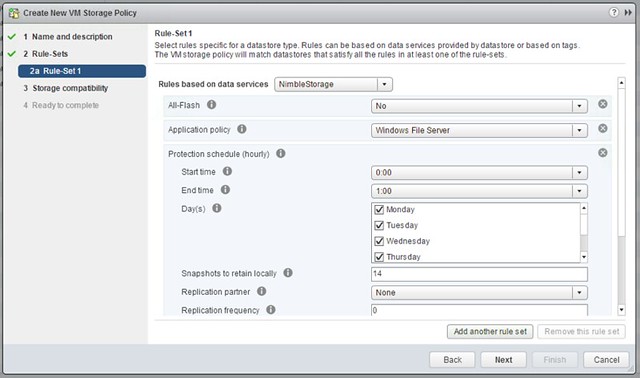
vvol-nimble

The screenshot below shows the Virtual Volumes created for a VM, this is the view from a Storage perspective:
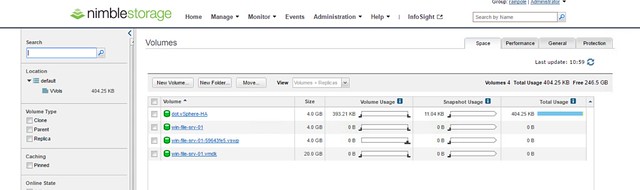
Screen Shot 2016-04-15 at 11.59.16

Can I still provision VMs when a VSAN Stretched Cluster site has failed?

Duncan Epping · Apr 13, 2016 ·

A question was asked internally if you can still provision VMs when a site has failed in a VSAN stretched cluster environment. In a regular VSAN environment when you don’t have sufficient fault domains you cannot provision new VMs, unless you explicitly enable Force Provisioning, which most people do not have enabled. In a VSAN stretched cluster environment this behaviour is different. In my case I tested what would happen if the witness appliance would be gone. I had already created a VM before I failed the witness appliance, and I powered it on after I failed the witness, just to see if that worked. Well that worked, great, and if you look at the VM at a component level you can see that the witness component is missing.

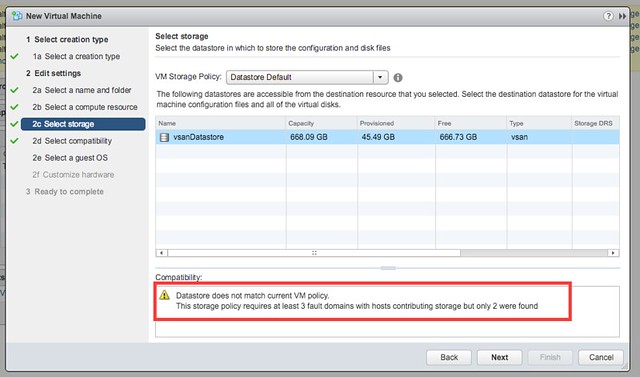
Next test would be to create a new VM while the Witness Appliance is down. That also worked, although I am notified by vCenter during the provisioning process that there are less fault domain than expected as shown in the below screenshot. This is the difference with a normal VSAN environment, here we actually do allow you to provision new workloads, mainly because the site could be down for a longer period of time.

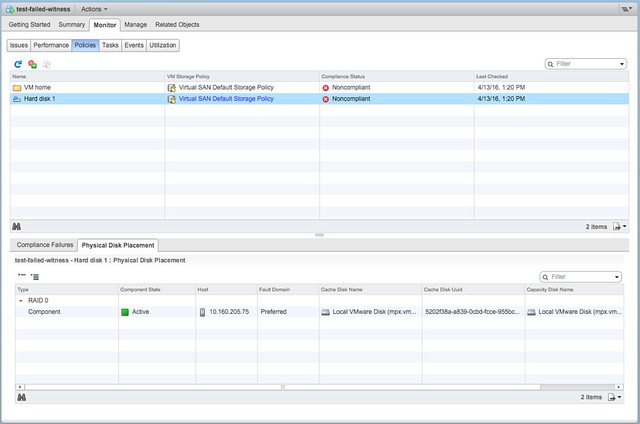
Now next step would be to power on the just created VM and then look at the components. The power on works without any issues and as shown below, the VM is created in the Preferred site with a single component. As soon though as the Witness recovers the the remaining components are created and synced.

Good to see that provisioning and power-on actually does work and that behaviour for this specific use-case was changed. If you want to know more about VSAN stretched clusters, there are a bunch of articles on it to be found here. And there is a deepdive white paper also available here.

Virtually Speaking Podcast Episode 7 – VSAN Customer Use Cases

Duncan Epping · Apr 2, 2016 ·

The Storage and Availability Tech Marketing team runs a podcast called Virtually Speaking Podcast every week. This week it was my turn to be a guest on their show. We spoke about VSAN / use cases / all-flash and various other random topic that came up. It was a fun conversation, and I am going to try to tune in more often for sure. (Although I do listen to it every week, I haven’t been able to join live…) Make to sign up, so you don’t miss out on an episode. Listen to Pete Flecha, John Nicholson and I through the below player. I hope you will enjoy it as much as I did.

vMSC and Disk.AutoremoveOnPDL on vSphere 6.x and higher

Duncan Epping · Mar 21, 2016 ·

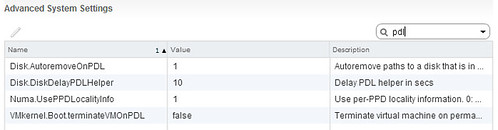
I have discussed this topic a couple of times, and want to inform people about a recent change in recommendation. In the past when deploying a stretched cluster (vMSC) it was recommended by most storage vendors and by VMware to set Disk.AutoremoveOnPDL to 0. This basically disabled the feature that automatically removes LUNs which are in a PDL (permanent device loss) state. Upon return of the device a rescan would then allow you to use the device again. With vSphere 6.0 however there has been a change to how vSphere responds to a PDL scenario, vSphere does not expect the device to return. To be clear, the PDL behaviour in vSphere was designed around the removal of devices, they should not stay in the PDL state and return for duty, this did work however in previous version due to a bug.

With vSphere 6.0 and higher VMware recommends to set Disk.AutoremoveOnPDL to 1, which is the default setting. If you are a vMSC / stretched cluster customer, please change your environment and design accordingly. But before you do, please consult your storage vendor and discuss the change. I would also like to recommend testing the change and behaviour to validate that the environment returns for duty correctly after a PDL! Sorry about the confusion.

Disk.AutoremoveOnPDL

KB article backing my recommendation was just posted: https://kb.vmware.com/kb/2059622. Documentation (vMSC whitepaper) is also being updated.

vSphere HA deepdive 6.x available for free!

Duncan Epping · Feb 18, 2016 ·

I’ve been discussing this over the last 12 months with Frank, and to be honest we are still not sure what is the right thing to do but we decided to take this step anyway. Over the past couple of years we released various updates of the vSphere Clustering Deepdive. Updating the book sometimes was a massive pain (version 4 to 5 for instance), but some of the minor updates have been relative straight forward, although still time consuming due to formatting / diagrams / screenshots etc.

Ever since we’ve been looking for new ways to distribute our book, or publication as I will refer to it from now on. I’ve looked at various options, and found one which I felt was the best of all worlds: Gitbook. Gitbook is a solution which allows you as an author to develop content in Markdown and distribute it in various different formats. This could be as static html, pdf, ePub or Mobi. Basically any format you would want in this day and age. The great thing about the platform as well is that it integrates with Github and you can share your source there and do things like version control etc. It does it in such a way that I can use the Gitbook client on my Mac, while someone else who wants to contribute or submit a change can simply use their client of choice and submit a change through git. Although I don’t expect too many people to do this, it will make it easier for me to have material reviewed for instance by one of the VMware engineers.

So what did I just make available for free? Well in short, an updated version (vSphere 6.0 Update 1) of the vSphere HA Deepdive. This includes the stretched clustering section of the book. Note that DRS and SDRS have not been included (yet). This may or may not happen in some shape or form in the future though. For now, I hope you will enjoy and appreciate the content that I made available for free. You can access it by clicking “HA Deepdive” on the left, or (in my opinion) for a better reading experience read it on Gitbook directly through this link: ha.yellow-bricks.com.

Note that there are links as well to download the content in different formats, for those who want to read it on their iPad / phone / whatever. Also note that Gitbook allows you to comment on a paragraph by clicking the “+” sign on the right side of the paragraph when you hover over it… Please submit feedback when you see mistakes! And for those who are really active, if you want to you could even contribute to the content! I will keep updating the content over the upcoming months probably with more info on VVols and for instance the Advanced Settings, so keep checking back regularly!

  • « Go to Previous Page
  • Page 1
  • Interim pages omitted …
  • Page 15
  • Page 16
  • Page 17
  • Page 18
  • Page 19
  • Interim pages omitted …
  • Page 63
  • Go to Next Page »

Primary Sidebar

About the Author

Duncan Epping is a Chief Technologist and Distinguished Engineering Architect at Broadcom. Besides writing on Yellow-Bricks, Duncan is the co-author of the vSAN Deep Dive and the vSphere Clustering Deep Dive book series. Duncan is also the host of the Unexplored Territory Podcast.

Follow Us

  • X
  • Spotify
  • RSS Feed
  • LinkedIn

Recommended Book(s)

Also visit!

For the Dutch-speaking audience, make sure to visit RunNerd.nl to follow my running adventure, read shoe/gear/race reviews, and more!

Do you like Hardcore-Punk music? Follow my Spotify Playlist!

Do you like 80s music? I got you covered!

Copyright Yellow-Bricks.com © 2026 · Log in