Just wanted to share the Virtually Speaking Podcast with you, this episode (32) is on the topic of VVol 2.0 and features Pete Flecha, Ben Meadowcroft (PM for VVol) and I. Make sure to listen to it, it has some good info on where VVol is today and where it may be going in the near future!
BC-DR
vSphere Replication 6.5, 5 minute RPO for ALL!
I just noticed the following in the vSphere Replication 6.5 release notes which I felt was worth sharing:
5-minute Recovery Point Objective (RPO) support for additional data store types – This version of vSphere Replication extends support for the 5 minute RPO setting to the following new data stores: VMFS 5, VMFS 6, NFS 4.1, NFS 3, VVOL and VSAN 6.5. This allows customers to replicate virtual machine workloads with an RPO setting as low as 5-minutes between these various data store options.
We have had this for vSAN in specific for a while now, but I hadn’t realized yet that we were enabling this for all sorts of datastores in this release. Definitely a great reason to move up to vSphere 6.5 and re-evaluate which VMs can do with a 5 minute RPO and use this great replication mechanism that just ships with vSphere for free! More info found in the release notes here.
If you like to know more about the 6.5 release visit this page with the links to all docs/downloads by William Lam.
vSphere 6.5 what’s new – VVols
Well I guess I can keep this one short, what is new for VVols? Replication. Yes, that is right… finally if you ask me. This is something I know many of my customers have been waiting for. I’ve seen various customers deploy VVols in production, but many were holding off because of the lack of support for Replication and with vSphere 6.5 that has just been introduced. Note that alongside with new VVol capabilities we have also introduced VASA 3.0. VASA 3.0 provides Policy Components in the SPBM UI which allows you to combine for instance a VVol policy with a VAIO Filter based solution like VMCrypt / Encryption or for instance Replication or Caching from a third party vendor.
When it comes to replication I think it is good to know that there will be Day 0 support from both Nimble and HPE 3PAR. More vendors can be expected soon. Not only is replication per object supported, but also replication groups. Replication groups can be viewed as consistency groups, but also a unit of granularity for failover. By default each VM will be in its own replication group, but if you need some form of consistency or would like a group of VMs always to failover at the same time then they can be lumped together through using the replication group option.
There is a full set of APIs available by the way, and I would expect most storage vendors to provide some tooling around their specific implementation. Note that through the API you will for instance be able to “failover” or do a “test failover” and even reverse replication if and when desired. Also, this release will come with a set of new PowerCLI cmdlets which will also allow you to failover and reverse replication, I can’t remember having seen the test failover cmdlet but as it is also possible through the API that should not be rocket science for those who need this functionality. Soon I will have some more stuff to share with regards to scripting DR scenarios…
vSphere 6.5 what’s new – HA
Here we go, one of my favourite features in vSphere… What’s new for HA in vSphere 6.5. To be honest, a lot! Many new features have been introduced, and although it took a while, I am honoured to say that many of these features are the results of discussions I had with the HA engineering team in the past. On top of that, your comments and feedback on some of my articles about HA futures have resulted in various changes to the design and implementation, my thanks for that! Before we get started, one thing I want to point out, in the Web Client under “Services” it now states “vSphere Availability” instead of HA, the reason for this is that because a new feature was stuck in to this section which is all about Availability but not implemented through HA.
- Admission Control
- Restart Priority enhancements
- HA Orchestrated Restart
- ProActive HA
Lets start with Admission Control first. This has been completely overhauled from a UI perspective, but essential still offers the same functionality but in an easy way and some extras. Let take a look at the UI first and then break it down.
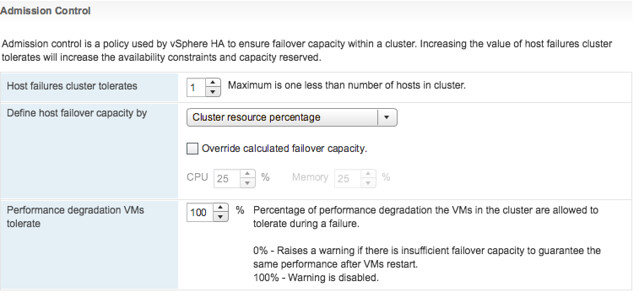
In the above screenshot we see “Cluster Resource Percentage” while above that we have specified the “Host failures cluster tolerates” as “1”. What does this mean? Well this means that in a 4 host cluster we want to be capable of losing 1 host worth of resources which equals 25%. The big benefit of this is that when you add a host to the cluster, the amount of resources set aside will then be automatically changed to 20%. So if you scale up, or down, the percentage automatically adjusts based on the selected number of failures you want to tolerate. Very very useful if you ask me as you won’t end up wasting resources any longer simply because you forgot to change the percentage when scaling the cluster. And the best, this doesn’t use “slots” but is the old “percentage based” solution still. (You can manually select the slot policy under “Define host failover capacity by” though if you prefer that.
Second part of enhancements around Admission Control is the “VM resource reduction event threshold” section. This is a new section and this is based on the fling that was out there for a while. I am very proud to see this being released as it is a feature I was closely involved with and actually had two patents awarded for recently. What does it do? It allows you to specify the performance degradation you are willing to incur if a failure happens. It is set to 100% by default, but I can imagine you want to change this to for instance 25% or 50%, depending on your SLA with the business. Setting it is very simple, you just change the percentage and you are done. So how does this work? Well first of all, you need DRS enabled as HA leverages DRS to get the cluster resource usage. But lets look at an example:
75GB of memory available in 3 node cluster
1 host failure to tolerate specifed
60GB of memory actively used by VMs
0% resource reduction tolerated
This results in the following:
75GB – 25GB (1 host worth of memory) = 50GB
We have 60GB of memory used, with 0% resource reduction to tolerate
60GB needed, 50GB available after failure >> Warning issued to Admin
Very useful if you ask me, as finally you can guarantee that the performance for you workloads after a failure event is close or equal to the performance before a failure event! Next up, Restart Priority enhancements. We have had this option in the UI for the longest time. It allowed you to specify the startup priority for VMs and that is what HA used during scheduling, however the restarts would happen so fast that in reality no one really noticed the difference between high, medium or low priority. In fact, in many cases the small “low priority” VMs would be powered up long before the larger “high priority” database machines. With 6.5 we introduce some new functionality. Lets show you how this works:
Go to your vSphere HA cluster and click on the configure tab and then select VM Overrides, next click Add. You are presented with a screen where you can select VMs by clicking the green plus and then specify their relative startup priority. I selected 3 VMs and then pick “lowest”, the other options are “low, medium, high and highest”. Yes the names are a bit funny, but this is to ensure backwards compatibility with the previous priority options.
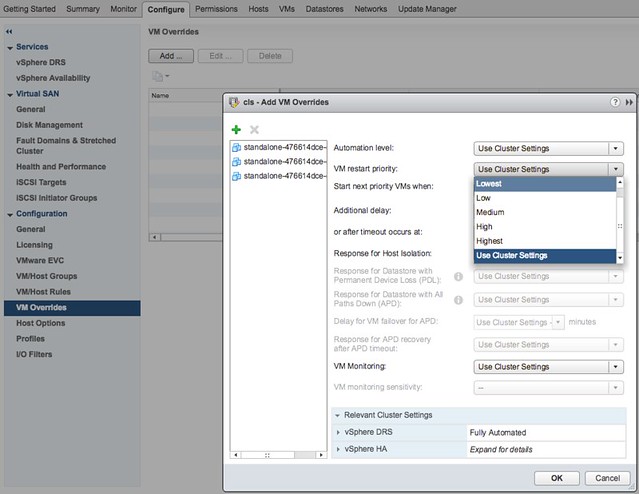
After you have specified the priority you can also specify if there needs to be an additional delay before the next batch can be started, or you can specify even what triggers the next priority “group”, this could for instance be the VMware Tools guest heartbeat as shown in the screenshot below. The other option is “resources allocated” which is purely the scheduling of the batch itself, the power-on event completion or the “app heartbeat” detection. That last one is most definitely the most complex as you would need to have App HA enabled and services defined etc. I expect that if people use this they will mostly set it to “Guest Heartbeats detected” as that is easy and pretty reliable.
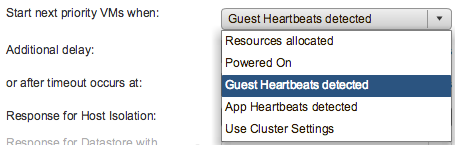
If for whatever reason by the way there is no guest heartbeat ever, or it simply takes a long time then there is also a timeout value that can be specified. By default this is 600 seconds, but this can be decreased or increased, depending on what you prefer. Now this functionality is primarily intended for large groups of VMs, so if you have a 1000 VMs you can select those 10/20 VMs that have the highest priority and let them power-on first. However, if you for instance have a 3-tier app and you need the database server to be powered on before the app server then you can also use VM/VM rules as of vSphere 6.5, this functionality is referred to as HA Orchestrated Restart.
You can configure HA Orchestrated Restarts by simply creating “VM” Groups. In the example below I have created a VM group called App with the Application VM in there. I have also created a DB group with the Database VM in there.
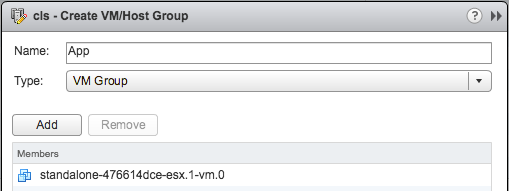
This application has a dependency on the Database VM to be fully powered-on, so I specify this in a rule as shown in the below screenshot.
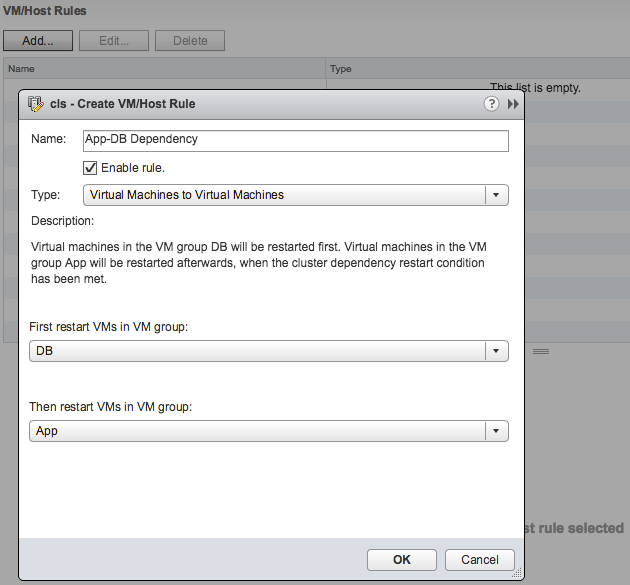
Now one thing to note here is that in terms of dependency, the next group of VMs in the rule will be powered on when the cluster wide set “VM Dependency Restart Condition” is met. If this is set to “Resources Allocated”, which is the default, then the VMs will be restarted literally a split second later. So you will need to think about how to set the “VM Dependency Restart Condition” as other wise the rule may be useless. Another thing is that these rules are “hard rules”, so if the DB VM in this example does not power on, then the App VM will also not be powered on. Yes, I know what you would like to see, and yes we are planning more enhancements in this space.
Last up “Pro-Active HA“… Now this is the odd one, it is not actually a vSphere HA feature, but rather a function of DRS. However, as it is stuck in the “Availability” section of the UI I figured I would stick it in this article as that is probably where most people will be looking. So what does it do? Well in short, it allows you to configure actions for events that may lead to VM downtime. What does that mean? Well you can imagine that when a power-supply goes down your host is in a so called “degraded state”, when this event occurs an evacuation of the host could be triggered, meaning all VMs will be migrated to any of the remaining healthy hosts in the cluster.
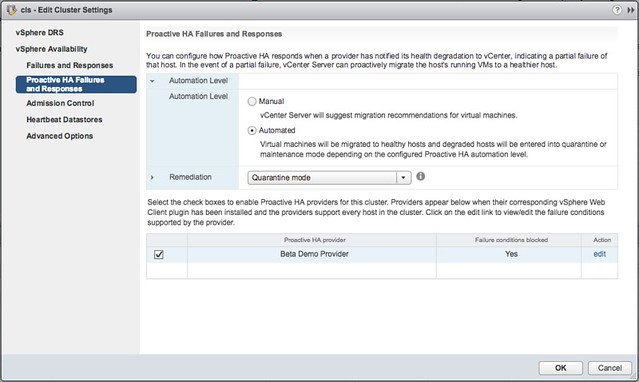
But how do we know the host is in a degraded state? Well that is where the Health Provider comes in to play. The health provider reads all the sensor data and analyze the results and then serve the state of the host up to vCenter Server. These states are “Healthy”, “Moderate Degration”, “Severe Degradation” and “Unknown”. (Green, Yellow, Red) When vCenter is informed DRS can now take action based on the state of the hosts in a cluster, but also when placing new VMs it can take the state of a host in to consideration. The actions DRS can take by the way is placing the host in Maintenance Mode or Quarantine Mode. So what is this quarantine mode and what is the difference between Quarantine Mode and Maintenance Mode?
Maintenance Mode is very straight forward, all VMs will be migrated off the host. With Quarantine Mode this is not guaranteed. If for instance the cluster is overcommitted then it could be that some VMs are left on the quarantined host. Also, when you have VM-VM rules or VM/Host rules which would conflict when the VM is migrated then the VM is not migrated either. Note that quarantined hosts are not considered for placement of new VMs. It is up to you to decide how strict you want to be, and this can simply be configured in the UI. Personally I would recommend setting it to Automated with “Quarantine mode for moderate and Maintenance mode for sever failure(Mixed)”. This seems to be a good balance between up time and resource availability. Screenshot below shows where this can be configured.
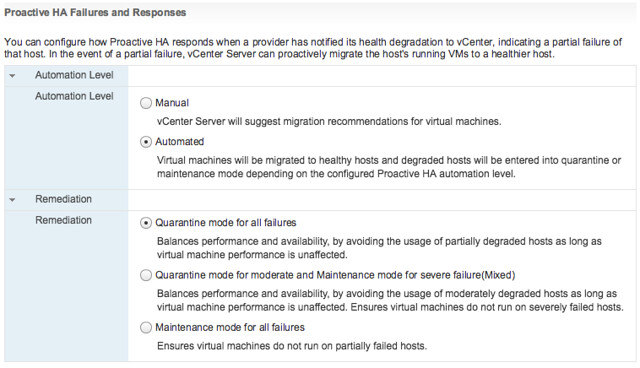
Pro-Active HA can respond to different types of failures, at the start of this section I mentioned power supply, but it can also respond to memory, network, storage and even a fan failure. Which state this results in (severe or moderate) is up to the vendor, this logic is built in to the Health Provider itself. You can imagine that when you have 8 fans in a server that the failure of one or two fans results in “moderate”, whereas the failure of for instance 1 out of 2 NICs would result in “severe” as this leaves a “single point of failure”. Oh and when it comes to the Health Provider, this comes with the vendor Web Client plugins.
Hyper-Converged is here, but what is next?
Last week I was talking to a customer and they posed some interesting questions. What excites me in IT (why I work for VMware) and what is next for hyper-converged? I thought they were interesting questions and very relevant. I am guessing many customers have that same question (what is next for hyper-converged that is). They see this shiny thing out there called hyper-converged, but if I take those steps where does the journey end? I truly believe that those who went the hyper-converged route simply took the first steps on an SDDC journey.
Hyper-converged I think is a term which was hyped and over-used, just like “cloud” a couple of years ago. Lets breakdown what it truly is: hardware + software. Nothing really groundbreaking. It is different in terms of how it is delivered. Sure, it is a different architectural approach as you utilize a software based / server side scale-out storage solution which sits within the hypervisor (or on top for that matter). Still, that hypervisor is something you were already using (most likely), and I am sure that “hardware” isn’t new either. Than the storage aspect must be the big differentiator right? Wrong, the fundamental difference, in my opinion, is how you manage the environment and the way it is delivered and supported. But does it really need to stop there or is there more?
There definitely is much more if you ask me. That is one thing that has always surprised me. Many see hyper-converged as a complete solution, reality is though that in many cases essential parts are missing. Networking, security, automation/orchestration engines, logging/analytic engines, BC/DR (and orchestration of it) etc. Many different aspects and components which seem to be overlooked. Just look at networking, even including a switch is not something you see to often, and what about the configuration of a switch, or overlay networks, firewalls / load-balancers. It all appears not to be a part of hyper-converged systems. Funny thing is though, if you are going on a software defined journey, if you want an enterprise grade private cloud that allows you to scale in a secure but agile manner these components are a requirement, you cannot go without them. You cannot extend your private cloud to the public cloud without any type of security in place, and one would assume that you would like to orchestrate every thing from that same platform and have the same networking / security capabilities to your disposal both private and public.
That is why I was so excited about the VMworld US keynote. Cross Cloud Services on top of hyper-converged leveraging all the tools VMware provides today (vSphere, VSAN, NSX) will exactly allow you to do what I describe above. Whether that is to IBM, vCloud Air or any other of the mega clouds listed in the slide below is even besides the point. Extending your datacenter services in to public clouds is what we have been talking about for a while, this hybrid approach which could bring (dare I say) elasticity. This is a fundamental aspect of SDDC, of which a hyper-converged architecture is simply a key pillar.
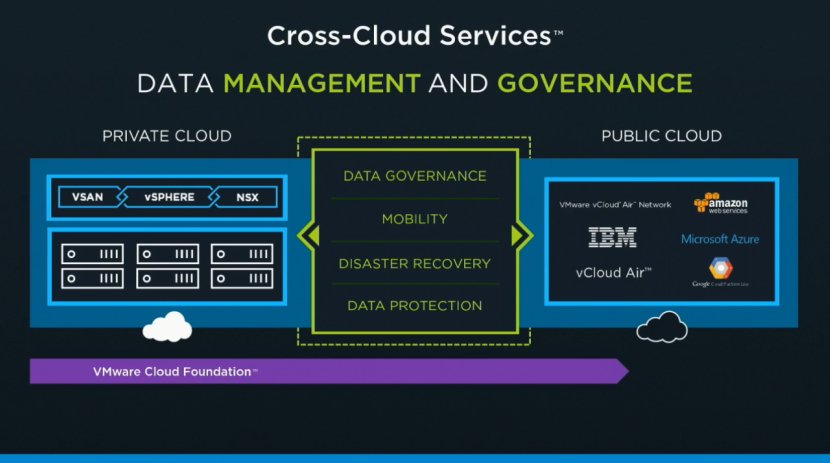
Hyper-converged by itself does not make a private cloud. Hyper-converged does not deliver a full SDDC stack, it is a great step in to the right direction however. But before you take that (necessary) hyper-converged step ask yourself what is next on the journey to SDDC. Networking? Security? Automation/Orchestration? Logging? Monitoring? Analytics? Hybridity? Who can help you reach full potential, who can help you take those next steps? That’s what excites me, that is why I work for VMware. I believe we have a great opportunity here as we are the only company who holds all the pieces to the SDDC puzzle. And with regards to what is next? Deliver all of that in an easy to consume manner, that is what is next!