• Skip to primary navigation
  • Skip to main content
  • Skip to primary sidebar

Yellow Bricks

by Duncan Epping

  • Home
  • Unexplored Territory Podcast
  • HA Deepdive
  • ESXTOP
  • Stickers/Shirts
  • Privacy Policy
  • About
  • Show Search
Hide Search

BC-DR

vSAN needs 3 fault domains

Duncan Epping · Mar 29, 2017 ·

I have been having discussions with various customers about all sorts of highly available vSAN environments. Now that vSAN has been available for a couple of years customers are starting to become more and more comfortable around designing these infrastructures, which also leads to some interesting discussions. Many discussions these days are on the subject of multi room or multi site infrastructures. A lot of customers seem to have multiple datacenter rooms in the same building, or multiple datacenter rooms across a campus. When going through these different designs one thing stands out, in many cases customers have a dual datacenter configuration, and the question is if they can use stretched clustering across two rooms or if they can do fault domains across two rooms.

Of course theoretically this is possible (not supported, but you can do it). Just look at the diagram below, we cross host the witness and we have 2 clusters across 2 rooms and protect the witness by hosting it on the other vSAN cluster:
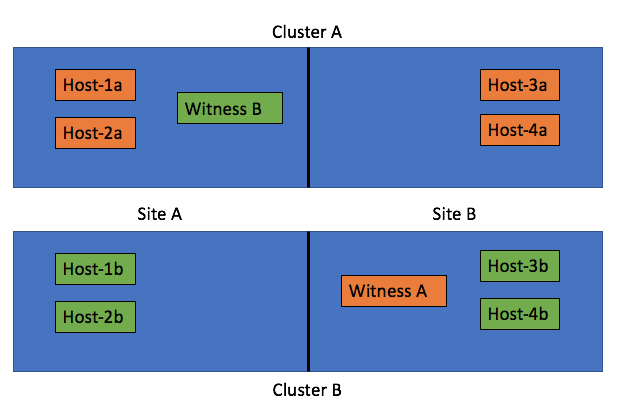
The challenge with these types of configurations is what happens when a datacenter room goes down. What a lot of people tend to forget is that depending on what fails the impact will vary. In the scenario above where you cross host a witness the failure if “Site A”, which is the left part of the diagram, results in a full environment not being available. Really? Yeah really:

  • Site A is down
  • Hosts-1a / 2a / 1b / 2b are unavailable
  • Witness B for Cluster B is down >> as such Cluster B is down as majority is lost
  • As Cluster B is down (temporarily), Cluster A is also impacted as Witness A is hosted on Cluster B
  • So we now have a circular dependency

Some may say: well you can move Witness B to the same side as Witness A, meaning in Site B. But now if Site B fails the witness VMs are gone also impacting all clusters directly. That would only work if only Site A is  ever expected to go down, who can give that guarantee? Of course the same applies to using “fault domains”, just look at the diagram below:
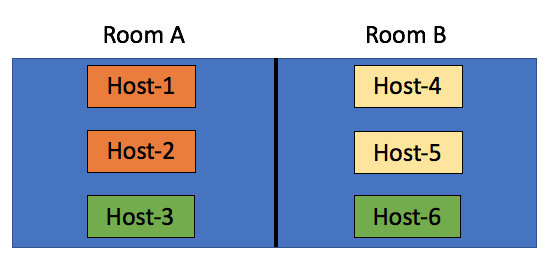
In this scenario we have the “orange fault domain” in  Room A, “yellow” in Room B and “green” across rooms as there is no other option at that point. If Room A fails, VMs that have components in “Orange” and on “Host3” will be impacted directly, as more than 50% of their components will be lost the VMs cannot be restarted in Room B. Only when their components in “fault domain green” happen to be on “Host-6” then the VMs can be restarted. Yes in terms of setting up your fault domains this is possible, this is supported, but it isn’t recommended. No guarantees can be given your VMs will be restarted when either of the rooms fail. My tip of the day, when you start working on your design, overlay the virtual world with the physical world and run through failure scenarios step by step. What happens if Host 1 fails? What happens if Site 1 fails? What happens if Room A fails?

Now so far I have been talking about failure domains and stretched clusters, these are all logical / virtual constructs which are not necessarily tied to physical constructs. In reality however when you design for availability/failure, and try to prevent any type of failure to impact your environment the physical aspect  should be considered at all times. Fault Domains are not random logical constructs, there’s a requirement for 3 fault domains at a minimum, so make sure you have 3 fault domains physically as well. Just to be clear, in a stretched cluster the witness acts as the 3rd fault domain. If you do not have 3 physical locations (or rooms), look for alternatives! One of those for instance could be vCloud Air, you can host your Stretched Cluster witness there if needed!

Virtually Speaking Podcast – vSAN Customer Use Cases

Duncan Epping · Feb 22, 2017 ·

As John Nicholson was traveling in and around New Zealand I was asked by Pete if I could co-host the Virtually Speaking Podcast again. It is always entertaining to join, Pete is such a natural when it comes to these things. I euuh, well I do my best to keep up with him :). Below you can find the latest episode on the topic of vSAN Customer Use Cases. It includes a lot of soundbites recorded at VMware World Wide Kick Off / Tech Summit, which is a VMware internal event for all Sales, Pre-Sales and Post-Sales field facing people.

You can of course also subscribe on iTunes!

Rubrik update >> 3.1

Duncan Epping · Feb 8, 2017 ·

It has been a while since I wrote about Rubrik. This week I was briefed by Chris Wahl on what is coming in their next release, which is called Cloud Data Management 3.1. As Chris mentioned during the briefing, backup solutions grab data. In most cases this data is then never used, or in some cases used for restores but that is it. A bit of a waste if you imagine there are various other uses cases for this data.
First of all, it should be possible from a backup and recovery perspective to set a policy, secure it, validate compliancy and search the data. On top of that the data set should be fully indexed and should be accessible through APIs which allows you to automate and orchestrate various types of workflows, like for instance provide it to developers for test/dev purposes.

Anyway, what was introduced in Cloud Data Management 3.1? Today Rubrik from a source perspective supports vSphere, SQL Server, Linux and NAS and with 3.1 also “physical” Windows (or native, whatever you want to call it) is supported. (Windows 2008 R2, 2012 and 2012 R2) Fully policy based in a similar way to how they implemented it for vSphere. Also, support for SQL Server Failover Clustering (WSFC) was added. Note that the Rubrik connector must be installed on both nodes. Rubrik will automatically recognize that the hosts are part of a cluster and provide additional restore options etc.

There are a couple of User Experience improvements as well. Instead of being “virtual machine” centric now the UI revolves around “hosts”. Meaning that the focus is on the “OS”, and they will for instance show all file systems which are protected and a calendar with snapshots and per day a set of the snapshots of the host. One of the areas Rubrik still had some gaps was reporting and analytics. With 3.1 Rubrik Envision is introduced.

Rubrik Envision provides you build your own fully customisable reports, and of course provides different charts and filtering / query options. These can be viewed, downloaded and emailed in html-5 format. This can also be done in a scheduled fashion, create a report and schedule it to be send out. Four standard reports are included to get you started, of course you can also tweak those if needed.


(blatantly stole this image from Mr Wahl)

Cloud Data Management 3.1 also adds Software Based encryption (AES-256) at rest, where in the past self encrypting devices were used. Great thing is that this will be supported for all R300 series. Single click to enable it, nice! When thinking about this later I asked Chris a question about multi-tenancy and he mentioned something I had not realized:

For multi tenant environments, we’re encrypting data transfers in and out of the appliance using SSL certificates between the clusters (such as hosting provider cluster to customer cluster), which are logically divided by SLA Domains. Customers don’t have any visibility into other replication customers and can supply their own keys for archive encryption (Azure, AWS, Object, etc.)

That was a nice surprise to me. Especially in multi-tenancy environments or large enterprise organizations with clear separation between business units that is a nice plus.

Some “minor” changes Chris mentioned as well, in the past Rubrik would help with every upgrade but this didn’t scale well plus there are customers who have Rubrik gear installed in a “dark site” (meaning no remote connection for security purposes). With the 3.1 release there is the option for customers to do this themselves. Download the binary, upload to the box, type upgrade and things happen. Also, restores directly to ESXi are useful. In the past you needed vCenter in place first. Some other enhancements around restoring, but too many little things to go in to. Overall a good solid update if you ask me.

Last but not least, from a company/business point of view, 250 people work at Rubrik right now. 6x growth in terms of customer acquisition, which is great to hear. (No statement around customer count though.) I am sure we will hear more from the guys in the future. They have a good story, a good product and are solving a real pain point in most datacenters today: backup/recovery and explosion of data sets and data growth. Plenty of opportunities if you ask me.

Two host stretched vSAN cluster with Standard license?

Duncan Epping · Jan 24, 2017 ·

I was asked today if it was possible to create a 2 host stretched cluster using a vSAN Standard license or a ROBO Standard license. First of all, from a licensing point of view the EULA states you are allowed to do this with a Standard license:

A Cluster containing exactly two Servers, commonly referred to as a 2-node Cluster, can be deployed as a Stretched Cluster. Clusters with three or more Servers are not allowed to be deployed as a Stretched Cluster, and the use of the Software in these Clusters is limited to using only a physical Server or a group of physical Servers as Fault Domains.

I figured I would give it a go in my lab. Exec summary: worked like a charm!

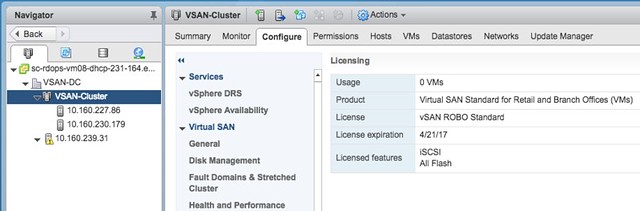
Loaded up the ROBO license:

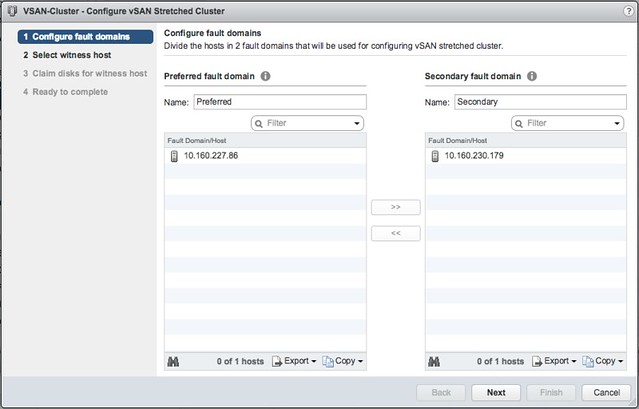
Go to the Fault Domains & Stretched Cluster section under “Virtual SAN” and click Configure. And one host to “preferred” and one to “secondary” fault domain:

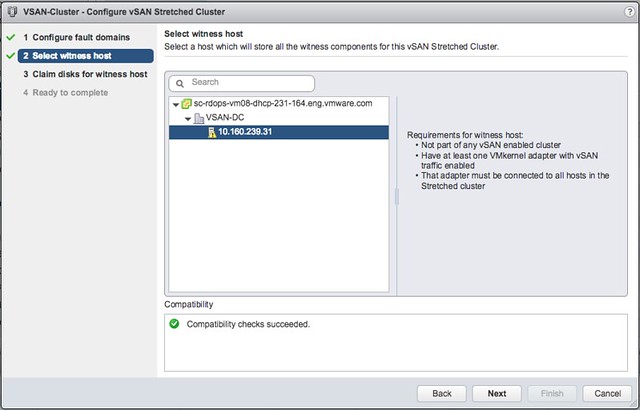
Select the Witness host:

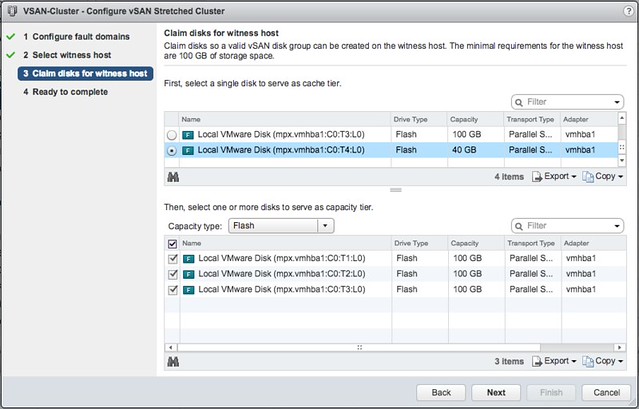
Select the witness disks for the vSAN cluster:

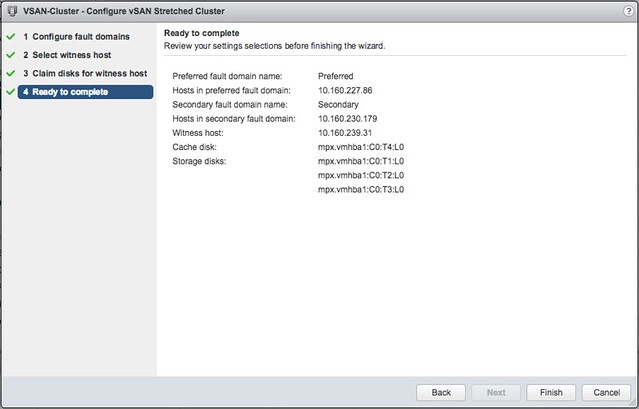
Click Finish:

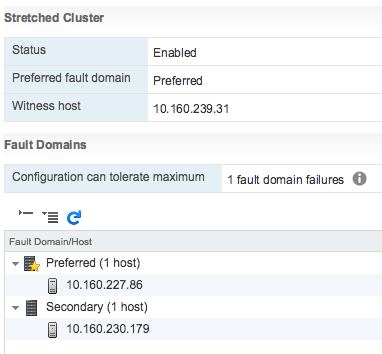
And then the 2-node stretched cluster is formed using a Standard or ROBO license:

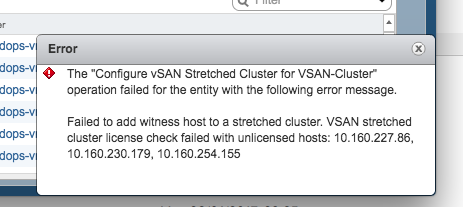
Of course I tried the same with 3 hosts, which failed as my license does not allow me to create a stretched cluster larger than 1+1+1. And even if it would succeed, the EULA clearly states that you are not allowed to do so, you need Enterprise licenses for that.

There you have it. Two host stretched using vSAN Standard, nice right?!

VMs not getting killed after vMSC partition has lifted

Duncan Epping · Jan 12, 2017 ·

I was talking to a VMware partner over the past couple of weeks about challenges they had in a new vSphere Metro Storage Cluster (vMSC) environment. In their particular case they simulated a site partition. During the site partition three things were expected to happen:

  • VMs that were impacted by APD (or PDL) should be killed by vSphere HA Component Protection
    • If HA Component Protection does not work, vSphere should kill the VMs when the partition is lifted
  • VMs should be restarted by vSphere HA

The problems faced were two-fold, VMs were restarted by vSphere HA, however:

  • vSphere HA Component Protection did not kill the VMs
  • When the partition was lifted vSphere did not kill the VMs which had lost the lock to the datastore either

It took a while before we figured out what was going on, at least for one of the problems. Lets start with the second problem first, why aren’t the VMs killed when the partition is lifted? vSphere should do this automatically. Well vSphere does this automatically, but only when there’s a Guest Operating system installed and an I/O is issued. As soon as an I/O is issued by the VM then vSphere will notice the lock to the disk is lost and obtained by another host and kill the VM. If you have an “empty VM” then this won’t happen as there will not be any I/O to the disk. (I’ve filed a feature request to kill VMs as well even without disk I/O or without a disk.) So how do you solve this? If you do any type of vSphere HA testing (with or without vMSC) make sure to install a guest OS so it resembles real life.

Now back to the first problem. The fact that vSphere HA Component Protection does not kick in is still being debated, but I think there is a very specific reason for it. vSphere HA Component Protection is a feature that kills VMs on a host so they can be restarted when an APD or a PDL scenario has occurred. However, it will only do this when it is:

  • Certain the VM can be restarted on the other side (conservative setting)
  • There are healthy hosts in the other partition, or we don’t know (Aggressive)

First one is clear I guess (more info about this here), but what does the second one mean? Well basically there are three options:

  • Availability of healthy host: Yes >> Terminate
  • Availability of healthy host: No >> Don’t Terminate
  • Availability of healthy host: Unknown >> Terminate

So in the case you where you have VMCP set to “Aggressively” failover VMs, it will only do so when it knows hosts are available in the other site or when it does not know the state of the hosts in the other site. If for whatever reason the hosts are deemed as unhealthy the answer to the question if there are healthy hosts available or not will be “No”, and as such the VMs will not be killed by VMCP. The question remains, why are these hosts reported as “unhealthy” in this partition scenario, that is something we are now trying to figure out. Potentially it could be caused by misconfigured Heartbeat Datastores, but this is still something to be confirmed. If I know more, I will update this article.

Just received confirmation from development, heartbeat datastores need to be available on both sites for vSphere HA to identify this scenario correctly. If there are no heartbeat datastores available on both sites then it could happen that no hosts are marked as healthy, which means that VMCP will not instantly kill those VMs when the APD has occured.

  • « Go to Previous Page
  • Page 1
  • Interim pages omitted …
  • Page 12
  • Page 13
  • Page 14
  • Page 15
  • Page 16
  • Interim pages omitted …
  • Page 63
  • Go to Next Page »

Primary Sidebar

About the Author

Duncan Epping is a Chief Technologist and Distinguished Engineering Architect at Broadcom. Besides writing on Yellow-Bricks, Duncan is the co-author of the vSAN Deep Dive and the vSphere Clustering Deep Dive book series. Duncan is also the host of the Unexplored Territory Podcast.

Follow Us

  • X
  • Spotify
  • RSS Feed
  • LinkedIn

Recommended Book(s)

Also visit!

For the Dutch-speaking audience, make sure to visit RunNerd.nl to follow my running adventure, read shoe/gear/race reviews, and more!

Do you like Hardcore-Punk music? Follow my Spotify Playlist!

Do you like 80s music? I got you covered!

Copyright Yellow-Bricks.com © 2026 · Log in