• Skip to primary navigation
  • Skip to main content
  • Skip to primary sidebar

Yellow Bricks

by Duncan Epping

  • Home
  • Unexplored Territory Podcast
  • HA Deepdive
  • ESXTOP
  • Stickers/Shirts
  • Privacy Policy
  • About
  • Show Search
Hide Search

Archives for August 2011

vCenter Appliance

Duncan Epping · Aug 10, 2011 ·

I was playing around in my lab and figured I would give the vCenter Appliance (VCVA)  a try. I realize that today there are limitations when it comes to the vCenter Appliance and I wanted to list those to get them out in the open:

  • No Update Manager
  • No Linked-Mode
  • No support for the VSA (vSphere Storage Appliance)
  • Only support for Oracle as the external database
  • With the embedded database it supports 5 hosts and 50 VMs
    • vSphere 5.0 embedded database uses DB2
    • vSphere 5.0 Update 1 and higher uses vPostgres
  • No support for vCenter Heartbeat

Now that you’ve seen the limitations why would you even bother testing it? You will still need Windows if you are running VUM and you can only use Oracle for large environments… Those are probably the two biggest constraints for 80% of you reading this and I agree they are huge constraints. But I am not saying that you should go ahead and deploy this in production straight away, I do feel that the VCVA deserves to be tested as it is the way forward in my opinion! Why? Most importantly, it is very simple to implement… Seriously setting it up takes a couple of minutes. You just import the OVF, accept the EULA, select the correct database type and start the vCenter service. Without any hassle it also includes the following services:

  • vSphere Web Client
  • vCenter Single Sign On (SSO)
  • vSphere Auto Deploy Server
  • ESXi Dump Collector
  • Inventory Service
  • Syslog Collector

But that’s not all… If you look at it from a strategic perspective this is the first step. A first step towards a possible distributed vCenter solution, and I know some of you have been waiting on that for a while, so why not get your hands dirty straight away and start testing it.

If you want to know how to deploy the vCenter 5.1 Appliance I highly recommend reading this article.

**info updated – 1st of february 2013**
VM with disks in multiple datastore clusters?

Duncan Epping · Aug 9, 2011 ·

This week I received a question about Storage DRS. The question was if it was possible to have a VM with multiple disks in different datastore clusters? It’s not uncommon to have set ups like these so I figured it would be smart to document it. The answer is yes that is supported. You can create a virtual machine with a system disk on a raid-5 backed datastore cluster and a data disk on a raid-10 backed datastore cluster. If Storage DRS sees the need to migrate either of the disks to a different datastore it will make the recommendation to do so.

vSphere 5 Coverage

Duncan Epping · Aug 6, 2011 ·

I just read Eric’s article about all the topics he covered around vSphere 5 over the last couple of weeks and as I just published the last article I had prepared I figured it would make sense to post something similar. (Great job by  the way Eric, I always enjoy reading your articles and watching your videos!) Although I did hit roughly 10.000 unique views on average per day the first week after the launch and still 7000 a day currently I have the feeling that many were focused on the licensing changes rather then all the new and exciting features that were coming up, but now that the dust has somewhat settled it makes sense to re-emphasize them. Over the last 6 months I have been working with vSphere 5 and explored these features, my focus for most of those 6 months was to complete the book but of course I wrote a large amount of articles along the way, many of which ended up in the book in some shape or form. This is the list of articles I published. If you feel there is anything that I left out that should have been covered let me know and I will try to dive in to it. I can’t make any promises though as with VMworld coming up my time is limited.

  1. Live Blog: Raising The Bar, Part V
  2. 5 is the magic number
  3. Hot of the press: vSphere 5.0 Clustering Technical Deepdive
  4. vSphere 5.0: Storage DRS introduction
  5. vSphere 5.0: What has changed for VMFS?
  6. vSphere 5.0: Storage vMotion and the Mirror Driver
  7. Punch Zeros
  8. Storage DRS interoperability
  9. vSphere 5.0: UNMAP (vaai feature)
  10. vSphere 5.0: ESXCLI
  11. ESXi 5: Suppressing the local/remote shell warning
  12. Testing VM Monitoring with vSphere 5.0
  13. What’s new?
  14. vSphere 5:0 vMotion Enhancements
  15. vSphere 5.0: vMotion enhancement, tiny but very welcome!
  16. ESXi 5.0 and Scripted Installs
  17. vSphere 5.0: Storage initiatives
  18. Scale Up/Out and impact of vRAM?!? (part 2)
  19. HA Architecture Series – FDM (1/5)
  20. HA Architecture Series – Primary nodes? (2/5)
  21. HA Architecture Series – Datastore Heartbeating (3/5)
  22. HA Architecture Series – Restarting VMs (4/5)
  23. HA Architecture Series – Advanced Settings (5/5)
  24. VMFS-5 LUN  Sizing
  25. vSphere 5.0 HA: Changes in admission control
  26. vSphere 5 – Metro vMotion
  27. SDRS and Auto-Tiering solutions – The Injector

Once again if there it something you feel I should be covering let me know and I’ll try to dig in to it. Preferably something that none of the other blogs have published of course.

SDRS and Auto-Tiering solutions – The Injector

Duncan Epping · Aug 5, 2011 ·

A couple of weeks ago I wrote an article about Storage DRS (hereafter SDRS) interoperability and I mentioned that using SDRS with Auto-Tiering solutions should work… Now the truth is slightly different, however as I noticed some people  started throwing huge exclamation marks around SDRS I wanted to make a statement. Many have discussed this and made comments around why SDRS would not be supported with auto-tiering solutions and I noticed the common idea is that SDRS would not be supported with them as it could initiate a migration to a different datastore and as such “reset” the tiered VM back to default. Although this is correct there is a different reason why VMware recommends to follow the guidelines provided by the Storage Vendor. The guideline by the way is to use Space Balancing but not enable I/O metric. Those who were part of the beta or have read the documentation, or our book might recall this when creating datastore clusters select datastores which have similar performance characteristics. In other words do not mix an SSD backed datastore with a SATA backed datastore, however mixing SATA with SAS is okay. Before we will explain why lets repeat the basics around SDRS:

SDRS allows the aggregation of multiple datastores into a single object called a datastore cluster. SDRS will make recommendations to balance virtual machines or disks based on I/O and space utilization and during virtual machine or virtual disk provisioning make recommendations for placement. SDRS can be set in fully automated or manual mode. In manual mode SDRS will only make recommendations, in fully automated mode these recommendations will be applied by SDRS as well. When balancing recommendations are applied Storage DRS is used to move the virtual machine.

So what about Auto-Tiering solutions? Auto-tiering solutions move “blocks” around based hotspots. Yes, again, when SvMotion would migrate the virtual machine or virtual disk this process would be reset. In other words the full disk will land on the same tier and the array will need to decide at some point what belongs where… but is this an issue? In my opinion it probably isn’t but it will depend on why SDRS decides to move the virtual machine as it might lead to a temporary decrease in performance for specific chunks of data within the VM. As auto-tiering solutions help preventing performance issues by moving blocks around you might not want to have SDRS making performance recommendations but why… what is the technical reason for this?

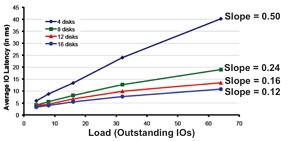
As stated SDRS uses I/O and space utilization for balancing… Space makes sense I guess but what about I/O… what does SDRS use, how does it know where to place a virtual machine or disk? Many people seem to be under the impression that SDRS simply uses average latency but would that work in a greenfield deployment where no virtual machines are deployed yet? It wouldn’t and it would also not say much about the performance capabilities of the datastore. No in order to ensure the correct datastore is selected  SDRS needs to know what the datastore is capable off, it will need to characterize the datastore and in order to do so it uses Storage IO Control (hereafter SIOC), more specifically what we call “the injector”. The injector is part of SIOC and is a mechanism which is used to characterize each of the datastore by injecting random (read) I/O. Before you get worried, the injector only injects I/O when the datastore is idle. Even when the injector is busy and it notices other activity on the datastore it will back down and retry later. Now in order to characterize the datastore the injector uses different amount of outstanding I/Os and measures the latency for these I/Os. For example it starts with 1 outstanding I/O and gets a response within 3 miliseconds. When 3 outstanding I/Os are used the average latency for these I/Os is 3.8 miliseconds. With 5 I/Os the average latency is 4.3 and so on and so forth. For each device the outcome can be plotted as show in the below screenshot and the slope of the graph indicates the performance capabilities of the datastore. The steeper the line the lower the performance capabilities. The graphs shows the test where a multitude of datastores are characterized each being backed by a different number of spindles. As clearly shown there is a relationship between the steepness and the number of spindles used.

So why does SDRS care? Well in order to ensure the correct recommendations are made each of the datastores will be characterized in other words a datastore backed by 16 spindles will be a more logical choice than a datastore with 4 spindles. So what is the problem with Auto-Tiering solutions? Well think about it for a second… when a datastore has many hotspots an auto-tiering solution will move chunks around. Although this is great for the virtual machine it also means that when the injector characterizes the datastore it could potentially read from the SSD backed chunks or the SATA backed chunks and this will lead to unexpected results in terms of average latency and as you can imagine this will be confusing to SDRS and possibly lead to incorrect recommendations. Now, this is typically one of those scenarios which requires extensive testing and hence the reason VMware refers to the storage vendor for their recommendation around using SDRS in combination with auto-tiering solutions. My opinion: Use SDRS Space Balancing as this will help preventing downtime related to “out of space” scenarios and also help speeding up the provisioning process. On top of that you will get Datastore Maintenance Mode and Affinity Rules.

vSphere 5 – Metro vMotion

Duncan Epping · Aug 3, 2011 ·

I received a question last week about higher latency thresholds for vMotion… A rumor was floating around that vMotion would support RTT latency up to 10 miliseconds instead of 5. (RTT=Round Trip Time) Well this is partially true. With vSphere 5.0 Enterprise Plus this is true. With any of the versions below Enterprise Plus the supported limit is 5 miliseconds RTT. Is there a technical reason for this?

There’s a new component that is part of vMotion which is only enabled with Enterprise Plus and that components is what we call ‘Metro vMotion’.  This feature enables you to safely vMotion a virtual machine across a link of up to 10 miliseconds RTT. The technique used is common practice in networking and a bit more in-depth described here.

In the case of vMotion the standard socket buffer size is around 0.5MB.  Assuming a 1GbE network (or 125MBps) then bandwidth delay product dictates that we could support roughly 5ms RTT delay without a noticeable bandwidth impact.  With the “Metro vMotion” feature, we’ll dynamically resize the socket buffers based on the observed RTT over the vMotion network.  So, if you have 10ms delay, the socket buffers will be resized to 1.25MB, allowing full 125MBps throughput.  Without “Metro vMotion”, over the same 10ms link, you would get around 50MBps throughput.

Is that cool or what?

  • « Go to Previous Page
  • Page 1
  • Interim pages omitted …
  • Page 3
  • Page 4
  • Page 5
  • Page 6
  • Go to Next Page »

Primary Sidebar

About the Author

Duncan Epping is a Chief Technologist and Distinguished Engineering Architect at Broadcom. Besides writing on Yellow-Bricks, Duncan is the co-author of the vSAN Deep Dive and the vSphere Clustering Deep Dive book series. Duncan is also the host of the Unexplored Territory Podcast.

Follow Us

  • X
  • Spotify
  • RSS Feed
  • LinkedIn

Recommended Book(s)

Also visit!

For the Dutch-speaking audience, make sure to visit RunNerd.nl to follow my running adventure, read shoe/gear/race reviews, and more!

Do you like Hardcore-Punk music? Follow my Spotify Playlist!

Do you like 80s music? I got you covered!

Copyright Yellow-Bricks.com © 2026 · Log in