• Skip to primary navigation
  • Skip to main content
  • Skip to primary sidebar

Yellow Bricks

by Duncan Epping

  • Home
  • Unexplored Territory Podcast
  • HA Deepdive
  • ESXTOP
  • Stickers/Shirts
  • Privacy Policy
  • About
  • Show Search
Hide Search

VMware

NetApp is now officially vMSC certified

Duncan Epping · Jul 27, 2012 ·

As I had many people asking about this over the last couple of months I figured I would share it. I just noticed that NetApp is now finally officially vSphere Metro Storage Cluster certified (see SAN HCL). NetApp has certified their platform for the following array types:

  • NFS
  • iSCSI

Yes indeed, FC is currently not listed… But for me the great news is that NFS is listed! A KB article has been published with all the details… make sure to read it if you are looking to deploy a stretched cluster with NetApp and vSphere 5.0.
Why is %WAIT so high in esxtop?

Duncan Epping · Jul 17, 2012 ·

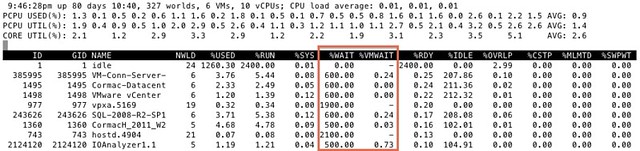
I got this question today around %WAIT and why it was so high for all these VMs. I grabbed a screenshot from our test environment. It shows %WAIT next to %VMWAIT.

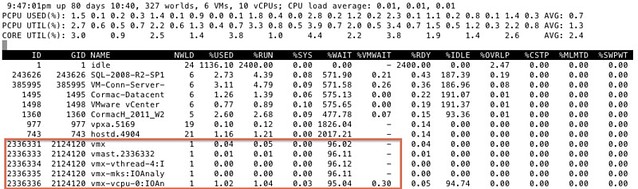
First of all, I suggest looking at %VMWAIT. This one is more relevant in my opinion than %WAIT. %VMWAIT is a derivative of %WAIT, however it does not include %IDLE time but does include %SWPWT and the time the VM is blocked for when a device is unavailable. That kind of reveals immediately why  %WAIT seems extremely high, it includes %IDLE! Another thing to note is the %WAIT for a VM is multiple worlds collided in to a single metric. Let me show you what I mean:

As you can see 5 worlds, which explains the %WAIT time to be around 500% constantly when the VM is not doing much. Hope that helps…

<edit> I just got pointed to this great KB article by one of my colleagues. It explains various CPU metrics in-depth. Key take away from that article for me is the following: %WAIT + %RDY + %CSTP + %RUN = 100%. Note that this is per world! Thanks Daniel for pointing this out!</edit>

Clearing up a misunderstanding around CPU throttling with vMotion

Duncan Epping · Jul 16, 2012 ·

I was reading a nice article by Michael Webster on multi-nic vMotion. In the comment section Josh Attwell refers to a tweet by Eric Siebert around how CPUs are throttled when many VMs are simultaneously vMotioned. This is the tweet:

Heard interesting vMotion tidbit today, more simultaneous vMotions are made possible by throttling the clock speed of VMs to slow them down

— Eric Siebert (@ericsiebert) June 6, 2012

I want to make sure that everyone understands that this is not exactly the case. There is a vMotion enhancement in 5.0 which is called SDPS aka “Slow Down During Page Send”. I wrote an article about this feature when vSphere 5.0 was released but I guess it doesn’t hurt to repeat this as the blogosphere was literally swamped with info around the 5.0 release.

SDPS kicks in when the rate at which pages are changed (dirtied) exceeds the rate at which the pages can be transferred to the other host. In other words, if your virtual machines are not extremely memory active then chances of SDSP ever kicking in is small, very very small. If it does kick in, it kicks in to prevent the vMotion process from failing for this particular VM. Now note that by default SDPS is not doing anything, normally your VMs will not be throttled by vMotion and it will only be throttled when there is a requirement to do so.

I quoted my original article on this subject below to provide you the details:

Simply said, vMotion will track the rate at which the guest pages are changed, or as the engineers prefer to call it, “dirtied”. The rate at which this occurs is compared to the vMotion transmission rate. If the rate at which the pages are dirtied exceeds the transmission rate, the source vCPUs will be placed in a sleep state to decrease the rate at which pages are dirtied and to allow the vMotion process to complete. It is good to know that the vCPUs will only be put to sleep for a few milliseconds at a time at most. SDPS injects frequent, tiny sleeps, disrupting the virtual machine’s workload just enough to guarantee vMotion can keep up with the memory page change rate to allow for a successful and non-disruptive completion of the process. You could say that, thanks to SDPS, you can vMotion any type of workload regardless of how aggressive it is.

It is important to realize that SDPS only slows down a virtual machine in the cases where the memory page change rate would have previously caused a vMotion to fail.

This technology is also what enables the increase in accepted latency for long distance vMotion. Pre-vSphere 5.0, the maximum supported latency for vMotion was 5ms. As you can imagine, this restricted many customers from enabling cross-site clusters. As of vSphere 5.0, the maximum supported latency has been doubled to 10ms for environments using Enterprise Plus. This should allow more customers to enable DRS between sites when all the required infrastructure components are available like, for instance, shared storage.

An introduction to Storage DRS

Duncan Epping · May 22, 2012 ·

Today someone asked for a Storage DRS intro, I wrote one for our book a year ago and figured I would share it with the world. I still feel that Storage DRS is one of the coolest features in vSphere 5.0 and I think that everyone should be using this! I know there are some caveats (1, 2) when you are using specific array functionality or for instance SRM, but nevertheless… this is one of those features that will make an admin’s life that much easier! If you are not using it today, I highly suggest evaluating this cool feature.

*** out take from the vSphere 5.0 Clustering Deepdive ***

vSphere 5.0 introduces many great new features, but everyone will probably agree with us that vSphere Storage DRS is most the exciting new feature. vSphere Storage DRS helps resolve some of the operational challenges associated with virtual machine provisioning, migration and cloning. Historically, monitoring datastore capacity and I/O load has proven to be very difficult. As a result, it is often neglected, leading to hot spots and over- or underutilized datastores. Storage I/O Control (SIOC) in vSphere 4.1 solved part of this problem by introducing a datastore-wide disk-scheduler that allows for allocation of I/O resources to virtual machines based on their respective shares during times of contention.

Storage DRS (SDRS) brings this to a whole new level by providing smart virtual machine placement and load balancing mechanisms based on space and I/O capacity. In other words, where SIOC reactively throttles hosts and virtual machines to ensure fairness, SDRS proactively makes recommendations to prevent imbalances from both a space utilization and latency perspective. More simply, SDRS does for storage what DRS does for compute resources.

There are five key features that SDRS offers:

  • Resource aggregation
  • Initial Placement
  • Load Balancing
  • Datastore Maintenance Mode
  • Affinity Rules

Resource aggregation enables grouping of multiple datastores, into a single, flexible pool of storage called a Datastore Cluster. Administrators can dynamically populate Datastore Clusters with datastores. The flexibility of separating the physical from the logical greatly simplifies storage management by allowing datastores to be efficiently and dynamically added or removed from a Datastore Cluster to deal with maintenance or out of space conditions. The load balancer will take care of initial placement as well as future migrations based on actual workload measurements and space utilization.

The goal of Initial Placement is to speed up the provisioning process by automating the selection of an individual datastore and leaving the user with the much smaller-scale decision of selecting a Datastore Cluster. SDRS selects a particular datastore within a Datastore Cluster based on space utilization and I/O capacity. In an environment with multiple seemingly identical datastores, initial placement can be a difficult and time-consuming task for the administrator. Not only will the datastore with the most available disk space need to be identified, but it is also crucial to ensure that the addition of this new virtual machine does not result in I/O bottlenecks. SDRS takes care of all of this and substantially lowers the amount of operational effort required to provision virtual machines; that is the true value of SDRS.

However, it is probably safe to assume that many of you are most excited about the load balancing capabilities SDRS offers. SDRS can operate in two distinct modes: No Automation (manual mode) or Fully Automated. Where initial placement reduces complexity in the provisioning process, load balancing addresses imbalances within a datastore cluster. Prior to vSphere 5.0, placement of virtual machines was often based on current space consumption or the number of virtual machines on each datastore. I/O capacity monitoring and space utilization trending was often regarded as too time consuming Over the years, we have seen this lead to performance problems in many environments, and in some cases, even result in down time because a datastore ran out of space. SDRS load balancing helps prevent these, unfortunately, common scenarios by making placement recommendations based on both space utilization and I/O capacity when the configured thresholds are exceeded. Depending on the selected automation level, these recommendations will be automatically applied by SDRS or will need to be applied by the administrator.

Although we see load balancing as a single feature of SDRS, it actually consists of two separately-configurable options. When either of the configured thresholds for Utilized Space (80% by default) or I/O Latency (15 milliseconds by default) are exceeded, SDRS will make recommendations to prevent problems and resolve the imbalance in the datastore cluster. In the case of I/O capacity load balancing, it can even be explicitly disabled.

Before anyone forgets, SDRS can be enabled on fully populated datastores and environments. It is also possible to add fully populated datastores to existing datastore clusters. It is a great way to solve actual or potential bottlenecks in any environment with minimal required effort or risk.

Datastore Maintenance Mode is one of those features that you will typically not use often; you will appreciate it when you need. Datastore Maintenance Mode can be compared to Host Maintenance Mode: when a datastore is placed in Maintenance Mode all registered virtual machines, on that datastore, are migrated to the other datastores in the datastore cluster. Typical use cases are data migration to a new storage array or maintenance on a LUN, such as migration to another RAID group.

Affinity Rules enable control over which virtual disks should or should not be placed on the same datastore within a datastore cluster in accordance with your best practices and/or availability requirements. By default, a virtual machine’s virtual disks are kept together on the same datastore.

For those who want more details, Frank Denneman wrote an excellent series about Datastore Clusters which might interest you:

Part 1: Architecture and design of datastore clusters.
Part 2: Partially connected datastore clusters.
Part 3: Impact of load balancing on datastore cluster configuration.
Part 4: Storage DRS and Multi-extents datastores.
Part 5: Connecting multiple DRS clusters to a single Storage DRS datastore cluster.
Part 6: Aggregating datastores from multiple storage arrays into one Storage DRS datastore cluster.

Some other articles that might be of use:

  • SDRS and Auto-Tiering solutions – The Injector (Duncan)
  • Storage DRS Load Balance Frequence (Frank)
  • SDRS Out-Of-Space avoidance (Frank)
  • Storage vMotion and the mirror-mode driver (Duncan)

The following video will give an overview of the above mentioned features… worth checking.

Project Octopus Beta

Duncan Epping · May 3, 2012 ·

I’ve been using Octopus for months internally already as I already discussed in my enterprise social collaboration post and I think it is an awesome tool! I would recommend everyone who is interested in an enterprise level file sharing solution, not unlike dropbox, to sign up for the beta as Octopus is the way to go!

Project Octopus is the successful marriage of Zimbra and Mozy technologies, with some additional code jointly developed by the two teams. Prior to GA release, it will be folded into Horizon, providing a centralized policy and entitlement engine that will broker user access to applications, virtual desktops and data resources. The result will be a simple, seamless end-user experience when accessing work resources across private and public clouds on whatever device the user chooses.

The beta is open to all and will last through VMworld. Due to limited support resources, priority will be placed on customers with active engagements.

  • « Go to Previous Page
  • Page 1
  • Interim pages omitted …
  • Page 76
  • Page 77
  • Page 78
  • Page 79
  • Page 80
  • Interim pages omitted …
  • Page 124
  • Go to Next Page »

Primary Sidebar

About the Author

Duncan Epping is a Chief Technologist and Distinguished Engineering Architect at Broadcom. Besides writing on Yellow-Bricks, Duncan is the co-author of the vSAN Deep Dive and the vSphere Clustering Deep Dive book series. Duncan is also the host of the Unexplored Territory Podcast.

Follow Us

  • X
  • Spotify
  • RSS Feed
  • LinkedIn

Recommended Book(s)

Also visit!

For the Dutch-speaking audience, make sure to visit RunNerd.nl to follow my running adventure, read shoe/gear/race reviews, and more!

Do you like Hardcore-Punk music? Follow my Spotify Playlist!

Do you like 80s music? I got you covered!

Copyright Yellow-Bricks.com © 2026 · Log in