• Skip to primary navigation
  • Skip to main content
  • Skip to primary sidebar

Yellow Bricks

by Duncan Epping

  • Home
  • Unexplored Territory Podcast
  • HA Deepdive
  • ESXTOP
  • Stickers/Shirts
  • Privacy Policy
  • About
  • Show Search
Hide Search

VMware

Reminder: Free Kindle copy of vSphere 5 and 4.1 Clustering Deepdive

Duncan Epping · Jun 5, 2013 ·

Just a reminder, if you want your free Kindle copy of the vSphere 5.0 Clustering Deepdive or the vSphere 4.1 HA and DRS Deepdive, make sure to check Amazon (US Kindle Store) today and tomorrow (Wednesday June the 5th and Thursday June the 6th)! You can download the Kindle copy of both these books for free, yes that is correct ZERO dollars.

So make sure you pick it up either before the promo expires…

** Note I have linked the US Kindle stores, it is also available for free in local Kindle stores, just do search! **
 

Free Kindle copy of vSphere 5.0 Clustering Deepdive?

Duncan Epping · May 28, 2013 ·

Do you want a free Kindle copy of the vSphere 5.0 Clustering Deepdive or the vSphere 4.1 HA and DRS Deepdive? Well make sure to check Amazon next week! I just put both of the books up for a promotional offer… For 48 hours, Wednesday June the 5th and Thursday June the 6th, you can download the Kindle (US Kindle Store) copy of both these books for free, yes that is correct ZERO dollars.

So make sure you pick it up either Wednesday June the 5th or Thursday June the 6th, it might be the only time this year it is on promo.

Pinging from different VMkernel NICs using esxcli?

Duncan Epping · May 27, 2013 ·

Today I had a network issue in my lab, I still don’t have a clue what the issue was but I did discover something useful. I had 3 different VMkernel’s setup and I wanted to make sure each of the three had network connection to a specific destination address. After going through the esxcli command I bumped in to the following command which I found very helpful:

esxcli network diag ping -I vmk0 -H 10.27.51.132

In this case I use VMkernel Interface “vmk0” to ping to the address “10.27.51.132”. If I want to use a different VMkernel Interface I just specify it, so swap “vmk0” with “vmk1” for instance. Useful right?!

Number of vSphere HA heartbeat datastores less than 2 error, while having more?

Duncan Epping · May 23, 2013 ·

Last week on twitter someone mentioned he received the error that he had less than two vSphere HA heartbeat datastores configured. I wrote an article about this error a while back so I asked him if he had two or more. This was the case, so next thing to do was to “reconfigure for HA” to clear the message hopefully.

The number of vSphere HA heartbeat datastores for this host is 1 which is less than required 2

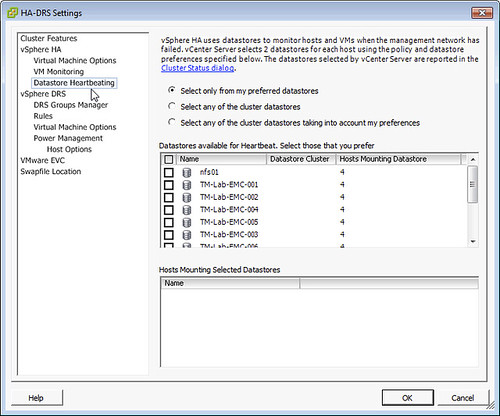
Unfortunately after reconfiguring for HA the error was still there, next suggestion was looking at the “heartbeat datastore” section in HA. For whatever reason HA was configured to “Select only from my preferred datastores” and no datastores were selected just like in the screenshot below. HA does not override this so when configured like this NO heartbeat datastores are used, resulting in this error within vCenter. Luckily the fix is easy, just set it to “Select any of the cluster datastores”.

the number of heartbeat datastores for host is 1

vSphere 5.1 Storage DRS Interoperability

Duncan Epping · May 13, 2013 ·

A while back I did this article on Storage DRS Interoperability. I had questions last week about this so I figured I would write a new article which reflects the current state (vSphere 5.1). I also included some details that are part of the interoperability white paper Frank and I did so that we have a fairly complete picture. This white paper is on 5.0, it will probably be updated at some point in the future.

The first column describes the feature or functionality, the second column the recommended or supported automation mode and the third and fourth column show which type of balancing is supported.

Capability Automation Mode Space Balancing I/O Metric Balancing
Array-based Snapshots Manual Yes Yes
Array-based Deduplication Manual Yes Yes
Array-based Thin provisioning Manual Yes Yes
Array-based Auto-Tiering Manual Yes No
Array-based Replication Manual Yes Yes
vSphere Raw Device Mappings Fully Automated Yes Yes
vSphere Replication Fully Automated Yes Yes
vSphere Snapshots Fully Automated Yes Yes
vSphere Thin provisioned disks Fully Automated Yes Yes
vSphere Linked Clones Fully Automated (*) Yes Yes
vSphere Storage Metro Clustering Manual Yes Yes
vSphere Site Recovery Manager Not supported n/a n/a
VMware vCloud Director Fully Automated (*) Yes Yes
VMware View (Linked Clones) Not Supported n/a n/a
VMware View (Full Clones) Fully Automated Yes Yes

(*) = Change from 5.0

  • « Go to Previous Page
  • Page 1
  • Interim pages omitted …
  • Page 69
  • Page 70
  • Page 71
  • Page 72
  • Page 73
  • Interim pages omitted …
  • Page 124
  • Go to Next Page »

Primary Sidebar

About the Author

Duncan Epping is a Chief Technologist and Distinguished Engineering Architect at Broadcom. Besides writing on Yellow-Bricks, Duncan is the co-author of the vSAN Deep Dive and the vSphere Clustering Deep Dive book series. Duncan is also the host of the Unexplored Territory Podcast.

Follow Us

  • X
  • Spotify
  • RSS Feed
  • LinkedIn

Recommended Book(s)

Also visit!

For the Dutch-speaking audience, make sure to visit RunNerd.nl to follow my running adventure, read shoe/gear/race reviews, and more!

Do you like Hardcore-Punk music? Follow my Spotify Playlist!

Do you like 80s music? I got you covered!

Copyright Yellow-Bricks.com © 2026 · Log in