• Skip to primary navigation
  • Skip to main content
  • Skip to primary sidebar

Yellow Bricks

by Duncan Epping

  • Home
  • Unexplored Territory Podcast
  • HA Deepdive
  • ESXTOP
  • Stickers/Shirts
  • Privacy Policy
  • About
  • Show Search
Hide Search

VMware

vSphere 6.0 finally announced!

Duncan Epping · Feb 3, 2015 ·

Today Pat Gelsinger and Ben Fathi announced vSphere 6.0. (if you missed it you can still sign up for other events) I know many of you have been waiting on this and are ready to start your download engines but please note that this is just the announcement of GA… the bits will follow shortly. I figured I would do a quick post which details what is in vSphere 6.0 / what is new.There were a lot of announcements today, but I am just going to cover vSphere 6.0 and VSAN. I have some more detailed posts to come so I am not gonna go in to a lot of depth in this post, I just figured I would post a list of all the stuff that is in the release… or at least that I am aware off, some stuff wasn’t broadly announced.

  • vSphere 6
    • Virtual Volumes
      • Want “Virtual SAN” alike policy based management for your traditional storage systems? That is what Virtual Volumes will bring in vSphere 6.0. If you ask me this is the flagship feature in this release.
    • Long Distance vMotion
    • Cross vSwitch and vCenter vMotion
    • vMotion of MSCS VMs using pRDMs
    • vMotion L2 adjacency restrictions are lifted!
    • vSMP Fault Tolerance
    • Content Library
    • NFS 4.1 support
    • Instant Clone aka VMFork
    • vSphere HA Component Protection
    • Storage DRS and SRM support
    • Storage DRS deep integration with VASA to understand thin provisioned, deduplicated, replicated or compressed datastores!
    • Network IO Control per VM reservations
    • Storage IOPS reservations
    • Introduction of Platform Services Controller architecture for vCenter
      • SSO, licensing, certificate authority services are grouped and can be centralized for multiple vCenter Server instances
    • Linked Mode support for vCenter Server Appliance
    • Web Client performance and usability improvements
    • Max Config:
      • 64 hosts per cluster
      • 8000 VMs per cluster
      • 480 CPUs per host
      • 12TB of memory
      • 1000 VMs per host
      • 128 vCPUs per VM
      • 4TB RAM per VM
    • vSphere Replication
      • Compression of replication traffic configurable per VM
      • Isolation of vSphere Replication host traffic
    • vSphere Data Protection now includes all vSphere Data Protection Advanced functionality
      • Up to 8TB of deduped data per VDP Appliance
      • Up to 800 VMs per VDP Appliance
      • Application level backup and restore of SQL Server, Exchange, SharePoint
      • Replication to other VDP Appliances and EMC Avamar
      • Data Domain support
  • Virtual SAN 6
    • All flash configurations
    • Blade enablement through certified JBOD configurations
    • Fault Domain aka “Rack Awareness”
    • Capacity planning / “What if scenarios”
    • Support for hardware-based checksumming / encryption
    • Disk serviceability (Light LED on Failure, Turn LED on/off manually etc)
    • Disk / Diskgroup maintenance mode aka evacuation
    • Virtual SAN Health Services plugin
    • Greater scale
      • 64 hosts per cluster
      • 200 VMs per host
      • 62TB max VMDK size
      • New on-disk format enables fast cloning and snapshotting
      • 32 VM snapshots
      • From 20K IOPS to 40K IOPS in hybrid configuration per host (2x)
      • 90K IOPS with All-Flash per host

As you can see a long list of features and products that have been added or improved. I can’t wait until the GA release is available. In the upcoming days I will post some more details on some of the above listed features as there is no point in flooding the blogosphere even more with similar info.
EZT Disks with VSAN, why would you?

Duncan Epping · Jan 26, 2015 ·

I noticed a tweet today which made a statement around the use of eager zero thick disks in a VSAN setup for running applications like SQL Server. The reason this user felt this was needed was to avoid the hit on “first write to block on VMDK”, it is not the first time I have heard this and I have even seen some FUD around this so I figured I would write something up. On a traditional storage system, or at least in some cases, this first write to a new block takes a performance penalty. The main reason for this is that when the VMDK is thin, or lazy zero thick, the hypervisor will need to allocate that new block that is being written to and zero it out.

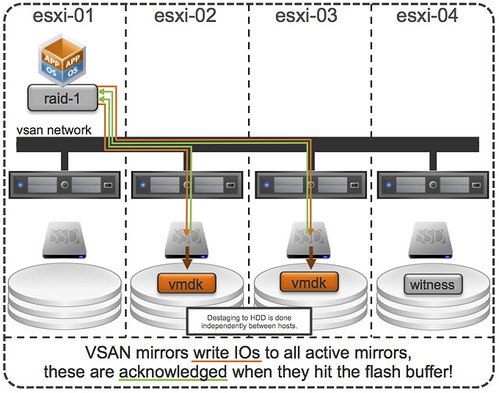
First of all, this was indeed true with a lot of the older storage system architectures (non-VAAI). However, this is something that even in 2009 was dispelled as forming a huge problem. And with the arrival of all-flash arrays this problem disappeared completely. But indeed VSAN isn’t an all-flash solution (yet), but for VSAN however there is something different to take in to consideration. I want to point out, that by default when you deploy a VM on VSAN you typically do not touch the disk format even and it will get deployed as “thin” with potentially a space reservation setting which comes from the storage policy! But what if you use an old template which has a zeroed out disk and you deploy that and compare it to a regular VSAN VM, will it make a difference? For VSAN eager zero thick vs thin will (typically) make no difference to your workload at all. You may wonder why, well it is fairly simple… just look at this diagram:

If you look at the diagram then you will see that the acknowledgement will happen to the application as soon as the write to flash has happened. So in the case of thick vs thin you can imagine that it would make no difference as the allocation (and zero out) of that new block would happen minutes after the application (or longer) has received the acknowledgement. A person paying attention would now come back and say: hey you said “typically”, what does that mean? Well that means that the above is based in the understanding that your working set will fit in cache, of course there are ways to manipulate performance tests to proof that the above is not always the case, but having seen customer data I can tell you that this is not a typical scenario… or extremely unlikely.

So if you deploy Virtual SAN… and have “old” templates floating around and they have “EZT” disks, I would recommend overhauling them as it doesn’t add much, well besides a longer waiting time during deployment.

DRS is just a load balancing solution…

Duncan Epping · Jan 15, 2015 ·

Recently I’ve been hearing this comment more and more, DRS is just a load balancing solution. It seems that some folks spread this FUD to diminish what DRS really is and does. Let me start by saying that DRS is not a load balancing solution. The ultimate goal of DRS is to ensure all workloads receive the resources they demand. Frank Denneman has a great post on this topic as this has led to some confusion in the past. I would advise reading it if you want to understand why exactly VMs are not moved while the cluster seems imbalanced. In short: why balance VMs when the VMs are not constraint? In other words, DRS has a VM centric view of the virtual world and not a host centric… In the end, it is all about your applications and how they perform and not necessarily about the infrastructure it is hosted on, DRS cares about VM/Application happiness. Also, keep in mind that there is a risk and a cost involved with every move you do.

Of course there is a lot of functionality that you leverage without thinking about it and take for granted. Things like Resource Pools (limits / reservations / shares), DRS Maintenance Mode (fully automated), VM Placement, Admission Control (yes DRS has one) and last but not least the various types of (anti) affinity rules. Also, before anyone starts shouting about active memory vs consumed (PercentIdleMBInMemDemand solves this) or %RDY taken in to account… DRS has many knobs you can twist.

But besides that, there is more. Something not a lot of people realize is that for instance HA and DRS are loosely coupled but tightly integrated. When you have both enabled on your cluster then HA will be able to call upon DRS for making the right placement decision and defragmenting resources when needed. What does that mean? Well lets assume for a second that you are running at full (or almost) capacity and a host fails while taking a host failure in to account by leveraging HA admission control. When the host fails HA will need to restart your VMs, but if there at some point is not enough spare capacity left to restart a VM on a given host? Well in that case HA will call upon DRS to make space available so that these VMs can be restarted. That is nice right?! And there is more smartness coming with considering HA / DRS admission control, hopefully I can tell you all about it soon.

Then of course there is also the case where resource pools are implemented. vSphere HA and DRS work in conjunction to ensure that when VMs are failed over that shares are flattened to avoid strange prioritisation during times of contention. HA and DRS do this as VMs always failover to the root resource pool of a host, but of course DRS will place the VMs back where they belong when it runs the first time after the failover has occurred. This especially is important when you have set shares on VMs individually in a resource pool model.

So when someone says DRS is just a simple load balancing solution take their story with a grain of salt…

ScaleIO in the ESXi Kernel, what about the rest of the ecosystem?

Duncan Epping · Jan 6, 2015 ·

Before reading my take on this, please read this great article by Vijay Ramachandran as he explains the difference between ScaleIO and VSAN in the kernel. And before I say anything, let me reinforce that this is my opinion and not VMware’s necessarily. I’ve seen some negative comments around Scale IO / VMware / EMC, most of them are around the availability of a second storage solution in the ESXi kernel next to VMware’s own Virtual SAN. The big complaint typically is: Why is EMC allowed and the rest of the ecosystem isn’t? The question though is if VMware is really not allowing other partners to do the same? While flying to Palo Alto I read an article by Itzik which stated the following:

ScaleIO 1.31 introduces several changes in the VMware environment. First, it provides the option to install the SDC natively in the ESX kernel instead of using the SVM to host the SDC component. The V1.31 SDC driver for ESX is VMware PVSP certified, and requires a host acceptance level of “PartnerSupported” or lower in the ESX hosts.

Let me point out here that the solution that EMC developed is under PVSP support. What strikes me is the fact that many seem to think that what ScaleIO achieved is a unique thing despite the “partner support” statement. Although I admit that there aren’t many storage solutions that sit within the hypervisor, and this is great innovation, it is not unique for a solution to sit within the hypervisor.

If you look at flash caching solutions for instance you will see that some sit in the hypervisor (PernixData, SanDisk’s Flashsoft) and some sit on top (Atlantis, Infinio). It is not like VMware favours one over the other in case of these partners. It was their design, it was their way to get around a problem they had… Some managed to develop a solution that sits in the hypervisor, others did not focus on that. Some probably felt that optimizing the data path first was most important, and maybe even more important they had the expertise to do so.

Believe me when I say that it isn’t easy to create these types of solutions. There is no standard framework for this today, hence they end up being partner supported as they leverage existing APIs and frameworks in an innovative way. Until there is you will see some partners sitting on top and others within the hypervisor, depending on what they want to invest in and what skill set they have… (Yes a framework is being explored as talked about in this video by one of our partners, I don’t know when or if this will be release however!)

What ScaleIO did is innovative for sure, but there are others who have done something similar and I expect more will follow in the near future. It is just a matter of time.

NetApp joins the EVO:RAIL party and includes a FAS

Duncan Epping · Dec 4, 2014 ·

NetApp announced yesterday that they are now part of the EVO:RAIL partner program. Although I have been part of the EVO:RAIL team it is not something I would have seen coming. But I can see why they decided to join and find their announcement interesting. I wasn’t planning on writing about it as Mike Laverick already did yesterday, but as I received 8 emails over night on this topic I figured I would share what is going to be included in this package.

NetApp has created a rapid deployment mechanism for theNetApp FAS unit that will be integrated with the  NetApp EVO:RAIL appliance. The FAS unit will connect into the same top of rack switch that the EVO:RAIL appliance will connect into. We have created a link and launch capability that NetApp can leverage from within the EVO:RAIL configuration engine to rapidly configure/integrate the FAS unit with the EVO:RAIL appliance. 

Yes, this does mean that that 2U hyper-converged appliance which includes vSphere, VSAN and LogInsight now also will include a FAS unit (FAS 2500 judging by NetApp’s website?) in NetApp’s case. Now this is not the first time I have seen vendors adding hardware to the VMware EVO:RAIL offering, but in most other cases physical switches were included. I think this is a very interesting play though, and am looking forward to see how these two products will be integrated. From a configuration perspective I can envision what this would look like, but from a management point of view that will be a bit more challenging and may take some more time. With cool features like Virtual Volumes coming out in the near future this could be a nice way of providing a customer multiple types of storage in a seamless way.

  • « Go to Previous Page
  • Page 1
  • Interim pages omitted …
  • Page 52
  • Page 53
  • Page 54
  • Page 55
  • Page 56
  • Interim pages omitted …
  • Page 124
  • Go to Next Page »

Primary Sidebar

About the Author

Duncan Epping is a Chief Technologist and Distinguished Engineering Architect at Broadcom. Besides writing on Yellow-Bricks, Duncan is the co-author of the vSAN Deep Dive and the vSphere Clustering Deep Dive book series. Duncan is also the host of the Unexplored Territory Podcast.

Follow Us

  • X
  • Spotify
  • RSS Feed
  • LinkedIn

Recommended Book(s)

Also visit!

For the Dutch-speaking audience, make sure to visit RunNerd.nl to follow my running adventure, read shoe/gear/race reviews, and more!

Do you like Hardcore-Punk music? Follow my Spotify Playlist!

Do you like 80s music? I got you covered!

Copyright Yellow-Bricks.com © 2026 · Log in