Last week I had the chance to catch up with one of our Virtual SAN customers. I connected to Neil Cresswell through twitter and after going back and forth we got on a conference call. Neil showed me what they had created for the company he works for, a public cloud provider called IndonesianCloud. No need to tell you where they are located as the name kind of reveals it. Neil is the CEO of IndonesianCloud by the way, and very very passionate about IT / Technology and VMware. It was great talking to him, and before I forget I want to say thanks for taking time out of your busy schedule Neil, I very much appreciate it!
IndonesianCloud is a 3 year old, cloud service provider, part of the vCloud Air Network, which focuses on the delivery of enterprise class hosting services to their customers. Their customers primarily run mission critical workloads in IndonesianCloud’s three DC environment, which means that stability, reliability and predictability is really important.
Having operated a “traditional” environment for a long time Neil and his team felt it was time for a change (Servers + Legacy Storage). They needed something which was much more fit for purpose, was robust / reliable and was capable of providing capacity as well as great performance. On top of that, from a cost perspective it needed to be significantly cheaper. The traditional environment they were maintaining just wasn’t allowing them to remain competitive in their dynamic and price sensitive market. Several different hyperconverged and software based offerings were considered, but finally the settled on Virtual SAN.
Since the Virtual SAN platform was placed into production two months ago, they have deployed over 450 new virtual machines onto their initial 12 node cluster. In addition, migration of another 600 virtual machines from one of their legacy storage platforms to their Virtual SAN environment is underway. While talking to Neil I was mostly interested in some of the design considerations, some of the benefits but also potential challenges.
From a design stance Neil explained how they decided to go with SuperMicro Fat Twin hardware, 5 x NL-SAS drives (4TB) and Intel S3700 SSDs (800GB) per host. Unfortunately no affordable bigger SSDs were available, and as such the environment has a lower cache to capacity ratio than preferred. Still, when looking at the cache hit rate for reads it is more or less steady around 98-99%. PCIe flash was also looked at, but didn’t fit within the budget. These SuperMicro systems were on the VSAN Ready Node list, and this was one of the main reasons for Neil and the team to pick them. Having a pre-validated configuration, which is guaranteed to be supported by all parties, was seen as a much lower risk than building their own nodes. Then there is the network; IndonesianCloud decided to go with HP networking gear after having tested various products. One of the reasons for this was the better overall throughput, better multicast performance, and lower price per port. The network is 10GbE end to end of course.
Key take away: There can be substantial performance difference between the various 10GbE switches, do your homework!
The choice to deploy 4TB NL-SAS drives was a little risky; IndonesianCloud needed to balance the performance, capacity, and price ratios. Luckily having already run their existing cloud platform for 3 years, there was a history of IO information readily available. Using this GB/IOPS historical information meant that IndonesianCloud were able to make a calculated decision that 4TB drives with 800GB SSD would provide the perfect combination of performance and capacity. With very good cache hit rates, Neil would like to deploy larger SSD drives when they become available, as he believes that cache is a great way to minimise the impact of the slower drives. Equally, the write performance of the 4TB drives was also concerning. Using the default VSAN stripe size configuration of 1 meant that at most, only 2 drives were able to service write de-stage requests for a given VM, and due to the slow speed of the 4TB drives, this could have an impact on performance. To mitigate this, IndonesianCloud performed a series of internal tests that baselined different stripe sizes to get a good balance of performance. In the end a stripe size of 5 was selected, and is now being used for all workloads. This also helps in situations where reads are coming from disk by the way, great side effect. BTW, the best way to think about Stripe Size and Failures to Tolerate is like Raid 1E (mirrored stripes).
Key take away: Write performance of large NL-SAS drives is low, striping can help improving performance.
IndonesianCloud has standardised on a 12 node Virtual SAN cluster, and I asked why, given that Virtual SAN 5.5 U1 supports up to 32 nodes (64 with 6.0 even). Neil’s response was that 12 nodes is what comprises an internal “zone”, and that customers can balance their workloads across zones to provide higher levels of availability. Having all nodes in a single cluster, whilst possible, was not considered the best fit for a service provider that is all about containing risk. 12 nodes also maps to approximately 1000 VMs, which is what they have modelled the financial costs against, so 1000 VMs deployed on the 12 node cluster would consume CPU/Memory/Disk at the same ratio, effectively ensuring maximum utilisation of the asset.
If you look at the workloads IndonesianCloud customers run, they range from large databases, time sensitive ERP systems, webservers, streaming TV CDN services, and they are even running Airline ERP operations for a local carrier… All of these VMs are from external paying customers by the way, and all of them are mission critical for those customers. On top of Virtual SAN some customers even have other storage services running. One of them for instance is running SoftNAS on top of Virtual SAN to offer shared file services to other VMs. Vast ranges of different applications, with different IO profiles and different needs but all satisfied by Virtual SAN. One thing that Neil stressed was that the ability to change the characteristics (failures to tolerate) specified in a profile was key for them, it allows for a lot of flexibility / agility.
I did wonder, with VSAN being relative new to the market, if they had concerns in terms of stability and recoverability. Neil actually showed me their comprehensive UAT Testing Plan and the results. They were very impressed by how VSAN handled these tests without any problem. Tests ranging from pulling drives, failing network interfaces and switches, through to removing full nodes from the cluster, all of these were performed whilst simultaneously running various burn-in benchmarks. No problems whatsoever were experienced, and as a matter of fact the environment has been running great in production (don’t curse it!!).
Key take away: Testing, Testing, Testing… Until you feel comfortable with what you designed and implemented!
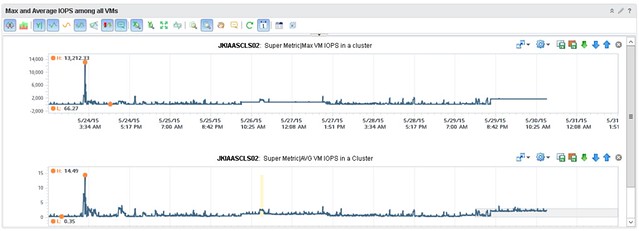
When it comes to monitoring though, the team did want to see more details than what is provided out of the box, especially because it is a new platform they felt that this gave them a bit more insurance that things were indeed going well and it wasn’t just their perception. They worked with one of VMware’s rock stars (Iwan Rahabok) when it comes to VR Ops on creating custom dashboards with all sorts of data ranging from cache hit ratio to latency per spindle to ANY type of detail you want on a per VM level. Of course they start with generic dashboard which then allow you to drill down; any outlier is noted immediately and leveraging VR Ops and these custom dashboards, they can drill deep whenever they need. What I loved most is how relatively easy it is for them to extend their monitoring capabilities. During our WebEx Iwan felt he needed some more specifics on a per VM basis and added these details literally within minutes to VR Ops. IndonesianCloud has been kind enough to share a custom dashboard they created, where they can catch a rogue VM easily. In this dashboard, when a single VM, and it can be any VM, generates excessive IOPS it will trigger a spike right away in the overall dashboard.
I know I am heavily biased, but I was impressed. Not just with Virtual SAN, but even more so with how IndonesianCloud has implemented it. How it is changing the way IndonesianCloud manages their virtual estate and how it enables them to compete in today’s global market.
 I’ve been thinking about the term Software Defined Data Center for a while now. It is a great term “software defined” but it seems that many agree that things have been defined by software for a long time now. When talking about SDDC with customers it is typically referred to as the ability to abstract, pool and automate all aspects of an infrastructure. To me these are very important factors, but not the most important, well at least not for me as they don’t necessarily speak to the agility and flexibility a solution like this should bring. But what is an even more important aspect?
 With Virtual Volumes placement of a VM (or VMDK) is based on how the policy is constructed and what is defined in it. The Storage Policy Based Management engine gives you the flexibility to define policies anyway you like, of course it is limited to what your storage system is capable of delivering but from the vSphere platform point of view you can do what you like and make many different variations. If you specify that the object needs to thin provisioned, or has a specific IO profile, or needs to be deduplicated or… then those requirements are passed down to the storage system and the system makes its placement decisions based on that and will ensure that the demands can be met. Of course as stated earlier also requirements like QoS and availability are passed down. This could be things like latency, IOPS and how many copies of an object are needed (number of 9s resiliency). On top of that, when requirements change or when for whatever reason SLA is breached then in a requirements driven environment the infrastructure will assess and remediate to ensure requirements are met.