• Skip to primary navigation
  • Skip to main content
  • Skip to primary sidebar

Yellow Bricks

by Duncan Epping

  • Home
  • Unexplored Territory Podcast
  • HA Deepdive
  • ESXTOP
  • Stickers/Shirts
  • Privacy Policy
  • About
  • Show Search
Hide Search

VMware

VMUGs I’ll be speaking at in November…

Duncan Epping · Nov 4, 2014 ·

I had this question last week from 2 readers if I was planning on presenting at a particular VMUG. I have prepared a session for three VMUGs in November where I will be presenting on vSphere (and related tech) futures. If you want a hint at what is going to be discussed I recommend reading this blog post. I will present this session at the following VMUGs, make sure you register as soon as possible as these yearly events are definitely worth attending. I encourage EVERYONE who comes to my session to ask questions and to interact to avoid death by Powerpoint 🙂

  • Tuesday 18th of November – UK VMUG – Birmingham
  • Thursday 20th of November – Nordic VMUG – Copenhagen
  • Friday 21st of November – Belgium VMUG – Antwerpen

For the folks near the belgian border (Holland / France / Germany), all presentations should be in English so it is worth attending if you live relatively close by!
(Inter-VM) TPS Disabled by default, what should you do?

Duncan Epping · Oct 27, 2014 ·

We’ve all probably seen the announcement around inter-VM(!!) TPS (transparent page sharing) being disabled by default in future releases of vSphere, and the recommendation to disable it in current versions. The reason for this is the fact there was a research paper published which demonstrates how it is possible to get access to data under certain highly controlled conditions. As the KB article describes:

Published academic papers have demonstrated that by forcing a flush and reload of cache memory, it is possible to measure memory timings to determine an AES encryption key in use on another virtual machine running on the same physical processor of the host server if Transparent Page Sharing is enabled. This technique works only in a highly controlled environment using a non-standard configuration.

There were many people who blogged about what the potential impact is on your environment or designs. Typically in the past people would take a 20 to 30% memory sharing in to account when sizing their environment. With inter-VM TPS disabled of course this goes out of the window. Frank described this nicely in this post. However, as Frank also described and I mentioned in previous articles when large pages are being used (usually the case) then TPS is not used by default and only under pressure…

The under pressure part is important if you ask me as TPS is the first memory reclaiming technique used when a host is under pressure. If TPS cannot sufficiently reduce the memory pressure then ballooning is leveraged, followed by compression and swapping ultimately. Personally I would like to avoid swapping at all costs and preferably compression as well. Ballooning typically doesn’t result in a huge performance degradation so it could be acceptable, but TPS is something I prefer as it just breaks up large pages in to small pages and collapses those when possible. Performance loss is hardly measurable in that case. Of course TPS would be way more effective when pages between VMs can be shared rather then just within the VM.

Anyway, the question remains should you have (inter-VM) TPS disabled or not? When you assess the risk you need to ask yourself first who has access to your virtual machines as the technique requires you to login to a virtual machine. Before we look at the scenarios, not that I mentioned “inter-VM” a couple of times now, TPS is not completely disabled in future versions. It will be disabled for inter-VM sharing by default, but can be enabled. More to be found on that in this article on the vSphere blog.

Lets explore 3 scenarios:

  1. Server virtualisation (private)
  2. Public cloud
  3. Virtual Desktops

In the case of “Server virtualisation”, in most scenarios I would expect that only the system administrators and/or application owners have access to the virtual machines. The question then is, why would they go to this level when they have access to the virtual machines anyway? So in the scenario where Server Virtualization is your use case, and access to your virtual machines is restricted to a limited number of people, I would definitely reconsider enabling inter-VM TPS.

In a public cloud environment this however is different of course. You can imagine that a hacker could buy a virtual machine and try to retrieve the AES encryption key. What he (the hacker) does with it next of course is even then still the question. Hopefully the cloud provider ensures that that the tenants are isolated from each other from a security/networking point of view. If that is the case there shouldn’t be much they could do with it. Then again, it could be just one of the many steps they have to take to break in to a system so I would probably not want to take the risk, although the risk is low. This is one of the scenarios where I would leave inter-VM TPS disabled.

Third and last scenario is Virtual Desktops. In the case of a virtual desktop many different users have access to virtual machines… The question though is if you are running any applications or accessing applications which are leveraging AES encryption or not. I cannot answer that for you, so I will leave that up in the air… you will need to assess that risk.

I guess the answer to whether you should or should not disable (inter-VM) TPS is as always: it depends. I understand why inter-VM TPS was disabled, but if the risk is low I would definitely consider enabling it.

What is coming for vSphere and VSAN? VMworld reveals…

Duncan Epping · Oct 21, 2014 ·

I’ve been prepping a presentation for upcoming VMUGs, but wanted to also share this with my readers. The session is all about vSphere futures, what is coming soon? Before anyone says I am breaking NDA, I’ve harvested all of this info from public VMworld sessions. Except for the VSAN details, those were announced to the press at VMworld EMEA. Lets start with Virtual SAN…

The Virtual SAN details were posted in this Computer Weekly article, and by the looks of it they interviewed VMware’s CEO Pat Gelsinger and Alberto Farronato from the VSAN product team. So what is coming soon?

  • All Flash Virtual SAN support
    Considering the price of MLC has lowered to roughly the same price as SAS HDDs per GB I think this is a great new feature to have. Being able to build all-flash configurations at the price point of a regular configuration, and with probably many supported configurations is a huge advantage of VSAN. I would expect VSAN to support various types of flash as the “capacity” layer, so this is an architects dream… designing your own all-flash storage system!
  • Virsto integration
    I played with Virsto when it was just released and was impressed by the performance and the scalability. Functions that were part of Virst such as snapshots and clones these have been built into VSAN and it will bring VSAN to the next level!
  • JBOD support
    Something many have requested, and primarily to be able to use VSAN in Blade environments… Well with the JBOD support announced this will be a lot easier. I don’t know the exact details, but just the “JBOD” part got me excited.
  • 64 host VSAN cluster support
    VSAN doesn’t scale? Here you go,

That is a nice list by itself, and I am sure there is plenty more for VSAN. At VMworld for instance Wade Holmes also spoke about support for disk controller based encryption for instance. Cool right?! So what about vSphere? Considering even the version number was dropped during the keynote and it hints at a major release you would expect some big functionality to be introduced. Once again, all the stuff below is harvested from various public VMworld sessions:

  • VMFork aka Project Fargo – discussed here…
  • Increased scale!
    • 64 host HA/DRS cluster, I know a handful of customers who asked for 64 host clusters, so here it is guys… or better said: soon you will have it!
  • SMP vCPU FT – up to 4 vCPU support
    • I like FT from an innovation point of view, but it isn’t a feature I would personally use too much as I feel “fault tolerance” from an app perspective needs to be solved by the app. Now, I do realize that there are MANY legacy applications out there, and if you have a scale-up application which needs to be highly available then SMP FT is very useful. Do note that with this release the architecture of FT has changed. For instance you used to share the same “VMDK” for both primary and secondary, but that is no longer the case.
  • vMotion across anything
    • vMotion across vCenter instances
    • vMotion across Distributed Switch
    • vMotion across very large distance, support up to 100ms latency
    • vMotion to vCloud Air datacenter
  • Introduction of Virtual Datacenter concept in vCenter
    • Enhance “policy driven” experience within vCenter. Virtual Datacenter aggregates compute clusters, storage clusters, networks, and policies!
  • Content Library
    • Content Library provides storage and versioning of files including VM templates, ISOs, and OVFs.
      Includes powerful publish and subscribe features to replicate content
      Backed by vSphere Datastores or NFS
  • Web Client performance / enhancement
    • Recent tasks pane drops to the bottom instead of on the right
    • Performance vastly improved
    • Menus flattened
  • DRS placement “network aware”
    • Hosts with high network contention can show low CPU and memory usage, DRS will look for more VM placements
    • Provide network bandwidth reservation for VMs and migrate VMs in response to reservation violations!
  • vSphere HA component protection
    • Helps when hitting “all paths down” situations by allowing HA to take action on impacted virtual machines
  • Virtual Volumes, bringing the VSAN “policy goodness” to traditional storage systems

Of course there is more, but these are the ones that were discussed at VMworld… for the remainder you will have to wait until the next version of vSphere is released, or you can also sign up for the beta still I believe!

EVO:RAIL now also available through HP and HDS!

Duncan Epping · Oct 14, 2014 ·

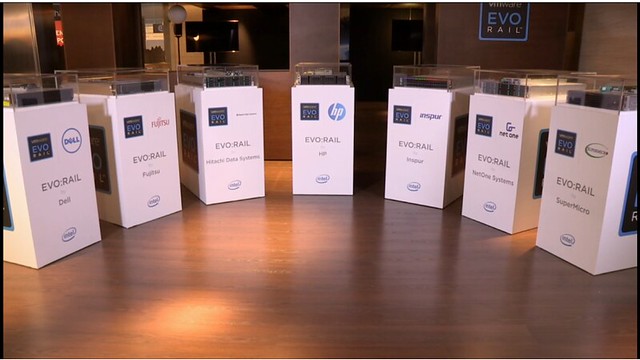
It is going to be a really short blog post, but as many folks have asked about this I figured it was worth a quick article. In the VMworld Europe 2014 keynote Pat Gelsinger today announced that both HP and Hitachi Data Systems have joined the VMware EVO:RAIL program. This is great news if you ask me for customers all throughout the world as it provides more options for procuring an EVO:RAIL hyper-converged infrastructure appliance through your preferred server vendor!

The family is growing: Dell, Fujitsy, Hitachi Data Systems, HP, Inspur, NetOne Systems and SuperMicro… who would you like to see next?

VMware / ecosystem / industry news flash… part 3

Duncan Epping · Oct 10, 2014 ·

It has been a couple of weeks since the last VMware / ecosystem / industry news flash… but we have a couple of items which I felt are worth sharing. Same as with the previous two parts I will share the link, my thoughts around it and hope that you will leave a comment with your thoughts around a specific announcement. If you work for a vendor, I would like to ask to add a disclaimer mentioning this so that all the cards are on the table.

  • PernixData FVP 2.0 available! New features and also new pricing / packaging!
    Frank Denneman has a whole slew of articles describing the new functionality of FVP 2.0 in-depth. If you ask me especially the resilient memory caching is a cool feature, but also the failure domains is something I can very much appreciate as it will allow you to build smarter clusters! The change in pricing/packaging kind of surprised me, an “Enterprise” edition was announced and the current version was renamed to “Standard”. The SMB package was renamed to “Essentials Plus” which from a naming point of view now aligns more with the VMware naming scheme, which makes life easier for customers I guess. I have not seen details around the pricing itself yet, so don’t know what the impact actually is. PernixData has upped the game again and it keeps amazing me how fast they keep growing and at which pace they are releasing new functionality. It makes you wonder what is next for these guys?!
  • Nutanix Unveils Industry’s First All-Flash Hyper-Converged Platform and Only Stretch Clustering Capability!
    I guess the “all-flash” part was just a matter of time considering the price point flash devices have reached. I have looked at these configurations many times, and if you consider that SAS drives are now as expensive as decent SSDs it only makes sense. It should be noted that “all-flash” also means a new model, NX-9000, and this comes as a 2U / 2Node form factor. List price is $110,000 per node… As that is 220k per block and with a 3 node minimum 330K it feels like a steep price, but then again we all know that the street price will be very different. The NX-9000 comes with either 6x 800GB or 1.6TB flash device for capacity, and I am guessing that the other models will also have “all-flash” options as well in the future… it only makes sense. What about that stretched clustering? Well this is what excited me most from yesterdays announcement. In version 4.1  Nutanix will allow for up to 400KM of distance between sites for a stretched cluster. Considering their platform is “vm aware” it should be very easy to select which VMs you want to protect (and which you do not). On top of that they provide the ability to have two different hardware platforms in each of the sites. In other words you can run with a top of the line block in your primary site, while having a lower end block in your recovery site. From a TCO/ROI point of view this can be very beneficial if you have no requirement for a uniform environment. Judging by the answers on twitter, the platform has not gone through VMware vSphere Metro Storage Cluster certification yet but this is likely to happen soon. SRM integration is also being looked at. All in all, nice announcements if you ask me!
  • SolidFire announces two new models and new round of funding (82 million!)
    What is there to say about the funding that hasn’t been said yet. 82 million in series D says enough if you ask me. SolidFire is one of those startups which have impressed me from the very beginning. They have a strong scale-out storage system which offers excellent quality of service functionality, a system which is primarily aimed at the Service Provider market. Although that seems to slowly change with the introduction of these new models as their smallest model now brings a 100K entry point. Note that the smallest configuration with SolidFire is 4 nodes, spec details can be found here. As stated, what excites me most with SolidFire is the services that the systems brings: QoS, data reduction and replication / SRM integration.

Thanks, and again feel free to drop a comment / leave your thoughts!

  • « Go to Previous Page
  • Page 1
  • Interim pages omitted …
  • Page 54
  • Page 55
  • Page 56
  • Page 57
  • Page 58
  • Interim pages omitted …
  • Page 124
  • Go to Next Page »

Primary Sidebar

About the Author

Duncan Epping is a Chief Technologist and Distinguished Engineering Architect at Broadcom. Besides writing on Yellow-Bricks, Duncan is the co-author of the vSAN Deep Dive and the vSphere Clustering Deep Dive book series. Duncan is also the host of the Unexplored Territory Podcast.

Follow Us

  • X
  • Spotify
  • RSS Feed
  • LinkedIn

Recommended Book(s)

Also visit!

For the Dutch-speaking audience, make sure to visit RunNerd.nl to follow my running adventure, read shoe/gear/race reviews, and more!

Do you like Hardcore-Punk music? Follow my Spotify Playlist!

Do you like 80s music? I got you covered!

Copyright Yellow-Bricks.com © 2026 · Log in