• Skip to primary navigation
  • Skip to main content
  • Skip to primary sidebar

Yellow Bricks

by Duncan Epping

  • Home
  • Unexplored Territory Podcast
  • HA Deepdive
  • ESXTOP
  • Stickers/Shirts
  • Privacy Policy
  • About
  • Show Search
Hide Search

VMware

Looking for the VROps VSAN Content Pack?

Duncan Epping · Jun 7, 2016 ·

I just noticed the link for the VROps VSAN Content Pack had changed and it isn’t easy to find through google either. Figured I would post it quickly so at least it is indexed and easier to find. Also including the LogInsight VSAN content pack link for your convenience:

  • LogInsight VSAN content pack: https://solutionexchange.vmware.com/store/products/vmware-vsan
  • VROps VSAN content pack: https://solutionexchange.vmware.com/store/products/vrealize-operations-management-pack-for-storage-devices

C# Client is officially dead…

Duncan Epping · May 19, 2016 ·

Many of you have seen the news by now, yesterday VMware announced that the Windows vSphere Client, usually referred to as the C# Client, is dead. Yes indeed, it has been declared dead and going forward will no longer be made available for future release of vSphere. Now this means that it is still available for all releases out there today (up to 6.0) and it will of course stick to the standard support period.

I have always loved the C# Client, but I don’t have mixed feelings on this one… It needs to go, it has been dead for a long time but it was still walking, it is time for a change and time we put it to rest once and for all. Yes it will be painful for some, but I believe this is the only way to move forward.
That also means for you, the admin / consultant, that there needs to be an alternative. Well one has been in the making for a while and that is the HTML-5 based “Host Client”. The Host Client started out as a fling, but as of vSphere 6.0 U2 is part of the default install of ESXi. Personally I really like the client and I can’t wait for it to be feature complete. What I probably like most, besides the slick interface and the speed, is the fact that you can access it from anywhere and that the developers are out there waiting for feedback and ready to engage and improve on what they released. It gets updated very frequently, just visit the Fling’s page (version 8.1 is up there right now) and if you have feedback engage with the engineers through the fling page, or simply drop a note on twitter to Etienne.

But that’s not it, VMware has also shown that it has the intention to get rid of Flash from the Web Client… Again released as a fling and you can download it and try it out as well, next to the regular Web Client. It was recently updated to version 1.6 and believe me when I say that these developers and the PM are also constantly looking for feedback and ways to improve the experience. The message was loud and clear over the past couple of years and they are doing everything they can to improve the Web Client experience, which includes performance and just generic usability aspects.

I would like to ask everyone to try out both the Host Client and the HTML-5 Web Client and leave feedback on those fling pages. What’s working, what is not, what about performance, different devices etc. And if you have strong feelings about the announcement, always feel free to leave a comment here, or on the announcement blog, as PM and Dev will be reading and commenting there where and when needed.

600GB write buffer limit for VSAN?

Duncan Epping · May 17, 2016 ·

Write Buffer Limit for VSANI get this question on a regular basis and it has been explained many many times, I figured I would dedicate a blog to it. Now, Cormac has written a very lengthy blog on the topic and I am not going to repeat it, I will simply point you to the math he has provided around it. I do however want to provide a quick summary:

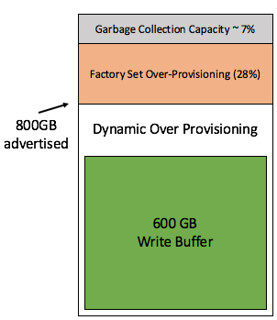
When you have an all-flash VSAN configuration the current write buffer limit is 600GB. (only for all-flash) As a result many seem to think that when a 800GB device is being used for the write buffer that 200GB will go unused. This simply is not the case. We have a rule of thumb of 10% cache to capacity ratio. This rule of thumb has been developed with both performance and endurance in mind as described by Cormac in the link above. The 200GB that is above the 600GB limit of the write buffer is actively used by the flash device for endurance. Note that an SSD usually is over-provisioned by default, most of them have extra cells for endurance and write performance. Which makes the experience more predictable and at the same time more reliable,  the same applies in this case with the Virtual SAN write buffer.

The image at the top right side shows how this works. This SSD has 800GB as advertised capacity. The “write buffer” is limited to 600GB however the white space is considered “dynamic over provisioning” capacity as it will be actively used by the SSD automatically (SSDs do this by default). Then there is an additional x % of over provisioning by default on all SSDs, which in the example is 28% (typical for enterprise grade) and even after that there usually is an extra 7% for garbage collection and other SSD internals. If you want to know more about why this is and how this works, Seagate has a nice blog.

So lets recap, as a consumer/admin the 600GB write buffer limit should not be a concern. Although the write buffer is limited in terms of buffer capacity, the flash cells will not go unused and the rule of thumb as such remains unchanged: 10% cache to capacity ratio. Lets hope this puts this (non) discussion finally to rest.

Virtually Speaking Podcast Episode 7 – VSAN Customer Use Cases

Duncan Epping · Apr 2, 2016 ·

The Storage and Availability Tech Marketing team runs a podcast called Virtually Speaking Podcast every week. This week it was my turn to be a guest on their show. We spoke about VSAN / use cases / all-flash and various other random topic that came up. It was a fun conversation, and I am going to try to tune in more often for sure. (Although I do listen to it every week, I haven’t been able to join live…) Make to sign up, so you don’t miss out on an episode. Listen to Pete Flecha, John Nicholson and I through the below player. I hope you will enjoy it as much as I did.

Cool fling: vSphere HTML5 Web Client! #h5client

Duncan Epping · Mar 29, 2016 ·

Many have asked for it, today the first iteration of the vSphere HTML5 Web Client has been delivered through the VMware Flings website. After the huge success of the ESXi Embedded Host Client (one of my fav flings) it was decided to take the same route for the HTML5 client. The amount of feedback on the ESXi Embedded Host Client fling was overwhelming and it allowed the engineers to incorporate feedback in a very agile while, respond to customers / users requirements literally within days sometimes. Of course the Web Client is a much larger undertaking, but the goal is very much similar. Having said that, it is not fully baked yet, VMware focused on the key workflows first and will expand over time.

Here are list of the most important features/workflows available:

  • VM power operations (common cases)p>
  • VM Edit Settings (simple CPU, Memory, Disk changes)
  • VM Console
  • VM and Host Summary pages
  • VM Migration (only to a Host)
  • Clone to Template/VM
  • Create VM on a Host (limited)
  • Additional monitoring views: Performance charts, Tasks, Events
  • Global Views: Recent tasks, Alarms (view only)
  • Feedback Tool (New feature to collect feedbacks from you)
  • And more.

So if you are interested in testing the latest and willing to provide feedback, start your engines! Note that the product management and engineering team will be closely monitoring twitter, VMTN communities and the feedback loop that is build in to the client itself. Here is how and where you can leave feedback:

  • Fling Comment Section: https://labs.vmware.com/flings/vsphere-html5-web-client
  • VMTN community: https://communities.vmware.com/community/vmtn/vcenter
  • On twitter through #h5client
  • Or in the UI by clicking that smiley at the top right
  • If you would like to receive email updates and surveys from us regarding this fling, sign up here: http://goo.gl/forms/IqGJ5twYHf.

I have tried it long before it was even close to ready, and can honestly say that I very much enjoyed how quick it was… it feels to snappy and fresh, yet gets the job done without any nonsense. Great work guys…

  • « Go to Previous Page
  • Page 1
  • Interim pages omitted …
  • Page 42
  • Page 43
  • Page 44
  • Page 45
  • Page 46
  • Interim pages omitted …
  • Page 124
  • Go to Next Page »

Primary Sidebar

About the Author

Duncan Epping is a Chief Technologist and Distinguished Engineering Architect at Broadcom. Besides writing on Yellow-Bricks, Duncan is the co-author of the vSAN Deep Dive and the vSphere Clustering Deep Dive book series. Duncan is also the host of the Unexplored Territory Podcast.

Follow Us

  • X
  • Spotify
  • RSS Feed
  • LinkedIn

Recommended Book(s)

Also visit!

For the Dutch-speaking audience, make sure to visit RunNerd.nl to follow my running adventure, read shoe/gear/race reviews, and more!

Do you like Hardcore-Punk music? Follow my Spotify Playlist!

Do you like 80s music? I got you covered!

Copyright Yellow-Bricks.com © 2026 · Log in