• Skip to primary navigation
  • Skip to main content
  • Skip to primary sidebar

Yellow Bricks

by Duncan Epping

  • Home
  • Unexplored Territory Podcast
  • HA Deepdive
  • ESXTOP
  • Stickers/Shirts
  • Privacy Policy
  • About
  • Show Search
Hide Search

VMware

Essential Virtual SAN (6.2) available for pre-order

Duncan Epping · Mar 14, 2016 ·

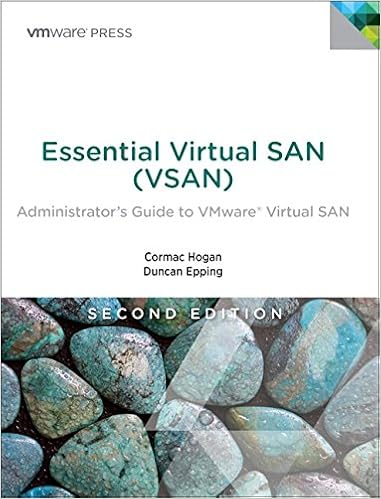
Just noticed that Essential Virtual SAN (based on 6.2) the second edition is available on Amazon for pre-ordering. If you are interested, make sure to put your order in and get it the day it is made available. For now the publication date is set to the 13th of June, hopefully we can shorten it a bit… We will do our best.

Fully updated for the newest versions of VMware Virtual SAN, this guide show how to scale VMware’s fully distributed storage architecture to meet any enterprise storage requirement. World-class Virtual SAN experts Cormac Hogan and Duncan Epping thoroughly explain how Virtual SAN integrates into vSphere 6.x and enables the Software Defined Data Center (SDDC). You’ll learn how to take full advantage of Virtual SAN, and get up-to-the-minute insider guidance for architecture, implementation, and management.

If you want to order it at a local book store, here are the ISBN details:

  • ISBN-13: 978-0134511665
  • ISBN-10: 0134511662

Also expect an update on when the Kindle version can be expected. Thanks!
Essential Virtual SAN – Second Edition – Rough Cuts now on Safari!

Duncan Epping · Mar 9, 2016 ·

essential virtual san second editionCormac Hogan and I have been working hard over the past couple of months to update the Virtual SAN book. It was a lot of work with all the changes that were introduced to Virtual SAN since the first version, but we managed to get it done. We just finalized the last chapter and it looks like the Rough Cuts have just gone been published through Safari. If you have a Safari account you can find the book here.

The book will go over the basics, but also describe specific subjects in-depth like stretched clustering that was introduced in 6.1 and the data services and perf monitoring which was introduced in 6.2. About to go on a VSAN journey? Well this is where you should start!

Foreword was written by Christos Karamanolis (VMware Fellow and CTO) and we had the pleasure of working with Christian Dickmann (VSAN Dev Architect) and John Nicholson (VSAN Tech Marketing) as technical reviewers. Thanks guys for keeping us honest.

Hopefully the official version will be out soon as well through Amazon and other book stores. We have asked for a “digital first approach” which means that the Mobi/Epub version should be out first followed by a paper version. When it is, I will definitely let you guys know.

Before I forget, thanks Cormac… Always a pleasure working with you on projects like these. Go VSAN!

Hybrid vs All-flash VSAN, are we really getting close?

Duncan Epping · Mar 4, 2016 ·

For the last 12 months people have been saying that all-flash and hybrid configurations are getting really close in terms of pricing. During the many conversations I have had with customers it became clear that this is not always the case when they requested quotes from server vendors and I wondered why. I figured I would go through the exercise myself to see how close we actually are and to what we are getting close. I want to end this discussion once and for all, and hopefully convince all of you to get rid of that spinning rust from your VSAN configurations, especially those who are now at the point of making their design.
For my exercise I needed to make up some numbers, I figured I would use an example of a customer to make it as realistic as possible. I want to point out that I am not looking at the price of the full infrastructure here, just comparing the “capacity tier”, so if you received a quote that is much higher than that does make sense as you will have included CPU, Memory, Caching tier etc etc. Note that I used dollar prices and took no discount in to account, discount will be different for every customer and differ per region, and I don’t want to make it more complex than it needs to be. This applies to both the software licenses as the hardware.

What are we going to look at:

  • 10 host cluster
  • 80TB usable capacity required
  • Prices for SAS magnetic disks and an all-flash configuration

I must say that the majority of my customers use SAS, some use NL-SAS. With NL-SAS of course the price point is different, but those customers are typically also not overly concerned about performance, hence the SAS and all-flash comparison is more appropriate. I also want to point out that the prices below are “list prices”. Of course the various vendors will give a substantial discount, and this will be based on your relationship and negotiation skills.

  • SAS 1.2TB HDD = $ 579
  • SAS 960GB SSD = $ 1131

The above prices were taken from dell.com and the SSD is a read intensive SSD. Now lets take a look at an example. With FTT=1 and RAID-1 for Hybrid and RAID-5 for all-flash. In order to get to 80TB usable we need to calculate the overhead and then divide it by the size of the device to find out how many devices we need. Multiply that outcome by the cost of the device and you end up with the cost of the 80TB usable capacity tier.

80TB * 2 (FTT factor) = 160TB / 1.2TB device = 133.33 devices needed
134* 579 = $ 77586
80TB * 1,33 (FTT factor) = 106.4TB / 0.960TB device = 110.8 devices needed
111 * 1131 = $ 125542

Now if you look at the price per solution, hybrid costs are $ 77.5k while all-flash is $125.5k. A significant difference, and then there also is the 30k licensing delta (list price) you need to take in to account, which means the cost for the capacity is actually $155.5k. However, we have not included ANY form of deduplication and compression in to account. Of course the results will differ per environment, but I feel 3-4x is a reasonable average across hundreds of VMs with 80TB of usable capacity in total. Lets do the math with 3x just to be safe.

I can’t simply divide the cost by 3 as unfortunately dedupe and compression do not work on licensing cost, unless of course the lower number of devices would result in a lower number of hosts needed, but lets not assume that that is the case. In this case I will divide 111 devices required by 3 which means we need 37 devices in total:

37 * 1131 = $ 41847

As you can see, from a storage cost perspective we are now much lower than hybrid, 41k for all-flash versus 78k for hybrid. We haven’t factored in the license yet though, so if you add 30K for licensing then (delta between standard/advanced * 20 CPUs) it means all-flash is 71k and hybrid 78k. The difference being $ 7000 between these configurations with all-flash being cheaper, well that is not the only difference, the biggest difference of course will be the user experience, much higher number of IOPS but more importantly also an extremely low latency. Now, as stated the above is an example with prices taken from Dell.com, if you do the same with SuperMicro then of course the results will be different. Prices will differ per partner, but Thinkmate for instance charges $379 for a 10K RPM 1.2TB SAS drive, and $549 for a Micron DC510 with 960GB of capacity. Which means that the base price with just taking RAID-5 in to consideration and no dedupe and compression benefit will be really close.

Yes, the time is now, all-flash will over take “performance” hybrid configurations for sure!

VSAN 6.2 : Why going forward FTT=2 should be your new default

Duncan Epping · Mar 1, 2016 ·

I’ve been talking to a lot of customers the past 12-18 months, if one thing stood out is that about 98% of all our customers used Failures To Tolerate = 1. This means that 1 host or disk could die/disappear without losing data. Most of the customers when talking to them about availability indicated that they would prefer to use FTT=2 but cost was simply too high.

With VSAN 6.2 all of this will change. Today with a 100GB disk FTT=1 results in 200GB of required disk capacity. With FTT=2 you will require 300GB of disk capacity for the same virtual machine, which is an extra 50% capacity required compared to FTT=1. The risk, for most people, did not appear to weigh up against the cost. With RAID-5 and RAID-6 the math changes, and the cost of extra availability also changes.

The 100GB disk we just mentioned with FTT=1 and the Failure Tolerance Method set to “RAID-5/6” (only available for all flash) means that the 100GB disk requires 133GB of capacity. Already that is a saving of 67GB compared to “RAID-1”. But that savings is even bigger when going to FTT=2, now that 100GB disk requires 150GB of disk capacity. This is less than “FTT=1” with “RAID-1” today and literally half of FTT=2 and FTM=RAID-1. On top of that, the delta between FTT=1 and FTT=2 is also tiny, for an additional 17GB disk space you can now tolerate 2 failures. Lets put that in to a table, so it is a bit easier to digest. (Note that you can sort the table by clicking on a column header.)

FTTFTMOverheadVM sizeCapacity required
1Raid-12x100GB200GB
1Raid-5/61.33x100GB133GB
2Raid-13x100GB300GB
2Raid-5/61.5x100GB150GB

Of course you need to ask yourself if your workload requires it, does it make sense with desktops? Well for most desktops it probably doesn’t… But for your Exchange environment maybe it does, for your databases maybe it does, for your file servers, print servers, for your web farm even it can make a difference. That is why I feel that the standard used “FTT” setting is going to change slowly, and will (should) be FTT=2 in combination with FTM set to “RAID-5/6”. Now let it be clear, there is a performance difference between FTT=2 with FTM=RAID-1 vs FTT=2 with FTM=RAID-6 (same applies for FTT=1) and of course there is a CPU resource cost as well. Make sure to benchmark what the “cost” is for your environment and make an educated decision based on that. I believe though that in the majority of cases the extra availability will outweigh the cost / overhead, but still this is up to you to determine and decide. What is great about VSAN in my opinion is the fact that we offer you the flexibility to decide per workload what makes sense.

Check your VSAN disk controllers against the HCL with PowerCLI

Duncan Epping · Feb 24, 2016 ·

Every now and then customers ask if it is possible to check if disk controllers are on the VSAN HCL (Or VMware Compatibility Guide (VCG) as it is actually called these days) for a given set of hosts through PowerCLI. Alan Renouf figured he would knock something out, thanks Alan for sharing! (Next up would be validate drivers and firmware of all components, thanks!) What this script does is the following, note that you need internet access for this to work:

  • Connect to vCenter
  • Download latest VSAN HCL details (json file)
  • Compare controllers of each host against the VSAN HCL
  • Report the state of your infra

Here is the script, it can also be found in the VMware Developer Center repository by the way.

Connect-VIServer myvcenter -user Administrator -password MyPass23
 
 
Function Get-CompatibleVSANController {
    if (-Not $vSANHCL) {
        $vSANHCL = Invoke-WebRequest -Uri http://partnerweb.vmware.com/service/vsan/all.json | ConvertFrom-Json
    }
    $vSANHCL.data.controller
}
 
$HBAs = get-vmhost | Get-VMHostPciDevice | where { $_.DeviceClass -eq "MassStorageController" }
 
Foreach ($HBA in $HBAs) {
    $HBAFound = $false
    Write-Host "Looking for $($hba.name) from host $($HBA.VMhost)"
    Foreach ($entry in Get-CompatibleVSANController) {
        $vid = [String]::Format("{0:x}", $HBA.VendorId)
              $did = [String]::Format("{0:x}", $HBA.DeviceId)
              $svid = [String]::Format("{0:x}", $HBA.SubVendorId)
        $ssid = [String]::Format("{0:x}", $HBA.SubDeviceId)
        If (($vid -eq $entry.vid) -and ($did -eq $entry.did) -and ($svid -eq $entry.svid) -and ($ssid -eq $entry.ssid) ) {
            Write-Host " HBA in $($HBA.VMHost) is $($HBA.Name) which can be found in the HCL as $($Entry.vendor) - $($Entry.Model) at the following URL: `n $($entry.vcglink)" -ForegroundColor Green
            $HBAFound = $true
        }
    }
    If (-Not $HBAFound){
        Write-Host " $($HBA.Name) in $($HBA.VMHost) is not found!" -ForegroundColor Red
    }
}

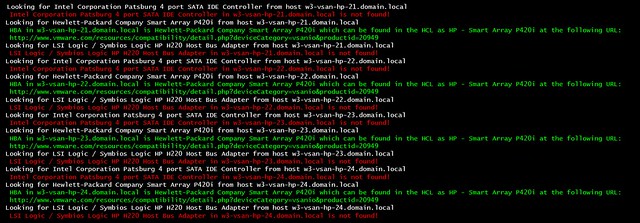
If you run it the output will look like this:

  • « Go to Previous Page
  • Page 1
  • Interim pages omitted …
  • Page 44
  • Page 45
  • Page 46
  • Page 47
  • Page 48
  • Interim pages omitted …
  • Page 124
  • Go to Next Page »

Primary Sidebar

About the Author

Duncan Epping is a Chief Technologist and Distinguished Engineering Architect at Broadcom. Besides writing on Yellow-Bricks, Duncan is the co-author of the vSAN Deep Dive and the vSphere Clustering Deep Dive book series. Duncan is also the host of the Unexplored Territory Podcast.

Follow Us

  • X
  • Spotify
  • RSS Feed
  • LinkedIn

Recommended Book(s)

Also visit!

For the Dutch-speaking audience, make sure to visit RunNerd.nl to follow my running adventure, read shoe/gear/race reviews, and more!

Do you like Hardcore-Punk music? Follow my Spotify Playlist!

Do you like 80s music? I got you covered!

Copyright Yellow-Bricks.com © 2026 · Log in