• Skip to primary navigation
  • Skip to main content
  • Skip to primary sidebar

Yellow Bricks

by Duncan Epping

  • Home
  • Unexplored Territory Podcast
  • HA Deepdive
  • ESXTOP
  • Stickers/Shirts
  • Privacy Policy
  • About
  • Show Search
Hide Search

performance

Real life RAID penalty example added to the IOps article

Duncan Epping · Jan 11, 2010 ·

I just added a real life RAID penalty example to the IOps article. I know Sys Admins are lazy,  so here’s the info I just added:

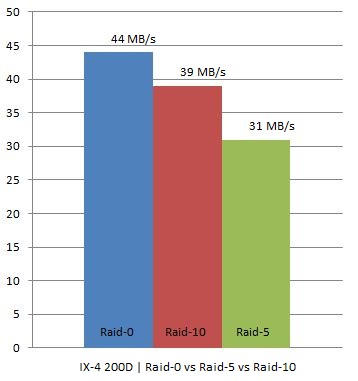
I have two IX4-200Ds at home which are capable of doing RAID-0, RAID-10 and RAID-5. As I was rebuilding my homelab I thought I would try to see what changing RAID levels would do on these homelab / s(m)b devices. Keep in mind this is by no means an extensive test. I used IOmeter with 100% Write(Sequential) and 100% Read(Sequential). Read was consistent at 111MB for every single RAID level. However for Write I/O this was clearly different, as expected. I did all tests 4 times to get an average and used a block size of 64KB as Gabes testing showed this was the optimal setting for the IX4.

In other words, we are seeing what we were expecting to see. As you can see RAID-0 had an average throughput of 44MB/s, RAID-10 still managed to reach 39MB/s but RAID-5 dropped to 31MB/s which is roughly 21% less than RAID-10.

I hope I can do the “same” tests on one of the arrays or preferably both (EMC NS20 or NetApp FAS2050) we have in our lab in Frimley!
FC vs NFS vs iSCSI

Duncan Epping · Jan 7, 2010 ·

I was just reading the excellent whitepaper that NetApp just published. The paper is titled “VMware vSphere multiprotocol performance comparison using FC, iSCSI and NFS“. I guess the title says enough and I don’t need to explain why it is important to read this one.

I read the paper twice so far. Something that stood out for me is the following graph:

I would have expected better performance from iSCSI+Jumbo Frames, and most certainly not less performance than iSCSI without Jumbo Frames. Although it is a minimal decrease it is something that you will need to be aware off. I do however feel that the decrease in CPU overhead is more than enough to justify the small decrease in performance.

Read the report, it is worth your time.

esxtop values/thresholds!

Duncan Epping · Jan 5, 2010 ·

I created a page which contains the latest and greatest info! Please go here.

Nehalem and memory config

Duncan Epping · Jan 1, 2010 ·

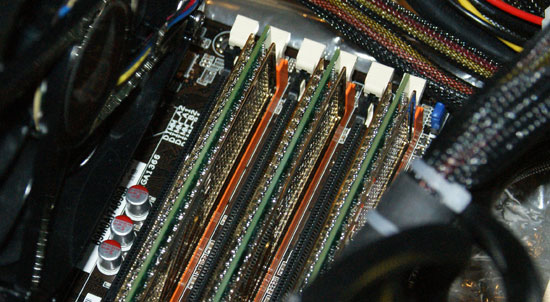
Just a short article for today, or should I call it a tip. Take your memory configuration into account for Nehalem processors. There’s a sweet spot in terms of performance which might just make a difference. Read this article on Scott’s blog or this article on Anandtech where they did measure the difference in performance. Again it is not a huge difference, but when combining workloads it might just be that little extra you were looking for.

IOps?

Duncan Epping · Dec 23, 2009 ·

Just something I wanted to document for myself as it is info I need on a regular basis and always have trouble finding it or at least finding the correct bits and pieces. I was more or less triggered by this excellent white paper that Herco van Brug wrote. I do want to invite everyone out there to comment. I will roll up every single useful comment into this article to make it a reference point for designing your storage layout based on performance indicators.

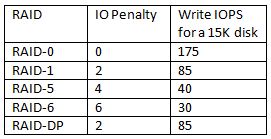
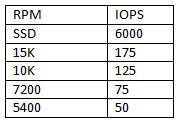
The basics are simple, RAID introduces a write penalty. The question of course is how many IOps do you need per volume and how many disks should this volume contain to meet the requirements? First, the disk types and the amount of IOps. Keep in mind I’ve tried to keep values on the safe side:

IOps?
(I’ve added SSD with 6000 IOps as commented by Chad Sakac)

So how did I come up with these numbers? I bought a bunch of disks, measured the IOps several times, used several brands and calculated the average… well sort of. I looked it up on the internet and took 5 articles and calculated the average and rounded the outcome.

[edit]
Many asked about where these numbers came from. Like I said it’s an average of theoretical numbers. I used a (now offline) article from ZDNet as the theoretical basis. ZDNet explains what the maximum amount of IOps theoretically is for a disk. In short; It is based on “average seek time” and the half of the time a single rotation takes. These two values added up result in the time an average IO takes. There are 1000 miliseconds in every second so divide 1000 by this value and you have a theoretical maximum amount of IOps. Keep in mind though that this is based on “random” IO. With sequential IO these numbers will of course be different on a single drive.
[/edit]

So what if I add these disks to a raid group:

For “read” IOps it’s simple, RAID Read IOps = Sum of all Single Disk IOps.

For “write” IOps it is slightly more complicated as there is a penalty introduced:

So how do we factor this penalty in? Well it’s simple for instance for RAID-5 for every single write there are 4 IO’s needed. That’s the penalty which is introduced when selecting a specific RAID type. This also means that although you think you have enough spindles in a single RAID Set you might not due to the introduced penalty and the amount of writes versus reads.

I found a formula and tweaked it a bit so that it fits our needs:

(TOTAL IOps × % READ)+ ((TOTAL IOps × % WRITE) ×RAID Penalty)

So for RAID-5 and for instance a VM which produces 1000 IOps and has 40% reads and 60% writes:

(1000 x 0.4) + ((1000 x 0.6) x 4) = 400 + 2400 = 2800 IO’s

The 1000 IOps this VM produces actually results in 2800 IO’s on the backend of the array, this makes you think doesn’t it?

Real life examples

I have two IX4-200Ds at home which are capable of doing RAID-0, RAID-10 and RAID-5. As I was rebuilding my homelab I thought I would try to see what changing RAID levels would do on these homelab / s(m)b devices. Keep in mind this is by no means an extensive test. I used IOmeter with 100% Write(Sequential) and 100% Read(Sequential). Read was consistent at 111MB for every single RAID level. However for Write I/O this was clearly different, as expected. I did all tests 4 times to get an average and used a block size of 64KB as Gabes testing showed this was the optimal setting for the IX4.

In other words, we are seeing what we were expecting to see. As you can see RAID-0 had an average throughput of 44MB/s, RAID-10 still managed to reach 39MB/s but RAID-5 dropped to 31MB/s which is roughly 21% less than RAID-10.

I hope I can do the “same” tests on one of the arrays or preferably both (EMC NS20 or NetApp FAS2050) we have in our lab in Frimley!
<update: December 2012>
More info about storage / VMFS volume sizing can be found in the following articles:

  • VMFS-5 LUN Sizing
  • LUN sizes in the new Storage World
  • Should I use many small LUNs or a couple large LUNs for Storage DRS?

</update>


  • « Go to Previous Page
  • Page 1
  • Interim pages omitted …
  • Page 11
  • Page 12
  • Page 13
  • Page 14
  • Page 15
  • Interim pages omitted …
  • Page 21
  • Go to Next Page »

Primary Sidebar

About the Author

Duncan Epping is a Chief Technologist and Distinguished Engineering Architect at Broadcom. Besides writing on Yellow-Bricks, Duncan is the co-author of the vSAN Deep Dive and the vSphere Clustering Deep Dive book series. Duncan is also the host of the Unexplored Territory Podcast.

Follow Us

  • X
  • Spotify
  • RSS Feed
  • LinkedIn

Recommended Book(s)

Also visit!

For the Dutch-speaking audience, make sure to visit RunNerd.nl to follow my running adventure, read shoe/gear/race reviews, and more!

Do you like Hardcore-Punk music? Follow my Spotify Playlist!

Do you like 80s music? I got you covered!

Copyright Yellow-Bricks.com © 2026 · Log in