• Skip to primary navigation
  • Skip to main content
  • Skip to primary sidebar

Yellow Bricks

by Duncan Epping

  • Home
  • Unexplored Territory Podcast
  • HA Deepdive
  • ESXTOP
  • Stickers/Shirts
  • Privacy Policy
  • About
  • Show Search
Hide Search

performance

Best training course in ages!

Duncan Epping · Mar 12, 2010 ·

I’ve done a lot of training courses in my career. A lot of them were disappointing as they never met my expectations. I guess the ones that did meet my expectations, or even exceeded them, were mainly VMware related. Especially the DSA course rocked. But there’s a new training in town, and it just claimed the crown… VMware vSphere: Manage for Performance!

I read the course material this week and I can honestly say that it rocks! Of course I did not expect anything less becauseVMware’s performance guru Scott Drummonds was involved in developing this course. (Scott wrote an article about the training a month ago, you can find it here.) Below you will find a short description.

This hands-on training course explores the management of performance in a VMware vSphere™ environment. It provides the knowledge and skills necessary to make fundamental design decisions that enhance performance and to meet performance goals in an already-deployed vSphere installation. The course is based on VMware® ESX™ 4.0, ESXi 4.0, and vCenter™ Server 4.0.

source pdf

Like I said, heavily recommended for everyone!
Reclaiming idle memory

Duncan Epping · Mar 11, 2010 ·

In the “CPU/MEM Reservation Behavior” article there was a lively discussion going on between Chris Huss(vmtrainers.com) and myself. I think the following comment by Chris more or less summarizes the discussion

I wasn’t aware that the balloon driver was involved with the Mem.IdleTax. I haven’t seen any documentation stating this…and assumed that the VMkernel just stopped mapping idle memory for the VM without letting it know. If the VM needed the memory again, the VMkernel would just re-map it.

I can be totally wrong about this, but I have not seen any documentation to debunk this theory. It is my belief that the Mem.IdleTax is a totally separate memory saving/shaving technique from the balloon driver or the .vswp file.

If VMware engineering has or would publish an official article on this…I think it would clear up alot of things.

To summarize; How does ESX reclaim idle memory or free memory from a virtual machine? The answer is simple. ESX has two idle memory reclamation mechanisms:

  1. Balloon driver
  2. vSwap

I would like to refer to page 29 of the Resource Management Guide where the above is stated. I do not think it is a coincidence that the paragraph above “memory reclamation” is “Memory Tax for Idle Virtual Machines”. (There is a third memory “reclamation” mechanism by the way, it is called “TPS”, but this is not used to specifically reclaim Idle Memory but rather to free up memory by sharing pages where possible.)

By default the balloon driver is used to reclaim idle memory. The balloon driver is in fact used as some operating systems only update there internal free memory map. Basically what I am saying is that the hypervisor is unaware of the fact that specific pages are unused as they might still contain data and the GOS(Guest Operating System) will not report to the hypervisor that the pages are not being used anymore. The balloon driver is used to notify the GOS that there is a lack of memory.

When the balloon inflates the GOS will first assign all “unused / free” pages to the balloon driver. If this is enough it will stop. If this isn’t enough the OS will decide which pages it will page out  until it reaches its threshold. The pages will need to be written to GOS swap as they might be needed later, they can’t just be reused without storing them somewhere.

I guess this section of the excellent white-paper “Memory Resource Management in VMware ESX Server” by Carl Waldspruger describes what I explained above.

The guest OS decides which particular pages to reclaim and, if necessary, pages them out to its own virtual disk. The balloon driver communicates the physical page number for each allocated page to ESX Server, which may then reclaim the corresponding machine page.

To be absolutely certain I reached out Carl Waldspruger to verify my statements/claims are correct. (Yes they were…)

By the way this concept is also described in the “VMware vSphere: Manage for Performance” course manual on page 151. Excellent course which I can recommend to everyone as it will not only explain this concept but also how to identify it and how to resolve it.

Re: Memory Compression

Duncan Epping · Mar 2, 2010 ·

I was just reading Scott Drummonds article on Memory Compression. Scott explains where Memory Compression comes in to play. I guess the part I want to reply on is the following:

VMware’s long-term prioritization for managing the most aggressively over-committed memory looks like this:

  1. Do not swap if possible.  We will continue to leverage transparent page sharing and ballooning to make swapping a last resort.
  2. Use ODMC to a predefined cache to decrease memory utilization.*
  3. Swap to persistent memory (SSD) installed locally in the server.**
  4. Swap to the array, which may benefit from installed SSDs.

(*) Demonstrated in the lab and coming in a future product.
(**) Part of our vision and not yet demonstrated.

I just love it when we give insights in upcoming features but I am not sure I agree with the prioritization. I think there are several things that one needs to keep in mind. In other words there’s a cost associated to these decisions / features and your design needs to adjusted to these associated effects.

  1. TPS -> Although TPS is an amazing way of reducing the memory footprint you will need to figure out what the ratio of deduplication is. Especially when you are using Nehalem processors there’s a serious decrease. The reasons for the decrease of TPS effectiveness are the following:
    • NUMA – By default there is no inter node transparent page sharing (read Frank’s article for more info on this topic)
    • Large Pages – By default TPS does not share large(2MB) pages. TPS only shares small(4KB) pages. It will break large pages down in small pages when memory is scarce but it is definitely something you need to be aware off. (for more info read my article on this topic.
  2. Use ODMC -> I haven’t tested with ODMC yet and I don’t know what the associated cost is at the moment.
  3. Swap on local SSD -> Swap on local SSD will most definitely improve the speed when swapping occurs. However as Frank already described in his article there is an associated cost:
    • Disk space – You will need to make sure you will have enough disk space available to power on VMs or migrate VMs as these swap files will be created at power on or at migration.
    • Defaults – By default .vswp files are stored in the same folder as the .vmx. Changing this needs to be documented and taken into account during upgrades and design changes.
  4. Swap to array (SSD) -> This is the option that most customers use for the simple reason that it doesn’t require a local SSD disk. There are no changes needed to enable it and it’s easier to increase a SAN volume than it is to increase a local disk when needed. The associated costs however are:
    • Costs – Shared storage is relatively expensive compared to local disks
    • Defaults – If .vswp files need to be SSD based you will need to separate the .vswp from the rest of the VMs and created dedicated shared SSD volumes.

I fully agree with Scott that it’s an exciting feature and I can’t wait for it to be available. Keep in mind though that there is a trade off for every decision you make and that the result of a decision might not always end up as you expected it would. Even though Scott’s list makes totally sense there is more than  meets the eye.

E1000 and dropped rx packets

Duncan Epping · Feb 2, 2010 ·

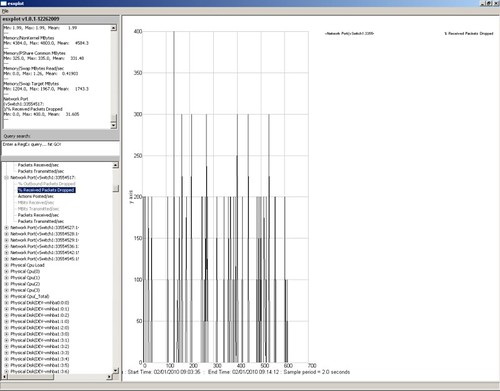
At a customer site we received several notifications of performance issues with a VMware VI3 environment. After having checked the configuration of the VMs and the Hosts we decided to dive into esxtop. At first sight we did not see any abnormalities. Low %RDY, which is usually the first thing I check, some swapping but not enough to cause any major delays. The weird thing about this one is that it seemed that only when IP was sent/received the VM felt sluggish. As we could not reproduce the issue we decided to start esxtop in batchmode and use esxplot and perfmon to get to the bottom of it. Soon we found what the issue was, receive packets were being dropped at the vSwitch level.

The following screenshot depicts the symptoms.

In other words, at times an enormous amount of received packets were dropped. After some research I found an article which actually describes this behavior. (http://kb.vmware.com/kb/1010071) We tried increasing the buffer size for the E1000 virtual network adapter this VM was configured with but it did not resolve the issue. As there were other drivers mentioned in the post we decided to “upgrade” the NIC to a “vmxnet” NIC and this actually resolved the issue. Although performance is not where we expected it would be yet we are not seeing any dropped packets anymore and can focus on the next possible cause.

Not al compute units are equal

Duncan Epping · Jan 14, 2010 ·

I was just reading an article which is titled “Surprise! Not all Amazon EC2 compute units are created equal. I think it’s a very interesting article and actually shows how people think/feel about what cloud computing is offering. In this case it’s all about the perception and as with many users the perception of performance and the misunderstanding of the technology that is driving this. The following quote from the article linked above captures the essence of the story

It turns out that the underlying hardware for each instance created impacts the actual performance that each instance gives you, even though the instances are all virtualized and marketed by Amazon as if they are all created equal. In our case, we found that the different underlying hardware that the virtual instance sits on has a significant impact on application performance, at least with respect to MySQL database performance. Instances that were created on machines with AMD’s Opteron 270 processors (2ghz 1mb L2 cache) showed significantly poorer MySQL performance compared to instances created on machines with Intel’s Xeon e5430 processors (2.66ghz 6mb L2 cache).

Now after reading this a lot of you may say “DUH”. Of course you can’t expect this be to be equal, but when reading Amazon’s explanation of a Compute Unit I do understand where this comes from.

Source
EC2 Compute Unit (ECU) – One EC2 Compute Unit (ECU) provides the equivalent CPU capacity of a 1.0-1.2 GHz 2007 Opteron or 2007 Xeon processor.

Cloud Computing, as Mike D. has explained many times already, is about the end-user not caring about what lays underneath as long as it meets there business requirements(non technical). Or in other words, and I quote “I don’t care”.

However as you can clearly see in the quote above, and please read the full article, the end-user does care when it comes down to performance. Performance needs to be guaranteed but more surprisingly equal in all cases. In the case mentioned above a single server had better(!) performance then guaranteed by Amazon and still the customer was dissatisfied with it as it clearly skewed expectations.

What can we do to prevent this and should we try to prevent this or create a better explanation of what “Compute Units” are. I actually don’t think there’s a single correct answer to the question or even a solution at this point in time as we are still growing and maturing. I will leave it at that for now and let the topic sink in, if you do have an answer please speak up.

While I was writing this article I was pointed by @MattPovey(EMC) to another article titled “Has Amazon EC2 become over subscribed?” Which is an excellent read and also deals about performance and the perception of just that. I think the key take away is that the user, when one of the few virtual instances using a physical server, sees a decline in performance over time. Although Amazon might still meet the SLA it is the users perception that performance decreased and are not equal to what has been offered.

  • « Go to Previous Page
  • Page 1
  • Interim pages omitted …
  • Page 10
  • Page 11
  • Page 12
  • Page 13
  • Page 14
  • Interim pages omitted …
  • Page 21
  • Go to Next Page »

Primary Sidebar

About the Author

Duncan Epping is a Chief Technologist and Distinguished Engineering Architect at Broadcom. Besides writing on Yellow-Bricks, Duncan is the co-author of the vSAN Deep Dive and the vSphere Clustering Deep Dive book series. Duncan is also the host of the Unexplored Territory Podcast.

Follow Us

  • X
  • Spotify
  • RSS Feed
  • LinkedIn

Recommended Book(s)

Also visit!

For the Dutch-speaking audience, make sure to visit RunNerd.nl to follow my running adventure, read shoe/gear/race reviews, and more!

Do you like Hardcore-Punk music? Follow my Spotify Playlist!

Do you like 80s music? I got you covered!

Copyright Yellow-Bricks.com © 2026 · Log in