• Skip to primary navigation
  • Skip to main content
  • Skip to primary sidebar

Yellow Bricks

by Duncan Epping

  • Home
  • Unexplored Territory Podcast
  • HA Deepdive
  • ESXTOP
  • Stickers/Shirts
  • Privacy Policy
  • About
  • Show Search
Hide Search

esxi

Scale UP!

Duncan Epping · Mar 17, 2010 ·

Lately I am having a lot of discussions with customers around sizing of their hosts. Especially Cisco UCS(with the 384GB option) and the upcoming Intel Xeon 5600 series with six cores per CPU takes the “Scale Up” discussion to a new level.

I guess we had this discussion in the past as well when 32GB became a commodity. The question I always have is how many eggs do you want to have in one basket. Basically do you want to scale up(larger hosts) or scale out(more hosts).

I guess it’s a common discussion and a lot of people don’t see the impact sizing your hosts correctly. Think about this environment, 250 VMs in total with the need of roughly 480GB of memory:

  • 10 Hosts, each having 48GB and 8 Cores, 25 VMs each.
  • 5 Hosts, each having 96GB and 16 Cores, 50 VMs each.

If  you look at it from an uptime perspective; Would a failure occur in scenario 1 you will lose 10% of your environment. If you look at scenario 2 this is 20%. Clearly the associated cost with the down time for 20% of your estate is higher than for 10% of your estate.

Now it’s not only the associated cost with the impact of a host failure it is also for instance the ability of DRS to load balance the environment. The less hosts you will have the smaller the chances are DRS will be able to balance the load. Keep in mind DRS uses a deviation to calculate the imbalance and simulates a move to see if it results in a balanced cluster.

Another thing to keep in mind is HA. When you design for N+1 redundancy and need to buy an extra host the costs associated for redundancy is high for a scale up scenario. Not only the costs associated are high, the load when the fail-over needs to occur will also increase immense. If you only have 4 hosts and 1 host fails the added load on the 3 hosts will have a higher impact than it would have on for instance 9 hosts in a scale out scenario.

Licensing is another often used argument for buying larger hosts but for VMware it usually will not make a difference. I’m not the “capacity management” or “capacity planning” guru to be honest but I can recommend VMware Capacity Planner as it can help you to easily create several scenarios. (Or Platespin Recon for that matter.) If you have never tried it and are a VMware partner check it out and run the scenarios based on scale up and scale out principles and do the math.

Now, don’t get me wrong I am not saying you should not buy hosts with 96GB but think before you make this decision. Decide what an acceptable risk is and discuss the impact of the risk with your customer(s). As you can imagine for any company there’s a cost associated with down time. Down time for 20% of your estate will have a different financial impact than down time for 10% of your estate and this needs to be weighted against all the pros and cons of scale out vs scale up.
Reclaiming idle memory

Duncan Epping · Mar 11, 2010 ·

In the “CPU/MEM Reservation Behavior” article there was a lively discussion going on between Chris Huss(vmtrainers.com) and myself. I think the following comment by Chris more or less summarizes the discussion

I wasn’t aware that the balloon driver was involved with the Mem.IdleTax. I haven’t seen any documentation stating this…and assumed that the VMkernel just stopped mapping idle memory for the VM without letting it know. If the VM needed the memory again, the VMkernel would just re-map it.

I can be totally wrong about this, but I have not seen any documentation to debunk this theory. It is my belief that the Mem.IdleTax is a totally separate memory saving/shaving technique from the balloon driver or the .vswp file.

If VMware engineering has or would publish an official article on this…I think it would clear up alot of things.

To summarize; How does ESX reclaim idle memory or free memory from a virtual machine? The answer is simple. ESX has two idle memory reclamation mechanisms:

  1. Balloon driver
  2. vSwap

I would like to refer to page 29 of the Resource Management Guide where the above is stated. I do not think it is a coincidence that the paragraph above “memory reclamation” is “Memory Tax for Idle Virtual Machines”. (There is a third memory “reclamation” mechanism by the way, it is called “TPS”, but this is not used to specifically reclaim Idle Memory but rather to free up memory by sharing pages where possible.)

By default the balloon driver is used to reclaim idle memory. The balloon driver is in fact used as some operating systems only update there internal free memory map. Basically what I am saying is that the hypervisor is unaware of the fact that specific pages are unused as they might still contain data and the GOS(Guest Operating System) will not report to the hypervisor that the pages are not being used anymore. The balloon driver is used to notify the GOS that there is a lack of memory.

When the balloon inflates the GOS will first assign all “unused / free” pages to the balloon driver. If this is enough it will stop. If this isn’t enough the OS will decide which pages it will page out  until it reaches its threshold. The pages will need to be written to GOS swap as they might be needed later, they can’t just be reused without storing them somewhere.

I guess this section of the excellent white-paper “Memory Resource Management in VMware ESX Server” by Carl Waldspruger describes what I explained above.

The guest OS decides which particular pages to reclaim and, if necessary, pages them out to its own virtual disk. The balloon driver communicates the physical page number for each allocated page to ESX Server, which may then reclaim the corresponding machine page.

To be absolutely certain I reached out Carl Waldspruger to verify my statements/claims are correct. (Yes they were…)

By the way this concept is also described in the “VMware vSphere: Manage for Performance” course manual on page 151. Excellent course which I can recommend to everyone as it will not only explain this concept but also how to identify it and how to resolve it.

VM powered on Alarm?

Duncan Epping · Mar 9, 2010 ·

One of my readers(Thanks Andrzej!) emailed me something that I thought might be interesting for those who are closely monitoring their environment.

Did you know that there are two similar VM event triggers in Alarms in vCenter?

  1. VM powered on
  2. DRS – VM powered on

The first only works for VMs outside of DRS enabled clusters. The second only works for VMs inside DRS enabled clusters. Now that’s definitely something you should be aware off when enabling Alarms / Event triggers. Imagine you want to know when a VM has been powered on and you enable the first even trigger but didn’t notice it will only sent an alarm when the VMs are not part of DRS cluster… You could be waiting for a very long time before you receive a single event alarm.

Just when I wanted to click “Publish” I received an email from one of my colleagues. Horst Mundt wrote an excellent article about Alarms and created a very handy spreadsheet which contains all alarms / events.

vSphere alarm triggers
In terms of alarms, vCenter 4 has much more to offer than vCenter 2.5. There is a whole range of default alarms available when you install vCenter 4, and they will give you a very good first shot for monitoring your vSphere  environment. If you’ve never wondered what exactly the default alarms mean, or how to tune them – that’s fine. If you’re interested in a bit more detail – read the attached PDF.

  • vSphere Alarms v2.xlsx (69.3 K)
  • Fun with vSphere Alarms.pdf (656.6 K)

Make sure to visit the VMTN source page and leave a comment or rate the article.

Adding NICs to your vSwitch on ESXi?

Duncan Epping · Mar 9, 2010 ·

I just finished installing vSphere ESXi 4.0 update 1, I used all the default settings. I expected that all my portgroups would inherit all their settings from the vSwitch that was configured during installation… unfortunately this is not the case as can be seen in the screenshots below.

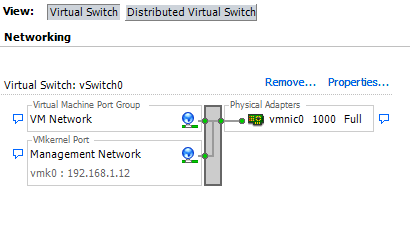
Default install with no redundancy:

VM Network inherits from vSwitch:

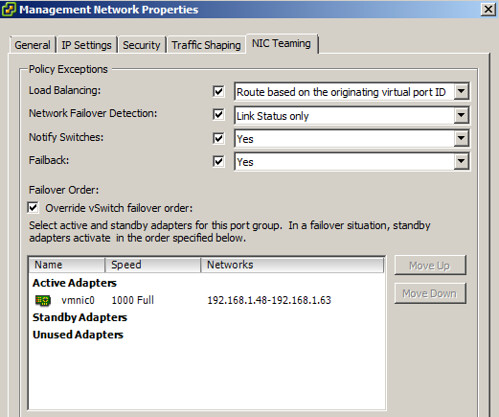
Management Network does not inherit from vSwitch:

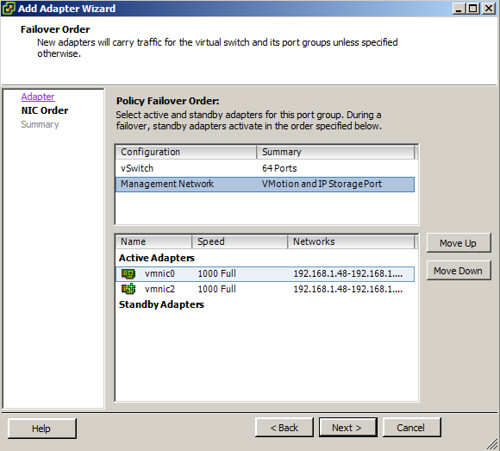
For the default “VM Network” portgroup everything works as expected. But for the “Management Network” it doesn’t. So what’s the problem? Well it might not be a huge issue but it is something you will need to keep in mind. I wanted to add two NICs to my vSwitch0 and expected that both would be marked as “active” on the vSwitch. And this is what happens on the vSwitch, BUT the “Management Network” does not inherit the vSwitch settings so what do you think will happen? Again see the screenshot below for the details:

For some weird reason one of the vmnics is set to “unused” instead of active… Keep this in mind when installing / configuring ESXi as you might end up with less redundancy then expected. I just did a quick search if it was a known/documented change and it appears that I am not the only one who ran into this, but is does not seem to be a commonly known “issue”/change.

Single Initiator Zoning, recommended or not?

Duncan Epping · Mar 4, 2010 ·

A question we receive a lot is what kind of zoning should be implemented for our storage solution? The answer is usually really short and simple: at least single initiator zoning.

Single initiator zoning is something we have always recommend in the field (VMware PSO Consultants/Architects) and something that is clearly mentioned in our documentation… at least that’s what I thought.

On page 31 of the SAN Design and Deploy guide we clearly state the following:

When a SAN is configured using zoning, the devices outside a zone are not visible to the devices inside the zone. When there is one HBA or initiator to a single storage processor port or target zone, it is commonly referred to as single zone. This type of single zoning protects devices within a zone from fabric notifications, such as Registered State Change Notification (RSCN) changes from other zones. In addition, SAN traffic within each zone is isolated from the other zones. Thus, using single zone is a common industry practice.

That’s crystal clear isn’t it? Unfortunately there’s another document floating around which is called “Fibre Channel SAN Configuration Guide” and this document states the following on page 36:

  • ESX Server hosts that use shared storage for virtual machine failover or load balancing must be in one zone.
  • If you have a very large deployment, you might need to create separate zones for different areas of functionality. For example, you can separate accounting from human resources.

So which one is correct and which one isn’t? I don’t want any confusion around this. The first document, the SAN Design and Deploy guide is correct. VMware recommends single initiator zoning. Of course if you want to do “single initiator / single target” that would even be better, but single initiator is the bare minimum. Now let’s hope the VMware Tech Writers can get that document fixed…

  • « Go to Previous Page
  • Page 1
  • Interim pages omitted …
  • Page 21
  • Page 22
  • Page 23
  • Page 24
  • Page 25
  • Interim pages omitted …
  • Page 66
  • Go to Next Page »

Primary Sidebar

About the Author

Duncan Epping is a Chief Technologist and Distinguished Engineering Architect at Broadcom. Besides writing on Yellow-Bricks, Duncan is the co-author of the vSAN Deep Dive and the vSphere Clustering Deep Dive book series. Duncan is also the host of the Unexplored Territory Podcast.

Follow Us

  • X
  • Spotify
  • RSS Feed
  • LinkedIn

Recommended Book(s)

Also visit!

For the Dutch-speaking audience, make sure to visit RunNerd.nl to follow my running adventure, read shoe/gear/race reviews, and more!

Do you like Hardcore-Punk music? Follow my Spotify Playlist!

Do you like 80s music? I got you covered!

Copyright Yellow-Bricks.com © 2026 · Log in