I just finished installing vSphere ESXi 4.0 update 1, I used all the default settings. I expected that all my portgroups would inherit all their settings from the vSwitch that was configured during installation… unfortunately this is not the case as can be seen in the screenshots below.
Default install with no redundancy:
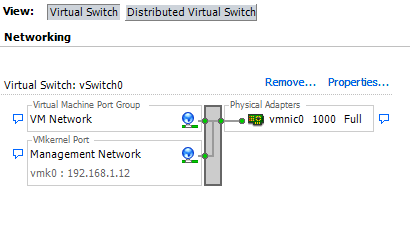
VM Network inherits from vSwitch:

Management Network does not inherit from vSwitch:
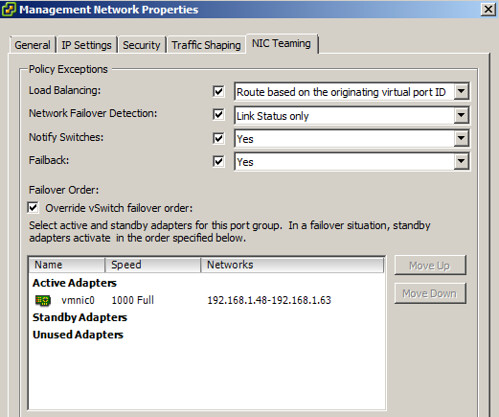
For the default “VM Network” portgroup everything works as expected. But for the “Management Network” it doesn’t. So what’s the problem? Well it might not be a huge issue but it is something you will need to keep in mind. I wanted to add two NICs to my vSwitch0 and expected that both would be marked as “active” on the vSwitch. And this is what happens on the vSwitch, BUT the “Management Network” does not inherit the vSwitch settings so what do you think will happen? Again see the screenshot below for the details:
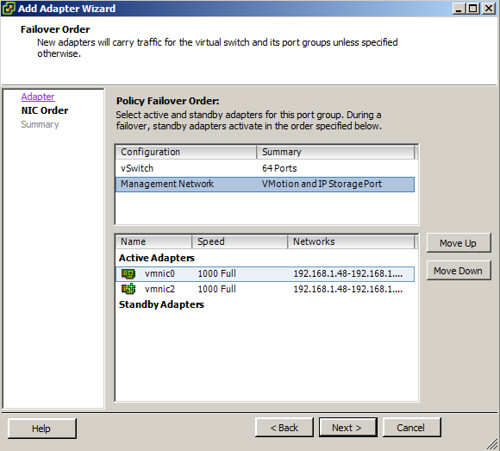
For some weird reason one of the vmnics is set to “unused” instead of active… Keep this in mind when installing / configuring ESXi as you might end up with less redundancy then expected. I just did a quick search if it was a known/documented change and it appears that I am not the only one who ran into this, but is does not seem to be a commonly known “issue”/change.
Yeah, that problem was really annoying when I was setting my cluster up last Nov. There weren’t any posts on it at the time either. I looked at switch configs and traced wires over and over until I noticed the override. I’m inclined to call this a bug unless VMware can say why it does this.
I understand why your images are hosted at Flickr.com, but some of us can’t see them at work because Flickr.com is blocked by the company. 8^(
Thanks for the heads up on this. I hadn’t noticed this before.
This issue/problem was also present prenset in version 3.5 (ESXi).
Have you found any way to clear that checkbox from the command line? I can set portgroup uplinks explicitly with esxcfg-vswitch, but I haven’t seen any way to tell it ‘inherit vswitch defaults’.
Amazingly, I had put in a vmware support ticket asking the above question today and ran into your post completely by accident (feed) AFTER I had put in that ticket. Talk about freak chances…
Hopefully I will hear something useful back from support, but I’m not holding my breath.