Last week I mentioned which metrics DRS used for load balancing VMs across a cluster. Of course the obvious question was when the DRS Deepdive would be posted. I must admit I’m not an expert on this topic as like most of you I always took for granted that it worked out of the box. I can’t remember that there ever was the need to troubleshoot DRS related problems, or better said I don’t think I’ve ever seen an issue which was DRS related.
This article will focus on two primary DRSĀ functions:
- Load balancing VMs due to imbalanced Cluster
- VM Placement when booting
I will not be focusing on Resource Pools at all as I feel that there are already more than enough articles which explain these. The Resource Management Guide also contains a wealth of info on resource pools and this should be your starting place!
Load Balancing
First of all VMware DRS evaluates your cluster every 5 minutes. If there’s an imbalance in load it will reorganize your cluster, with the help of VMotion, to create an evenly balanced cluster again. So how does it detect an imbalanced Cluster? First of all let’s start with a screenshot:
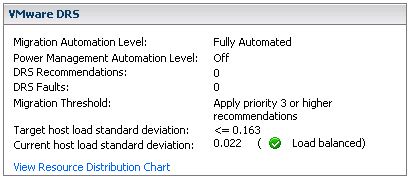
fig 1
There are three major elements here:
- Migration Threshold
- Target host load standard deviation
- Current host load standard deviation
Keep in mind that when you change the “Migration Threshold” the value of the “Target host load standard deviation” will also change. In other words the Migration Threshold dictates how much the cluster can be “imbalanced”. There also appears to be a direct relationship between the amount of hosts in a cluster and the “Target host load standard deviation”. However, I haven’t found any reference to support this observation. (Two host cluster with threshold set to three has a THLSD of 0.2, a three host cluster has a THLSD of 0.163.) As said every 5 minutes DRS will calculate the sum of the resource entitlements of all virtual machines on a single host and divides that number by the capacity of the host:
sum(expected VM loads) / (capacity of host)
The result of all hosts will then be used to compute an average and the standard deviation. (Which effectively is the “Current host load standard deviation” you see in the screenshot(fig1).) I’m not going to explain what a standard deviation is as it’s explained extensively on Wiki.
If the environment is imbalanced and the Current host load standard deviation exceeds the value of the “Target host load standard deviation” DRS will either recommend migrations or perform migrations depending on the chosen setting.
The question left is how does DRS decide which VM or set of VMs it will VMotion…
The following procedure is used to form a set of recommendations to correct the imbalanced cluster:
While (load imbalance metric > threshold) {
move = GetBestMove();
If no good migration is found:
stop;
Else:
Add move to the list of recommendations;
Update cluster to the state after the move is added;
}
Step by step in plain English:
While the cluster is imbalanced (Current host load standard deviation > Target host load standard deviation) select a VM to migrate based on specific criteria and simulate a move and recompute the “Current host load standard deviation” and add to the migration recommendation list. If the cluster is still imbalanced(Current host load standard deviation > Target host load standard deviation) repeat procedure.
Now how does DRS select the best VM to move? DRS uses the following procedure:
GetBestMove() {
For each VM v:
For each host h that is not Source Host:
If h is lightly loaded compared to Source Host:
If Cost Benefit and Risk Analysis accepted
simulate move v to h
measure new cluster-wide load imbalance metric as g
Return move v that gives least cluster-wide imbalance g.
}
Again in plain English:
For each VM check if a VMotion to each of the hosts which are less utilized than source host would result in a less imbalanced cluster and meets the Cost Benefit and Risk Analysis criteria. Compare the outcome of all tried combinations(VM<->Host) and return the VMotion that results in the least cluster imbalance.
This should result in a migration which gives the most improvement in terms of cluster balance, in other words: most bang for the buck! This is the reason why usually the larger VMs are moved as they will most likely decrease “Current host load standard deviation” the most. If it’s not enough to balance the cluster within the given threshold the “GetBestMove” gets executed again by the procedure which is used to form a set of recommendations.
Now the next question would be what does “Cost Benefit” and “Risk Analysis” consist of and why are we doing this?
First of all we want to avoid a constant stream of VMotions and this will be done by weighing costs vs benefits vs risks. These consists of:
- Cost benefit
Cost: CPU reserved during migration on t he target host
Cost: Memory consumed by shadow VM during VMotion on the target host
Cost: VM “downtime” during the VMotion
Benefit: More resources available on source host due to migration
Benefit: More resources for migrated VM as it moves to a less utilized host
Benefit: Cluster Balance - Risk Analysis
Stable vs unstable workload of the VM (historic info used)
Based on these consideration a cost-benefit-risk metric will be calculated and if this has an acceptable value the VM will be consider for migration.
Every migration recommendation will get a priority rating. This priority rating is based on the Current host load standard deviation. The actual algorithm being used to determine this is described in this KB article. I needed to read the article 134 times before I actually understood what they were trying to explain so I will use an example based on the info shown in the screenshot(fig1). Just to make sure it’s absolutely clear, LoadImbalanceMetric is the Current host load standard deviation value and ceil is basically a “round up”. The formula mentioned in the KB article followed by an example based on the screenshot(fig1):
6 - ceil(LoadImbalanceMetric / 0.1 * sqrt(NumberOfHostsInCluster))
6 - ceil(0.022 / 0.1 * sqrt(3))
This would result in a priority level of 5 for the migration recommendation if the cluster was imbalanced.
Many people requested a diagram as visualizing this process is tough. It took me a while to get it the way I wanted it, and it’s still not perfect so I might refresh it when I have some more time on my hands.
VM Placement
The placement of a VM when being powered on is as you know part of DRS. DRS analyzes the cluster based on the algorithm described in “Load Balancing”. The question of course is for the VM which is being powered on what kind of values does DRS work with? Here’s the catch, DRS assumes that 100% of the provisioned resources for this VM will be used. DRS does not take limits or reservations into account. Just like HA, DRS has got “admission control”. If DRS can’t guarantee the full 100% of the resources provisioned for this VM can be used it will VMotion VMs away so that it can power on this single VM. If however there are not enough resources available it will not power on this VM.
That’s it for now… Like I said earlier, if you have more in-depth details feel free to chip in as this is a grey area for most people.


excellent. nice work.
This is a fine piece of work! There are still administrators out there that are concerned about automating DRS. This article does a great job of addressing those concerns by describing the algorithms used to mitigate risk before VM workloads are re-balanced.
Thank you Duncan – a very useful document. However, I wonder if you (or readers of your blog) are able to clarify a couple of points for me:
I cannot find information on how the ‘load’ on each Host is calculated and therefore the deviation. Does it relate to the VMs’ CPU or memory usage or both?
Also, in your last section ‘VM Placement’ you state that when a VM is powered on “DRS assumes that 100% of the provisioned resources for this VM will be used.” Am I right in thinking that if the VM subsequently does not use all the resources that it has been provisioned, the next time DRS evaluates the Cluster it will calculate a different Host load (than the expected value DRS calculated when the VM requested being powered on) assuming all other VMs remain the same?
I am presuming that DRS works by comparing actual loads used by VMs once they are powered on and only uses the load from 100% of provisioned resources when calculating which Host to use when Powering on a VM. Is this correct?
Thanks
I’m trying to find this too. I did see a good presentation here that gives some details, and has oddly some of the same pseudo code mentioned in this article, but is referenced in a separate VMware presentation given at VMworld 2008:
http://labs.vmware.com/download/93/
Slide 11 seems to indicate the cost benefit migration analysis is based on Mhz (CPU) and MB (Memory) analysis. I’d be interested in learning more about how they calculate the cost-benefit-risk metric as well, as that sounds interesting. (Sounds like they multiple the gain or loss by the time they anticipate that gain or loss will last, until the next 5 minute rebalancing interval.)
Thanks Duncan. Always an in-depth article.
Just wondering if DRS in vSphere 4.1 now take into account HA into account. For example:
I have 20 very small VM and 2 very huge VM, and I only have 2 hosts.
Assuming all other factors are identical, will DRS spread the VM “nicely”? That means each host will have 1 big VM and 10 small VM?
Thanks from Singapore. And hopefully I get to meet you in VMworld SFO.
e1
http://www.yellow-bricks.com/2010/07/14/vsphere-4-1-vmware-ha-new-maximums-and-drs-integration-will-make-our-life-easier/
Hi Duncan,
You say that “DRS does not take limits or reservations into account”. I don’t know if this has changed with 4.1, as the resources guide indicates that it does. For example, it states one of the reasons for a migration recommendation is to “balance average CPU loads or reservations”. Another is “satisfy resource pool reservations”.
I also found on the great performance best practices PDF for 4.0, reference to being careful about reservations and limits, due to limiting DRS options (page 39).
Anyway, just wondering if you can shed any light on this, if it does or doesn’t consider limits and reservations in in DRS calculations.
Thanks, Forbes.
Thank you for all your nice articles.
Now I have a question about the performance of vCenter Server.
Will vCenter Server be the bottleneck?
1) vCenter Server obtains the realtime resource usage information of every VM. And the powered on VM can reach 10000 in a vCenter Server.
2) I have thought that for every DRS cluster there will be a DRS module. The DRS module is responsible for the VM placement and load balance. What’s more, the DRS module and vCenter Server lie on different hosts. But my thought might be wrong. the DRS modules of all the clusters and vCenter Server lie on the same module.
I could not imagine how could vCenter Server on a single host could handle so many requests…
And will vCenter Server be the bottleneck?
Thank you.
for every cluster there is a DRS thread running on your vCenter server basically. so if you have 10 clusters… If you have very transient workloads the mount of work these threads will be doing will be severe, as such you might need more memory / cpu power.
in the end it all depends, but vCenter can definitely be a bottleneck at some point.
Thank you for your reply.
I still have a few questions:
1. vCenter Server collect realtime data of all hosts, including CPU, memory, disk and network. But I haven’t found the collect interval. Could you kindly tell me? Thank you
2. Accordinng to the “configuration maximum”, hosts per vCenter Server can reach 1000 and the maximum powered on VMs per vCenter Server is 10000 in vSphere 4.1.
And according to “VMware vCenter Server Performance and Best Practices”, for the extra large deployment size above, the suggested configuration is 8 cores, 16G mem, 10G disk.
Does it mean that the vCenter Server with the configuration can monitor the realtime data of 1000 hosts?
The managment architecture is quite flat. And I thought it is rare, isn’t it?
I wonder if hierachical architecture could be better for both performance and scalability?
3. The maximum hosts per cluster is 32. Does it mean vCenter Server with the configuration afore-mentioned can support 31 clusters (32 hosts per cluster)?
In “HA Deepdive”, it is said that primary nodes hold cluster settings and instance resource usage information. why vCenter Server still obtain information from hosts but not primary node, which can contribute to simplicity and better scalability.
As you have said before, there is a DRS thread on vCenter Server for each DRS cluster. How about deploying the DRS thread on a node within the cluster? The DRS thread collect the resource usage data, take the responsibility of initial placement and load balance, and transmit the usage information to vCenter Server. Is there any problem for the idea?
Sorry for bothering you with so many questions. But I do confuse about the flat architecture, the workload and the performance of vCenter Server…I think it is quite amazingļ¼:)
1) 20 seconds
2) indeed, soft limit
3) yes, or 50 clusters with 20 hosts…. combination of all of them to a max of.
4) distributed DRS
, yeah great solution… but it will take time to implement. who knows, maybe in the future. I am not a developer and not authorized to comment on it.
Thank you for your reply.
But what do you mean by soft limit for question 2? Could you explain it in more detail?
Thank you.
Soft limit means that it is the supported limit but you can have more.
Hi Duncan
Thanks for these explanations. As I experienced, DRS does not count vCpus per pCore when making migration decisions. Is that correct? I can see quite remarkable differences in vCpu/pCore counts between hosts when DRS is working in fully automated mode. Won’t this lead to high CPU %ready times on some hosts when reaching a higher VM density?
Best, Daniel
It’s great article, I am new to VMWare and is in need to develop something that will notify user when actually VM will move to other host in the cluster and also need a notification when placement is complete. Is there any way I can add hooks in DRS / vCeneter to understand when VM movement will happen?
excellent! great work and nice langauge:)
We received a unique error at our hosts as : Unable to apply DRS resource settings on host. The operation is not allowed in the current state. This can significantly reduce the effectiveness of DRS.
Restarting the mgmt services fixed the issue but we cant find any RCA for same. Do we have any reasons why we get this type of alerts?
Thanks
I am not sure to be honest. Did you contact GSS? I have never seen this issue.
GSS? are you speaking about technical support; i havent yet.
As i can see there is a KB article which says to just restart the mgmt services but RCA was given. i Mean why this alert was generated and what caused it and how can we avoid it further.
http://kb.vmware.com/selfservice/microsites/search.do?language=en_US&cmd=displayKC&externalId=1028351
Any ideas?
The VMWare white paper on Microsoft Clustering mentions the advanced setting ‘ForceAffinePowerOn’, which causes DRS VM-VM affinity and anti-affinity rules to be strictly applied. Could you possibly elaborate on what this means?
Hi Duncan,
thanks for writing HA and DSR deep dive i bought your book and read all i learned more from your book.
in drs calculation how the Target host load standard deviation is calculated.
and it changes based on the threshold value.Can you tell the math behind the Target host load standard deviation calculation.
is target host load standard deviation is constant values for each threshold value ?
current host load standard deviation is – standard deviation of(sum(expected VM loads) / (capacity of host)
then how can i calculate the target host standard deviation mathematically and how it’s related to threshold value.
thanks
rajesh.
Hi Duncan,
For the RAM, does DRS use memory.active counter or memory.usage? I notice in 4.1 that DRS kicks in when RAM is 94% (memory.usage) but did not kick in when RAM was 92%.
I hope it is using active instead of consumed or usage, as it is memory.active that we should be looking at.
Thanks!
e1