• Skip to primary navigation
  • Skip to main content
  • Skip to primary sidebar

Yellow Bricks

by Duncan Epping

  • Home
  • Unexplored Territory Podcast
  • HA Deepdive
  • ESXTOP
  • Stickers/Shirts
  • Privacy Policy
  • About
  • Show Search
Hide Search

esxi

Standby NICs in an “IP-Hash” configuration

Duncan Epping · Aug 6, 2010 ·

I was reviewing a document today and noticed something that I’ve seen a couple of times already. I already wrote about Active/Standby set ups for etherchannels a year ago but this is a slight different variant. Frank also wrote a more extensive article on it a while and I just want to re-stress this.

Scenario:

  • Two NICs
  • 1 Etherchannel of 2 links
  • Both Management and VMkernel traffic on the same switch

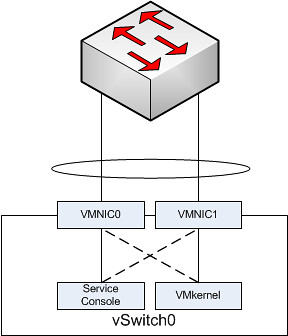
I created a simple diagram to depict this:
nics

In the above scenario each “portgroup” is configured in an active/standby scenario. So let’s take the Service Console. It has VMNIC0 as active and VMNIC1 as standby. The physical switch however is configured with both NICs active in a single channel.

Based on the algorithm that etherchannels use either of the two VMNICs will accept inbound traffic. The Service Console however will only send traffic outbound via VMNIC0. Even worse, the Service Console isn’t actively listening to VMNIC1 for incoming traffic as it was placed in Standby mode. Standby mode means that it will only be used when VMNIC0 fails. In other words your physical switch will think it can use VMNIC1 for you Service Console but your Service Console will not see the traffic coming in on VMNIC1 as it is configured in Standby mode on the vSwitch. Or to quote from Frank’s article…

it will sit in a corner, lonely and depressed, wondering why nobody calls it anymore.
High physical switch CPU load?

Duncan Epping · Aug 4, 2010 ·

One of my customers experienced high CPU load on their physical switch. After some investigation they noticed broadcasts packets being sent every two seconds. The first reaction was Beacon Probing is probably enabled.

Unfortunately this wasn’t the case. But VMware GSS came to the rescue and pointed us towards a KB article. Apparently a bug has been identified in 4.0 which causes this behaviour:

src: http://kb.vmware.com/kb/1024435

Problem:

  • ESX sends Beacon Packets when vDS/vSwitch are connected to more than one uplink.
  • ESX server sends periodic broadcast of Beacon Packets even if the vSwitch/vNetwork Distributed Switch (vDS) is not configured to use Beacon Probing for Network Failover Detection.
  • These packets have the virtual MAC of the vmnic in the Source MAC Address field.

Workaround:

#esxcfg-advcfg -s 0 /Net/MaxBeaconsAtOnce

The customer implemented this workaround and the problem is gone… From what I have been told this issue does not exist in ESX(i) 4.1 so if you are experiencing it, an upgrade might be a better solution. In this case due to the size of the environment that was not an option.

HA Cli

Duncan Epping · Aug 3, 2010 ·

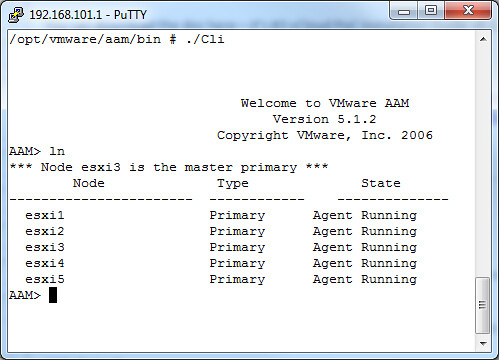
I was just playing around with the HA Cli and noticed that when you give an “ln” (listNodes) that the failover coordinator (aka master primary) is also listed. I have never noticed this before, but don’t have a pre-vSphere 4.1 environment to test it on to see if this existed before 4.1. If you want to test it in your own environment just simply run “/opt/vmware/aam/bin/Cli” and give the “ln” command as shown in the screenshot below:

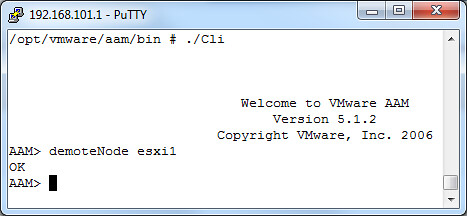
I also tested demoting of a node just for fun. In this case I demoted the node “esxi1” from primary to secondary:

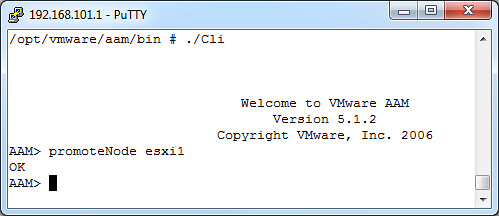
And of course I promoted it again to primary:


** Disclaimer: This article contains references to the words master and/or slave. I recognize these as exclusionary words. The words are used in this article for consistency because it’s currently the words that appear in the software, in the UI, and in the log files. When the software is updated to remove the words, this article will be updated to be in alignment. **

Storage Migrations?

Duncan Epping · Jul 28, 2010 ·

On an internal mailing list we had a very useful discussion around storage migrations when a SAN is replaced or a migration needs to take place to a different set of disks. Many customers face this at some point. The question usually is what is the best approach? SAN Replication or Storage vMotion… Both have its pros and cons I guess.

SAN Replication:

  • Can utilize Array based copy mechanisms for fast replication (+)
  • Per LUN migration, high level of concurrency (+)
  • Old volumes still available (+)
  • Need to resignature or mount the volume again (-)
    • A resignature also means you will need to reregister the VM! (-)
  • Downtime for the VM during the cut over (-)

Storage vMotion:

  • No downtime for your VMs (+)
  • Fast Storage vMotion when your Array supports VAAI (+)
    • If your Array doesn’t support VAAI migrations can be slow (-)
    • Induced cost if VAAI isn’t supported (-)
    • Only intra Array not across arrays (-)
  • No resignaturing or re-registering needed (+)
  • Per VM migration (-)
    • Limited concurrency (2 per host, 8 per vmfs volume) (-)

As you can see both have its pros and cons and it boils down to the following questions:

How much down time can you afford?
How much time do you have for the migration?

HA/DRS and Flattened Shares

Duncan Epping · Jul 22, 2010 ·

A week ago I already touched on this topic but I wanted to get a better understand for myself what could go wrong in these situations and how vSphere 4.1 solves this issue.

Pre-vSphere 4.1 an issue could arise when shares had been set custom on a virtual machine. When HA fails over a virtual machine it will power-on the virtual machine in the Root Resource Pool. However, the virtual machine’s shares were scaled for its appropriate place in the resource pool hierarchy, not for the Root Resource Pool. This could cause the virtual machine to receive either too many or too few resources relative to its entitlement.

A scenario where and when this can occur would be the following:

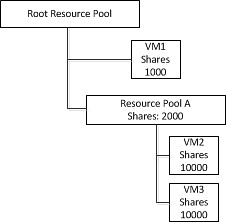
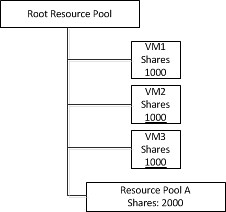
VM1 has a 1000 shares and Resource Pool A has 2000 shares. However Resource Pool A has 2 VMs and both will have 50% of those “2000” shares.

When the host would fail both VM2 and VM3 will end up on the same level as VM1. However as a custom shares value of 10000 was specified on both VM2 and VM3 they will completely blow away VM1 in times of contention. This is depicted in the following diagram:

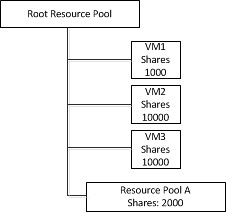
This situation would persist until the next invocation of DRS would re-parent the virtual machine to it’s original Resource Pool. To address this issue as of vSphere 4.1 DRS will flatten the virtual machine’s shares and limits before fail-over. This flattening process ensures that the VM will get the resources it would have received if it would have been failed over to the correct Resource Pool. This scenario is depicted in the following diagram. Note that both VM2 and VM3 are placed under the Root Resource Pool with a shares value of 1000.

Of course when DRS is invoked  both VM2 and VM3 will be re-parented under Resource Pool A and will receive the amount of shares they had originally assigned again. I hope this makes it a bit more clear what this “flattened shares” mechanism actually does.

  • « Go to Previous Page
  • Page 1
  • Interim pages omitted …
  • Page 14
  • Page 15
  • Page 16
  • Page 17
  • Page 18
  • Interim pages omitted …
  • Page 66
  • Go to Next Page »

Primary Sidebar

About the Author

Duncan Epping is a Chief Technologist and Distinguished Engineering Architect at Broadcom. Besides writing on Yellow-Bricks, Duncan is the co-author of the vSAN Deep Dive and the vSphere Clustering Deep Dive book series. Duncan is also the host of the Unexplored Territory Podcast.

Follow Us

  • X
  • Spotify
  • RSS Feed
  • LinkedIn

Recommended Book(s)

Also visit!

For the Dutch-speaking audience, make sure to visit RunNerd.nl to follow my running adventure, read shoe/gear/race reviews, and more!

Do you like Hardcore-Punk music? Follow my Spotify Playlist!

Do you like 80s music? I got you covered!

Copyright Yellow-Bricks.com © 2026 · Log in