• Skip to primary navigation
  • Skip to main content
  • Skip to primary sidebar

Yellow Bricks

by Duncan Epping

  • Home
  • Unexplored Territory Podcast
  • HA Deepdive
  • ESXTOP
  • Stickers/Shirts
  • Privacy Policy
  • About
  • Show Search
Hide Search

ESXi on ARM/Raspberry Pi for vSAN Witness purposes or for?

Duncan Epping · Nov 12, 2018 ·

I was just catching up on a couple of VMworld sessions. One session that stood out to me was most definitely once again the session by Chris Wolf and Daniel Beveridge. I am not going to write up a full coverage of it, as it is mostly very similar to the session they did in the US which I posted about here.

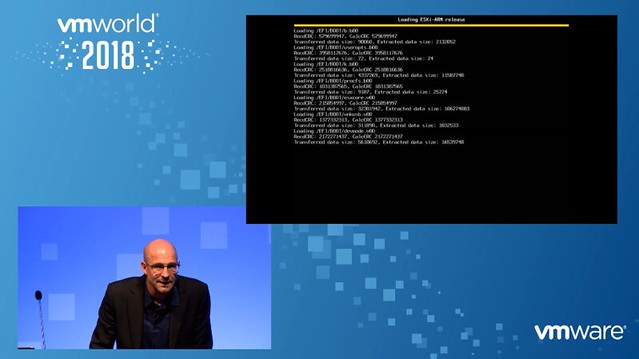
However, what is interesting in the European edition is that Regis Duchesne comes up on stage after about 38 minutes in and he starts discussing and demoing ESXi on ARM, but more impressively ESXi on top of a Raspberry Pi. Note that these machines have very limited memory (1GB) and little CPU (64-bit SoC @ 1.4GHz) resources, and are low powered! Gotta love an intro as well that includes “been at VMware for about 20 years”.

Very interesting to see that Regis and the team managed to get ESXi booting on an RPI 3b, but also that it only uses about 500MB of the memory, which would leave room to boot one VM as Regis points out if you are lucky. One example of a use case is to use this machine as a physical vSAN Witness host for 2 host configurations. This was the immediate use case I had in mind as well for this! (Although preferably a configuration with a bit more CPU power and memory would be preferred!)

Regis also mentions the option to run 1 VM on an RPi3, but you could, of course, have multiple RPi’s running and connect them using a 1GbE switch so the VMs can communicate with each other, you could even create a cluster and move VMs between RPi’s when you are doing maintenance at the edge. Or even more VMs could potentially run on an RPi and you could use it as an IoT gateway. As Regis points out, what is great about ESXi is that it already provides isolation and QoS for VMs, which ensures that all apps running on an IoT gateway would get their fair share of resources. (Eliminate the noisy neighbor problems) Note that this is a project and very much at an alpha stage, nowhere close to being available for customers or partners, but as Regis points out… if you are a customer or partner doing things at the edge and interesting in this please let us know. The team is looking for design partners to better understand the different use case, to ensure they build something which can be useful for customers! (You can leave a comment here, let us know what you are looking to do with it and I will connect you with the right folks.)
HA Futures: Per VM Admission Control – Part 4 of 4 – (Please comment!)

Duncan Epping · Nov 2, 2018 ·

As admission control hasn’t evolved in the past years, we figured we would include another potential Admission Control change. Right now when you define admission control you do this cluster-wide. You can define you want to tolerate 1 failure for instance, but some VMs simply may be more important than other VMs. What do you do in that case?

Well if that is the case then with today’s implementation you are stuck. This became very clear when customers started using the vSAN policies and defined different “failures to tolerate” for different workloads, it just makes sense. But as mentioned, HA does not allow you to do this. So our proposal is the following: Per VM FTT Admission Control.

In this case you would be able to define Host Failures To Tolerate on a per VM basis. This would provide a couple of benefits in my opinion:

  • You can set a higher Host Failures To Tolerate for critical workloads, increasing the chances of being to restart them when a failure has occurred
  • Aligning the HA Host Failures To Tolerate with the vSAN Host Failures To Tolerate, resulting in similar availability from a compute and storage point of view
  • Lower resource fragmentation by providing on a per VM basis Admission Control, even when using “slot based algorithm”
  • Of course you can use the new admission control types as mentioned in my earlier post.

Hopefully that is clear, and hopefully, it is a proposal you appreciate. Please leave a comment if you find this useful, or if you don’t find this useful. Please help shape the future of HA!

HA Futures: VMCP for Networking – Part 3 of 4 – (Please comment!)

Duncan Epping · Oct 30, 2018 ·

VMCP, or VM Component Protection, has been around for a while. Many of you are probably using this to mitigate storage issues. However, what if the VM network fails? Well, that is a problem right now… if the VM network fails then there’s no response from HA. This by many customers is considered to be a problem. So what would we like to propose? VM Component Protection for Networking!

How would this work? Well the plan would be to allow you to enable VM Component Protection for Networking for any network on your host. This could be the vMotion network, different VM networks etc. On this network HA would need to have an IP address it could check “liveness” against of course, very similar to how it used the default gateway to verify “host isolation”.

On top of that, besides validating liveness through an IP address, of course, HA should also monitor the physical NIC. If either of the two would not work, well then HA should take action immediately. What this action will be will depend on the type of failure that has occurred. We are considering the following two types of responses to a failure:

  1. If vMotion still works, migrate the VM from impacted host to a healthy host
  2. If vMotion doesn’t work, restart the impacted VM on a healthy host

In addition to monitoring the health of the physical NIC, HA can also use in guest/VM monitoring techniques to monitor the network route from within the VM to a certain address/gateway. Would this technique be useful?

What do you think? Please provide feedback/comments below, even if it is just a “yes, please!” Please help shape the future of HA!

HA Futures: Admission Control – Part 2 of 4 – (Please comment, feedback needed!)

Duncan Epping · Oct 23, 2018 ·

Admission Control is always a difficult topic when I talk to customers. It seems that many people still don’t fully grasp the concept, or simply misunderstand how it works. To be honest, I can’t blame them. It doesn’t always make sense when you think things through. Most recently for Admission Control we introduced a mechanism in which you can specify what the “tolerated performance loss” should be for any given VM. This isn’t really admission control unfortunately as it doesn’t stop you from powering on new VMs, it does, however, warn you if you reach the threshold where a host failure would lead to the specified performance degradation.

After various discussion with the HA team over the past couple of years, we are now exploring what we can change about Admission Control to give you more options as a user to ensure VMs are not only restarted but also receive the resources you expect them to receive. As such, the HA team is proposing 3 different ways of doing Admission Control, and we would like to have your feedback on this potential change:

  • Admission Control based on reserved resources and VM overheads
    This is what you have today, nothing changes here. We use the static reservations and ensure that all VMs can be powered on!
  • Admission Control based on consumed resources
    This is similar to the “performance degradation tolerated” option. We will look at the average consumed CPU and Memory resources, let’s say past 24 hours), and base our admission control calculations on that. This will allow you to guarantee performance for workloads to be similar after a failure.
  • Admission Control based on configured resources
    This is a static way of doing admission control similar to the first. The only difference is that here Admission Control will do the calculations based on the resources configured. So if you configured a VM with 24GB of memory, then we will do the math with 24GB of memory for that VM. The big advantage, of course, is that the VMs will always be able to claim the resources they have assigned.

In our opinion, adding these options should help to ensure that VMs will receive the resources you (or your customers) would expect them to get. Please help us by leaving a comment/providing feedback. If you agree that this would be helpful then let us know, if you have serious concerns then we would also like to know. Please help shape the future of HA!

HA Futures: Orchestrated Restart and Restart Priority – Part 1 of 4 – (Please comment!)

Duncan Epping · Oct 15, 2018 ·

Last week I visited Palo Alto. I had a long conversation with my friends from the vSphere HA team. I have done a series of articles in the past asking for feedback/comments on future features/functions of HA that the team is looking to implement. One of the first features I would like to discuss is Orchestrated Restart and Restart Priority. Funny enough, this feature is one I discussed in the previous series as well.

For those who don’t know, today you can specify in the vSphere Client what the dependency is between VMs. If a host fails, or multiple hosts fail, and the VMs in a dependency chain are impacted than HA ensures that these VMs are powered on in a particular order. And actually, vSphere HA also has the ability to specify what the restart priority should be of VMs. I described both of these features here. The difference between the two is fairly straightforward though: restart priority are considered “soft rules” and restart orchestration is considered a hard rule. In other words: if one VM can’t be restarted when restart orchestration is used then the next batch will not start.

The UI, to be honest, is confusing, and having two similar concepts that more or less do the same is also confusing. We have discussed various things we would like to have your opinion on. Please leave your feedback in the comments using a valid email address, this way when needed we can follow up.

  • Would you like to have the ability to restart a full chain of VMs, when Orchestration or Priority is enabled and only a few VMs in the chain are impacted by a failure? In other words, would you like to have an option that allows you to restart running VMs that are part of a chain which is impacted by a failure?
  • Would you like to have Orchestrated Restarts / Restart Priority for APD impacted VMs and VM & App Monitoring as well?
  • Would you like to have Orchestrated Restarts and Restart Priority combined in a single feature?
    • Potentially have an option to have multi-level for Orchestration like Restart Priority has
    • Define if it is a “hard” or “soft” rule

And of course, if you feel anything else needs to change about this feature, then please also leave that in a comment. The HA team will be reading this, and are happy to take all feedback they can get. Please help shape the future of HA!

  • « Go to Previous Page
  • Page 1
  • Interim pages omitted …
  • Page 68
  • Page 69
  • Page 70
  • Page 71
  • Page 72
  • Interim pages omitted …
  • Page 497
  • Go to Next Page »

Primary Sidebar

About the Author

Duncan Epping is a Chief Technologist and Distinguished Engineering Architect at Broadcom. Besides writing on Yellow-Bricks, Duncan is the co-author of the vSAN Deep Dive and the vSphere Clustering Deep Dive book series. Duncan is also the host of the Unexplored Territory Podcast.

Follow Us

  • X
  • Spotify
  • RSS Feed
  • LinkedIn

Recommended Book(s)

Also visit!

For the Dutch-speaking audience, make sure to visit RunNerd.nl to follow my running adventure, read shoe/gear/race reviews, and more!

Do you like Hardcore-Punk music? Follow my Spotify Playlist!

Do you like 80s music? I got you covered!

Copyright Yellow-Bricks.com © 2026 · Log in