• Skip to primary navigation
  • Skip to main content
  • Skip to primary sidebar

Yellow Bricks

by Duncan Epping

  • Home
  • Unexplored Territory Podcast
  • HA Deepdive
  • ESXTOP
  • Stickers/Shirts
  • Privacy Policy
  • About
  • Show Search
Hide Search

Changed advanced setting VSAN.ClomRepairDelay and upgrading to 6.7 u1? Read this…

Duncan Epping · Feb 6, 2019 ·

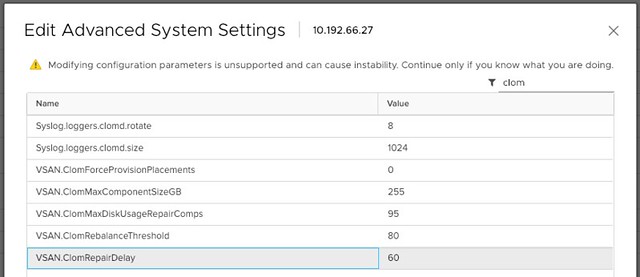
If you changed the advanced setting VSAN.ClomRepairDelay to anything else than the default 60 minutes there’s a caveat during the upgrade to 6.7 U1 you need to be aware of. When you do this upgrade the default is reset, meaning the value is configured once again to 60 minutes.  It was reported on twitter by “Justin Bias” this week, and I tested in the lab and indeed experience the same behavior. I set my value to 90 and after an upgrade from 6.7 to 6.7 U1 the below was the result.
Why did this happen? Well, in vSAN 6.7 U1 we introduced a new global cluster-wide setting. On a cluster level under “Configure >> vSAN >> Services” you now have the option to set the “Object Repair Time” for the full cluster, instead of doing this on a host by host basis. Hopefully this will make your life a bit easier.
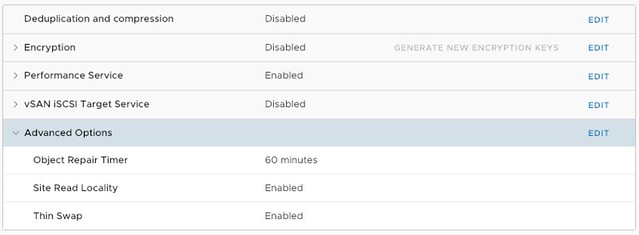
Note that when you make the change globally it appears that the Advanced Settings UI is not updated automatically. The change is however committed to the host, this is just a UI bug at the moment and will be fixed in a future release.
HA Admission Control Policy: Dedicated Failover Hosts

Duncan Epping · Feb 5, 2019 ·

This week I received some questions on the topic of HA Admission Control. There was a customer that had a cluster configured with the dedicated failover host admission control policy and they had no clue why. This cluster had been around for a while and it was configured by a different admin, who had left the company. As they upgraded the environment they noticed that it was configured with an admission control policy they never used anywhere else, but why? Well, of course, the design was documented, but no one documented the design decision so that didn’t really help. So they came to me and asked what it exactly did and why you would use it.

Let’s start with that last question, why would you use it? Well normally you would not, you should not. Forget about it, well unless you have a specific use case and I will discuss that later. What does it do?

When you designate hosts as failover hosts, they will not participate in DRS and you will not be able to run VMs on these hosts! Not even in a two-host cluster when placing one of the two in maintenance. These hosts are literally reserved for failover situations. HA will attempt to use these hosts first to failover the VMs. If, for whatever reason, this is unsuccessful, it will attempt a failover on any of the other hosts in the cluster. For example, in a when two hosts would fail, including the hosts designated as failover hosts, HA will still try to restart the impacted VMs on the host that is left. Although this host was not a designated failover host, HA will use it to limit downtime.

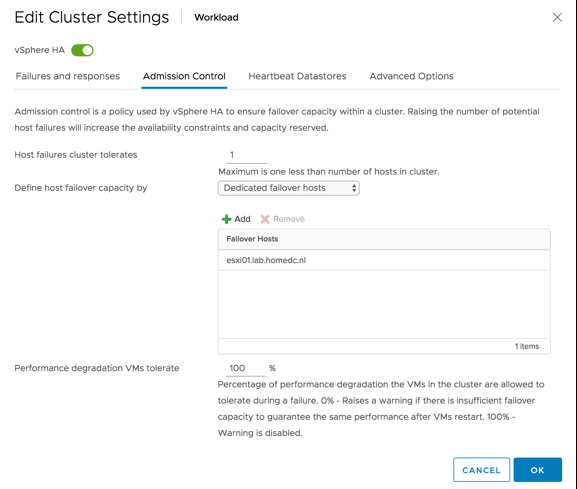
As can be seen above, you select the correct admission control policy and then add the hosts. As mentioned earlier, the hosts added to this list will not be considered by DRS at all. This means that the resources go wasted unless there’s a failure. So why would you use it?

  • If you need to know where a VM runs all the time, this admission control policy dictates where the restart happens.
  • There is no resource fragmentation, as a full host (or multiple) worth of resources will be available to restart VMs on, instead of 1 host worth of resources across multiple hosts.

In some cases, the above may be very useful, for instance knowing where a VM is all the time could be required for regulatory compliance, or could be needed for licensing reasons when you run Oracle for instance.

Free E-Book: Operationalizing VMware vSAN

Duncan Epping · Jan 17, 2019 ·

A while ago my colleague and friend Kevin Lees reached out to me and asked me if I could go over some material he wrote together with Paul Wiggett. He also asked me if I would be willing to write a foreword. When Kevin send the document over I literally finished it within a day. What I enjoyed most about this vSAN book was the fact that it wasn’t a deep dive, it wasn’t drilling down on technology, instead the people/process aspect of things are being discussed. This is an area which is often overlooked, and definitely an area that deserves more attention when people are looking to adopt software-defined storage, or the software-defined data center for that matter. Thanks Paul/Kevin for providing me the opportunity to write the foreword, I just downloaded my free copy and I have to say it looks great.

If you are interested, the book can be downloaded for free through the VMware Virtual Blocks blog, simply go here and download your copy.


Device X is not listed on the vSAN Compatability Guide, can I still use it?

Duncan Epping · Jan 8, 2019 ·

I get this question almost daily, and I am pretty sure I have said this various times, but just in case it wasn’t clear I figured I would share the answer to the question whether a device should be used in a vSAN cluster when it is not listed on the vSAN Compatibility Guide? if you have not looked at the components variant of the VCG for vSAN please take a look here: http://vmwa.re/vsanhclc. Of course, we also have an easier route, which is the ReadyNode VCG. But some may want to tweak based on performance, cost etc. I get that, and so does VMware, that is why we have listed all supported and tested components. Can you use a device which is not listed? Sure you can. Will VMware support the environment? Maybe they will, maybe they won’t! Should you use a device which is not listed if the previous answer is maybe? No!

So let’s be clear and let’s answer the two most asked questions:

  • Device X is not listed on the vSAN Compatability Guide, can I still use it?
    • No, you should not. If any problem arises chances are you will not get the support you need as a result of an unsupported configuration. Sure, usually VMware Support will do their best to help, but if it appears the unsupported device is causing the problem then it becomes difficult. Please do not use devices which are not listed
  • Device X is listed with Firmware version Y, but the OEM says I should use Z, what to do?
    • Ask the OEM why the version is not listed on VMware’s VCG website. Vendors are responsible for certifying components and the software (drivers / firmware) associated with it. If it is not listed then it has either not been submitted yet, it has not been tested, or it has not passed the test. Please only use tested and listed versions, the only exception is when both VMware GSS and the OEM points you to a new version.

Hope that helps,

This host has no isolation addresses defined as required by vSphere HA

Duncan Epping · Dec 19, 2018 ·

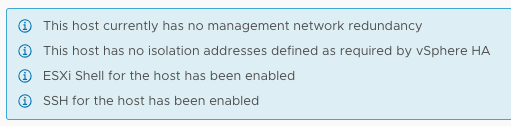
I had a comment on one of my 2-node vSAN cluster articles that there was an issue with HA when disabling the Isolation Response. The isolation response is not required for 2-node as it is impossible to properly detect an isolation event and vSAN has a mechanism to do exactly what the Isolation Response does: kill the VMs when they are useless. The error witnessed was “This host has no isolation addresses defined as required by vSphere HA” as shown also in the screenshot below.

This host has no isolation addresses defined as required by vSphere HA

So now what? Well first of all, as mentioned in the comments section as well, vSphere always checks if an isolation address is specified, that could be the default gateway of the management network or it could be the isolation address that you specified through advanced setting das.isolationaddress. When you use das.isolationaddress it often goes hand in hand with das.usedefaultisolationaddress set to false. That last setting, das.usedefaultisolationaddress, is what causes the error above to be triggered. What you should do in a 2-node configuration is the following:

  1. Do not configure the isolation response, explanation to be found in the above-mentioned article
  2. Do not configure das.usedefaultisolationaddress, if it is configured set it to true
  3. Make sure you have a gateway on the management vmkernel, if that is not the case you could set das.isolationaddress and simply set it to 127.0.0.1 to prevent the error from popping up.

Hope this helps those hitting this error message.

  • « Go to Previous Page
  • Page 1
  • Interim pages omitted …
  • Page 65
  • Page 66
  • Page 67
  • Page 68
  • Page 69
  • Interim pages omitted …
  • Page 497
  • Go to Next Page »

Primary Sidebar

About the Author

Duncan Epping is a Chief Technologist and Distinguished Engineering Architect at Broadcom. Besides writing on Yellow-Bricks, Duncan is the co-author of the vSAN Deep Dive and the vSphere Clustering Deep Dive book series. Duncan is also the host of the Unexplored Territory Podcast.

Follow Us

  • X
  • Spotify
  • RSS Feed
  • LinkedIn

Recommended Book(s)

Also visit!

For the Dutch-speaking audience, make sure to visit RunNerd.nl to follow my running adventure, read shoe/gear/race reviews, and more!

Do you like Hardcore-Punk music? Follow my Spotify Playlist!

Do you like 80s music? I got you covered!

Copyright Yellow-Bricks.com © 2026 · Log in