• Skip to primary navigation
  • Skip to main content
  • Skip to primary sidebar

Yellow Bricks

by Duncan Epping

  • Home
  • Unexplored Territory Podcast
  • HA Deepdive
  • ESXTOP
  • Stickers/Shirts
  • Privacy Policy
  • About
  • Show Search
Hide Search

Seeing green only on your HMD when using ALVR to stream an app?

Duncan Epping · Jan 2, 2020 ·

I have been testing various things as part of the Take 3 I started not too long ago. While I was setting up my environment I ran into a few issues. One of those issues was something very strange. Just so people understand what I am testing, I have an Oculus Quest headset to which I want to stream a VR app over WIFI from a powerful VM which has a passthrough GPU. Now by default, this isn’t possible. The Quest wasn’t intended for this particular usecase. In order to do this you need to setup some kind of remoting technology, which is where ALVR comes in to play. ALVR is an open source remoting/streaming solution for VR applications. Huh, what are you doing? Well as shown in the diagram below I am basically running an App using Steam within Windows and then streaming that output using ALVR from the server to the client, where the client runs as an app on the HMD (head-mounted display).
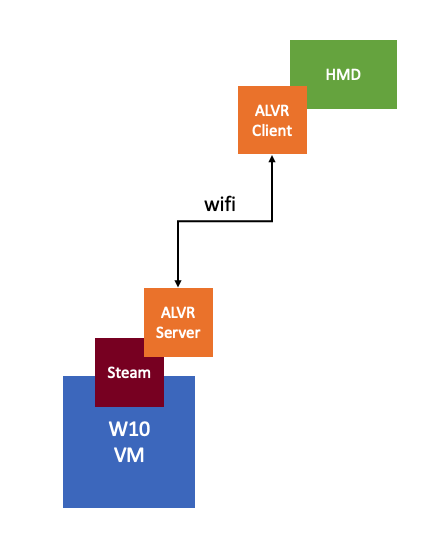
There’s also AMD ReLive VR and NVIDIA Cloud XR by the way, of which I have also tested AMD ReLive VR, which is embedded in the AMD Driver and can be enabled through the AMD advanced settings. Anyway, while testing this solution I had to disable the display head by setting “svga.present = false” in order for ALVR to work (otherwise I would get an error stating “could not create graphics device for adapter 0”), which means that as a result, I can’t access the VM using the Web/Remote Console, unfortunately.

So in order to launch the VR app and ALVR Server I have to RDP into the Windows 10 VM. When doing so I can launch the apps and connect the Headmount to ALVR Server, great… But when putting on the headset I would only see green, basically a big green screen. So why did this happen? Well, it appears that it is an artifact caused by the fact that I am launching the VR app from within an RDP session. When using RDP you end up using a specific video driver for the screen rendering, which is not something ALVR (or AMD ReLive VR) understands. So in order to get around it, you will need to log in from a “proper” console to the Windows VM and launch the app from there so that it is rendered by the AMD or NVIDIA driver instead. I used TightVNC to get around the problem, there are other solutions, but this was the fastest to implement for me.
vSAN Deep Dive Book Promotion! Price paper copy dropped by 50% and ebook as low as 0.99 USD!

Duncan Epping · Dec 19, 2019 ·

Amazon allows publishers to create book promotions and I just created one for the vSAN 6.7 U1 Deep Dive ebook. The promotion starts on the 24th of December and will end on the 31st of December. The ebook promotion will be available only on Amazon.com and Amazon.co.uk, as that is where Amazon allows publishers to create these. The price will start as low as 0.99 USD for the ebook in the US and will go up in increments of 1 USD over the course of 10 days, for the UK the price will start at 0.99 Pounds. The paper copy will also drop in price starting today and will return to normal on the 31st of December. (Note, unfortunately for the UK the ebook promo will start on the 20th of January, Amazon doesn’t allow me to schedule it sooner.) The paper copy will be discounted in all Amazon stores worldwide we have dropped the price by over 50%, in other words, for the US market you can pick it up for less than 20 USD, for EMEA it is less than 15 Euro. This should be a great deal to brush up your vSAN skills over the holiday season!

Make sure to pick a copy up using my referral links below:

  • Paper US Store – https://amzn.to/2SFsKxF
  • Ebook US Store – https://amzn.to/2L67DCl

Happy holidays!

Can I still provision VMs when a vSAN Stretched Cluster site has failed? Part II

Duncan Epping · Dec 18, 2019 ·

3 years ago I wrote the following post: Can I still provision VMs when a VSAN Stretched Cluster site has failed? Last week I received a question on this subject, and although officially I am not supposed to work on vSAN in the upcoming three months I figured I could test this in the evening easily within 30 minutes. The question was simple, in my blog I described the failure of the Witness Host, what if a single host fails in one of the two “data” fault domains? What if I want to create a snapshot for instance, will this still work?

So here’s what I tested:

  • vSAN Stretched Cluster
  • 4+4+1 configuration
    • Meaning, 4 hosts in each “data site” and a witness host, for a total of 8 hosts in my vSAN cluster
  • Create a VM with cross-site protection and RAID-5 within the location

So I first failed a host in one of the two data sites. When I fail the host, the following is what happens when I create a VM with RAID-1 across sites and RAID-5 within a site:

  • Without “Force Provisioning” enabled the creation of the VM fails
  • When “Force Provisioning” is enabled the creation of the VM succeeds, the VM is created with a RAID-0 within 1 location

Okay, so this sounds similar to the originally described scenario, in my 2016 blog post, where I failed the witness. vSAN will create a RAID-0 configuration for the VM. When the host returns for duty the RAID-1 across locations and RAID-5 within each location is then automatically created. On top of that, you can snapshot VMs in this scenario, the snapshots will also be created as RAID-0. One thing to mind is that I would recommend removing “force provisioning” from the policy after the failure has been resolved! Below is a screenshot of the component layout of the scenario by the way.

I also retried the witness host down scenario, and in that case, you do not need to use the “force provisioning” option. One more thing to note. The above will only happen when you create a RAID configuration which is impossible to create as a result of the failure. If 1 host fails in a 4+4+1 stretched cluster you would like to create a RAID-1 across sites and a RAID-1 within sites then the VM would be created with the requested RAID configuration, which is demonstrated in the screenshot below.

VR and AR, what is it good for besides gaming? (Take 3 learnings)

Duncan Epping · Dec 9, 2019 ·

I first got introduced to Virtual Reality (VR) in the 90’s. Back then it was all about gaming of course. Even today though the perception is that it is mainly about gaming, and to be honest that was also my perception. When I spoke with Alan Renouf the first time about the project he was working on and I saw his keynote demo I didn’t really see the opportunity. It all felt a bit gimmicky, to be honest, but can you blame me when the focus of the demo is moving workloads to the cloud by picking up a VM and throwing it over “the fence”.

In the last few days, as part of my Take 3, I have been mainly reading up on VR and AR use cases. I listened to podcasts and watched a dozen youtube videos. While listening, reading and watching it became clear to me that the perception I have(had) is way off. I had never given this much thought I guess, but the more I read, watch, hear, the more I get excited about the opportunities for VR/AR out there.

I believe right now training is a big opportunity. When I heard about this I related it back to my own job, but that is not really where the opportunity is today. The opportunity here is training for dangerous, challenging, or hazardous scenarios, which are often expensive and difficult to create. Okay, let’s get a bit more specific here, one of the examples I learned about last week was training for firefighters. Not just the actual fire fighting, but also the investigation of for instance how and where the fire started.

It isn’t something I ever thought about, but in order to train firefighters they create a room inside a container, burn down the container and then have groups of firefighters try to figure out how and where the fire started. The problem is though if they train 10 groups per day, only the last group can touch the objects and do a proper investigation. With VR this problem is solved, as after every training session you reset and start over. Same for instance could apply to police force training for things like crime scene investigation. Or for instance training of personnel working (nuclear) power plants, oil platforms, etc etc. Or even customer services training for retailers like Walmart, let them deal with difficult customers in VR first, let them handle dozens of difficult situations in VR before they are exposed to “real” customers.

There are many companies that have a need for (realistic) training of personnel in an easy, repeatable, and relatively affordable way. VR and AR allows you to do just that. If you want to learn more, I recommend listening to the Virtually Speaking Podcast episode covering Spatial Computing.

Taking a break with VMware Take-3

Duncan Epping · Dec 3, 2019 ·

Over the past 6 years, my focus has very much been VMware vSAN. I started focussing on vSAN when we internally started working on Project Marvin in 2012, or EVO:RAIL as it was officially called, which then became Dell EMC VxRail. After a brief stop in the corporate Office of CTO I then joined the Office of CTO for Storage and Availability to focus solely on vSAN. I think it is fair to say that vSAN has been on top of mind for what feels forever. As such, I figured I needed a break, some time to think and talk about something different for a change, some time to learn new technologies, some time to work on something else.

Fortunately, VMware has this great concept called “Take 3”. Take 3 provides you the opportunity, if you have been with VMware for at least 5 years, to spend 3 months working on something else. No, I am not going to a cabin in the woods and think for 3 months. That would be nice, but that is not an option. Take 3 provides you the option to join projects, or teams, which have published an opening and are looking for help. I looked around the Take 3 portal to see what kind of opportunities were listed, and I found one that immediately caught my attention: Spatial Computing aka VR/AR/MR. (If you work for VMware and want to know more, or are interested simply go to the Take 3 portal, note that the Spatial Computing team has other T3 opportunities open.)

Some of you may recall the awesome demo Alan Renouf gave at VMworld during the keynote a few years ago. Well, that demo ultimately turned in to an incubation project which Alan is running together with my old professional services colleague Matt Coppinger. I had a conversation with Alan, Matt and their lead developer Arjun Dube and decided to jump on-board for 3 months. Note, jump on board for 3 months! This doesn’t mean I will be leaving the HCI BU or move away from vSAN. I will return for duty in March, but until then I will dive into virtual/augmented reality. I am aiming to update you folks occasionally, over the course of the next 3 months, on my experience of taking on this project. If you want to know more about what it is all about, listen to Alan on the VMTN Podcast below.

For now, I am looking forward to learning new technologies like AR, VR, GPUs etc. I am very thankful that VMware provides its employees with opportunities like these. The only thing I wonder is, why I waited 11 years before trying this. Ah well, time to put on my goggles and submerge in virtual reality!

  • « Go to Previous Page
  • Page 1
  • Interim pages omitted …
  • Page 60
  • Page 61
  • Page 62
  • Page 63
  • Page 64
  • Interim pages omitted …
  • Page 502
  • Go to Next Page »

Primary Sidebar

About the Author

Duncan Epping is a Chief Technologist and Distinguished Engineering Architect at Broadcom. Besides writing on Yellow-Bricks, Duncan is the co-author of the vSAN Deep Dive and the vSphere Clustering Deep Dive book series. Duncan is also the host of the Unexplored Territory Podcast.

Follow Us

  • X
  • Spotify
  • RSS Feed
  • LinkedIn

Recommended Book(s)

Also visit!

For the Dutch-speaking audience, make sure to visit RunNerd.nl to follow my running adventure, read shoe/gear/race reviews, and more!

Do you like Hardcore-Punk music? Follow my Spotify Playlist!

Do you like 80s music? I got you covered!

Copyright Yellow-Bricks.com © 2026 ยท Log in