• Skip to primary navigation
  • Skip to main content
  • Skip to primary sidebar

Yellow Bricks

by Duncan Epping

  • Home
  • Unexplored Territory Podcast
  • HA Deepdive
  • ESXTOP
  • Stickers/Shirts
  • Privacy Policy
  • About
  • Show Search
Hide Search

Self-publishing, where do you start and which tools to use?

Duncan Epping · Jul 10, 2019 ·

I have had this question a couple of times and typed lengthy emails as a response, I figured I may as well write a blog post and share that going forward. Self-publishing, where do you start and which tools to use?

Well, I think the process is rather simple, but it takes a lot of time. Before you even get started writing a book you need to ask yourself if you will have the time to write a book and if you have the support of your family. As it typically means you will end up sitting in your home office for many evenings, and weekends, typing up content. Without the support of your family, or time, you won’t be able to finish it. Especially when it is your first book, expect it to take 6-9 months. Unless you get time from your work to add in extra hours during the week, and even then it probably takes 6 months at least.

Then there’s the question, self-publishing or a publisher? There are advantages to either, of course with a publisher a cut of the royalties will go to the publisher and typically as an author you will get between 8-12% (with 15% being the upper end). Big benefit of a publisher is the fact that they will provide editors, pay tech reviewers and will do all the formatting for you for both the paper and ebook edition. With self-publishing, you have to do that yourself, but it also means you are in control and you get to determine the price, which is nice as you can for instance price the ebook at 9.99 instead of the 40 USD a publisher will ask. (This will help with volume.)

Now when it comes to self-publishing, how do you start? I would recommend the following:

  1. Write a short summary of what you are going to write about and what you expect the reader to learn from the book
  2. Decide if you want a co-author or not, and ask the co-author if you want one
  3. Create a Table of Content (list of chapters)
  4. Create a timeline for completing the chapters
  5. Think about who you would like to ask as a technical reviewer, you may want more than 1
  6. Think about asking someone for editing/grammar, it helps to have someone focus on pure readability of the content!
    1. Think about which platform you will use to publish, I personally feel that Amazon (KDP) is the best option today!

Now when you have the above done, you can start writing, but what kind of tools should you use? I personally have used MS Word as the main tool to write books. When working with multiple authors we typically create a file per chapter and divide the chapters between the authors and work on them individually and store them in a shared dropbox folder. When you are done you can simply share the files with reviewers and editors. When you are done, you simply combine all the chapters and create a PDF. Now before you even do, make sure to check the publishing platform you will use and check whether they provide templates or not. These templates will be very helpful when you start the work to create a PDF. Amazon (KDP) will provide you various types of templates for different sized books. Also, when you create a PDF consider buying Adobe Acrobat DC. Not a requirement, but may help to produce usable PDFs, although KDP can also help with this.

The above is the print part, but of course, you may also want to create an ebook, typically this means you will need to redo all the formatting. KDP can do this for you, typically at a cost, or you can do it yourself. I have done this myself for most books (where Frank typically did the formatting for the paper copy), and for the ebook I have used various tools. I have a Macbook and I used both Vellum and Scrivener. Scrivener is a combination of a word processor/authoring tool and an ebook creator. Vellum was purely developed to create clean ebooks. That is why I moved from Scrivener to Vellum, as we do all our writing in MS Word, the only thing I need is the ability to create clean Kindle files. Vellum does that extremely well. It comes at a cost, but it was worth it! I tried importing the MS Word doc by the way various times, but I ended up doing copy/paste in the end, was much easier as it allowed me to also verify the formatting per copy/paste action.

Last but not least the tools used for the diagrams, it doesn’t really matter what you use. Visio, Powerpoint, Omnigraffle, it all works well. As long as you are consistent in terms of style and icons used. I would definitely recommend having one author create, or edit/verify all the diagrams. It just provides a more consistent look and feel and will make your book look more professional.

Before I forget, then of course when you are finished you will need to set a price. Now, when self-publishing I have always released the ebook at a fraction of the cost of the paper book. Simply because it allows you to reach more people, and of course because it is better for the environment. Yet is will cut into your royalties, but if you are considering writing a book to make money then you probably should rethink things. In most cases, tech books won’t make you a lot of money, put in the same amount of hours at the local McDonalds and you probably make more money, but hopefully that is not what you were trying to achieve. Hopefully, your goal is to learn from the experience, share your knowledge and expand your horizon.

If you want some more great hints and tips, I would recommend looking at the self-publishingschool website, which has a huge amount of information on the topic of self-publishing, with a lot of useful video content.

Unable to query vSphere health information. Check vSphere Client logs for details.

Duncan Epping · Jul 2, 2019 ·

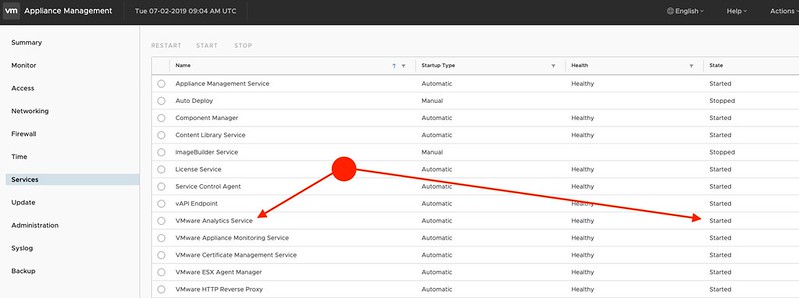
After an upgrade from 6.5 U1 to 6.7 U1 a customer received the following error in vCenter: Unable to query vSphere health information. Check vSphere Client logs for details. They looked at the log files but couldn’t get an indication of what was wrong. In this case, it was pretty simple, one of the required services wasn’t started for whatever reason. You can verify this in the vCenter Appliance VAMI (management interface for the appliance), which can be accessed by going to “http://ip-of-vcenter:5480”. When logged in you have to check the Services section, and make sure the VMware Analytics Services is running, as shown in the screenshot below.

Top 25 VMworld US 2019 sessions to attend (or watch online)

Duncan Epping · Jun 20, 2019 ·

I do this every year, list my favorite 25 VMworld sessions which you definitely should try to attend in person. Or if you are not going, watch online. Most of these sessions are by folks I know, or folks I have seen presenting, or topics which I find interesting for various reasons. Make sure to register for these sessions as soon as possible, as these are the sessions which tend to fill up extremely fast. I also have couple of sessions, 3 to be precise, make sure to register for those as well. You can find them through this link. HCI1870BU is the HA best practices for vSAN customers, HBI2186BU is the vSphere HA and DRS Hybrid Cloud Deep Dive which I will be presenting with Frank, and HCI3551KU is the HCI Keynote.

Now that I got that out of the way, let’s take a stab at my top 25, these are in random order! if your session is not on the list it is not because I think it was not good enough to be on there, it is because there are simply too many awesome sessions to select from. Here we go!

  1. 60 Minutes of Non-Uniform Memory Architecture [HBI2278BU] by Frank Denneman
    I am sure this session will go extremely deep, everything you always wanted to know (and more) about NUMA and vSphere. I don’t think I need to say much more.
  2. A Practitioner’s Guide to vCenter Server Architecture [HBI2227BU] by  Emad Younis and Sandeep Byreddy
    Of course, you don’t need to understand the vCenter Architecture to use vSphere, but we are all geeks, right? So this is probably the perfect session to understand more about the internals, services, modules etc.
  3. HCI Management: Current and Future [HCI1207BU] by Junchi Zhang and Christian Dickmann
    This is a great session where product management and engineering talk (and demo) new HCI management features. It typically contains at least 2-3 cool demos, and I watched the session previous years and it was well worth it.
  4. “If This Then That” for vSphere – The Power of Event-Driven Automation [HCI1379CU] by William Lam and Michael Gasch
    I found the abstract of this session very interesting, event-driven automation is definitely something that should of interest for most of you. And when it happens to have William and Michael speaking, you know you will be in for something good.
  5. Hyperconverged Infrastructure: Present and Future [HCI2733BU] by Vijay Ramachandran
    Another forward-looking session, this one by the VP of Product Management, and a bit more generic than the HCI Management session. Previous editions of this session showcased vSAN Data Protection for instance. So expect insights of what the future holds for vSAN/HCI.
  6. VMware CTO Panel: What’s Over the Horizon? [OCTO2899PU] by Ray O’Farrell, Pere Monclus, Greg Lavender and Christos Karamanolis
    The CTO panel has always been interesting, typically they will start with a discussion about where VMware stands and where VMware is going, followed by audience questions and deep (forward-looking) answers/statements. Very entertaining and worth the time!
  7. The Virtually Speaking Podcast Live: The Future of Storage [HCI1894PU] by Pete Flecha, John Nicholson, and Ken Werneburg
    A VMworld session which at the same time will be a live podcast, by your favorite podcast team. Not only are all three great speakers, I suspect they will have some amazing guests and I suspect it will be very entertaining at the same time.
  8. PowerCLI Deep Dive [HBI1729BU] by Kyle Ruddy and Luc Dekens
    These guys are the PowerCLI guru’s, if you want to get your mind blown and learn more about PowerCLI and automation, then this is the session to attend. I can guarantee that you will walk out with new ideas and knowledge.
  9. vSphere Virtual Volumes: Technical Deep Dive [HBI2853BU] by Jason Massae and Thiruvengada Govindan Thirumal
    Adoption of VVols is going up fast, and there’s a good reason for it. Find out what is so special about VVols and why you should consider it. Jason and Thiruvengada are experts on the topic, and will be able to go deep!
  10. VMware Cloud on AWS: SDDC Availability Deep Dive [HBI1924BU] by Jeremiah Megie and Glenn Sizemore
    VMware Cloud on AWS has some very appealing availability features which you won’t find anywhere else. Want to understand how VMware and AWS are working together to improve your uptime and resource availability? Make sure to attend this one by Glenn and Jeremiah!
  11. Zero to DR in 60 Minutes: VMware Site Recovery DRaaS Technical Deep Dive [HBI1229BU] by Stefan Tsonev and Cato Grace
    One of the use cases for public cloud, of course, is disaster recovery, in this session, Stefan and Cato will do a deep dive on the VMware DR as a Service solution.
  12. Extreme Performance Series
    Yes, I am cheating as this is actually 5 separate sessions, but these are simply a must attend/watch! I’ve learned a lot about vSphere internals over the past years by watching these sessions, they cover things like persistent memory, schedulers, best practices etc.
  13. How GPU-Assisted ML for Medical Research Proved to Be a Force for Good [HBI1546BU] by Niels Hagoort and Johan van Amersfoort
    Very interesting use case explained by Johan and Niels. They will discuss how a vSphere environment is used machine learning and deep learning. Worth attending!
  14. One Storage Platform for Thousands of Cloud Providers [HBI2537PU] by Ari Paul, Rawlinson Rivera, and John Toor
    In this session, they will discuss the availability of S3 compatible object storage in vCloud Director based platforms and the use cases. It will feature Rawlinson from Cohesity and John from Cloudian. Hosted by Ari Paul from VMware.
  15. Core Storage Best Practices: Ensuring Your Storage Is Reliable [HBI2751BU] by Jason Massae and Cody Hosterman
    This session has been in the top VMworld sessions for the past couple of years. Jason and Cody have a wealth of knowledge to share with you on the topic of core storage (VMFS, NFS, VAAI etc)
  16. Optimizing vSAN for Performance [HCI1757BU] by Paudie O’Riordan
    Paudie is one of the most technical guys in our team, if anyone understands vSAN (and performance) inside out it is him. Make sure to attend this one to get a good understanding of how to tweak vSAN to get the best performance out of it.
  17. Showcase Keynote: Hybrid Cloud Architecture – The New Standard from the Data Center [HYB3544KU] by Kit Colbert, Raghu Raghuram and Mark Lohmeyer
    I always enjoy these showcases as they discuss what we have today, but more importantly what is coming in the future. Kit, Raghu and Mark are excellently equipped to bring you up to speed!
  18. vSphere Networking in the Data-Centric Future [HBI2136BU] by Sudhansu Jain and Disha Chopra
    I am not a networking guy, but this sounds very interesting as in this session the future of networking will be discussed. What are the current trends, where is the market moving towards?
  19. Innovations in vMotion: Features, Performance, and Best Practices [HBI1421BU] by Sreekanth Setty and Arunachalam Ramanathan
    vMotion is the most used vSphere feature, and it continues to evolve. Over the years the vMotion innovations/futures session has always been very interesting, and I suspect it will be again this year!
  20. VMware Cloud on Dell EMC: Technical Deep Dive [HBI1975BU] by Mike Hall and Sridevi Ravuri
    This session will provide a deep dive on what was formerly called Project Dimension. A very interesting concept where VMware and Dell will join forces to deliver and manage an SDDC as a Service on premises.
  21. Encrypting VMs on Standalone Hosts: Tech Preview [HBI1947BU] by Mike Foley and Samyuktha Subramanian
    A session title with “tech preview” always has my interest! In this session they will also be discussing very interesting use cases for this potential future feature.
  22. Diversity and Inclusion Tech Panel: You Can Drive Success for Women in Tech [PD2632U] by Jodi Shely
    An interesting topic, and an important topic as well, definitely one I will be attending or watching!
  23. Accelerating Intra-Host PVRDMA Storage Traffic in a Future Dell AMD Server [OCTO2718BU] by Richard Brunner and Shyamkumar Iyer
    I’ve attended various sessions by Richard, and they are always excellent and very deep and typically forward-looking. I know this one will also be, and I am sure they will go deep fast!
  24. Edge Computing Innovations in Office of the CTO and Dell Technologies [EIOT2715BU] by Chris Wolf and Daniel Beveridge
    This session was one of my favorite sessions last year, although the title has slightly changed, I am sure it will be packed with cool demos, industry insights, and futures!
  25. How to Become the Platform Engineer of the Future [PD2248U] by Martijn Baecke and Matthew Steiner
    The last session on this list and I think it is an important one. How do you evolve as an IT practitioner, what kind of opportunities are out there and what types of skills would you need for those opportunities? Martijn and Matt will guide you through a fast evolving IT world.

That was it for now, enjoy the show. (Early bird tickets will end the 21st of June, so get them now!)

Does a vSAN IO Limit impact resync traffic?

Duncan Epping · Jun 12, 2019 ·

A question just came in, and I figured other people may have the same question so I would share it. The question was if a vSAN IO limit would impact resync traffic or for instance SvMotion? In this case the customer defines limits within each policy to ensure VMs do not interfere with other VMs or excessively uses IO resources. Especially in cloud environments this can be useful, or when running production and test/dev on the same cluster. The concern, of course, was if this limit would impact for instance recovery times after a failure. Because you can imagine that a limit of 50 IOPS would be devastating when a VM (or multiple VMs) need to have objects resynced.

The answer is simple: no, the IO limit specified within a policy does not impact resync traffic (or SvMotion for that matter). It only applies to Guest IO to a VMDK, namespace or swap object. Which means that it is safe to set limits when it comes to recovery times.

Major vSAN Milestone: 20K customers – Celebrating by dropping the price of our book with 50%!

Duncan Epping · Jun 2, 2019 ·

I haven’t done one of these in a while, and as it is a question that comes up regularly during customer conversations I figured I would share a nice quote from the VMware earnings call. But before I do I want to thank every VMware employee, partner and customer who helped us reaching this major milestone. Sometimes customers ask how invested VMware is in storage, well very invested. Determined to remain the number 1 player in the hyperconverged and hybrid cloud world, and the below numbers show why!

vSAN license bookings grew over 50% year-over-year in Q1 with a total customer count growing to over 20,000. (seekingalpha.com)

Yes, that is 20,000 customers indeed. Actually, more than 20k customers. Which, again, is a great success and would not have been possible without the help from you guys. So to thank all of you Cormac and I have decided to lower the price of our book temporarily. For 1 week, today until Friday the 7th, we have lowered the price of the book by ~50%. This means that on the Amazon US store the book will be 20 USD for the paper version, and only 5 USD for the ebook. So pick it up! (It may take a day for the price change to reach some of the Amazon stores…) Please note, as an Amazon Associate I earn from below qualifying purchases.

  • Paper – https://amzn.to/2SFsKxF
  • Ebook – https://amzn.to/2L67DCl

<UPDATE>

It seems the price has been pushed down to all “local” amazon websites. So go to your local website and pick up the book for 50% of the previous price. Links to most localized websites here:

  • Germany – Paper
  • Germany – ebook
  • UK – Paper
  • UK – ebook
  • FR – Paper
  • FR – ebook
  • ES – Paper
  • ES – ebook
  • IT – Paper
  • IT – ebook
  • JP – Paper
  • JP – ebook
  • NL – ebook
  • BR – ebook
  • CA – ebook
  • MX – ebook
  • AU – ebook
  • IN – ebook
  • « Go to Previous Page
  • Page 1
  • Interim pages omitted …
  • Page 61
  • Page 62
  • Page 63
  • Page 64
  • Page 65
  • Interim pages omitted …
  • Page 497
  • Go to Next Page »

Primary Sidebar

About the Author

Duncan Epping is a Chief Technologist and Distinguished Engineering Architect at Broadcom. Besides writing on Yellow-Bricks, Duncan is the co-author of the vSAN Deep Dive and the vSphere Clustering Deep Dive book series. Duncan is also the host of the Unexplored Territory Podcast.

Follow Us

  • X
  • Spotify
  • RSS Feed
  • LinkedIn

Recommended Book(s)

Also visit!

For the Dutch-speaking audience, make sure to visit RunNerd.nl to follow my running adventure, read shoe/gear/race reviews, and more!

Do you like Hardcore-Punk music? Follow my Spotify Playlist!

Do you like 80s music? I got you covered!

Copyright Yellow-Bricks.com © 2026 · Log in