• Skip to primary navigation
  • Skip to main content
  • Skip to primary sidebar

Yellow Bricks

by Duncan Epping

  • Home
  • Unexplored Territory Podcast
  • HA Deepdive
  • ESXTOP
  • Stickers/Shirts
  • Privacy Policy
  • About
  • Show Search
Hide Search

Site locality in a vSAN Stretched Cluster?

Duncan Epping · May 28, 2019 ·

On the community forums, a question was asked around the use of site locality in a vSAN Stretched Cluster. When you create a stretched cluster in vSAN you can define within a policy how the data needs to be protected. Do you want to replicate across datacenters? Do you want to protect the “site local data” with  RAID-1 or RAID-5/6? All of these options are available within the UI.

What if you decide to not stretch your object across locations, is it mandatory to specify which datacenter the object should reside in?

The answer is simple: no it is not. The real question, of course is, would be: should you define the location? Most definitely! If you wonder how to do this, simplicy specify it within the policy you define for these objects as follows:

The above screenshot is taken from the H5 client, if you are still using the Web Client it probably looks slightly different (Thanks Seamus for the screenshot):

Why would you do this? Well, that is easy to explain. When the objects of a VM get provisioned the decision will be made per object where to place it. If you have multiple disks, and you haven’t specified the location, you could find yourself in the situation where disks of a single non-stretched VM are located in different datacenters. This is, first of all, terrible for performance, but maybe more importantly also would impact availability when anything happens to the network between the datacenters. So when you use site locality for non-stretched VMs, make sure to also configure the location so that your VM and objects will align as demonstrated in the below diagram.


VMware RADIO Fun Run 2019

Duncan Epping · May 27, 2019 ·

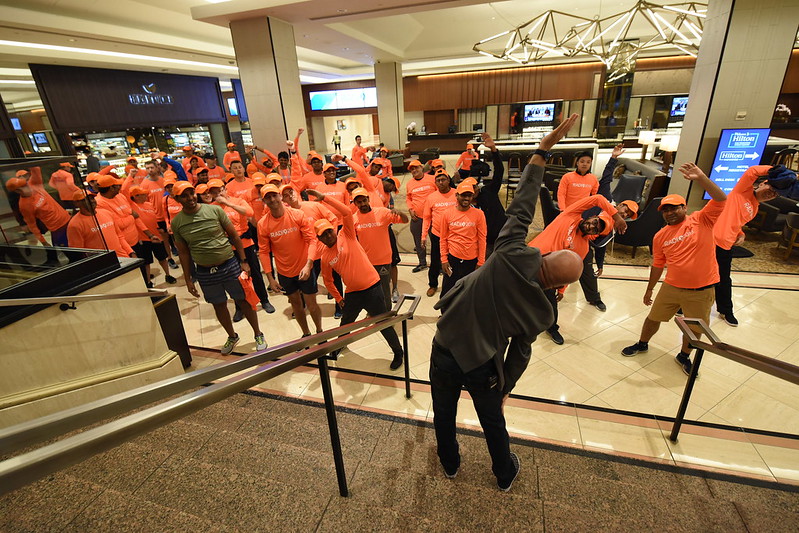
William Lam and I have been organizing a “running” event at a VMware internal event called RADIO. RADIO is our yearly R&D Innovation Offsite and is usually held in San Francisco. What is this run? Well basically it started many years ago (7 or 8?) with a group of 4-5 runners meeting up at 6:00 AM to go for a run. The group organically grew the next year to about 7 or 8 and I figured I could potentially do something similar to the VMworld RUN I organized many years ago. So the year after we asked the RADIO team if we could have it listed on the agenda officially, they looked at us a bit strange as they didn’t expect anyone to wake up at 05:30 to go for a 5KM or 10KM run at 06:00 AM. I guess they forgot that many of us fly in from a different country, and as such are jetlagged and will be awake for hours by then. The first official run had 15-20 runners, followed by 25 the next year and it steadily grew. It wasn’t just William and I, of course, organizing this, we had folks like Chris Wolf, for instance, helping out.

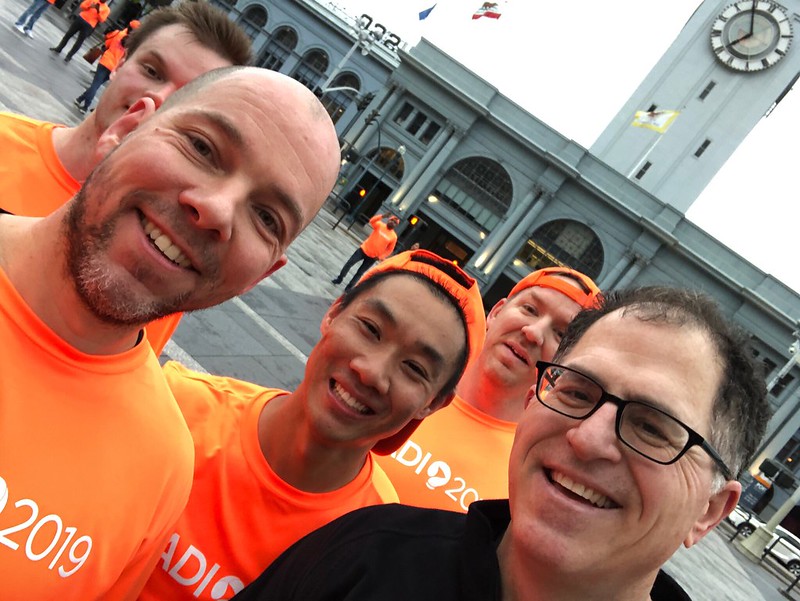
The past two years we stepped up our game, as the numbers started growing, and we managed to get funding for running shirts and hats and started working with the event team to get it a bit more structured. Why? Well, when there are 75-80 people running in a city like San Francisco you need to stand out and you can’t just walk outside and run, things need to be a bit more structured. This year we had about 120 people joining on the run. VMware employees from different business units and different countries. A great way to meet people you normally wouldn’t meet, especially not in a setting like this. For instance, we had our Chief People Officer joining last year, we bumped into Michael Dell this year and of course our global field CTO Chris Wolf also joined again. But that is not the goal, the goal is to get to meet people you normally would not meet. I for instance also happened to run next to a developer who worked on VASA and we got to discuss an issue I was experiencing, which subsequently then got fixed. Pretty cool.

Anyway, I just wanted to share some pictures of the run, as it may get you thinking about organizing something like this as well for a company event! It is fun and worth the effort! If you participated and are reading this, thanks for joining, hope to see you next year! And of course, everyone who helped to organize, thanks!

Impact of adding Persistent Memory / Optane Memory devices to your VM

Duncan Epping · May 22, 2019 ·

I had some questions around this in the past month, so I figured I would share some details around this. As persistent memory (Intel Optane Memory devices for instance) is getting more affordable and readily available more and more customers are looking to use it. Some are already using it for very specific use cases, usually in situations where the OS and the App actually understand the type of device being presented. What does that mean? At VMworld 2018 there was a great session on this topic and I captured the session in a post. Let me copy/paste the important bit for you, which discusses the different modes in which a Persistent Memory device can be presented to a VM.

  • vPMEMDisk = exposed to guest as a regular SCSI/NVMe device, VMDKs are stored on PMEM Datastore
  • vPMEM = Exposes the NVDIMM device in a “passthrough manner, guest can use it as block device or byte addressable direct access device (DAX), this is the fastest mode and most modern OS’s support this
  • vPMEM-aware = This is similar to the mode above, but the difference is that the application understands how to take advantage of vPMEM

But what is the problem with this? What is the impact? Well when you expose a Persistent Memory device to the VM, it is not currently protected by vSphere HA, even though HA may be enabled on your cluster. Say what? Yes indeed, the VM which has the PMEM device presented to it will be disabled for vSphere HA! I had to dig deep to find this documented anywhere, and it is documented in this paper. (Page 47, at the bottom.) So what works and what not? Well if I understand it correctly:

  • vSphere HA >> Not supported on vPMEM enabled VMs, regardless of the mode
  • vSphere DRS >> Does not consider vPMEM enabled VMs, regardless of the mode
  • Migration of VM with vPMEM / vPMEM-aware >> Only possible when migrating to host which has PMEM
  • Migration of VM with vPMEMDISK >> Possible to a host without PMEM

Also note, as a result (data is not replicated/mirrored) a failure could potentially lead to loss of data. Although Persistent Memory is a great mechanism to increase performance, it is something that should be taken into consideration when you are thinking about introducing it into your environment.

Oh, if you are wondering why people are taking these risks in terms of availability, Niels Hagoort just posted a blog with a pointer to a new PMEM Perf paper which is worth reading.


DRS Advanced Setting IsClusterManaged

Duncan Epping · May 7, 2019 ·

On Reddit, someone asked what DRS advanced setting IsClusterManaged does and if it is even legit. I can confirm it is legit, it is a setting which was introduced to prevent customers from disabling DRS while the cluster is managed by vCloud Director for instance. As disabling DRS would lead to deleting resource pools, which would be a very bad situation to find yourself in when you run vCloud Director as it leans on DRS Resource Pools heavily. So if you see the advanced setting IsClusterManaged in your environment for DRS, just leave it alone, it is there for a reason. (Most likely because you are using something like vCloud Director…)

Present Powerpoint slides in window instead of full screen

Duncan Epping · May 7, 2019 ·

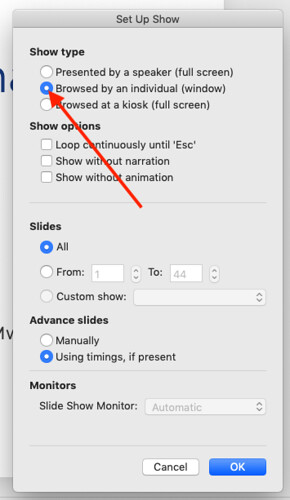
I just had to do a Zoom presentation (on a Macbook by the way) and one thing which always bugs me is that I need to run the presentation in full screen and can’t see the chat or Q&A. I like to address questions as I go during the presentation. I was going through the Powerpoint interface and noticed an option I had not noticed before. If you click on “Slideshow” and then “Set Up Slide Show” you can select “Browsed by an individual (window)”, this allows you to run the presentation within a window and have your chat and Q&A open next to the window. Very useful if you ask me. Figured I would share as it doesn’t seem common knowledge

  • « Go to Previous Page
  • Page 1
  • Interim pages omitted …
  • Page 62
  • Page 63
  • Page 64
  • Page 65
  • Page 66
  • Interim pages omitted …
  • Page 497
  • Go to Next Page »

Primary Sidebar

About the Author

Duncan Epping is a Chief Technologist and Distinguished Engineering Architect at Broadcom. Besides writing on Yellow-Bricks, Duncan is the co-author of the vSAN Deep Dive and the vSphere Clustering Deep Dive book series. Duncan is also the host of the Unexplored Territory Podcast.

Follow Us

  • X
  • Spotify
  • RSS Feed
  • LinkedIn

Recommended Book(s)

Also visit!

For the Dutch-speaking audience, make sure to visit RunNerd.nl to follow my running adventure, read shoe/gear/race reviews, and more!

Do you like Hardcore-Punk music? Follow my Spotify Playlist!

Do you like 80s music? I got you covered!

Copyright Yellow-Bricks.com © 2026 · Log in