• Skip to primary navigation
  • Skip to main content
  • Skip to primary sidebar

Yellow Bricks

by Duncan Epping

  • Home
  • Unexplored Territory Podcast
  • HA Deepdive
  • ESXTOP
  • Stickers/Shirts
  • Privacy Policy
  • About
  • Show Search
Hide Search

Event Season has lifted off! #VirtualRoadshow

Duncan Epping · May 28, 2020 ·

It seems that Event Season has lifted off, and the virtual roadshow has really started. I can’t remember a point in time where I had this many events scheduled in a few months. Actually, I think I have more events scheduled in the upcoming 3 months than I had in the previous 12. I guess the whole Corona situation has made people realize that we don’t necessarily need to be in a single room together to share knowledge and discuss interesting situations, architectures, and/or problems. Considering I have many different events planned, I figured I would share the links where you can register for these. If you are a VMUG leader and are interested in hosting a virtual event, feel free to drop me (or Frank Denneman / Cormac Hogan) a note, and we can see how we can fit it in our schedule.

  • June 4th – VMUG Romania – VMware Platform for a New Decade with Frank Denneman, Cormac Hogan and Duncan Epping
  • June 23rd – VMware vSAN 7.0 what’s new Webinar by Duncan Epping
  • June 25th – VMUG Scotland / Ireland – VMware Platform for a New Decade with Frank Denneman, Cormac Hogan and Duncan Epping
  • June 30th – VMUG Germany – VMware Platform for a New Decade with Frank Denneman, Cormac Hogan and Duncan Epping
  • July 2nd – VMUG England – VMware Platform for a New Decade with Frank Denneman, Cormac Hogan and Duncan Epping
  • July 7th – VMware vSAN File Services and Cloud Native Workloads with Cormac Hogan and Duncan Epping
  • September 9th – VMUG Southern Virginia – with Frank Denneman, Cormac Hogan and Duncan Epping
  • September 17th – VMUG Nordics (Denmark / Norway / Sweden) – VMware Platform for a New Decade with Frank Denneman, Cormac Hogan and Duncan Epping
  • October 6th – VMUG New York Keynote – Duncan Epping
  • December 10th – VMUG Portland Keynote – Duncan Epping

These are the “public” virtual events that are planned right now in a virtual format. There are a few more events that I will be presenting at, but these are mostly invite-only events for VMware TAM customers. Of course, we are also working with various other VMUGs that had events scheduled to see how we can turn it into a successful virtual event, so the above list will be updated in the near future probably.

If you are a member of any of the above VMUG chapters, make sure to register, and I hope to see you at one of those events.

Whitepaper: Running Augmented and Virtual Reality Applications on VMware vSphere using NVIDIA CloudXR

Duncan Epping · May 15, 2020 ·

As many of you know by now, I worked on this project with the VXR team at VMware to try to run Augmented and Virtual Reality Applications on VMware vSphere. The white paper demonstrates that, using VMware vSphere backed by NVIDIA Virtual GPU technology, AR/VR applications can be run on a Windows 10 virtual machine with an NVIDIA vGPU, and streamed to a standalone AR/VR device, such as the Oculus Quest or Vive Focus Plus, using NVIDIA’s CloudXR protocol. It was a very interesting project as we had some real challenges I did not expect. I am not going to reveal the outcome of the project and our findings, you will need to read the white paper for that, it will also give you a good understanding of the use cases around these technologies in my opinion. One thing I can reveal right here though is that these workloads are typically graphic intense. I want to share with you one image which in my opinion explains why this is:

Traditional apps/workloads usually run on a single monitor with a frame rate of 30 frames per second. VR applications are presented in a VR headset. A VR headset has a display for both eyes, that doubles the number of megapixels per second immediately, but these displays also expect 72 frames per second or more typically. This is to avoid motion sickness. All of this is described in-depth in the white paper, of course including our findings around GPU utilization when running VR/AR applications using NVIDIA CloudXR, NVIDIA and VMware vGPU on top of VMware vSphere. I hope you enjoy reading the paper as much as I enjoyed the project!

Go here to sign up for the white paper: https://pathfinder.vmware.com/activity/projectvxr

Running vSphere 6.7 or 6.5 and configured HA APD/PDL responses? Read this…

Duncan Epping · May 14, 2020 ·

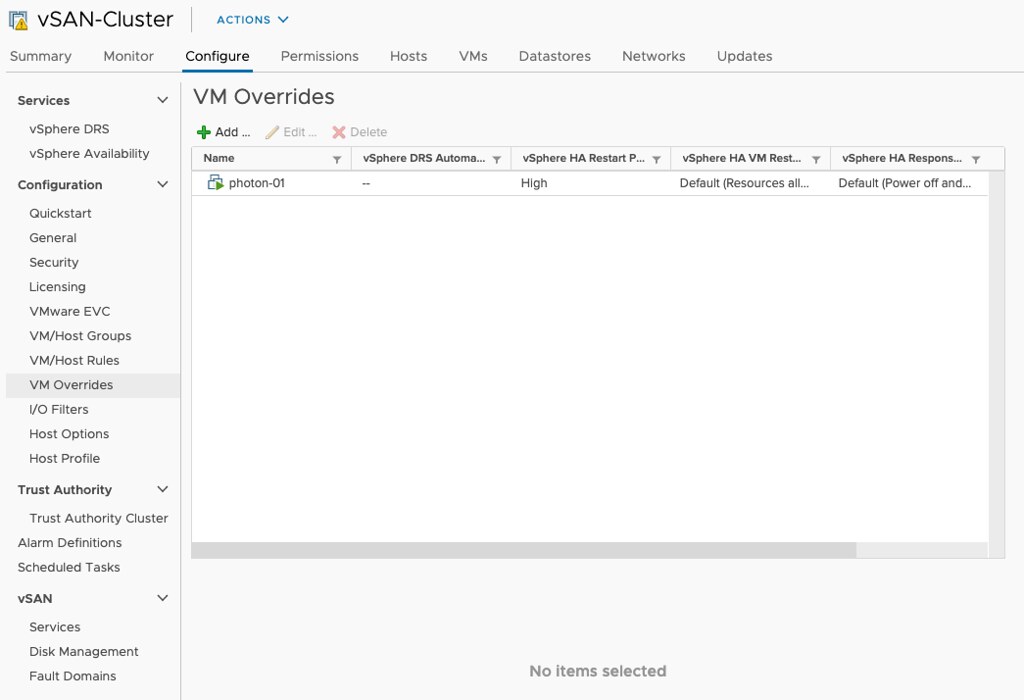
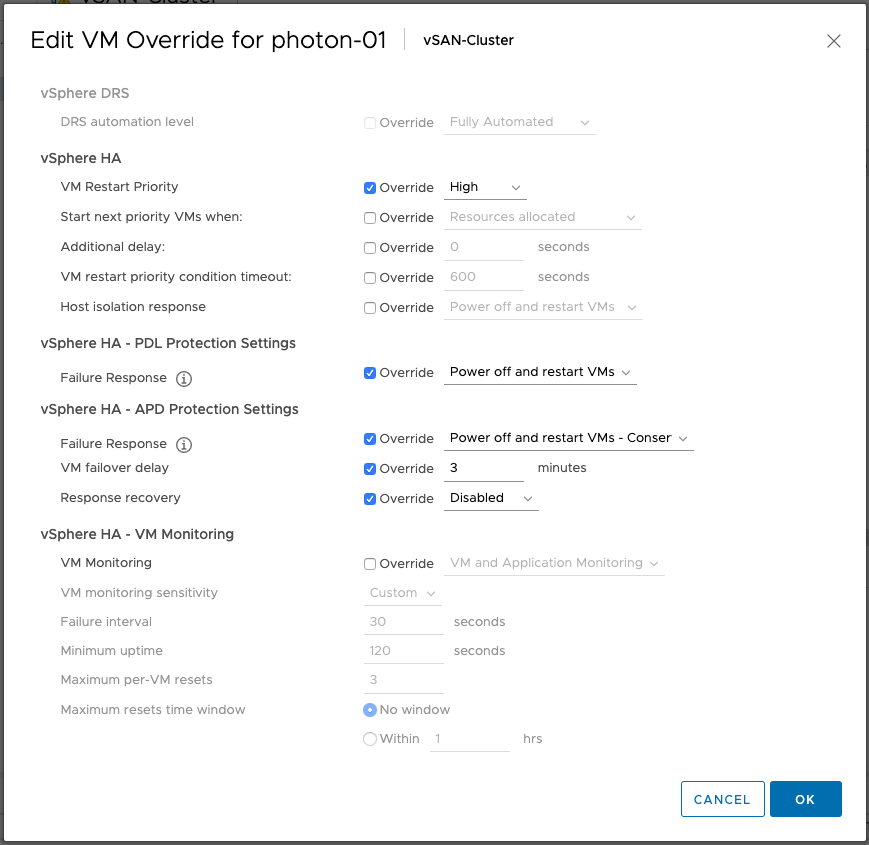
If you are running vSphere 6.7 or 6.5 and have not installed 6.7 P02 yet (6.5 P05 is available soon) and you have APD/PDL responses configured within vSphere HA it could be that an issue causes VMs not to be failed over when an APD or PDL occurs. This is a known issue in the release, and P02 or P05 solves this problem. What is the problem? Well, a bug causes VMs which are listed in “VM overrides” to have settings that are not configured to be set to “disabled” instead of “unset”, in specific the APD/PDL setting.

This means that even though you have APD/PDL responses configured on a cluster level, the VM level configuration overrides it as it would be set to “disabled”. It doesn’t matter really why you added them to VM Overrides, could be to configure VM Restart Priority for instance. The frustrating part is that the UI doesn’t show you it is disabled as it looks like it is not configured.

If you can’t install the patch just yet, for whatever reason, but you do have VMs in VM Overrides, make sure to go to VM Overrides and explicitly configure the VMs to have the APD/PDL responses enabled similar to what it is configured to on a cluster level as shown in the screenshots below.

vSphere HA internals: restart placement changes in vSphere 7!

Duncan Epping · May 13, 2020 ·

Frank and I are looking to update the vSphere Clustering deep dive to vSphere 7. While scoping the work I stumbled on to something interesting, and this is the change that was introduced for the vSphere HA restart mechanism,  and specifically the placement of VMs in vSphere 7. In previous releases vSphere HA had a straight forward way of doing placement for VMs when VMs need to be restarted as a result of a failure. In vSphere 7.0 this mechanism was completely overhauled.

So how did it work pre-vSphere 7?

  • HA uses the cluster configuration
  • HA uses the latest compatibility list it received from vCenter
  • HA leverages a local copy of the DRS algorithm with a basic (fake) set of stats and runs the VMs through the algorithm
  • HA receives a placement recommendation from the local algorithm and restarts the VM on the suggested host
  • Within 5 minutes DRS runs within vCenter, and will very likely move the VM to a different host based on actual load

As you can imagine this is far from optimal. So what is introduced in vSphere 7? Well, we introduce two different ways of doing placement for restarts in vSphere 7:

  1. Remote Placement Engine
  2. Simple Placement Engine

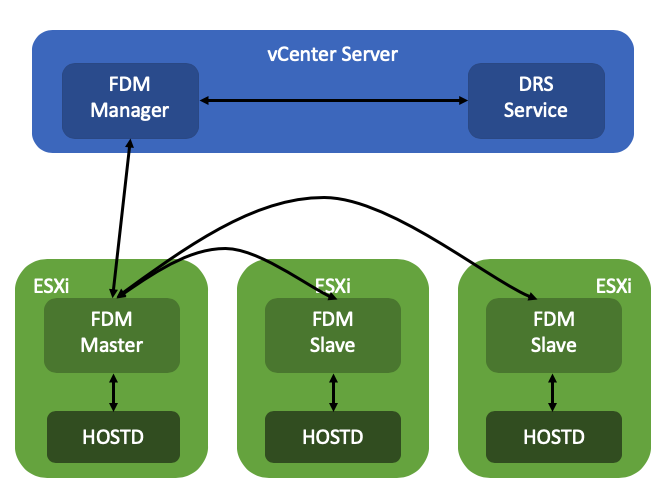
The Remote Placement Engine, in short, is the ability for vSphere HA to make a call to DRS for the recommendation of the placement of a VM. This will take the current load of the cluster, the VM happiness, and all configured affinity/anti-affinity/vm-host affinity rules into consideration! Will this result in a much slower restart? The great thing is that the DRS algorithm has been optimized over the past years and it is so fast that there will not be a noticeable difference between the old mechanism and the new mechanism. Added benefit of course for the engineering team is that they can remove the local DRS module, which means there’s less code to maintain. How this works is that the FDM Master communicated with the FDM Manager which runs in vCenter Server. FDM Manager communicates with the DRS service to request a placement recommendation.

Now some of you will probably wonder what happens when vCenter Server is unavailable, well this is where the Simple Placement Engine comes into play. The team has developed a new placement engine that basically takes a round-robin approach, but does consider of course “must rules” (VM to Host) and the compatibility list. Note, affinity, or anti-affinity rules, are not considered when SPE is used instead of RPE! This is a known limitation, which is considered to be fixed in the future. If a host, for instance, is not connected to the datastore the VM is running on that needs to be restarted than that host is excluded from the list of potential placement targets. By the way, before I forget, version 7 also introduced a vCenter heartbeat mechanism as a result. HA will be heart beating the vCenter Server instance to understand when it will need to resort to the Simple Placement Engine vs the Remote Placement Engine.

I dug through the FDM log to find some proof of these new mechanisms, (/var/log/fdm.log) and found an entry that shows there are indeed two placement engines:

Invoking the RPE + SPE Placement Engine

RPE stands for “remote placement engine”, and SPE for “simple placement engine”. Where Remote of course refers to DRS. You may ask yourself, how do you know if DRS is being called? Well, that is something you can see in the logs in the DRS log files, when a placement request is received, the below entry shows up in the log file:

FdmWaitForUpdates-vim.ClusterComputeResource:domain-c8-26307464

This even happens when DRS is disabled and also when you use a license edition which does not include DRS even, which is really cool if you ask me. If for whatever reason vCenter Server is unavailable, and as a result DRS can’t be called, you will see this mentioned in the FDM log, and as shown below, it will use the Simple Placement Engine’s recommendation for the placement of the VM:

Invoke the placement service to process the placement update from SPE

A cool and very useful small HA enhancement if you ask me for vSphere 7.0!


** Disclaimer: This article contains references to the words master and/or slave. I recognize these as exclusionary words. The words are used in this article for consistency because it’s currently the words that appear in the software, in the UI, and in the log files. When the software is updated to remove the words, this article will be updated to be in alignment. **

vSphere HA internals: VMCP super aggressive option in vSphere 7

Duncan Epping · May 11, 2020 ·

Most of you probably heard about a feature called VMCP aka VM Component Protection. If not, this is the functionality in vSphere HA that enabled you to restart VMs which have been impacted by a PDL (permanent device loss) or APD (all paths down) scenario. (If you have no idea what I am talking about read this article first.)

When you configure the APD response you have four options:

  1. Disable
  2. Issue Event
  3. Power Off / Restart – Conservative
  4. Power Off / Restart – Aggressive

The main difference between Conservative and Aggressive is that if you find yourself in a situation where HA isn’t sure whether a VM can be restarted during an APD scenario it will not power off the VM when using Conservative. If you have it configured as Aggressive it will power off the VM. However, if HA is certain that a VM can’t be powered on it will not power off the VM. Basically it prefers availability of the VM.

As you can imagine, in certain scenarios having a VM running while it is impacted by an “APD” situation makes no sense. The VM has lost access to storage, and you simply may prefer to kill the workload. Why? Well, when it loses access to storage it can’t write to disk. You could find yourself in a situation where a change is acknowledged and you think it is written to disk but it somehow is sitting in a memory cache etc.

If you prefer the VM to be killed, regardless of whether it can be restarted or not, you can enable this via a vSphere HA advanced setting. Now before you implement this, do note that if a cluster-wide APD situation occurs, you could find yourself in the scenario where ALL virtual machines are powered off by HA and not restarted as the resources are not available. Anyway, if you feel this is a requirement, you can configure the following vSphere HA advanced setting in vSphere 7:

das.restartVmsWithoutResourceChecks = true
  • « Go to Previous Page
  • Page 1
  • Interim pages omitted …
  • Page 53
  • Page 54
  • Page 55
  • Page 56
  • Page 57
  • Interim pages omitted …
  • Page 502
  • Go to Next Page »

Primary Sidebar

About the Author

Duncan Epping is a Chief Technologist and Distinguished Engineering Architect at Broadcom. Besides writing on Yellow-Bricks, Duncan is the co-author of the vSAN Deep Dive and the vSphere Clustering Deep Dive book series. Duncan is also the host of the Unexplored Territory Podcast.

Follow Us

  • X
  • Spotify
  • RSS Feed
  • LinkedIn

Recommended Book(s)

Also visit!

For the Dutch-speaking audience, make sure to visit RunNerd.nl to follow my running adventure, read shoe/gear/race reviews, and more!

Do you like Hardcore-Punk music? Follow my Spotify Playlist!

Do you like 80s music? I got you covered!

Copyright Yellow-Bricks.com © 2026 · Log in