• Skip to primary navigation
  • Skip to main content
  • Skip to primary sidebar

Yellow Bricks

by Duncan Epping

  • Home
  • Unexplored Territory Podcast
  • HA Deepdive
  • ESXTOP
  • Stickers/Shirts
  • Privacy Policy
  • About
  • Show Search
Hide Search

90% of all vSphere 5.1 Clustering Deepdive books sold are virtual

Duncan Epping · Sep 7, 2012 ·

I was just checking the sales numbers of the vSphere 5.1 Clustering Deepdive and 90% of all vSphere 5.1 Clustering Deepdive books sold on Amazon are e-book copies. Both Frank and I are heavy supporters of e-books and hence the reason we priced all of our books aggressively. Just some facts for the 5.1 book:

  • 100 pages extra content
  • Stretched Cluster section added and Storage DRS section fully rewritten
  • Over 3000 copies sold in under two weeks (wooohooooooooooo)
  • Over 200 paper copies sold at VMworld
  • Available on paper for just $ 24.95
  • Available as an ebook for just $ 7.49
    (location based pricing so may vary)
  • Yes this book contains all 5.0 info with call-outs to what has changed in 5.1!

While we are at it, I just enabled the vSphere 5.0 Clustering Deepdive book for the Kindle Lending Library. But for $ 4.99 you can’t really go wrong. The 4.1 HA/DRS Deepdive is still available for only $ 0.99, and there might just be another opportunity to pick it up for $ 0.- next week between the 11th and the 13th of September.

vSphere 5.1 networking enhancements

Duncan Epping · Sep 6, 2012 ·

There are many networking enhancement in vSphere 5.1 but I want to call out a couple specifically. The reason for this is that there have been many discussions on this blog about “hybrid VSS / VDS” environments as many were not comfortable with running everything on a VDS. Although the risks were minimal I could understand where people were coming from. So what’s new in this space?

  1. Management network rollback and recovery
  2. VDS config backup and restore
  3. Network health check

Management Network rollback / recovery says it all I guess. I for whatever reason you made changes that will result in your host not being able to connect to vCenter then this change will not be committed. Even more importantly, if you ever end up in the situation where your host is not able to connect to the network while using a VDS you can now reconfigure it through the DCUI (Network Restore Options). I played around with it, and I think it is a huge enhancement. I don’t see a reason to go hybrid any longer… go full VDS!

Another often heard complaint was around export/import of the VDS config or backup/restore. With vSphere 5.1 this ability is now added. Not only can you save the VDS config and use it for new VDS’s but you can of course also use this feature for backup purposes (see screenshot below). Another cool feature is that if you made a change to a portgroup that was not what you intended you can actually roll it back.

Last but not least is the “Network Health Check” option. I particularly like this feature as I’ve been in the situation many times in the past that changes were made on a physical level and people forgot to inform me about it. This will allow you to quickly identify when things changed and that will make the discussion with your networking colleagues a lot easier. In this release three things are checked:

  • VLAN
  • MTU
  • Network adapter teaming

These checks will be done every minute, and is done by sending probing packets on the VDS uplinks. If for whatever reason these probing packets fail it could indicate that the config of the physical components have changed. Nice right… I am not going to reveal any more secrets as I am guessing Venky will be writing some deepdive stuff soon.

In the mean while, for more details around what’s new I would like to refer to the great what’s new paper that Venky Deshpande wrote: What’s New for Network in vSphere 5.1.

vMotion enhancement in vSphere 5.1

Duncan Epping · Sep 5, 2012 ·

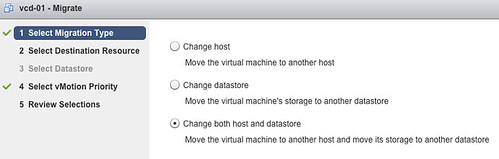
There’s a nice new enhancement to vMotion in vSphere 5.1. (and no, it doesn’t have specific name :-)) With vSphere 5.1 you can migrate virtual machines live without needing “shared storage”. In other words you can vMotion virtual machines between ESXi hosts with only local storage. It is very simple:

  • Open the vSphere Web Client
  • Click “VMs and Templates”
  • Right click the VM you want to migrate
  • Select “Change both host and datastore”

I am sure Frank Denneman is going to dive in to this soon so I won’t elaborate on how the process it self works. There’s already a blogpost out by Sreekant Setty which has some more details and which points to a nice white paper about vMotion / SvMotion performance.

INF-BCO2807 – vSphere HA and Datastore Access Outages tech preview

Duncan Epping · Sep 5, 2012 ·

All of you know by now that I have a love for availability related topics… Hence the reasons I needed to write something about INF-BCO2807. The session titled “vSphere HA and Datastore Access Outages – Current- Capabilities Deep-Dive and Tech Preview”, presented by Keith Farkas and Smriti Desai, discussed possible future HA enhancements that will solve component failures. Those of you who read my whitepaper on stretched clusters can immediately see why this would be a nice enhancement!

Once again a big fat disclaimer, VMware gives absolutely no guarantees when or even if this will be released.

This session was all about inaccessible data stores. During our talk Lee Dilworth and I explained the difference between a Permanent Device Loss (PDL) and an All Paths Down (APD) condition. In short, PDL is a “scsi sense code” issued by the storage system (or an iSCSI “login reject” for that matter). This scsi sense code allows vSphere (both the kernel and HA) to respond and act upon it. In the case of an APD vSphere cannot respond… the LUN is gone on that host and we don’t know why, so what do we do? Well with 5.1 and prior we do nothing. This results in zombied virtual machines, and that is not the state you want your virtual machines to be in right?

So how is VMware planning to solve this? It is planning to enhance HA with what was referred to as “Component Protection”. Component Protection allows responses per virtual machine when an APD or PDL has been detected. This is not based on guest I/Os failing, but on the vSphere platform declaring that the device is in a PDL or APD condition.

When an APD scenario is detected HA will be smart enough to understand which hosts can restart virtual machines, as in some cases multiple hosts might be impacted. Of course it will also only kill your virtual machine and restart it when it knows capacity is available for it.

I don’t know about you, but I would rather see this implemented today than tomorrow!? APD is not common, but also not rare… and when disaster strikes, it strikes hard!

I don’t think this session is scheduled for VMworld Europe, so make sure to watch the recording as soon as it is available as it is well worth your time. Keith and Smriti gave an excellent deepdive on the current vSphere HA and a nice look in to the future!

INF-STO2192 – Tech Preview of VMware Distributed Storage

Duncan Epping · Sep 4, 2012 ·

I could visit just one session on Tuesday so I decided I would attend a session which is on a topic that I love “Software Defined Storage”, aka vCloud Distributed Storage. This session was hosted by Christos Karamanolis and Kiran Madnani. Christos is one of the lead engineers on the project and Kiran is the product manager, both VMware employees.

Before I lay down what their session was about, note that this was a technology preview. No commitments have been made when or even IF this will ever be released… but as the demo looked so promising I figured it was worth sharing.

[Edit: Cormac Hogan published the demo, worth watching!]

Kiran started out with explaining the journey to Software Defined Storage. Awesome features he mentioned were Storage vMotion, Storage DRS, SIOC, Profile Driven Storage, vSphere Replication and more. Kieran made a statement which I can only agree with….

The world is changing, compute resource keep growing, data keeps on growing!

[Read more…] about INF-STO2192 – Tech Preview of VMware Distributed Storage

  • « Go to Previous Page
  • Page 1
  • Interim pages omitted …
  • Page 220
  • Page 221
  • Page 222
  • Page 223
  • Page 224
  • Interim pages omitted …
  • Page 502
  • Go to Next Page »

Primary Sidebar

About the Author

Duncan Epping is a Chief Technologist and Distinguished Engineering Architect at Broadcom. Besides writing on Yellow-Bricks, Duncan is the co-author of the vSAN Deep Dive and the vSphere Clustering Deep Dive book series. Duncan is also the host of the Unexplored Territory Podcast.

Follow Us

  • X
  • Spotify
  • RSS Feed
  • LinkedIn

Recommended Book(s)

Also visit!

For the Dutch-speaking audience, make sure to visit RunNerd.nl to follow my running adventure, read shoe/gear/race reviews, and more!

Do you like Hardcore-Punk music? Follow my Spotify Playlist!

Do you like 80s music? I got you covered!

Copyright Yellow-Bricks.com © 2026 · Log in