• Skip to primary navigation
  • Skip to main content
  • Skip to primary sidebar

Yellow Bricks

by Duncan Epping

  • Home
  • Unexplored Territory Podcast
  • HA Deepdive
  • ESXTOP
  • Stickers/Shirts
  • Privacy Policy
  • About
  • Show Search
Hide Search

Back to Basics: Using the vSphere 5.1 Web Client to configure a vSwitch

Duncan Epping · Sep 13, 2012 ·

In the previous articles we created a Datacenter, a cluster and added hosts to it. Now that we have done that we can start finalizing the configuration. This is just one example out of the many ways to configure networking for an ESXi host, and I kept it really really simple. This is not following any best practices, I just wanted to show some of the steps. In this scenario I have 4 network cards per host and I have VLANs for each network segment. Separating traffic through the use of VLAN is highly recommended and is a best practice.

Lets configure the virtual switch first. I will use a “standard vSwitch” for now. In this case we will set all vmnics to active on the vSwitch and control NIC usage on a portgroup level. [Read more…] about Back to Basics: Using the vSphere 5.1 Web Client to configure a vSwitch
Back to Basics: Using the vSphere 5.1 Web Client to create a Cluster object

Duncan Epping · Sep 12, 2012 ·

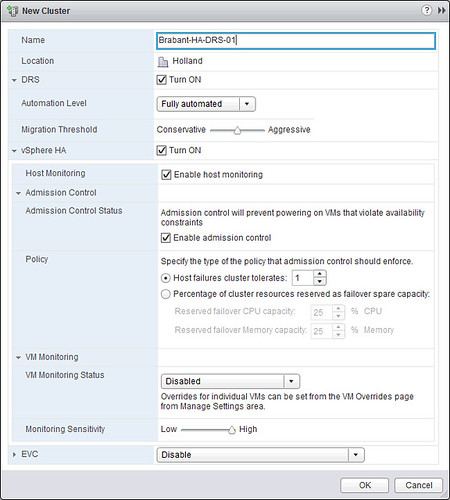
We’ve shown you how to create a vSphere Datacenter object, next we are going to create a cluster object. Again, this is fairly straight forward:

  • Click on “Create a Cluster” in your “Getting Started” tab.
  • Provide a name for your cluster and tick “Turn On” for both “DRS” and “vSphere HA”.
  • Click “OK”.

We will not tweak any settings around HA and DRS, the defaults should work for most, although I would prefer to use the “Percentage Based” admission control policy. For more details I would like to recommend reading the vSphere 5.1 Clustering Deepdive. [Read more…] about Back to Basics: Using the vSphere 5.1 Web Client to create a Cluster object

What’s new in vSphere 5.1 for High Availability

Duncan Epping · Sep 12, 2012 ·

As vSphere High Availability was completely revamped in 5.0 not a lot of changes have been introduced in 5.1. There are some noteworthy changes though that I figured I would share with you. So what’s cool?

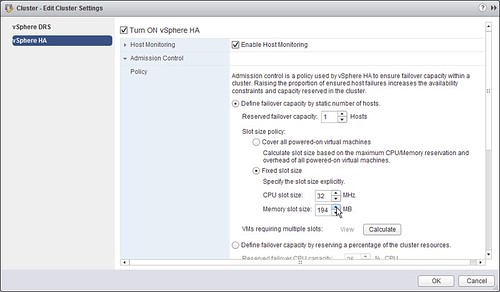
  • Ability to set slot size for “Host failures tolerated” through the vSphere Web Client
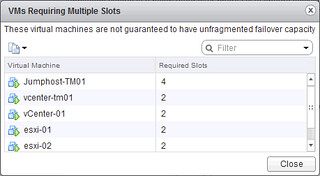
  • Ability to retrieve a list of the virtual machines that span multiple slots
  • Support for Guest OS Sleep mode
  • Including the Application Monitoring SDK  in the Guest SDK (VMware Tools SDK)
  • vSphere HA (FDM) VIB is automatically added to Auto-Deploy image profile
  • Ability to delay isolation response throught the use of “das.config.fdm.isolationPolicyDelaySec”

Although many of these speak for itself, I will elaborate on why these enhancements are useful and when to use them.

The ability  to set slot size for “Host failures tolerated” allows you to manually dictate how many virtual machines you can power-on in your cluster. Many have used advanced settings to achieve more or less the same, but through the UI things are a lot easier I guess.

Now if you do this, it could happen that a virtual machine needs multiple slots in order to successfully power-on. That is where the second bullet point comes in to play. In the vSphere Web Client you can now see a list of all the virtual machines that currently span multiple slots.

Support for Guest OS “Sleep Mode” in environments where VM Monitoring is used was added. This was reported by Sudharsan a while back and I addressed it with the HA engineering team. As a result they added in the logic that recognizes the “state” of the virtual machine to avoid unneeded restarts. Thanks Sudharsan for reporting! (I can’t find this in the release notes however)

With 5.0 the Application Monitoring SDK was opened up to the broader audience. It was still a separate installer though. As of vSphere 5.1 the App Monitoring SDK is part of the VMware Tools SDK. This will make your life easier when you use Application Monitoring.

Those running stateless will be happy about the fact that the FDM VIB is now part of the Auto-Deploy image profile. This will avoid the need to manually add it every time you create a new image.

Last but not least, in 5.1 we re-introduce “das.failuredetectiontime”… well not exactly but a similar concept with a different name. This new advanced setting named “das.config.fdm.isolationPolicyDelaySec” will allow you to extend the time it takes before the isolation response is triggered. By default the isolation response is triggered after ~30 seconds with vSphere 5.x. If you have a requirement to increase this then this new advanced setting can be used.

Get your Kindle copy of the vSphere 4.1 HA/DRS Deepdive for free

Duncan Epping · Sep 11, 2012 ·

I just sent out this tweet. Last time we did this promo many people said they somehow missed it and asked if we could do it again. We started the promo this morning, make sure to download it now as it will not be free (yes that is $ 0,-!) for long. Promo ends Thursday.

Special offer, the vSphere 4.1 HA/DRS Deepdive Kindle edition for FREE! vmwa.re/free41

Enjoy,

Back to Basics: Using the vSphere 5.1 Web Client to create a Datacenter object

Duncan Epping · Sep 11, 2012 ·

I am going to assume you already have vCenter 5.1 up and running, if you don’t read this article. Once again, this is a “Back to Basics” series, so don’t expect deepdive info here.

First point your browser to the vSphere Web Client. The vSphere Web Client can be found at: https://<IP address or DNS name of your vCenter instance>:9443/vsphere-client/. Now you will see is a question if it is okay to install the “VMware Remote Console Plugin” as shown in the following screenshot.

[Read more…] about Back to Basics: Using the vSphere 5.1 Web Client to create a Datacenter object

  • « Go to Previous Page
  • Page 1
  • Interim pages omitted …
  • Page 218
  • Page 219
  • Page 220
  • Page 221
  • Page 222
  • Interim pages omitted …
  • Page 502
  • Go to Next Page »

Primary Sidebar

About the Author

Duncan Epping is a Chief Technologist and Distinguished Engineering Architect at Broadcom. Besides writing on Yellow-Bricks, Duncan is the co-author of the vSAN Deep Dive and the vSphere Clustering Deep Dive book series. Duncan is also the host of the Unexplored Territory Podcast.

Follow Us

  • X
  • Spotify
  • RSS Feed
  • LinkedIn

Recommended Book(s)

Also visit!

For the Dutch-speaking audience, make sure to visit RunNerd.nl to follow my running adventure, read shoe/gear/race reviews, and more!

Do you like Hardcore-Punk music? Follow my Spotify Playlist!

Do you like 80s music? I got you covered!

Copyright Yellow-Bricks.com © 2026 · Log in