• Skip to primary navigation
  • Skip to main content
  • Skip to primary sidebar

Yellow Bricks

by Duncan Epping

  • Home
  • Unexplored Territory Podcast
  • HA Deepdive
  • ESXTOP
  • Stickers/Shirts
  • Privacy Policy
  • About
  • Show Search
Hide Search

Fixed: Macbook waking up every hour or so

Duncan Epping · Jan 18, 2013 ·

For the last months I have people asking me why on earth I was on google talk / messenger in the middle of the night, but then did not respond when they said hi. It appears that my Macbook had been waking up roughly every hour while I had put it to sleep.

At first I thought it was the messenger software I was running called Adium. But after closely checking this didn’t seem to be the problem. Then I started digging and checked my log files. My log files did reveal something:

syslog |grep -i "Wake reason"
Jan 12 00:37:59 Depping-MBA kernel[0] <Debug>: Wake reason: RTC (Alarm)

So I did a quick search on “RTC” and stumbled on this article which explained why this was happening. The article refers to an Apple KB, which hints at what to disable. When disabling “Wake for network access” as suggested by the KB I noticed another feature called “Power Nap”. It appears that Power Nap also enables your Mac to do certain things on a regular interval. For instance it can allow for a backup to occur or it will check email every hour.
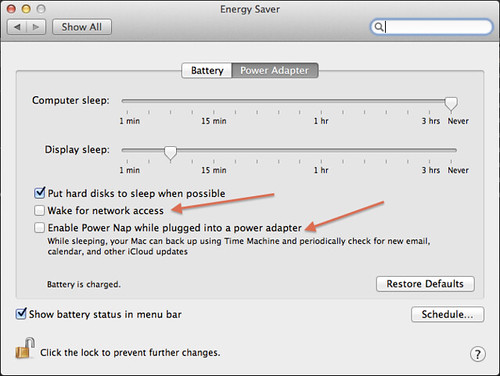
Prevent Macbook waking up

In my case there is no need to power-on in the middle of the night to do these things, so I disabled both “Wake for network access” and “Power Nap”. There is some more info about “Power Nap” to be found in this KB article.

Storage DRS Survey – Please fill it out

Duncan Epping · Jan 17, 2013 ·

If you have a couple of minutes, please take the time to fill out this survey about Storage DRS. It literally takes about 5 minutes to fill out and it would help the Product Management team a lot! Thanks.

http://www.surveymethods.com/EndUser.aspx?C9ED8198CB8E9F9CCF

Stretched vCloud Director infrastructure

Duncan Epping · Jan 15, 2013 ·

A while back I wrote about design considerations when designing or building a stretched vCloud Director infrastructure. Since then I have been working on a document in collaboration with Lee Dilworth, and this document should be out soon hopefully. As various people have asked for the document I decided to throw it in to this blog post so that the details are already out there.

** Disclaimer: this article has not been reviewed by the technical marketing team yet, this is a preview of what will possibly be published. When the official document is published I will add a link to this article **

Introduction

VMware vCloud® Director™ 5.1 (vCloud Director) gives enterprise organizations the ability to build secure private clouds that dramatically increase datacenter efficiency and business agility. Coupled with VMware vSphere® (vSphere), vCloud Director delivers cloud computing for existing datacenters by pooling vSphere virtual resources and delivering them to users as catalog-based services. vCloud Director helps you build agile infrastructure-as-a-service (IaaS) cloud environments that greatly accelerate the time-to-market for applications and responsiveness of IT organizations.

Resiliency is a key aspect of any infrastructure but is even more important in “Infrastructure as a Service” (IaaS) solutions. This solution overview was developed to provide additional insight and information in how to architect and implement a vCloud Director based solution on a vSphere Metro Storage Cluster infrastructure.

Architecture Introduction

This architecture consists of two major components. The first component is the geographically separated vSphere infrastructure based on stretched storage solution, here after referred to as the vSphere Metro Storage Cluster (vMSC) infrastructure. The second component is vCloud Director.

Note –  Before we dive in to the details of the solution we would like to call out the fact that vCloud Director is not site aware. If incorrectly configured availability could be negatively impacted in certain failure scenarios.

[Read more…] about Stretched vCloud Director infrastructure

My Bookstore

Duncan Epping · Jan 13, 2013 ·

I had various people asking why I didn’t make it easier to buy my books via my website. Greg Schulz from StorageIOblog.com mentioned that he created an amazon store. So I took a peek at how he set it up and kinda did something similar. If you click “My Bookstore” at the top you will be automatically brought to a custom Amazon store. It will list all my books on the first page, paper copies that is. On the right side you have two more options:

  • Kindle Items – ebook versions of what I have published so far
  • Books by Friends – exactly what it says… books that my friends have written

Over time of course new books will be added to the appropriate sections. Thanks and I hope it makes things easier.

Faking an SSD in your virtualized vSphere lab

Duncan Epping · Jan 11, 2013 ·

I have written about this before (and so has William Lam, so all credits go to William), but I wanted to note down these commands for my own use as I find myself digging around often for the same commands these days. So what is my goal: Faking an SSD in my virtualized vSphere lab.

In my lab I have a bunch of virtualized ESXi hosts. Those hosts have multiple disks and I want to mark one of those disks as SSD. To keep things simple I set things up as follows. Just to point out, I use 0:0 / 1:0 / 2:0 so that each device gets a new controller and is easy to identifiy:

  • First Disk – ESXi install disk – 5GB – SCSI 0:0
  • Second Disk – Fake SSD – 40GB – SCSI 1:0
  • Third Disk – Large disk – 1TB – SCSI 2:0

When I boot all disks are recognized as regular disks and in some cases as non-local. In my testing I need local disks and need SSD. So this is what I did to get exactly that. With the first command I mark the “second disk” as SSD and local. With the second command I mark the third disk as local. Next I reclaim the devices so that the new SATP rules are applied.

esxcli storage nmp satp rule add --satp VMW_SATP_LOCAL --device mpx.vmhba2:C0:T0:L0 --option "enable_local enable_ssd"
esxcli storage nmp satp rule add --satp VMW_SATP_LOCAL --device mpx.vmhba3:C0:T0:L0 --option "enable_local"
esxcli storage core claiming reclaim -d mpx.vmhba2:C0:T0:L0
esxcli storage core claiming reclaim -d mpx.vmhba3:C0:T0:L0

Next you can simply validate if it has worked by typing the following for device vmhba2 and 3 (if you replace the 2 with a 3 ofcourse) :

esxcli storage core device list --device=mpx.vmhba2:C0:T0:L0

As you can see, faking an SSD is fairly straight forward. Note that even if you have an SSD drive you still might need to do this. In some cases the SSD drive is not recognized and you will need to create a rule for it manually.

  • « Go to Previous Page
  • Page 1
  • Interim pages omitted …
  • Page 204
  • Page 205
  • Page 206
  • Page 207
  • Page 208
  • Interim pages omitted …
  • Page 502
  • Go to Next Page »

Primary Sidebar

About the Author

Duncan Epping is a Chief Technologist and Distinguished Engineering Architect at Broadcom. Besides writing on Yellow-Bricks, Duncan is the co-author of the vSAN Deep Dive and the vSphere Clustering Deep Dive book series. Duncan is also the host of the Unexplored Territory Podcast.

Follow Us

  • X
  • Spotify
  • RSS Feed
  • LinkedIn

Recommended Book(s)

Also visit!

For the Dutch-speaking audience, make sure to visit RunNerd.nl to follow my running adventure, read shoe/gear/race reviews, and more!

Do you like Hardcore-Punk music? Follow my Spotify Playlist!

Do you like 80s music? I got you covered!

Copyright Yellow-Bricks.com © 2026 · Log in