
• Skip to primary navigation
  • Skip to main content
  • Skip to primary sidebar

Yellow Bricks

by Duncan Epping

  • Home
  • Unexplored Territory Podcast
  • HA Deepdive
  • ESXTOP
  • Stickers/Shirts
  • Privacy Policy
  • About
  • Show Search
Hide Search

We are DevOps

Duncan Epping · Nov 27, 2014 ·

devopsOver the last couple of months I have started running in to more and more customers who are wondering what that DevOps thing is they keep hearing about. They want to know if they need to start hiring DevOps engineers and which software they need to procure for DevOps. I more or less already alluded to what I think it really is or means in my blog post about The Phoenix Project, let me re-use a quote from the review that I wrote for that book:

After reading the book I am actually left wondering if DevOps is the right term, as it is more BizDevOps then anything else. All of IT enabling the development of business through operational efficiency / simplicity.

DevOps is not something you buy, it is not about specific tools you use, it is a state-of-mind … an operational model, a certain level of maturity. I would argue that it is just a new fancy way of describing IT maturity. At VMware we have had this professional services engagement called Operational Readiness where IT (Ops and Dev) and business owners would be interviewed to identify the shortcomings in terms of the IT offerings and agility, the outcome would a set of recommendations that would allow an organization to align better with the business demands. (This engagement has been around for at least 6 years now to my knowledge.)

Typically these types of engagements would revolve around people and process and focus less on the actual tools used. The theme of the recommendations generally was around breaking down the silos in IT (between the various teams in an IT department: dev / ops / security / networking / storage), and of course reviewing processes / procedures. It is strange how even today we still encounter the same types of problems we encountered years ago. You can deploy a new virtual machine in literally minutes, you can configure physical servers in about 10 minutes (when the installation is fully automated)… yet it takes 3 weeks to get a networking port configured, 2 weeks to get additional LUNs, 4 days to prepare that test/dev environment or even worse the standard change process from start to finish takes 6 weeks.

What is probably most striking is that we live in an ever changing world, the pace at which this happens is unbelievably fast and we happen to work in the industry which enables this… Yet, when you look at IT (in most cases) we forget to review our processes (or design) and do not challenge the way we are doing things today. We (no not you I know, but that guy sitting next to you) take what was described 5 years ago and blindly automate that. We use the processes we developed for the physical world in a virtualized world, and we apply the same security policies and regulations to a virtual machine as to a physical machine. In many cases, unfortunately, from a people perspective things are even far worse… no communication whatsoever between the silos besides through an ancient helpdesk ticketing tool probably, sadly enough.

In todays world, if you want to stay relevant, it is important that you can anticipate as fast as possible to the (ever changing) demands of your business / customers. IT has the power to enable this. This is what this so-called “Operational Readiness” was there for, identify the operational and organizational pain-points, solve them and break down those silos to cater for the business needs. In todays world the expected level of operational maturity is a couple of levels higher even, and that level is what people (to a certain extent) refer to when they talk about DevOps in my opinion.

So the question then remains, what can you do to ensure you stay relevant? Lets make it clear that DevOps is not something you buy, it is not a role in your organization, and it is not a specific product, it is an IT mindset… hence the title: we are DevOps. Joe Baguley’s keynote at the UK VMUG was recorded, and although he did not drop the word DevOps he does talk about staying relevant, what it is IT does (provide applications), how you can help your company to beat the competition and what your focus should be. (On top of that, he does look DevOps with his beard and t-shirt!) I highly recommend watching this thought provoking keynote. Make sure to sit down afterwards, do nothing for 30 to 60 minutes besides reflecting back on what you have done the last 12 months and then think about what it is you can do to improve business development, whether new or existing markets, for your company.
Sharing VMUG presentation “vSphere futures”

Duncan Epping · Nov 24, 2014 ·

Last week I presented at the UK VMUG, Nordic VMUG and VMUG Belgium. My topic was vSphere futures… I figured I would share the deck publicly. The deck is based on this blog post and essentially is a collection of what has been revealed at last VMworld. Considering the number of announcements I am guessing that this deck is a nice summary of what is coming, feel free to use it / share it / comment etc.

Once again, I would like to thank the folks of the VMUG organizations throughout EMEA for inviting me, three great events last week with very passionate people. One thing I want to call out in particular that struck me last week: Erik from the VMUG in Belgium has created this charity program where he asks sponsors (and attendees) to contribute to charity. Last event he collected over 8000 euros which went to a local charity, it was the biggest donation that this particular charity received in a long time and you can imagine they were very thankful… all of this while keeping the event free for attendees, great work Erik! Thanks for giving back to the community in various ways.

See you next time.

Validate your hardware configuration when it arrives!

Duncan Epping · Nov 18, 2014 ·

In the last couple of weeks I had 3 different instances of people encountering weird behaviour in their environment. In two cases it was a VSAN environment and the other one was an environment using a flash caching solution. What all three had in common is that when they were driving a lot of IO the SSD device would be unavailable, for one of them they even had challenges enabling VSAN in the first place before any IO load was placed on it.

With the first customer it took me a while what was going on. I asked him the standard questions:

  • Which disk controller are you using?
  • Which flash device are you using?
  • Which disks are you using?
  • Do you have 10GbE networking?
  • Are they on the HCL?
  • What is the queue depth of the devices?

All the answers were “positive”, meaning that the full environment was supported… the queue depth was 600 so that was fine, enterprise grade MLC devices used and even the HDDs were on the HCL. So what was causing their problems? I asked them to show me the Web Client and the disk devices and the flash devices, then I noticed that the flash devices were connected to a different disk controller. The HDDs (SAS drives) were connected to the disk controllers which was on the HCL, a highly performant and reliable device… The flash device however was connected to the on-board shallow queue depth and non-certified controller. Yes indeed, the infamous AHCI disk controller. When I pointed it out the customers were shocked ,”why on earth would the vendor do that…”, well to be honest if you look at it: SAS drives were connected to the SAS controller and the SATA flash device was connected to the SATA disk controller, from that perspective it makes sense right? And in the end, the OEM doesn’t really know what your plans are with it when you configure your own box right? So before you install anything, open it up and make sure that everything is connected properly in a fully supported way! (PS: or simply go VSAN Ready Node / EVO:RAIL :-))

Slow backup of VM on VSAN Datastore

Duncan Epping · Nov 14, 2014 ·

Someone at out internal field conference asked me a question around why doing a full back up of a virtual machine on a VSAN datastore is slower then when doing the same exercise for that virtual machine on a traditional storage array. Note that the test that was conducted here was done with a single virtual machine. The best way to explain why this is is by taking a look at the architecture of VSAN. First, let me mention that the full backup of the VM on a traditional array was done on a storage system that had many disks backing the datastore on which the virtual machine was located.

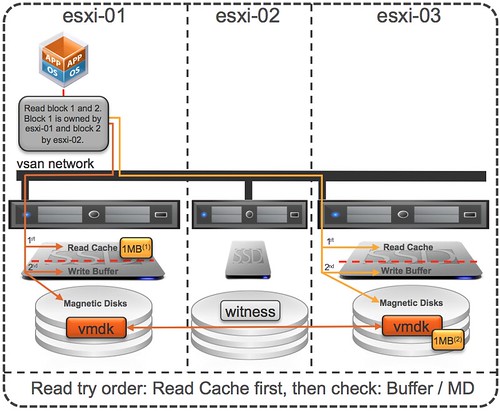
Virtual SAN, as hopefully all of you know, creates a shared datastore out of host local resources. This datastore is formed out of disk and flash. Another thing to understand is that Virtual SAN is an object store. Each object typically is stored in a resilient fashion and as such on two hosts, hence 3 hosts is the minimum. Now, by default the component of an object is not striped which means that components are stored in most cases on a single physical spindle, for an object this means that as you can see in the diagram below that the disk (object) has two components and without stripes is stored on 2 physical disks.

Now lets get back to the original question. Why did the backup on VSAN take longer then with a traditional storage system? It is fairly simple to explain looking at the above info. In the case of the traditional storage array you are reading from multiple disks (10+) but with VSAN you are only reading from 2 disks. As you can imagine when reading from disk performance / throughput results will differ depending on the number of resources the total number of disks it is reading from can provide. In this test, as there it is just a single virtual machine being backed up, the VSAN result will be different as it has a lower number of disks (resources) to its disposal and on top of that is the VM is new there is no data cached so the flash layer is not used. Now, depending on your workload you can of course decide to stripe the components, but also… when it comes to backup you can also decided to increase the number of concurrent backups… if you increase the number of concurrent backups then the results will get closer as more disks are being leveraged across all VMs. I hope that helps explaining  why results can be different, but hopefully everyone understands that when you test things like this that parallelism is important or provide the right level of stripe width.

Project Fargo aka VMFork and TPS?

Duncan Epping · Nov 11, 2014 ·

I received some questions this week around how VMFork (aka Instant Clone) will work when TPS is disabled in the future, already answered some questions in comments but figured this would be easier to google. First of all, I would like to point out that in future versions TPS will not be globally disabled, but rather it will disabled for inter-VM page collapsing. Within the VM though pages will be collapsed as normal and the way it works is that each virtual machine configuration will contain a salt and all virtual machines with the same salt will share pages… However, each virtual machine by default will have a unique salt. Now this is where a VMFork’ed virtual machine will differ in the future.

VMFork’ed virtual machines in the future will share the salt, which means that “VMFork groups” can be considered a security domain and pages will be shared between all of these VMs. In other words, the parent and all of its children have the same salt and will share pages (see sched.mem.pshare.salt). If you have a different parent then pages between those VMFork Groups (both parents and its children) will not be shared.

  • « Go to Previous Page
  • Page 1
  • Interim pages omitted …
  • Page 139
  • Page 140
  • Page 141
  • Page 142
  • Page 143
  • Interim pages omitted …
  • Page 497
  • Go to Next Page »

Primary Sidebar

About the Author

Duncan Epping is a Chief Technologist and Distinguished Engineering Architect at Broadcom. Besides writing on Yellow-Bricks, Duncan is the co-author of the vSAN Deep Dive and the vSphere Clustering Deep Dive book series. Duncan is also the host of the Unexplored Territory Podcast.

Follow Us

  • X
  • Spotify
  • RSS Feed
  • LinkedIn

Recommended Book(s)

Also visit!

For the Dutch-speaking audience, make sure to visit RunNerd.nl to follow my running adventure, read shoe/gear/race reviews, and more!

Do you like Hardcore-Punk music? Follow my Spotify Playlist!

Do you like 80s music? I got you covered!

Copyright Yellow-Bricks.com © 2026 · Log in