• Skip to primary navigation
  • Skip to main content
  • Skip to primary sidebar

Yellow Bricks

by Duncan Epping

  • Home
  • Unexplored Territory Podcast
  • HA Deepdive
  • ESXTOP
  • Stickers/Shirts
  • Privacy Policy
  • About
  • Show Search
Hide Search

vSAN

VMworld Sessions with vSAN Customers

Duncan Epping · Sep 10, 2018 ·

At VMworld, there were various sessions with vSAN Customers, many of which I have met in some shape or form in the past couple of years. Some of these stories contain some great use cases or stories. Considering they are “hidden” in 60-minute sessions I figured I would write about them and share with you the link where and when applicable.

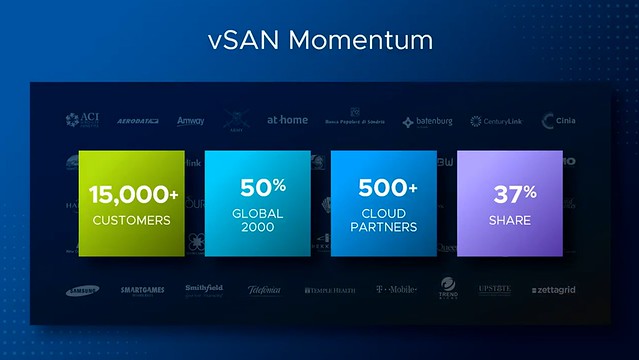
In the Monday keynote, there were also a couple of great vSAN quotes and customers mentioned. Not sure everyone spotted this, but definitely, something I felt is worth sharing, as these were powerful stories and use cases. First of all the vSAN numbers were shared, with 15k customers and adoption within 50% of the Global 2000 within 4 years I think it is fair to say that our business unit is doing great!
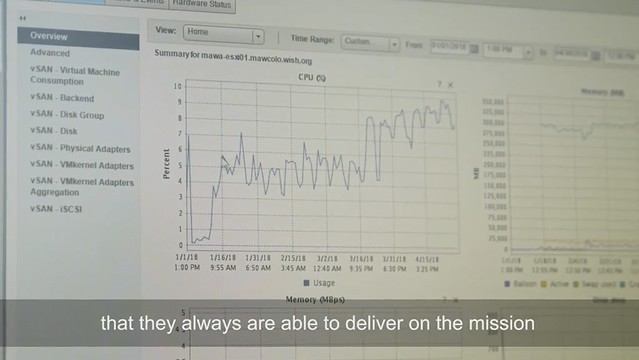
In the Make A Wish foundation video I actually spotted the vSAN management interface, although it was not explicitly mentioned still very cool to see that vSAN is used. As their CEO mentioned, it was great to get all that attention after they appeared on national television but it also resulted in a big website outage. The infrastructure is being centralized and new infra and security policies are put into place, “working with VMware enables us to optimize our processes and grant more wishes”.
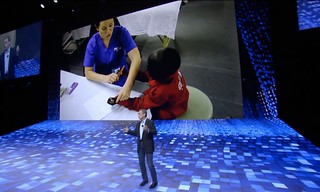
Another amazing story was Mercy Ships, this non-profit operates the largest NGO hospital ship bringing free medical care to different countries in Africa. Not just medical care, they also are providing training to local medical staff so they can continue providing the help needed in these areas of the world. They are now building their next generation ship which is going live in 2020, VMware and Dell/EMC will be a big part of this. As Pat said: “it is truly amazing to see what they do with our technology”. Currently, they use VxRail, Dell Isilon etc on their ships as part of their infrastructure.

The first session I watched was a session by our VP of Product Management and VP of Development, I actually attended this session in person at VMworld, and as a result of technical difficulties, they started 20 minutes late, hence the session is “only” 40 minutes. This session is titled “HCI1469BU – The Future of vSAN and Hyperconverged Infrastructure“. In this session, David Selby has a section of about 10 minutes and he talks about the vSAN journey which Honeywell went through. (If you are just interested in David’s section, skip to 9:30 minutes into the session) In his section, David explains how at Honeywell they had various issues with SAN storage causing outages of 3k+ VMs, as you can imagine very costly. In 2014 Honeywell started tested with a 12 Node cluster for their management VMs. This for them was a low-risk cluster. Their test was successful and they quickly started to move VMs over to vSAN in other parts of the world. Just to give you an idea:

  • US Delaware, 11k VMs on vSAN
  • US Dallas, 500 VMs on vSAN
  • NL Amsterdam, 12k VMs (40% on vSAN, 100% by the end of this year!)
  • BE Brussels, 1000 VMs (20% on vSAN, 100% by the end of this year!)

That is a total of roughly 24,500 VMs on vSAN, with close to 1.7PB of capacity, with an expected capacity of around 2.5PB by the end of this year. All running on vSAN All Flash the Dell PowerEdge FX2 platform by the way! Many different types of workloads run on these clusters. Apps ranging from MS SQL, Oracle, Horizon View, Hadoop, Chemical Simulation software, and everything else you can think off. What I found interesting is that they are running their Connexo software on top of vSAN, in this particular case the data of 5,000,000 smart energy meters in homes in a country in Europe is landing on vSAN. Yes, that is 5 million devices sending data to the Honeywell environment and being stored, and analyzed on vSAN.
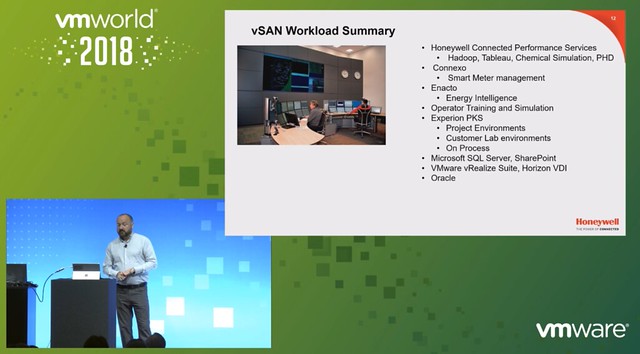
David also explained how they are leveraging IBM cloud with vSAN to run Chemical Plant simulators so operators of chemical plants can be trained. IBM cloud also runs vSAN, and Honeywell uses this so they can leverage the same tooling and processes for on-premises as well as in IBM Cloud. What I think was a great quote, “performance has gone through the roof, applications load in 3 seconds instead of 4 minutes, they received helpdesk tickets as users felt applications were loading too fast”. David works closely with the vSAN team on the roadmap, and had a long list of features he wanted in 2014, all of those have been released now, now there are a couple of things he would like to see addressed and as mentioned by Vijay, they will be worked on in the future.

A session I watched online was “HCI1615PU -vSAN Technical Customer Panel on vSAN Experiences“. This was a panel session that was hosted by Peter Keilty from VMware and had various customers: William Dufrin – General Motors, Mark Fournier – US Senate Federal Credit Union, Alex Rodriguez – Rent A Center, Mariusz Nowak – Oakland University. I always like these customer panels as you get some great quotes and stories, which are not scripted.
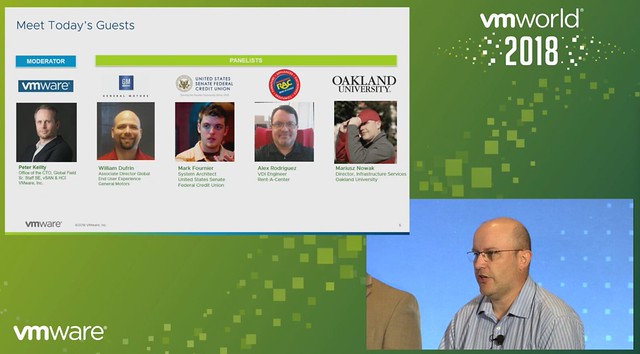
First, each of the panel members introduces themselves and followed by an intro of their environment. Let me quickly give you some stats of what they are doing/running:

  • General Motors – William Dufrin
    • Two locations running vSAN Thirteen vCenter Server instances
    • 700+ physical hosts
    • 60 Clusters
    • 13,000+ VMs

William mentioned they started with various 4 node vSAN clusters, now they by default role out a minimum of 6-node or 12-node, depending on the use-case. They have server workloads and VDI desktops running, here we are talking thousands of desktops. Not using stretched vSAN yet, but this is something they will be evaluating in the future potentially.

  • US Senate Federal Credit Union – Mark Fournier
    • Three locations running vSAN (remote office location
    • 2 vCenter Instances
    • 8 hosts
    • 3 clusters
      • one cluster with 4 nodes, and then two 2-node configurations
    • Also using VVols!

What is interesting is that Mark explains how they started virtualizing only just 4 years ago, this is not something I hear often. I guess change is difficult within the US Senate Federal Credit Union. They are leveraging vSAN in remote offices for availability/resiliency purposes at a relatively low cost (ROBO Licensing). They run all-flash but this is overkill for them, resource requirements are relatively low. Funny detail is that vSAN all-flash is outperforming their all-flash traditional storage solution in their primary data center. Now considering moving some workloads to the branches to leverage the available resources and perform better. Also a big user of vSAN Encryption, considering this is a federal organization that was to be expected, leveraging Hytrust as their key management solution.

  • Rent-A-Center – Alex Rodriguez
    • One location using vSAN
    • 2 vCenter Server instances
    • 16 hosts
    • 2 clusters
    • ~1000 VMs

Alex explains that they run VxRail, which for them was the best choice. Flawless and very smooth implementation, which is a big benefit for them. Mainly using it for VDI and published applications. Tested various other hyper-converged solutions, but VxRail was clearly better than the rest. Running a management cluster and a dedicated VDI cluster.

  • Oakland University – Mariusz Nowak
    • Two locations
    • 1 vCenter Server instance
    • 12 hosts
    • 2 clusters
    • 400 VMs

Mariusz explains the challenges around storage costs. When vSAN was announced in 2014 Mariusz was intrigued instantly, he started reading and learning about it. In 2017 they implemented vSAN and moved all VMs over, except for some Oracle VMs, but this is for licensing reasons. Mariusz leverages a lot of enterprise functionality in their environment, ranging from Stretched Cluster, Dedupe and Compression, all the way to Encryption. This is due to compliance/regulations. Interesting enough, Oakland University runs a stretched cluster with a < 1ms RTT, pretty sweet.

Various questions then came in, some interesting questions/answers or quotes:

  • “vSAN Ready Node and ROBO licensing is extremely economical, it was very easy to get through the budget cycle for us and set the stage for later growth”
  • The Storage Policy Based Management framework allows for tagging virtual disks with different sets of rules and policies when we implemented that we crafted different policies for SolidFire and vSAN to leverage the different capabilities of each platform (reworded for readability)
  • QUESTION: What were some of the hurdles and lessons learned?
    • Alex: We started with a very early version vSPEX Blue and the most challenging for us back then was updating, going from one version to the other. Support, however, was phenomenal.
    • William: Process and people! It is not the same as traditional storage, you use a policy-based management framework on object-based storage, which means different procedures. Networking, in the beginning, was also a challenge, consistent MTU settings across hosts and network switches are key!
    • Mariusz: We are not using Jumbo Frames right now as we can’t enable it across the cluster (including the witness host), but with 6.7 U1 this problem is solved!
    • Mark: What we learned is that dealing with different vendors isn’t always easy. Also, ROBO licensing makes a big difference in terms of price point.
  • QUESTION: Did you test different failure scenarios with your stretched cluster? (reworded for readability)
    • Mariusz: We did various failure scenarios. We unplugged the full network of a host and watched what happened. No issues, vSphere/vSAN failed over VMs with no performance issues.
  • QUESTION: How do you manage upgrades of vSphere and firmware?
    • Alex: We do upgrades and updates through VxRail Manager and VUM. It downloads all the VIBs and does a rolling upgrade and migration. It works very well
    • Mark: We leverage both vSphere ROBO as well as vSAN ROBO, one disadvantage is that vSphere ROBO does not include DRS which means you don’t have “automated maintenance mode”. This results in the need to manually migrate VMs and placing hosts into maintenance mode manually. But as this is a small environment this is not a huge problem currently. We can probably script it through PowerCLI.
    • Mariusz: We have Ready Nodes, which is more flexible for us, but it means upgrades are a bit more challenging. But VMware has promised more is coming in VUM soon. We use Dell Plugins for vCenter so that we can do firmware upgrades etc from a single interface (vCenter).

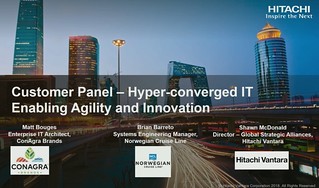
The last session I watched was “HCI3691PUS – Customer Panel: Hyper-converged IT Enabling Agility and Innovation“, which appeared to be a session sponsored by Hitachi with ConAgra Brands and Norwegian Cruise Line as two reference customers. Matt Bouges works for ConAgra Brands as an Enterprise Architect, Brian Barretto works for Norwegian Cruise Line as a Virtualization Manager.

First Matt discussed why ConAgra moved towards HCI, which is all about scaling and availability as well as business restructuring. They needed a platform that could scale with their business needs. For Brian / Norwegian Cruise Line‘s it was all about cost. The current SAN/Storage architecture was very expensive, and as at the time, a new scalable solution (HCI) emerged they explored that and found that the cost model was in their favor. As they run the data centers on the ships as well they need something that is agile, note that these ships are huge, basically floating cities, with redundant data centers onboard of some of these ships. (Note they have close to 30 ships, so a lot of data centers to manage.) Simplicity and also rack space was a huge deciding factor for both ConAgra and Norwegian Cruise Lines.
Norwegian Cruise Line mentioned that they also still use traditional storage, same for ConAgra. It is great that you can do this with vSAN, keep your “old investment”, while building out the new solution. Over time most applications will move over though. One thing that they feel is missing with hyper-converged is the ability to run large memory configurations or large storage capacity configurations. (Duncan: Not sure I entirely agree, limits are very close to non-HCI servers, but I can see what they are referring to.) One thing to note as well from an operational aspect is that certain types of failures are completely different, and handled completely different in an HCI world, that is definitely something to get familiar with. Another thing mentioned was the opportunity of HCI in the Edge, nice small form factor should be possible and should allow running 10-15 VMs. It removes the need for “converged infra” in those locations or traditional storage in general in those environments. Especially now that compute/processing and storage requirements go up at the edge due to IoT and data analytics that happens “locally”.

That was it for now, hope you find this useful!
CTO2860BU & VIN2183BU: It is all about Persistent Memory

Duncan Epping · Sep 6, 2018 ·

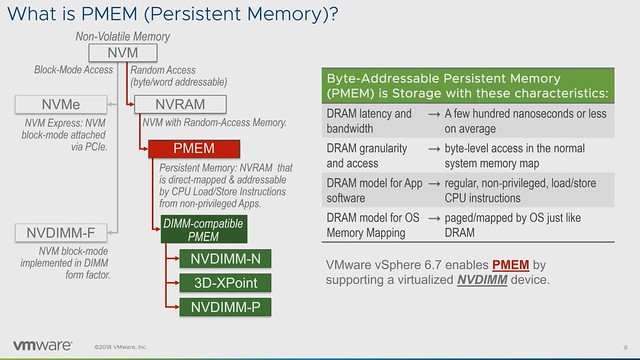
I was going through the list of sessions when I spotted a session Persistent Memory by Rich Brunner and Rajesh V. Quickly after that I noticed that there also was a PMEM session by the perf team available. Both CTO2860BU and VIN2183BU I would highly recommend watching. I would recommend starting with CTO2860BU though, is it gives a great introduction to what PMEM brings to the table. I scribbled down some notes, and they may appear somewhat random, considering I am covering 2 sessions in 1 article, but hopefully the main idea is clear.

I think the sub-title of the sessions make clear what PMEM is about: Storage at Memory Speed. This is what Richard talks about in CTO2860BU during the introduction. I thought this slide explained the difference pretty well, it is all about the access times:

  • 10,000,000 ns – HDD
  • 100,000 ns – SAS SSD
  • 10,000 ns – NVMe
  • 50-300 ns – PMEM
  • 30-100ns – DRAM

So that is 10 million nanoseconds vs 50 to 300 nanoseconds. Just to give you an idea, that is roughly the speed difference between the space shuttle and a starfish. But that isn’t the only major benefit of persistent memory. Another huge advantage is that PMEM devices, depending on how they are used, are byte addressable. Compare this to 512KB, 8KB / 4KB reads many storage systems require. When you have to change a byte, you no longer incur that overhead.

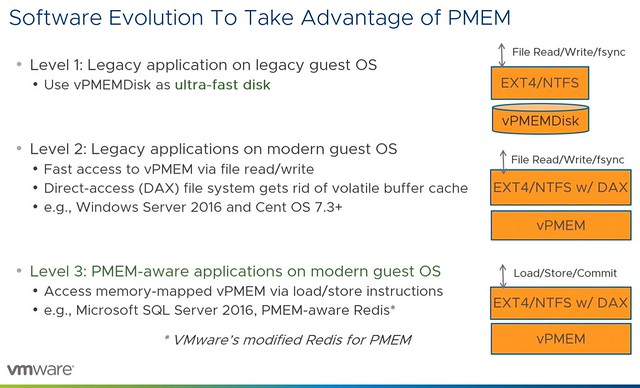
As of vSphere 6.7, we have PMEM support. A PMEM can be accessed as a block device or as a disk, but the other option would be to access it as “PMEM”. Meaning that in the latter case we serve a virtual PMEM device to the VM and the Guest OS sees this as PMEM. What also was briefly discussed in Richard’s talk was the different types of PMEM. In general, there are 4 different types, but most commonly talked about are 2. These two are NVDIMM-N and Intel Optane. With the difference being that NVDIMM-N has DRAM memory backed by NAND, and where persistence is achieved by writing to NAND only during shutdown / power-fail. Whereas with Intel Optane there’s what Intel calls 3D XPoint Memory on the DIMM directly addressable. The other two mentioned were “DRAM backed to NVMe” and NVDIMM-P, where the first was an effort by HPe which has been discontinued and NVDIMM-P seems to be under development and is expected in 2019 roughly.

When discussing the vSphere features that support PMEM what I found most interesting was the fact that DRS is fully aware of VMs using PMEM during load balancing. It will take this in to account, and as the cost is higher for a migration of a PMEM enabled VM it will most likely select a VM backed by shared storage. Of course, when doing maintenance DRS will move the VMs with PMEM to a host which has sufficient capacity. Also, FT is fully supported.

In the second session,VIN2183BU, Praveen and Qasim discussed performance details. After a short introduction, they dive deep into performance and how you can take advantage of the technology. First they discuss the different modes in which persistent memory can be exposed to the VM/Guest OS, I am listing these out as they are useful to know.

  • vPMEMDisk = exposed to guest as a regular SCSI/NVMe device, VMDKs are stored on PMEM Datastore
  • vPMEM = Exposes the NVDIMM device in a “passthrough manner, guest can use it as block device or byte addressable direct access device (DAX), this is the fastest mode and most modern OS’s support this
  • vPMEM-aware = This is similar to the mode above, but the difference is that the application understands how to take advantage of vPMEM

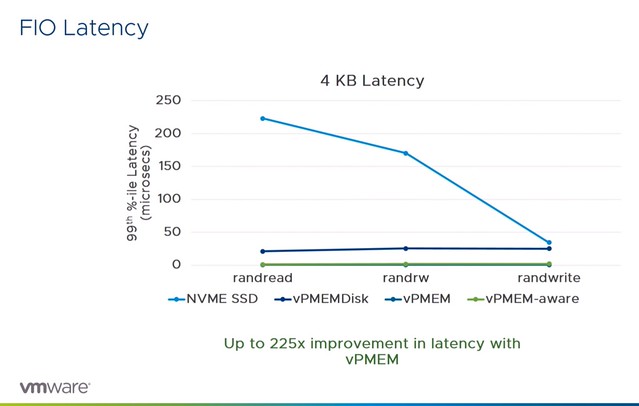
Next they discussed the various performance tests and comparisons they have done. What they have tested is various modes and compare that as well to the performance of NVMe SSD. What stood out most to me is that both the vPMEM and vPMEM-Aware mode provide great performance, up to an 8x performance increase. In the case of vPMEMDisk that is different, and that has to do with the overhead there is. Because it is presented as a block device there’s significant IO amplification which in the case of “4KB random writes” even leads to a throughput that is lower for NVMDIMM than it is for NVMe. During the session it is mentioned that both VMware as well as Intel are looking to optimize their part of the solution to solve this issue. What was most impressive though wasn’t the throughput but the latency, there was a 225x improvement measured between NVMe and vPMEM and vPMEM-Aware. Although vPMEMDisk was higher than vPMEM and vPMEM-aware, it was still significantly lower than NVMe and very consistent across reads and writes.

This was just the FIO example, this is followed by examples for various applications both scale out and scale up solutions. What I found interesting were the Redis tests, nice performance gains at a much lower latency, but more importantly, the cost will probably go down when leveraging persistent memory instead of pure DRAM.

Last but not least tests were conducted around performance during vMotion and the peformance of the vMotion process itself. In both cases using vPMEM or vPMEM-aware can be very beneficial for the application and the vMotion process.

Both great sessions, again highly recommended watching both.

HCI3041BU: Introducing Scalable File Storage on vSAN

Duncan Epping · Sep 6, 2018 ·

Another beta announcement last week for vSAN was around Native File Services. This was the topic of HCI3041BU, which was titled “Introducing Scalable File Storage on vSAN with Native File Services”. The full session can be found here, the summary is below for your convenience. The session was by Venkat Kolli (Product Manager) and engineers Rick Spillane and Wenguang Wang.

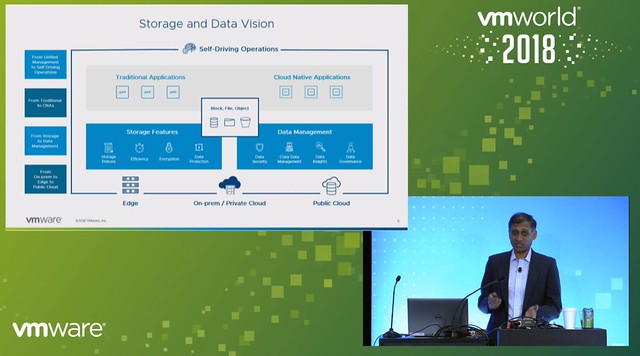
Venkat kicks of the session describing the different types of storage most of our customers have in their data center today, and also what kind of data lands on the different types of storage. Basically, it is divided into three main types: Block, File, and Object. Where I personally believe that “object” is at the point of becoming more common on-premises but for many is consumed as a cloud service. Looking at where the data growth is today, it is mainly in the “unstructured data” space.

Next Venkat discusses the management complexity of traditional file storage, not just management complexity but also scaling and forecasting. Which in most cases leads to increased cost. How can vSAN help with simplifying File Services and lowering cost by providing a framework which allows you to serve block, file and object. For now, we are discussing file-services however, but the vision is clear.

Rick is up next introducing File Services. vSAN File Services allows you to create file shares and provide file services to users/consumers through the same familiar interface you have available today in vSphere. On top of that, you get to leverage the power of policy-based management to provision file shares in a specific way. Which means that File Shares will work in stretched clusters, can be protected with vSAN Data Protection, can be striped/replicated etc. Most important piece of feedback during the design phase from customers was that they did not want a separate storage cluster to manage for file services, this needed to be an integral part of today’s offering.

The requirements and design principles for the vSAN Distributed File System were:

  • Elastic Scaling
    • Scale IOPs up/down
  • Single namespace across the cluster
  • Centrally managed, configured and monitored
  • Transparent failover
  • POSIX File Interface
  • Use vSAN services like data path, consensus mechanisms, and checksumming

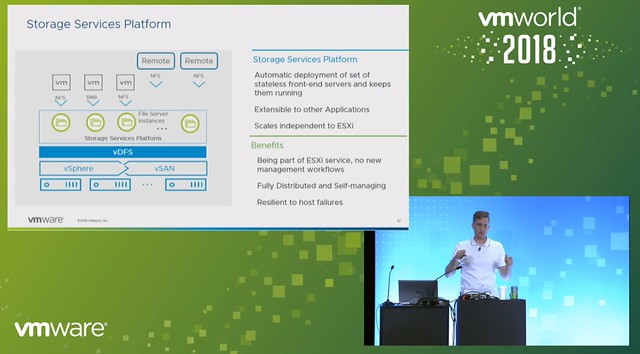
Rick next explains a new platform that will (potentially) be included in vSAN, this is called the Storage Services Platform. What this provides is stateless containerized frontend servers which sit on top of the vSAN Distributed File System. This will be available for both VMware and partners, so even partners should be able to provide storage services through this platform. Data will sit in the VDFS volumes and then will be exposed through these services. These services, of course, are fully distributed and self-managing.

The Storage Services Platform is implemented in the form of a storage services control plane. This control plane will for instance monitor all front-end servers and node and help in the case of failures, but also will help to ensure availability during maintenance and upgrade. Also, when it comes to scalability the control plane monitors the instances and allows to scale up and down when needed.

Okay, that sounds great, but how do file shares get formed? File shares will be an aggregate of one or multiple vSAN Objects. The great thing about this is that it allows for elasticity in size and performance, plus policies can be associated with these objects. You can now simply create file shares through the UI, or leverage the API. The vSAN team made sure that you can access it and define them the way you prefer. On top of that, this platform will also be available to Kubernetes as part of our Cloud Native Storage Control Plane.

Next Rick briefly discussed data protection for file shares, he mentioned that the team has worked with various 3rd party vendors to allow for full backup and recovery, including file-level restore. What Rick also revealed, surprisingly enough, is that in the initial release we will have:

  • NFS v4.1 support
  • AD-based Authentication
  • Kerberos
  • Containerized application support

And in the release after that support for the following is planned:

  • SMB
  • vSAN DP Integration
  • OpenLDAP support

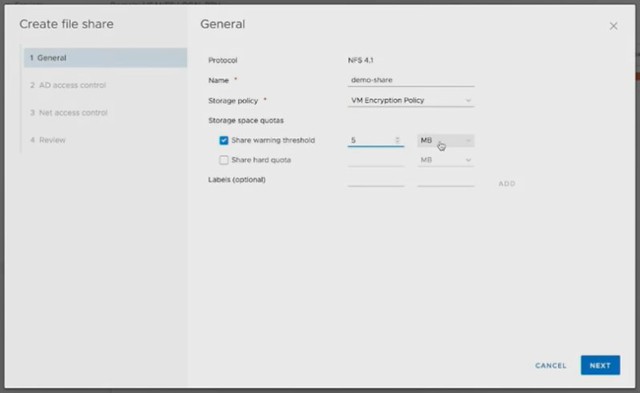
Next Wenguang came up on stage, and he demoed vSAN File Services. He showed how simple it is to enable File Services in the UI. Literally, a couple of steps, provide the networking details and also authentication mechanism. The next step will be to download an OVF, this contains the frontend service we spoke about earlier, for now, this is an NFS server, but this could be other services in the future. After the File Services have been enabled and the OVF is deployed you can start creating file shares. Again this is very straightforward, part of the familiar vSAN UI / HTML-5 interface, which is what I like most, if you know vSAN and/or vSphere you will be able to use vSAN File Services as well. I hope potential other services will be implemented in a similar easy manner.

The Q&A was interesting as well, as some questions around the potential SMB implementation were answered (SAMBA on Linux vs Microsoft vs Dell/EMC stack?) and for instance what block size is used for the file system (4K, like vSAN).

All in all a very exciting solution, and a great overview of what you can expect in the future for vSAN. Note that this is part of the beta, so if you are interested sign up!

HCI2476BU – Tech Preview RDMA and next-gen storage tech for vSAN

Duncan Epping · Sep 5, 2018 ·

This session I had high on my list to go and watch live. Unfortunately, I was double booked during the show, hence I had to watch “HCI2476BU – Tech Preview RDMA and next-gen storage tech for vSAN” online as well. This session was by my colleagues Biswa and Srinath (PM/Engineering) and discusses how we can potentially use RDMA and next-gen storage technology for vSAN.

I am not going to cover the intro, as all readers by now are well aware of what vSAN is and does. What I think was interesting was the quick overview of the different types of ready nodes we have available. Recently included is the Cisco E-Series which is intended for Edge Computing scenarios. Another interesting comment was around some of the trends in the market around CPU, it seems that “beefy” single-socket servers are gaining traction. Not entirely surprising considering it lowers the licensing considerably and you can go up to 64 cores per CPU with AMD EPYC. Next up is the storage aspect of things, what can we expect in the upcoming years?

Biswa mentions that there’s a clear move towards the adoption of NVMe, moving away from SAS/SATA. It is expected that the NVMe devices will be able to deliver 500k+ of IOPS in the next 2 years. Just think about that. 500k IOPS from a single device. Biswa also briefly touched on DDR4 based Persistent Memory, where we can expect million(s) of IOPS with nanoseconds of latency. Next various types of devices are discussed and the performance and endurance capabilities. Even if you consider what is available today, it is a huge contrast compared to 1-2 years ago. Of course, all of this will come at a cost. From a networking perspective 10G/25G/40G is mainstream now or becoming, and RDM enabled (RoCE) NIC is becoming standardized as well. 100G will become the new standard, but this will take 3-5 years at a minimum.

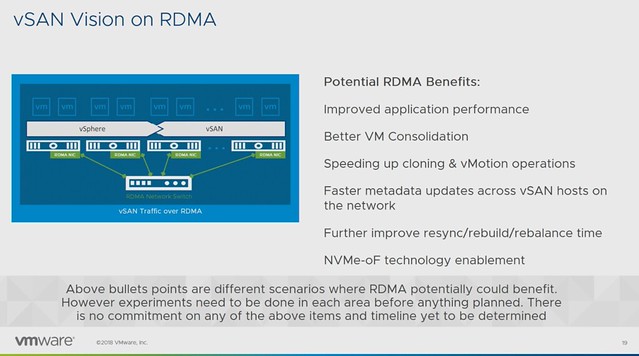
Before the RDMA section started a quick intro to RDMA was provided: “Remote direct memory access from one computer into that of another without involving either one’s operating system allows for high throughput and low latency, which is especially useful in massive parallel computer clusters”. The expected potential / benefits for vSAN is:

  • Improved application performance
  • Better VM Consolidation
  • Speeds up cloning & vMotion
  • Faster metadata updates
  • Faster resync/rebuild times
  • NVMe-oF technology enablement

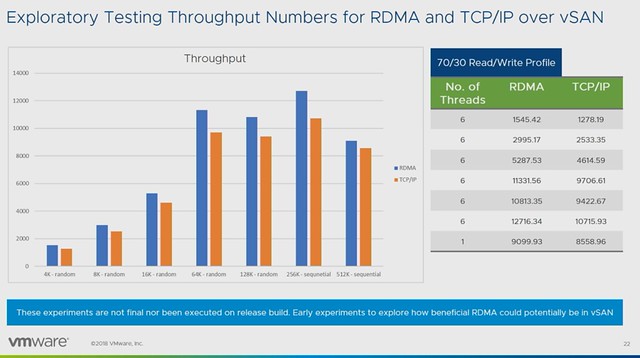
Early performance tests show a clear performance benefit for using RDMA. Throughput and IOPS are clearly higher, while latency is consistency lower when comparing RDMA to TCP/IP. Note that vSAN has not been optimized in these particular cases yet and this is just one example of a particular workload on a very specific configuration. (Tests were conducted with Mellanox.)

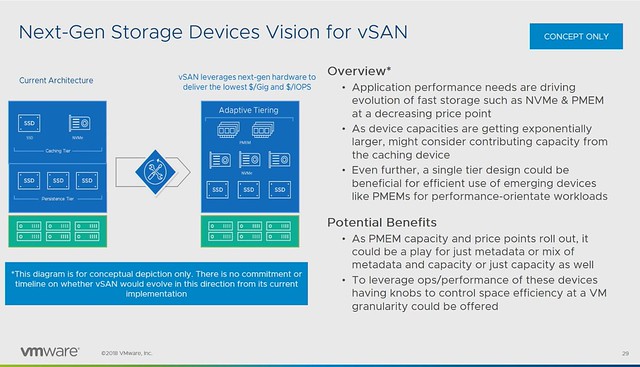
But what about that “next-gen storage”? How can we use this to increase IOPS/throughput while lowering not only latency but also HCI “overhead” like CPU and Memory consumption? Also, what does it mean for the vSAN architecture, what do we need to do to enable this? Faster networks, faster devices may mean that changes are required to various modules/processes. (Like DOM, LSOM, CLOM etc.)

Persistent Memory is definitly one of those next-gen storage devices which will require us to rethink the architecture. Simply because of the ultra low latency, the lower the latency the higher the overhead of the storage stack appears to be. Especially when we are reaching access times which are close to memory speeds. Can we use these devices in an “adaptive tiering” architecture where we use PMEM, NVMe and SSDs? Where for instance PMEM is used for metadata, or even metadata and capacity for hot blocks?

Last but not least a concept demo was shown around NVMe-oF for vSAN. Meaning that NVMe over Fabric allows you to present (additional) capacity to ESXi/vSAN hosts. These devices would be “JBOF”, aka “just a bunch of flash” connected over RDMA / NVMe-oF. In other words, these hosts had no direct locally attached storage, but instead these NVMe devices are presented as “local devices” across the fabric. Which, potentially, allows you to present a lot of storage to hosts which have no local storage capabilities even(Blades anyone?). Also, I wonder if this would allow us in the future to have similar benefits of fabric connected devices as for instance VMware Cloud on AWS has. Meaning that devices can be connected to other hosts after a failure, so that a resync/rebuild can be avoided? Food for thought definitely.

Make sure to watch “HCI2476BU – Tech Preview RDMA and next-gen storage tech for vSAN” online if you want to know more, as it doesn’t appear to be scheduled for VMworld Europe!

HCI2164BU – HCI Management, current and futures

Duncan Epping · Sep 5, 2018 ·

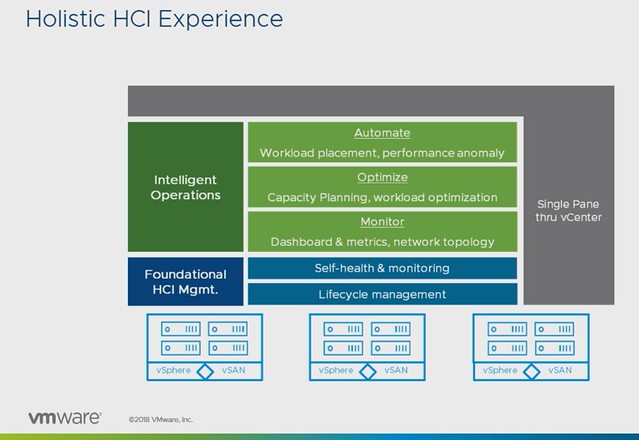
This session by Christian Dickmann and Junchi Zhang is usually one of my favorites in the HCI track, mainly because they show a lot of demos and in many cases show you what ends up being part of the product in 6-12 months. The session revolved all around management, or as they called it in the session “providing a holistic HCI experience”.

After a short intro Christian showed a demo around what we currently have around the installation of the vCenter Server Appliance and how we can deploy that to a vSAN Datastore, followed by the Quickstart functionality. I posted a demo of Quickstart earlier this week, let me post it here as well so you have an idea of what it is/does.

In the next demo, Christian showed how you can upgrade the firmware of a disk controller using Update Manager. Pretty cool, but afaik still limited to a single disk controller, hopefully, more will follow soon. But more importantly, after that demo ended he started talking about “Guided SDDC Update & Patching”, and this is where it got extremely interesting. We all know that it isn’t easy to upgrade a full stack, and what Christian was describing would be doing exactly that. Do you have Horizon? Sure, we will upgrade that as well when we do vCenter / ESXi / vSAN etc. Do you have NSX as part of your infra? Sure, that is also something we will take into account and upgrade it when required. This would also include firmware upgrades for NICs, disk controllers etc.

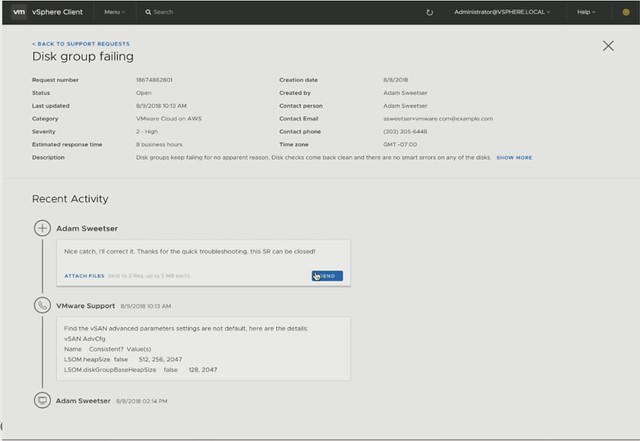
Next Christian showed the Support Insight feature, which is enabled through the Customer Experience Improvement Program. His demo then showed how to create a support request right from the H5 Client. The process shows that the solution understands the situation and files the ticket. Then it shows what the support team sees. It allows the support team to quickly analyze the environment, and more importantly inform the customer about the solution. No need to upload log bundles or anything like that, that all happens automatically. That’s not where it stop, you will be informed in the H5 client about the solution as well. Cool right?

Next Junchi was up and he discussed Capacity Management first. As he mentioned it appears to be difficult for people to understand the capacity graphs provided by vSAN. Junchi proposes a new model where it is clear instantly what the usable space is and by what current capacity is being consumed. Not just on a cluster level, but also at a VM level. This should also include what-if scenarios for usage projection. Junchi then quickly demoed the tools available that help with sizing and scaling.

Next Native File Services was briefly discussed, Data Protection and Cloud Native Storage. What does the management of these services look like? The file services demo that Junchi showed was really slick. Fill out IP details and Domain details and have File Services running in a minute or two natively on vSAN. Only thing you would need to do is create file shares and give folks access to the file shares. Also, monitoring will go through the familiar screens like the health check etc.

Last but not least Junchi discusses the integration with vRealize Automation on-premises and SaaS-based, a very cool demo showing how Cloud Assembly (but also vRA) will be able to leverage storage policies and new applications are provided using blueprints which have these policies associated with them.

That was it, if you like to know more, watch the session online, or attend it in EMEA!

  • « Go to Previous Page
  • Page 1
  • Interim pages omitted …
  • Page 26
  • Page 27
  • Page 28
  • Page 29
  • Page 30
  • Interim pages omitted …
  • Page 71
  • Go to Next Page »

Primary Sidebar

About the Author

Duncan Epping is a Chief Technologist and Distinguished Engineering Architect at Broadcom. Besides writing on Yellow-Bricks, Duncan is the co-author of the vSAN Deep Dive and the vSphere Clustering Deep Dive book series. Duncan is also the host of the Unexplored Territory Podcast.

Follow Us

  • X
  • Spotify
  • RSS Feed
  • LinkedIn

Recommended Book(s)

Also visit!

For the Dutch-speaking audience, make sure to visit RunNerd.nl to follow my running adventure, read shoe/gear/race reviews, and more!

Do you like Hardcore-Punk music? Follow my Spotify Playlist!

Do you like 80s music? I got you covered!

Copyright Yellow-Bricks.com © 2026 · Log in